Showing posts with label fractional part. Show all posts

Friday, March 25, 2022

March Calculus Madness Sweet Sixteen - Day 10: ∫ frac(x) dx

 ------------


Welcome to March Calculus Madness!


------------


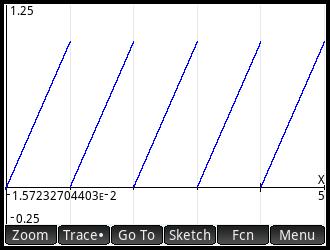
frac(x) - HP Prime


frac(x):  fractional part function


Domain:  0 ≤ frac(x) < 1


∫ frac(x) dx for x = 0 to 1


According to the graph above, the area between resembles as a right triangle.


When 0≤x<1, frac(x) = x


Hence:

∫ frac(x) dx for x = 0 to x = 1


Note:  

lim a→1-  (∫ frac(x) dx for x = 0 to x = a)

= lim a→1-  (∫ x dx for x = 0 to x = a)

= lim a→1-  (∫ x dx for x = 0 to x = a)

= lim a→1-  (a^2/2 - 0)

= 1/2


What if the upper limit is less than 1? 


Let b where, 0≤x≤b<1  (b<1):


∫ frac(x) dx for x = 0 to x = b

= ∫ x dx for x = 0 to x = b

= b^2/2


Eddie 


All original content copyright, © 2011-2022.  Edward Shore.   Unauthorized use and/or unauthorized distribution for commercial purposes without express and written permission from the author is strictly prohibited.  This blog entry may be distributed for noncommercial purposes, provided that full credit is given to the author. 


Friday, March 30, 2018

Retro Review: Texas Instruments TI-54

Retro Review:  Texas Instruments TI-54


General Information

Company:  Texas Instruments
Type:  Scientific
Memory:  7 memory registers
Battery:  2 x LR-44 or 2 x AR-76
Years:  1981 - 1983
Original Cost: $40
Operating System: AOS, Immediate Execution
Storage Arithmetic:  +, -, *, ÷, ^, roots, percent change

It’s good to finally to get the calculator that accompanies the Scientific Calculator Sourcebook that I bought years ago. 

Features

The TI-54 is a scientific calculator with a lot of additional features over the typical non-programming scientific calculator that was released at the time. 

Percent Key (Δ%) 

I think the percent works backwards than modern calculators.   Press the new value first, then [2nd] ( Δ% ), then old value, [ = ].

Example:  Percent change from 32 to 56:  56 [2nd]  (Δ%) 32 [ = ] 75  (75% increase)

Combinations and Permutations

Like the TI-55 III, the arguments for combination and permutation functions take one argument in the form of nnn.rrr.  

Example:

Combination where n = 25, r = 5 is entered as 25.005 [2nd] [ 9 ] (nCr)  
(Result: 53,130)

Permutation where n = 25, r = 5 is entered as 25.005 [2nd] [ 8 ] (nPr)  
(Result:  6,375,600)

Rectangular/Polar Conversion

[2nd] [x<>y] (P-R):  to Rectangular.  Input:  r [x<>y] θ [2nd] [x<>y] (P-R).  Result: y [x<>y] x.

[INV] [2nd] [x<>y] (P-R):  to Polar.   Input x [x<>y] y [INV] [2nd] [x<>y] (P-R).  Result:  θ [x<>y] r.

Statistics

The TI-54 has one variable and two variable statistics, with linear regression of the equation y = a * x + b.   The b/a key gives the intercept and slope.  Predictive values and correlation are also available.

Extra Functions

The TI-54 also has percent change, absolute value, fractional part, and integer part. 

Other Functions

Other functions include degree/degree-minutes-seconds conversions and constant operations with [ K ].

Complex Numbers

Perhaps the biggest attraction of the TI-54 is the complex number mode.  Complex mode is activated as soon as the complex number is entered.

To enter complex numbers:

Rectangular:  b [ Img ] a

Polar:  θ [ θ ] r

Since the display is one number, the real part/magnitude is default shown.  To show the complex part, press [ EXC ] [ Img ]/[ θ ] to show the imaginary part/angle.  The user will know if that the imaginary part/angle is shown by the CMPLX indicator is flashing.

The amount of functions to complex functions offered are greater than most scientific calculators would offer, which is impressive at the time:  arithmetic, power, natural logarithms, exponentials, square root, and square.

Keyboard

Scientific calculators that were produced from Texas Instruments in that era (early 1980s) had a reputation for their not so great keyboards, affecting TI-54, TI-55 II, and TI-57.  Unfortunately, the keyboard is the Achilles’ Heel for this model.  On occasion, pressing the key doesn’t register, and occasion the key registers twice.  This problem is prevalent on the number keys.   So operating the TI-54 will require patience and maybe a few extra presses of the [ON/C] key.  Other than this, the TI-54 worked well. 

Verdict

If you are to purchase a TI-54, please be aware of possible keyboard issues, other than that it is a good calculator.

Eddie

All original content copyright, © 2011-2018.  Edward Shore.   Unauthorized use and/or unauthorized distribution for commercial purposes without express and written permission from the author is strictly prohibited.  This blog entry may be distributed for noncommercial purposes, provided that full credit is given to the author.  Please contact the author if you have questions

Sunday, October 8, 2017

Adventures in Python: Generating Random Numbers

Adventures in Python:  Generating Random Numbers

This program generates a list of random numbers between 0 and 1, using the pseudo-random number generator frac((π + t)^5). 

To use a pseudo-random number generator, you will need an initial seed.  This program uses the fractional part of the number of ticks from January 1, 1970.  To get ticks, you will need to import the time module.  Call the number of ticks by the time.time() function.

Python has no native fractional part.  To extract the fractional part of a number, the following formula is required, where t is any variable:

t = t – math.trunc(t)

The function math.trunc(t) truncates t and returns the integer part.

Keep in mind, to generate n items, use the for loop with the in range(0, n-1)

# Program 006 - Random Number Generation
print("Random number generation")

# import time, use as a seed
import time
t = time.time()
print

# since t is a floating number
# lets import math and use
# math.trunc

import math
t = t - math.trunc(t)

# We are going to use a psuedo-random
# formula to generate n numbers.  n
# will be an integer as range requires.
n = int(input("How many random numbers?"))
for k in range(0,n-1):
     t = (math.pi + t)**5
     t = t - math.trunc(t)
     print(t)

Output (15 numbers generated):

Random number generation
How many random numbers?15
0.8619577822222482
0.5526325838995945
0.045018018769951595
0.5829554424582284
0.7503835409480644
0.9988016770092827
0.770091723446285
0.8387765088751848
0.11795716208871454
0.9494124177641083
0.9088916269388392
0.2717401531838277
0.3329376152682926
0.38460892637095867
(your answers will vary)

Eddie


This blog is property of Edward Shore, 2017.

Sunday, July 31, 2016

Casio fx-3650p and fx-50FH: Integer Parts and Fractional Parts

Casio fx-3650p and fx-50FH: Integer Parts and Fractional Parts

Programming can be a pain if the popular functions INT (integer part) and FRAC (fractional part) are not present.  Here is a sample routine to extract the parts for the Casio fx-3650p and fx-50FH.  The key is to take advantage of:

* Switching to and from Fix 0 mode and
* Using the RND (round the number in the display) to the number of decimal places specified in the Fix mode

You can modify or incorporate the sample code to fit your needs.  This basic scheme should work on any programming calculator with at least 2 variable registers and the RND function.   Due to the syntax of RND, the programs for the fx-3650p and fx-50FH are slightly different.  

The following results will be stored in the following variables:
A = ABS(A)
B = INTG(A)
C = FRAC(A)
M = SGN(A) 

Casio fx-3650P:  Integer and Fractional Parts  (53 steps)

?→A:  \\ ask for a number 
A ÷ √( A ²) → M:  \\ sign of A
√( A ²) → A:  \\ absolute value
Fix 0:  \\ go into Fix 0 mode
RND:  \\ round answer in the display
Ans → B:
Norm 1:  \\ back into floating mode
B > A ⇒ B - 1 → B:  \\ adjust B if necessary
BM → B ◢  \\ integer portion
AM - B → C  \\ fractional portion

Casio fx-50FH: Integer and Fractional Parts  (51 steps)

?→A:  \\ ask for a number 
A ÷ Abs(A) → M:  \\ sign of A 
Abs(A) → A:  \\ absolute value
Fix 0:  \\ go into Fix 0 mode
Rnd(A) →  B :  \\ round A and store in B
Norm 1:  \\ back into floating mode
B > A ⇒ B - 1 → B:  \\ adjust B if necessary
BM → B ◢  \\ integer portion
AM - B → C  \\ fractional portion


Test 1:   13.913
Results:
B = 13 (integer portion)
C = 0.913 (fractional portion)

Test 2: -741.185
Results:
B = -741 (integer portion)
C = -0.185 (fractional portion)

If you find this helpful and can incorporate this routine into future programs.  To those calculators with fractional  and integer part commands: you're awesome.  

Eddie

This blog is property of Edward Shore, 2016 

Python (TI-84 Evo) and HP 32S: Shannon-Wiener Diversity Index

Python (TI-84 Evo) and HP 32S: Shannon-Wiener Diversity Index Introduction The Shannon-Wiener Diversity Index measures a leve...