Showing posts with label length. Show all posts

Saturday, August 9, 2025

RPN: HP 15C and DM32: Integer Length and Digit Extraction

RPN: HP 15C and DM32: Integer Length and Digit Extraction (up to 99,999,999)


The following programs are utilities for positive integers:


(1) Integer Length: how many digits in a positive integer

(2) Digit Extraction: Get the nth digit of a positive integer


Note:  Do not use more than 8 digits (integers up to 99,999,999).   Beyond this, the program may return inaccurate answers.  

Thanks to J-F Garnier for pointing out the limitation of the programs.  


Integer Length


Find the number of digits of a positive integer. The integer is decimal base (base 10).


For a positive integer n, the number of the digits can be easily found by the formula:


L = int(log(x)) + 1


DM32, HP 32S, HP 32SII Code


L01 LBL L

L02 LOG

L03 IP

L04 1

L05 +

L06 RTN


HP 15C, DM15 Code


001

42, 21, 11

LBL A

002

43, 13

LOG

003

43, 44

INT

004

1

1

005

40

+

006

43, 32

RTN


The program finds the number of digits in the positive integer in the X stack.


Examples:


X = 436782; Length: 6

X = 5195008; Length: 7

X = 23156956; Length: 8


Digit Extraction


Extract the nth digit of a positive integer. Digit positions go from left to right. For example: for the integer 4582, the 1st digit is 4, the 2nd digit is 5, 3rd digit is 8, and 4th digit is 2.


Steps that this program follows:

Step 1: Find the length of the positive integer. L = int(log(x)) + 1.

Step 2: Divide X by 10^(L – n + 1). D = X / (10^(L – n + 1))

Step 3: Extract the fractional part. D = frac(D)

Step 4: Multiple the result by 10 and extract the integer part. D = int(10 * D)


Setting up the stack:

Y: integer

X: nth digit to extract


Variables Used:

DM32, HP 32S, HP 32S II

HP 15C, DM15

X

R1

N

R2

L

R3


DM32, HP 32S, HP 32SII Code


E01 LBL E

E02 STO N

E03 R↓

E04 STO X

E05 LOG

E06 IP

E07 1

E08 +

E09 STO L

E10 RCL X

E11 RCL L

E12 RCL- N

E13 1

E14 +

E15 10^x

E16 ÷

E17 FP

E18 10

E19 ×

E20 IP

E21 RTN


HP 15C, DM15 Code


001

42, 21, 12

LBL B

002

44, 2

STO 2

003

33

R↓

004

44, 1

STO 1

005

43, 13

LOG

006

43, 44

INT

007

1

1

008

40

+

009

44, 3

STO 3

010

45, 1

RCL 1

011

45, 3

RCL 3

012

45, 30, 2

RCL- 2

013

1

1

014

40

+

015

13

10^x

016

10

÷

017

42, 44

FRAC

018

1

1

019

0

0

020

20

×

021

43, 44

INT

022

43, 32

RTN


Examples


Integers

Length

2nd Digit

4th Digit

5th Digit

436782

6

3

7

8

5195008

7

1

5

0

23156956

8

3

5

6


Eddie


All original content copyright, © 2011-2025. Edward Shore. Unauthorized use and/or unauthorized distribution for commercial purposes without express and written permission from the author is strictly prohibited. This blog entry may be distributed for noncommercial purposes, provided that full credit is given to the author.


All posts are 100% generated by human effort.  The author does not use AI engines and never will.


Monday, January 31, 2022

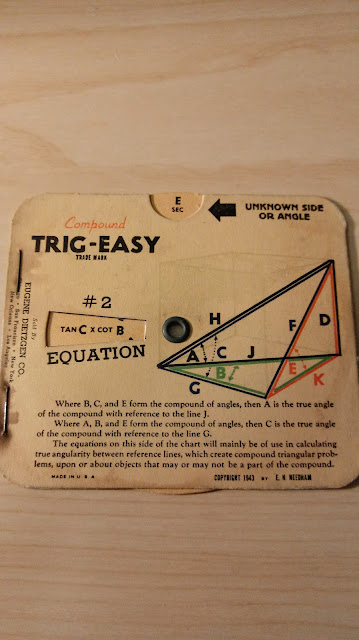
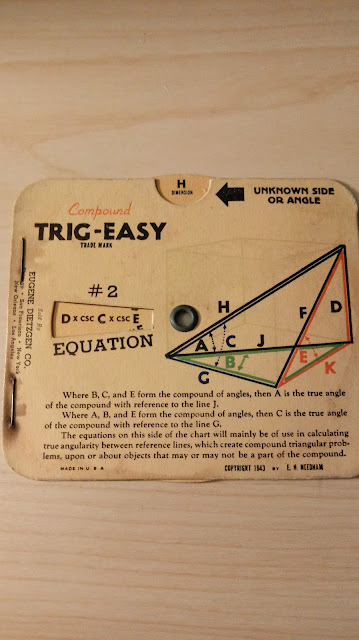
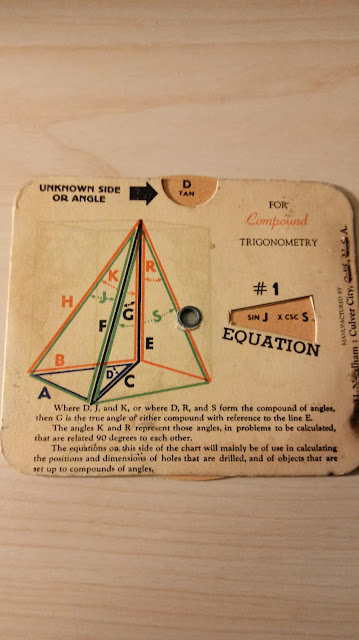
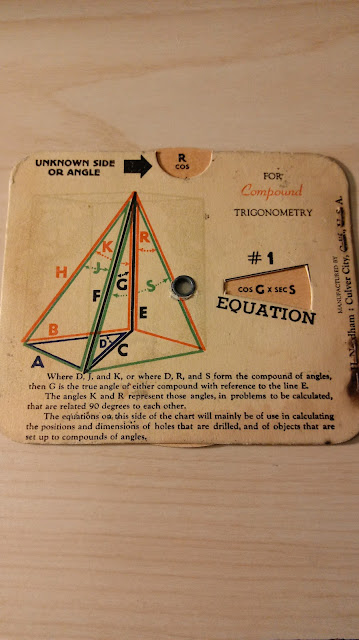
Eugene Dietzgen: Compound Trig-Easy Calculator

 Eugene Dietzgen: Compound Trig-Easy Calculator


I purchased this cool, vintage formula card on Esty from the Lost Angeles Vintage Co. in Wofford Heights, California.  


The Compound Trig-Easy calculator is a 1943 formula reference card for calculating angels and lengths (dimension) of right triangle pyramids and rectangular pyramids.  Following are some example calculations.   


sec E = tan C * cot B

H = D * csc C * csc E

tan D = sin J * csc S

cos R = cos G * sec S

Eddie


All original content copyright, © 2011-2022.  Edward Shore.   Unauthorized use and/or unauthorized distribution for commercial purposes without express and written permission from the author is strictly prohibited.  This blog entry may be distributed for noncommercial purposes, provided that full credit is given to the author. 


Saturday, October 2, 2021

Swiss Micros DM41X: Working With Alpha Strings

Swiss Micros DM41X: Working With Alpha Strings


This first blog in the October series for the DM41X will cover basic tips and tricks for working with alpha strings.  


Considerations


Alpha characters are marked in blue on the Swiss Micros DM41X and the HP 41C series.  Alpha characters and the shift characters are shown on the back of the calculator.  


The alpha string can hold up to 24 characters total.  All letters are upper case, with the only lower case letters available are a, b, c, d, and e.  


Let's start with clearing the alpha register.   Usually, when a new alpha string is started, it will replace the contents of the alpha register.  However, ARCL and |- add to the string.  A sure way to make sure that the alpha register is cleared by executing the Clear Alpha (CLA) command.


You can attach the contents of a register, including stack register characters, to the end of the alpha register by using the ARCL command.  


ALENG returns the length of the alpha string.  


You can store strings by using ASTO.  But please be aware, each register can only hold up to six characters.   Example:  an attempt to store EDWARDS to R00 will only store EDWARD.  


Swiss Micros DM41X Program 1:  ALP1


Notes:


To attach strings together, use the append symbol (|-) as the first symbol of the string. Press [ alpha ], [ shift ], [ XEQ ] for the append symbol.  


33 XTOA adds an exclamation point (shown as a small 1 or a small exclamation point).   XTOA is present for the HP 41CX, HP 41C with the Extended Module, or the Swiss Micros DM41X.  XTOA appends characters to the end of the string.   Some XTOA characters include:


12 µ

33 !

34 "

36 $   

37 % (also [ alpha ], [ shift ], G)

63 ?  (also [ alpha ], [ 3 ])


Program:


Goal:  Build "HELLO WORLD, I AM THE 41!" from two strings and 33 XTOA.  If you have an HP 41C without the extended functions, the 33 XTOA must be ignored.  


01 LBL^T ALP1

02 CLA

03 ^T HELLO WORLD,

04 ^T |- I AM THE 41

05 33

06 XTOA

07 AVIEW

08 END


Swiss Micros DM41X Program 2:  ALP2


Goal:

Store 41 in R00.

"HELLO WORLD, I AM THE "

Alpha recall R00.


01 LBL^T ALP2

02 FIX 0

03 41

04 STO 00

05 ^T HELLO WORLD,

06 ^T |- I AM THE

07 ARCL 00

08 AVIEW

09 FIX 4

10 END


Swiss Micros DM41X Program 3:  ALP3


Goal:

Ask for two numbers and store them in R01 and R02, respectively.

Multiply them and store the result in R03.

Build the string "{R01} * {R02} = {R03}"


01 LBL^T APL3

02 FIX 0

03 CLA

04 CLX

05 ^T R01?

06 PROMPT

07 STO 01

08 CLA

09 ^T R02?

10 PROMPT

11 STO 02

12 RCL 01

13 *

14 STO 03

15 CLA

16 ARCL 01 

17 ^T |- *

8 ARCL 02

19 ^T |- = 

20 ARCL 03

21 AVIEW

22 FIX 4

23 RTN

24 END


Example:  R01 = 11, R02 = 24

Result:  "11*24=264" 


Swiss Micros DM41X Program 4:  ALP4


Ask what is user's name.   Then store the name in:

"HELLO, {NAME} ."


Remember, ASTO stores only the left four characters.  


01 LBL^T ALP4

02 CLA

03 ^T NAME?

04 PROMPT

05 AON

06 ASTO 00

07 CLA

08 ^T HELLO,

09 ARCL 00

10 ^T |- .

11 AVIEW

12 END


Example:  LAUREN  (it's already in Alpha mode because of the AON command)

HELLO, LAUREN.


Hope you find this helpful, 


Eddie


All original content copyright, © 2011-2021.  Edward Shore.   Unauthorized use and/or unauthorized distribution for commercial purposes without express and written permission from the author is strictly prohibited.  This blog entry may be distributed for noncommercial purposes, provided that full credit is given to the author. 


Saturday, September 14, 2019

TI-84 Plus CE and Casio fx-5800P: Highway Transition Spiral

TI-84 Plus CE and Casio fx-5800P:  Highway Transition Spiral

Introduction


For any given parameters of a highway transition spiral:

PI:  point of intersection of the vertices (X coordinate, Y coordinate; Program Variables A, B)
∆:  intersection angle  (Program variable I)
D_C:  degree of the curve (Program variable D)
L_S:  length of the spiral (Program variable L)

Outputs:

Z:  Angle between the radii of spiral at TS and SC
R:  radius of circular curve
TS:  point of intersection of main tangent and approach spiral   (Program Variables U, V)
SC:  point of intersection of main tangent and circular curve
ST:  short tangent

Formulas:

Z = L * D / 200

Z is in degrees
Convert Z to radians:  Q = Z * Ï€ /180

x = L * (1 - Q^2/10)
y = L * (Q/3 - Q^3/43)
k = x - R * sin Z
p = y - R * (1 - cos Z)
T = (R + P) tan (∆/2) + K
S = Y * csc Z = Y / sin Z

Coordinates of TS:
[ PI_X - intg(T/100),  PI_Y - 100 * frac(T/100)]

Coordinates of SC:
[ TS_X + intg(L/100), TS_Y + 100 * frac(L/100)]


TI-84 Plus CE Program HYSPIRAL
(program to be typed)

Degree
"EWS 2019-08-03"
Disp "HWY SPIRAL"
Input "PI X: ",A
Input "+ PI Y: ",B
Input "INT-ANGLE: ",I
Input "LENGTH: ",L
Input "DEGREE: ",D
L*D/200→Z
100/(D*Ï€/180)→R
ZÏ€/180→Q
L(1-Q²/10)→X
L(Q/3-Q³/43)→Y
X-R sin(Z)→K
Y-R (1-cos(Z))→P
(R+P) tan(I/2)+K→T
Y/sin(Z)→S
Disp "ANGLE TS-SC:",Z,"RADIUS:",R
Pause
A-iPart(0.01T)→U
B-100 fPart(0.01T)→V
Disp "TS:",U,"+",V
Pause
Disp "SC:",U+iPart(0.01L),"+",V+100 fPart(0.01L)
Pause
Disp "ST:",S

Casio fx-5800P Program HWYSPIRAL

Deg
"HIGHWAY SPIRAL"
"PI X: "?→A
"PI Y: "?→B
"INT-ANGLE: "?→I
"LENGTH: "?→L
"DEGREE: "?→D
L*D÷200→Z
100÷(D*Ï€÷180)→R
Z*Ï€÷180→Q
L*(1-Q²÷10)→X
L*(Q÷3-Q^(3)÷43)→Y
X-R sin(Z)→K
Y-R (1-cos(Z))→P
(R+P) tan(I÷2)+K→T
Y÷sin(Z)→S
"ANGLE TS-SC:"
Z⊿
"RADIUS:"
R⊿
A-Int(0.01T)→U
B-100 Frac(0.01T)→V
"TS X:"
U⊿
"TS Y:"
V⊿
"SC X:"
U+Int(0.01L)⊿
"SC Y:"
V+100 Frac(0.01L)⊿
"ST:"
S

Example

A highway with a transition spiral is at station 50 + 64.84, with the intersection angle 50°, and the degree of the curve at 6°.  The length of the curve is said to be 360 ft.

Inputs:

PI X = 50
PI Y = 64.84
INT-ANGLE = 50
LENGTH = 360
DEGREE = 6

Outputs:

ANGLE TS-SC = 10.8
RADIUS = 954.9296586
TS:  (X + Y) = 44 + 37.12990632
SC:  (X + Y) = 47 + 97.12990632
ST = 120.4143341

Source:

Hicks, Tyler P.E.  Handbook of Civil Engineering Calculations McGraw Hill: New York.  2000  ISBN 0-07-028814-3


Eddie

All original content copyright, © 2011-2019.  Edward Shore.   Unauthorized use and/or unauthorized distribution for commercial purposes without express and written permission from the author is strictly prohibited.  This blog entry may be distributed for noncommercial purposes, provided that full credit is given to the author.

The MU Key on a Four Function Calculator and Programs for the DM42/HP 42S

  The MU Key on a Four Function Calculator and Programs for the DM42/HP 42S Not too long ago, I purchased this very colorful, four funct...