Showing posts with label Casio fx-5000F. Show all posts

Saturday, January 3, 2026

Comparison of Formula Evaluators: TI-60X, TI-68, Sharp EL-5150, fx-4200P, fx-5000f

Comparison of Formula Evaluators


Happy New Year! Let’s start the new year by comparing formula evaluator calculators. The calculators featured are:


TI-60X (early 1990s)


TI-68 (late 1980s/1990s)


Sharp EL-5150 (late 1970s/early 1980s)


fx-4200P (late 1980s/early 1990s)


fx-5000f (late 1980s/early 1990s)


Formula evaluator: A calculator which strictly evaluates simple formulas. There are no loops, no solvers, no sums. The formula evaluates to one answer but can have more than one inputs.


Example:

Allowed: f(x) = x² + 3 – 1 / x

Allowed: f(a,b) = (a * b) / (a + b)

Not Allowed: f(x) = Σ(x² / 3, x = 0, 10)

Not Allowed: f(x) = [1 if x ≥ 0, else 0]


TI-60X

TI-68

Sharp EL-5150

fx-4200P

fx-5000F

Battery

1 x CR2032

1 X CR2032

3 x SR44/LR44

1 x CR2032

2 x CR2032

Memory (bytes)

12 registers (84 bytes)

55 registers (440 bytes)

80 steps

279 steps

675 steps

Variables: Number and Type

12, Single letter: A through I, X, Y, Z

Up to three character variables (3 character variables take up 2 registers)

11: A – J, M

26 single letters for formulas only: A – Z; 6 separate numerical constants (K1-K6)

Letters and Greek characters for formulas only; separate numerical constants (K0-K9)

Does store values to variables take space?

Yes, each variable takes up a register

Yes, 1 register for 1 or 2 character variables, 2 for 3 character variables

No

No

No

How Formulas are accessed

[ 2nd ] [ EE ] (FMLA)

[ 2nd ] [ EE ] (FMLA)

AER Mode; up to 5 lines

[ IN ]/[ OUT ]

[ MODE ] 2: WRT

Prog 0-9,A,B: 12 slots

Integration?

∫ f(x) dx

Yes

Yes

No

No

No

Base conversions?

Yes, with Boolean logic

Yes, with Boolean logic

No

Yes, 32 bit binary block

No

Complex numbers?

No

Yes, with trig and log complex calculations

No

No

No

Engineering symbols?

No

No

Display toggle switch

Display toggle switch

Display toggle switch

Conversions?

Yes. 4 pairs (in/cm, gal/L, lb/kg, °F/°C)

Yes. 4 pairs (in/cm, gal/L, lb/kg, °F/°C)

No

No

No

Scientific Constants?

No

No

No

No

Yes ([ALPHA] [ ln ] (CONST)), 13


Other


Special 13 digit precision mode

Landscape form


128 built in formulas


The four pairs of conversions included in the TI-60X and TI-68 are:

in/cm: inches/centimeters

gal/L: gallons/liters

lb/kg: pounds/kilograms

°F/°C: degrees Fahrenheit/degrees Celsius


The scientific constants included on the fx-5000F are:

c: Speed of Light

h: Planck’s Constant

G: Universal Gravitational Constant

e: Elementary Charge

me: Electron Mass

u: Atomic Mass Unit

k: Boltzmann Constant

Vm: Molar Volume of Ideal Gas at Standard, Temperature, and Pressure

g: Earth’s Gravity Constant

R: Molar Gas Constant

ε0: Permittivity of Vacuum

µ0: Permeability of Vacuum


All the constants are in SI units.


Out of the calculators listed, my favorites are the TI-68 and fx-5000F.


Eddie


All original content copyright, © 2011-2025. Edward Shore. Unauthorized use and/or unauthorized distribution for commercial purposes without express and written permission from the author is strictly prohibited. This blog entry may be distributed for noncommercial purposes, provided that full credit is given to the author.


The author does not use AI engines and never will.


Sunday, December 3, 2023

Casio fx-5000F: Auto Formulas

Casio fx-5000F:   Auto Formulas


The formula listing can apply to (almost) any calculator that can handle formula programming.


In November, there I want to a luncheon that a local car club had in Riverside.  Of course, this was an opportunity to bring a calculator and find something in common with the members.   I previously did this with a TI-68.


Except noted, US, imperial units are used.  


The source for all the equations are from The Auto Math Handbook, except for Gas Efficiency.  


Stroke of an Engine

(spaces added for readability)


S = D / ( π / 4 × B^2 × n ) = D / ( π / 4 × B² × n )


S = stroke (in)

D = displacement (in^3)

B = bore (in)

n = number of cylinders


Example:

D = 421

B = 4 

n = 6


Result: 

S ≈ 5.58369 in 


Engine Horsepower


H = R × T × 2 × π / 33000


H = engine horsepower (hp)

R = revolutions per minute (rpm)

T = torque (lbs-ft)


Example:

R = 5200 

T = 446


Result:

H ≈441.57465


Theoretical Air Capacity of an Engine


C = R × D / 3456


C = air capacity (in^3/min [cubic feet per minute])

R = revolutions per minute (rpm)

D = displacement (in^3)


Example:

R = 5200

D = 421 


Result:

C ≈ 633.44907


Estimated Elapsed Time in a Quarter Mile


The time is based off an engine's weight (really, mass) and horsepower.


E = 5.825 × ³√( W / H ) = 5.825 × ( W / H )^(1/3)


E = elapsed time in seconds (sec)

W = weight of the automobile/truck (pounds)

H = horsepower of the engine (hp)


Example:

W = 3676 

H = 440


Result:

E ≈ 11.81962


Gear Ratio 


This estimates the final gear ratio.  Note that 63360 ÷ 60 = 1056, allowing a simplified formula to be used.


G = R × T × θ / M / 1056


G = gear ratio

R = revolutions per minute (rpm)

T = tire diameter (in)

M = miles per hour (mph) (average)


Example:

R = 5200

T = 28

M = 57.8


Result:

G ≈ 7.49410


Tire Diameter


T = W × A / 1270 + R


Take the following measurements as they are marked on the tire:


[LT/P]  W / A  [R/B]   R


W = section width (mm:  yes, somehow U.S. tires measure this in millimeters)

A = aspect ratio (percentage difference between section height and section width)

R = rim diameter (in)


T = tire diameter (in)


Example:

W = 235

A = 75

R = 15


Result:

D ≈ 28.87795


Gas Efficiency


M = (B - A) / g


B = ending mileage (mi)

A = beginning mileage (mi)

g = number of gallons used


M = gas efficiency (mpg, miles per gallon)


Example:

B = 13695

A = 13385

G = 10


Result:

M = 31


Source


Lawlor, John.   Auto Math Handbook:  Calculations, Formulas, Equations and Theory  HPBooks  New York, NY 1992.


Eddie


All original content copyright, © 2011-2023.  Edward Shore.   Unauthorized use and/or unauthorized distribution for commercial purposes without express and written permission from the author is strictly prohibited.  This blog entry may be distributed for noncommercial purposes, provided that full credit is given to the author. 


Monday, August 2, 2021

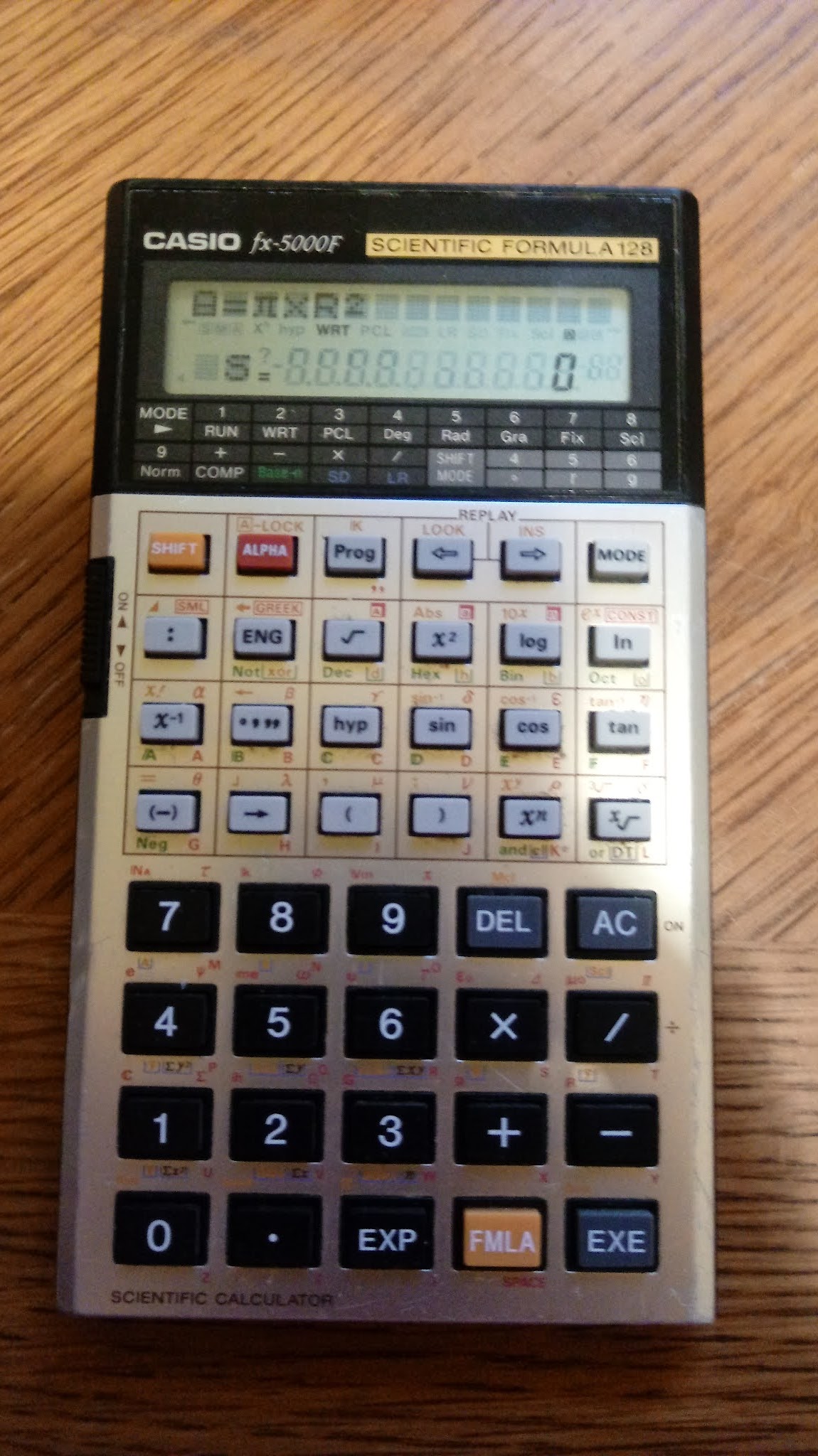
Retro Review: Casio fx-5000F

 Retro Review:  Casio fx-5000F


Quick Facts


Company:  Casio

Year Introduced:  1987

Type:  Scientific, Formula Programming

Memory:  675 steps

Batteries:  2 x CR-2032

Operating System: Algebraic

Display:  Scrolling 14 character screen

Formula Library: 128 formulas


Keyboard and ALPHA Key


The Casio fx-5000F has the keyboard split into two sections:  the scientific keys (gray keys, upper half) and the number and arithmetic keys (black keys, lower half).   There is a physical ON-OFF switch on the left side of the thin keyboard and a contrast wheel on the right side.   


There is a fx-1000F where is the same fx-5000F, except the keyboard of the fx-1000F is angled and the hyperbolic functions are not available.  


The keyboard of the fx-5000F is busy.  The alpha characters are presented in red, including symbols and Greek letters.   In fact, the [ ALPHA ] key serves multiple purposes:


*  Alone, the uppercase letter is typed (bottom right hand corner of the key)

*  [ ALPHA ] [ : ] (SMALL) combination: a lowercase letter is typed

*  [ ALPHA ] [ ENG ] (GREEK) combination: a Greek character is typed (top right hand of the key)

*  [ ALPHA ] [ √ ] combination:  small uppercase letters

*  [ ALPHA ] [ x^2 ] combination: small lowercase letters

*  [ ALPHA ] [ log ] combination: small numbers

*  [ ALPHA ] [ ln ] combination:  calls up constants (upper left hand of the keyboard)


Modes Included


* Formula Programming

* Statistics:  Single Variable (SD) and Linear Regression (LR)

* Base Conversions and Boolean Math


A Library of Formulas


The fx-5000F has a library of 128 formulas, which includes topics like:


*  geometry

*  quadratic equations

*  electricity

*  physics

*  probability

*  combinatorics


For a full listing, you can download the calculator's manual here:


http://www.usersmanualguide.com/info_redirect/manuals/casio/FX-1000F__FX-5000F.pdf.shtml


User Formulas


The fx-5000F can handle user formulas.   User formulas that are meant for one-time or temporary can be entered directly in Run mode (1) by using the format:


var = expression


Example:


A=π*R^2


Variables on the right side of the equation will be prompted automatically.  No input or print commands are required.  Multiple statements can be chained in one of three ways:


*  Colon ( : ):  variable values are carried over in multiple calculations

*  Right Triangle (◢):  intermediate calculations are shown and variables are re-prompted

*  Right Angle Symbol/"Fraction" Symbol ( _| ):  intermediate calculations are not shown and variables are re-prompted


At the conclusion of each formula, all the variables are treated as local variables and cleared.  The practice is different from other formula calculators like the TI-68, where values are stored in variable registers for future use.


We can store user formulas in 12 program slots (0-9, A, B) in WRT (Write) mode (Mode 2).  Up to 675 steps can be used, and storing operations (→) are allowed.  


There are no loop (for, Σ) commands or comparison commands (if, >, <, =); hence each written formula must be a closed expression.  However, multiple formulas can be stored in a program slot.


Example:


P1:  S=A+B:D=A-B


This program asks for A and B and displays S (the sum) and D (difference).


Verdict


I enjoy using this calculator, it is small and compact.  The fx-5000F is hard to get at a bargain price as it is one of more sought after calculators, commanding a premium price.  The closest thing to the fx-5000F that I can think of is the Casio fx-5800P, which has a formula feature and a library of formulas.   


I find the formula library to be one of the most underrated features.  


Eddie


All original content copyright, © 2011-2021.  Edward Shore.   Unauthorized use and/or unauthorized distribution for commercial purposes without express and written permission from the author is strictly prohibited.  This blog entry may be distributed for noncommercial purposes, provided that full credit is given to the author. 


Earth's Radius by Latitude

Earth's Radius by Latitude Introduction: Calculating the Earth’s Radius In quick, general calculations, we assume that the...