Showing posts with label lists. Show all posts

Saturday, July 13, 2024

TI-84 Plus CE and Casio fx-CG 50: Mean Squared Error

TI-84 Plus CE and Casio fx-CG 50: Mean Squared Error


Introduction


The mean square error computes the mean distance from observed (y) versus predicted (y’) values. With the n data points, the standard formula for mean squared error (MSE) is calculated as:


MSE = 1 / n * Σ((y_i – y’_i)^2 for i=1 to n)


Where:

n = number of data points

y = observed points

y’ = predicted points. Any regression can be used, but the linear regression is typically used (y = a + b * x).


When MSE is small, (as closed to zero as possible), the better the data fits the regression curve. MSE is sensitive to how much data points stray from the regression line. [see Source]


TI-84 Plus CE Program: MSE


How to retrieve the statistical variables and the apostrophe character:

a: [ vars ], 5, [ → ], [ → ], 2

b: [ vars ], 5, [ → ], [ → ], 3

n: [ vars ], ,5 ,1

‘: [ 2nd ] [ apps ] <angle>, 2


Lists used:

L1 = x data

L2 = y data

L3 = y’ (predicted y) data


Download the program here: https://drive.google.com/file/d/1toVMgznJOGdaK4uhvfrcvvb3t__D9yJD/view?usp=drive_link


Casio fx-CG 50


The Casio fx-CG 50 (and other modern Casio graphing calculators such as the fx-9750GIII/9860GIII) has a MSe variable (Mean Square Error) included in the statistics variables. However, Casio’s calculation of Mse vary depending on the regression model selected. For the linear regression mode, Mse is calculated with the following formula:


Mse = 1 / (n – 2) * Σ((y_i – y’_i)^2 for i=1 to n)


Apparently the are different approaches.

.


Examples (with the Presented Formula)


Linear Regression is assumed (y = a + b * x, a = y-intercept, b = slope). Results are shown using the MSE program (TI-84 Plus CE).


Set 1:


L1 = x

L2 = y

1

1.035

2

1.076

3

1.112

4

1.400

5

1.558

6

1.827


a: 0.7652666667

b: 0.1626857143

MSE: 0.0066101841


Set 2:


L1 = x

L2 = y

40

385

41

349

40

376

41

358

39

333

38

326

39

371

40

350


a: 22.1

b: 8.4

MSE: 306.85


Source


Encord. “Mean Square Error”. Encord Computer Vision Glossary. 2023. Retrieved May 25, 2024. https://encord.com/glossary/mean-square-error-mse/


Next post: Saturday, July 20, 2024


Eddie


All original content copyright, © 2011-2024. Edward Shore. Unauthorized use and/or unauthorized distribution for commercial purposes without express and written permission from the author is strictly prohibited. This blog entry may be distributed for noncommercial purposes, provided that full credit is given to the author.

Saturday, November 12, 2022

HP Prime: Reversing an Integer's Digits

HP Prime:  Reversing an Integer's Digits


(Inspired by the HHC 2022 programming contest)


What Should I Add To Reverse the Digits?


Let A, B, C, D, and E be individual digits (0-9) of an integer.   AB would represent a two digit integer with the value of 10 * A + B.  ABC would represent a three digit integer with the value of 100 * A + 10 * B + C.


Reversing a Two Digit Integer


AB + # = BA

10 * A + B + # = 10 * B + A

# = 9 * (B - A)


Example:  Let AB = 76.

A = 7, B = 6

# = 9 * (6 - 7) = -9

76 - 9 = 67


Reversing a Three Digit Integer


ABC + # = CBA

100 * A + 10* B + C + # = 100 * C + 10 * B + A

# = 99 * (C - A)


Example:  ABC = 469

# = 99 * (9 - 4) = 495

469 + 495 = 964


Reversing a Four Digit Integer


ABCD + # = DCBA

1000 * A + 100 * B + 10 * C + D + # = 1000 * D + 100 * C + 10 * B + A

# = 999 * (D - A) + 90 * (C - B)


Example:  ABCD = 7219

# = 999 * (9 - 7) + 90 * (1 - 2) = 1908

7219 + 1908 = 9127


Reversing a Five Digit Integer


ABCDE + # = EDBCA

10000 * A + 1000 * B + 100 * C + 10 * D + E + # =

10000 * E + 1000 * D + 100 * C + 10 * B + A 

# = 9999 * (E - A) + 990 * (D - B)


Example: ABCDE = 52693

# = 9999 * (3 - 5) + 990 * (9 - 2) = -13068

52693 - 13068 = 39625


Having the Calculator Do It


The program REVINT reverses the digits of an integer, up to 11 digits.   The program does not allow numbers that have non-zero fractional parts or integers more than 11 digits.  Instead of solving for # (see above), the program splits the integers into a list in reverse order, and uses list processing to get the final answer. 


HP Prime Program:  REVINT


Caution:  Integers that end or begin with zero may not return accurate results.   My suggestion is not use 0s with this program.  See examples below for more details.  


EXPORT REVINT(N)

BEGIN

// 2022-09-18 EWS

// reverse the integer N

// up to 12 digits

LOCAL D,P,A,I,M,L;

L:={};

P:=XPON(N);


// check size 

  IF P>11 THEN

  RETURN "TOO BIG";

  KILL;

  END;


// check type

  IF FP(N) THEN

  RETURN "NOT AN INTEGER";

  KILL;

  END;


D:=N;


// loop

  FOR I FROM P DOWNTO 0 DO

  A:=D/ALOG(I);

  L:=CONCAT({IP(A)},L);

  D:=D-IP(A)*ALOG(I); 

  END;


// rebuild 

M:=ΣLIST(MAKELIST(ALOG(X),X,P,0,−1)*L);

RETURN M; 

END;


Examples:


REVINT(4321) returns 1234


REVINT(56765) returns 56765   (56765 is a palindrome, reversing the digits results in the same number)


REVINT(42910) returns 1924 (01924 - be aware about integers ending or beginning with 0)


REVINT(67.28) returns "NOT AN INTEGER" (error)


Eddie


All original content copyright, © 2011-2022.  Edward Shore.   Unauthorized use and/or unauthorized distribution for commercial purposes without express and written permission from the author is strictly prohibited.  This blog entry may be distributed for noncommercial purposes, provided that full credit is given to the author. 


Saturday, October 8, 2022

Drawing Random Numbers with Playing Cards 


An Easy Way to Get Random Numbers

Need an easy and fun way to draw random is to use a playing deck of cards.  No electricity or potentially expensive electronic devices are needed, and your shuffling skills will improve dramatically.  


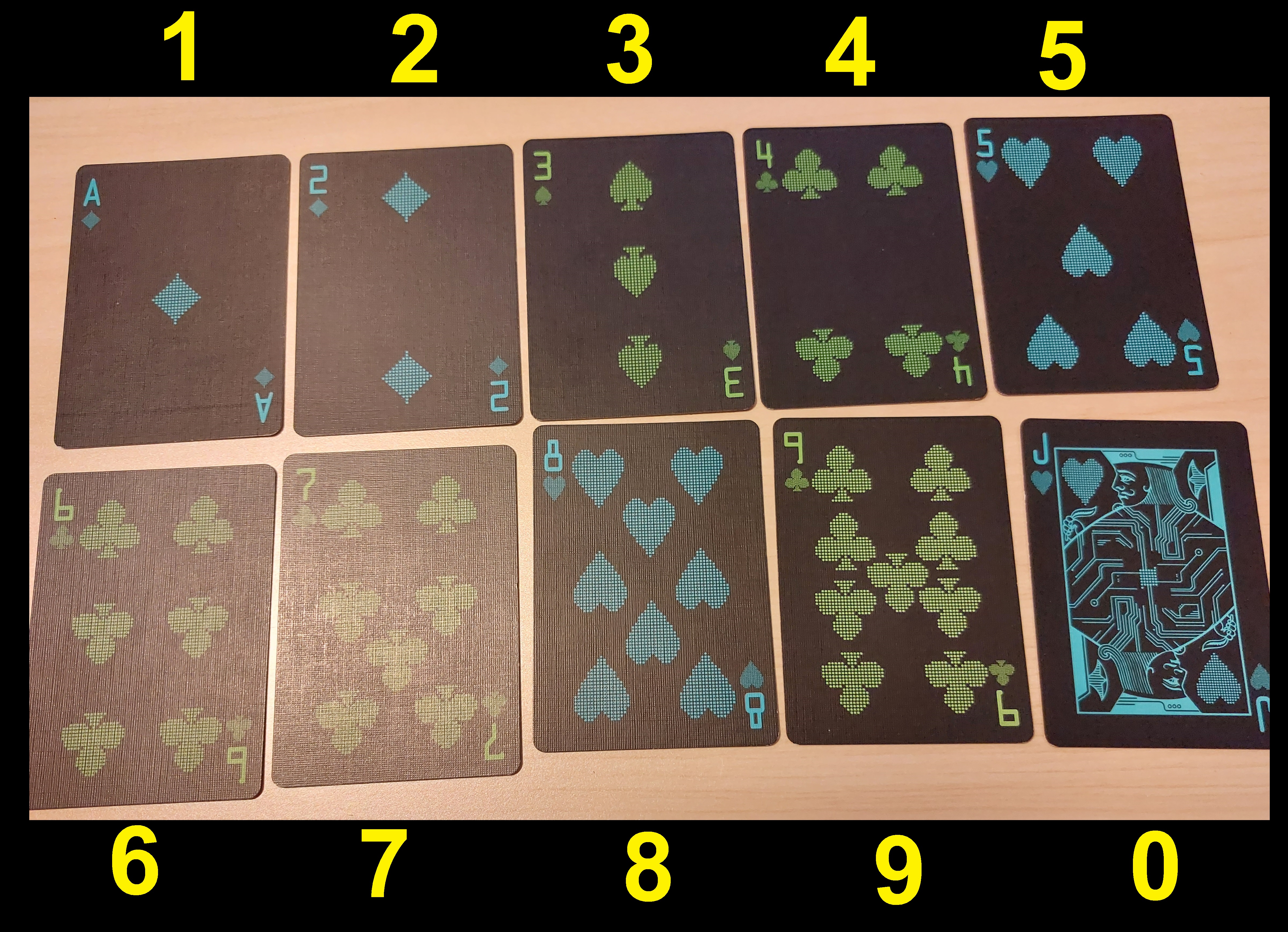
Take a regular deck of cards, and you will only need 40 cards.  Get all the Aces, ones through nines, and one set of face cards.   Assign the following cards as the following values:


Aces:  1

Twos:  2

Threes: 3

Fours: 4

Fives: 5

Sixes: 6

Sevens: 7

Eights: 8

Nines: 9

Any set of face card or tens: 0  (I use Jacks, see the pictures above.  You can use Queens, Kings, or Tens)


To get a random number:

1.  Shuffle the deck

2.  Draw up to four cards 

3.  That card becomes the random number.  Insert a decimal point anywhere if appropriate.  


Why only up to four cards?  There are only four digits available per deck.  We are generating a samples with no replacement.  


Sample four digit numbers:

8-clubs, Ace-hearts, 2-clubs, 5-diamonds:  8125

2-diamonds, Ace-clubs, 3-clubs, 5-spades:  2135

4-hearts, 8-spades, 3-diamonds, 9-spades: 4839

4-hearts, 3-diamonds, 9-slides, 8-clubs: 4398

Jacks-clubs, Ace-clubs, 2-diamonds, 2-spades: 0122


How many possible permutations are possible with this deck?

2 digits:  nPr(40, 2) = 1560

3 digits:  nPr(40, 3) = 59,280

4 digits:  nPr(40, 4) = 2,193,360


Can we create a program to generate random numbers using this method?  

Yes.   I am using the TI-84 Plus CE to for this program.   The TI-84 has a randIntNoRep function, which generates a list of random integers without replacement.   The nice part of the is we are working with base 10, so the use of a remainder function will give the results we want: 0 through 9.  


Syntax:


Random Sample of Integers Without Replacement:

randIntNoRep(low, high, size of the sample)


Remainder function, which can be used as the modulus function.

remainder(x, y):  returns the remainder of x ÷ y


The program RANDDECK will generate a list and draw a histogram.


TI-84 Plus CE Program:  RANDDECK


"2022-08-16 EWS"

ClrHome

Disp "MAKE A 4 DIGIT,","NUMBER FROM A DECK 0-9"

Input "NO OF TRIALS: ", N

For(I,1,N)

randIntNoRep(1,40,4)→L6

remainder(L6,10)→L6

sum(L6*{1000,100,10,1})→N

If I=1

Then

{N}→L5

Else

augment(L5,{N})→L5

End

End

Pause L5

ClrHome

Disp "PRESS [ENTER] TO"

Pause "DISPLAY HISTOGRAM"

Plot1(Histogram,L5,1,BLUE)

PlotsOn 1

ZoomStat


Here is an example.


Until next time,


Eddie


All original content copyright, © 2011-2022.  Edward Shore.   Unauthorized use and/or unauthorized distribution for commercial purposes without express and written permission from the author is strictly prohibited.  This blog entry may be distributed for noncommercial purposes, provided that full credit is given to the author. 


Saturday, August 27, 2022

Lists in Numworks - Version 19.2

Lists in Numworks - Version 19.2


Introduction


In Version 19,  lists were added as an object in the Numworks calculator.  We can define and name lists with any values that we want. Lists are designated by the brackets { }. 


*   The values can be real number, complex numbers, numbers with units, scientific constants, and combinations of those types.   What is not allowed in lists are strings and matrices.


*  The indexing of lists starts with 1.   We can call a list's elements by the parenthesis after the list name.  For example,  xlist(10) recalls the 10th element of the list xlist.


*  { f(k) }_k≤value generates a list of f(k) from k=1 to value, step 1.   The variable can be almost any variable you want, except e and i.  e is designated as the exponential constant (about 2.71828...) and i is designated as the imaginary number √-1.   The limits are strictly from 1 to value.


*  Once a user defined list is created, the individual values cannot be changed.   Furthermore, there are no augment or delete commands.  In this sense, user defined lists acts like tuples in Python.


*  Lists can be recalled in the Statistics and Regression apps.   The system named lists V#, X#, and Y# are updated accordingly.


* Defining a list of random values will always change the randomized values every time a user defined list is recalled.  


Please note that this is for Version 19.2.  


Screenshots are captured using the Numworks Emulator on July 10, 2022:  www.numworks.com/emulator


Note:  Casio fx-991EX Week - September 5, 2022 to September 9, 2022 


Eddie


All original content copyright, © 2011-2022.  Edward Shore.   Unauthorized use and/or unauthorized distribution for commercial purposes without express and written permission from the author is strictly prohibited.  This blog entry may be distributed for noncommercial purposes, provided that full credit is given to the author. 


Saturday, June 18, 2022

TI-84 Plus CE Python: The Split Command and Some Statistics

TI-84 Plus CE Python:  The Split Command and Some Statistics


Python:  Split Command


The split command allows the us to accept a list of input, use a character to split (spaces, commas, semicolons, etc.).


Example:


list1=input("List: ").split(",")   # split by comma

print(list1)


List:  1, 3, 4, 5

[ '1', '3', '4', '5' ]


Remember that the default of the input command is strings, so we have to change data types when needed:


n=len(list1)

for i in range(n):

  list1[i]=float(list[i])


(this is one way to do it)


The .split command does not require a module.  


TI-84 Plus CE Python Program:  SIMPSTAT


# Math Calculations

from math import *

print("Simple Statistics")

print("Edward Shore")

# 2022-04-27


x=input("\nSeparate data points \nby a comma: ").split(",")


# make every entry float

n=len(x)

for i in range(n):

   x[i]=float(x[i])


# \t tab \n new line

print("\nn =\t",n)


# sum

s=sum(x)

print("sum =\t",s)


# mean

a=s/n 

print("avg =\t",a)


# population deviation

d=0

for i in range(n):

  d+=(x[i]-a)**2

d=sqrt(d/n)

print("det =\",d)


# range of data

m0=min(x)

m1=min(x)

m2=m1-m0

print("min =\t",m0)

print("max =\t",m1)

print("range\t",m2)


Example


Sample list:  5.8, 5.9, 6.7, 6.9, 8.2, 8.8, 9.1

(use a comma to separate list items)


Results:

n = 7

sum = 51.4 (displayed as 51.400000000004)

avg = 7.342857142857143

dev = 1.25454276572008

min = 5.8

max = 9.1

range = 3.3


Source


Rohit.  "How to take list input in Python in single line"  Tutorial By EyeHunts.   December 11, 2021.  https://tutorial.eyehunts.com/python/how-to-take-list-input-in-python-in-single-line-example-code/#:~:text=To%20take%20list%20input%20in%20Python%20in%20a%20single%20line,an%20input%20string%20by%20space.

Last Retrieved April 28, 2022.  


Hope you find this useful.  Until next time,


Eddie 


All original content copyright, © 2011-2022.  Edward Shore.   Unauthorized use and/or unauthorized distribution for commercial purposes without express and written permission from the author is strictly prohibited.  This blog entry may be distributed for noncommercial purposes, provided that full credit is given to the author. 


Saturday, February 19, 2022

Casio fx-9750GIII: 0-1 Knapsack Problem

Casio fx-9750GIII: 0-1 Knapsack Problem


What Do I Take?


Imagine you are given a list of objects, which each object has its profit value and it's associated weight.  You are given a knapsack, which is also known as a backpack, which can carry a limited amount of weight.  Your task is to select the objects with the most value that can fit in the knapsack.


In a 0-1 Knapsack Problem, each object can not be broken up into pieces.  There is a problem where that is allowed, known as the Fractional Knapsack Problem.  


One approach is to use what is known as the greedy algorithm.  In the greedy algorithm, you select the best choice at the moment at each step.   Once an object is selected, you go on to the next step.  There is no reverse or correction.  The greedy algorithm lives by the philosophy of "no regrets".  


Please be aware, even with attempt to select the best choice at each step, we may still not have the optimal solution.   


You can choose which criteria is used for selecting the best option.  For the program 01KNAPS, this criteria is used:


1.  The maximum ratio value of value to weight

2.  If the ratio is a tie, the maximum value 


Introduction to the Program 01KNAPS - Casio fx-9750GIII


Inputs:

List of Values of Each Object:  stored in List 10

List of Weights of Each Object:  stored in List 11

Capacity of the Knapsack:  stored in M


Outputs:

Total Value/Profit Made:   stored in P

Weight Remaining:  stored in M

A matrix showing which objects are selected, along with their weights, and value to weight ratio.   Columns are stored in List 14, List 15, and List 16, respectively.  Zeroes mean that the object is not selected.  


Notes:


The Wait Loop


The program starts with an intro screen created with several Locate statements and a For loop used as a "Wait".   This is 100% optional and serves to tell the user what program they are running.


A "Wait" Loop:

For I→1 To 750 (or a suitable number to create a short wait, 1/4 to 1/2 second)

Next


I aim to give a title screen to programs when possible.  


The SortD Function


In the MENU-LIST function in the program editor screen, we can sort lists by using the SortA (ascending) or SortD (descending).   We can sort a list by itself, or a list using up to five sub-lists.  The sorted lists are saved automatically.


It's not perfect, but it's better than nothing.


By the way, the function can be found in the CATALOG in certain times:  in the program editor or in the RUN-MAT mode (main) if the Linear Input is selected.   


Casio fx-9750GIII Program:  01KNAPS

(452 bytes)


ClrText

Locate 1,1,"0-1 KNAPSACK"

Locate 1,2,"PROBLEM BY"

Locate 1,3,"GREEDY ALG"

Locate 1,4,"EWS 2022-01-08"

For 1→I To 750

Next


ClrText

"LIST OF VALUES"?→List 10

"LIST OF WEIGHTS"?→List 11

"CAPACITY"?→M

List 10→List 12

0→P

List 10÷List 11→List 12

Dim List 12→Dim List 13

SortD(List 12, List 10, List 11)


For 1→I To Dim List 10

If List 11[ I ]≤M

Then

List 10[ I ]+P→P

M-List 11[ I ]→M

1→List 13[ I ]

IfEnd

Next


List 13×List 10→List 14

List 13×List 11→List 15

List 13×List 12→List 16


ClrText

Locate 1,3,"TOTAL VALUE:"

Locate 3,4,P

Locate 1,6,"WEIGHT LEFT:"

Locate 3,7,M◢

List→Mat(List 14,List 15,List 16)


Examples


Example 1:

Values:  {5, 3, 8, 4, 8, 4, 8}

Weights: {1, 1, 2,4, 2, 2, 4}

Capacity: 10


Total Value:  28

Weight Left: 2

[ [ 5, 1, 5 ]

[ 8, 2, 4 ]

[ 8, 2, 4 ]

[ 3, 1, 3 ]

[ 4, 2, 2 ]

[ 0, 0, 0 ] 

[ 0, 0, 0 ]]


Example 2:

Values: {20, 24, 22, 30, 25, 30}

Weights: {4, 6, 2, 6, 5, 5}

Capacity: 15


Total Value: 72

Weight Left: 4

[[22, 2, 11]

[30, 5, 6]

[20, 4, 5]

[0, 0, 0]

[0, 0, 0]

[0, 0, 0]]


Source


"Basics of Greedy Algorithms"  HackerEarth. 2022.  https://www.hackerearth.com/practice/algorithms/greedy/basics-of-greedy-algorithms/tutorial/   Retrieved January 6, 2022.


Eddie


All original content copyright, © 2011-2022.  Edward Shore.   Unauthorized use and/or unauthorized distribution for commercial purposes without express and written permission from the author is strictly prohibited.  This blog entry may be distributed for noncommercial purposes, provided that full credit is given to the author. 


Saturday, November 6, 2021

TI-92 Plus and TI-Nspire CX II: List Filters

TI-92 Plus and TI-Nspire CX II:  List Filters


For this particular post, I also have a TI-Nspire CX II CAS document which can be downloaded here:  https://drive.google.com/file/d/1Rm5vIWdUMg5OEyXi4VecNfuIGdiGRtan/view?usp=sharing


The functions are public and are available in the catalog.  Examples and syntax are included.  


The Filters


filters(list, criteria): filters out a list 

sumfilt(list, criteria): sum of selected elements of a list

avgfilt(list, criteria): arithmetic average of elements of a list

prdlist(list, criteria): product of selected elements of a list

dimfilt(list, criteria): returns a count of list elements that fit a criteria


This is similar to Excel functions filter, sumifs, averagefits, and countifs; there is no productifs in Excel.  


The criteria is a string, using x as a variable.  Examples:

"x<10": select elements less than 10

"x≥20": select elements greater than or equal to 20

"10<x and x<20": select elements between 10 and 20, not including 10 or 20

"10≤x and x≤20": select elements between 10 and 20, including 10 or 20


TI-92 Plus Functions: Filters


Note:  I am using the symbol [| for comment; in the program editor, select F2, option 9.  


TI-92 Plus Function:  filters


filters(list1,cr) 

Func

[| list, criteria string with x

[| EWS 2021-08-13

[| filter function

Local list2,d,i,t,x

{}→list2

dim(list1)→d

For i,1,d

expr(cr)|x=list1[i]→t

If t Then

augment(list2,{list1[i]})→list2

EndIf

EndFor

Return list2

EndFunc


TI-92 Plus Function: sumfilt


sumfilt(list1,cr) 

Func

[| list, criteria string with x

[| EWS 2021-08-14

[| sum-if filter function

Local list2,d,i,t,x

{}→list2

dim(list1)→d

For i,1,d

expr(cr)|x=list1[i]→t

If t Then

augment(list2,{list1[i]})→list2

EndIf

EndFor

Return sum(list2)

EndFunc


TI-92 Plus Function: avgfilt


avgfilt(list1,cr) 

Func

[| list, criteria string with x

[| EWS 2021-08-14

[| average-if filter function

Local list2,d,i,t,x

{}→list2

dim(list1)→d

For i,1,d

expr(cr)|x=list1[i]→t

If t Then

augment(list2,{list1[i]})→list2

EndIf

EndFor

Return sum(list2)/(dim(list2))

EndFunc


TI-92 Plus Function:  prdfilt


prdfilt(list1,cr) 

Func

[| list, criteria string with x

[| EWS 2021-08-14

[| product-if filter function

Local list2,d,i,t,x

{}→list2

dim(list1)→d

For i,1,d

expr(cr)|x=list1[i]→t

If t Then

augment(list2,{list1[i]})→list2

EndIf

EndFor

Return product(list2)

EndFunc


TI-92 Plus Function:  dimfilt


dimflt(list1,cr) 

Func

[| list, criteria string with x

[| EWS 2021-08-13

[| count-if filter function

Local list2,d,i,t,x

{}→list2

dim(list1)→d

For i,1,d

expr(cr)|x=list1[i]→t

If t Then

augment(list2,{list1[i]})→list2

EndIf

EndFor

Return dim(list2)

EndFunc


Examples:


list0 = {2,4,5,6,9,10,11,13,14,15,18}


filters(list0,"x≤10"):  {2,4,5,6,9}

filters(list0,"5≤x and x≤15"):  {5,6,9,10,11,13,14,15}


sumfilt(list0,"x≤10"):  36

sumfilt(list0,"5≤x and x≤15"):  83


avgfilt(list0,"x≤10"):  6

avgfilt(list0,"5≤x and x≤15"):  83/8


prdfilt(list0,"x≤10"):  21600

prdfilt(list0,"5≤x and x≤15"):  2700


dimfilt(list0,"x≤10"):  6

dimfilt(list0,"5≤x and x≤15"):  8


All original content copyright, © 2011-2021.  Edward Shore.   Unauthorized use and/or unauthorized distribution for commercial purposes without express and written permission from the author is strictly prohibited.  This blog entry may be distributed for noncommercial purposes, provided that full credit is given to the author. 


Sunday, September 5, 2021

TI-Nspire CX II and TI-84 Plus CE: COUNTIF, SUMIF, AVERAGEIF

TI-Nspire CX II and TI-84 Plus CE:  COUNTIF, SUMIF, AVERAGEIF


Introduction


Three popular spreadsheet functions are operating on elements of a list contingent of a criteria.   


Let L be a list of numerical data.


COUNTIF(L, criteria):   returns a count of all the elements that fit a criteria


SUMIF(L, criteria):  returns the sum of all the elements that fit a criteria


AVERAGEIF(L, criteria):  returns the arithmetic average of all the elements that fit a criteria


Example:


L = {0, 1, 2, 3, 4, 5, 6}


COUNTIF(L, "≥4") = 3.  

Counts all the elements of L that are greater than or equal to 4.


SUMIF(L, "≥4") = 15

Sums all the element's of L that are greater than or equal to 4. 


AVERAGEIF(L, "≥4") = 5

Returns the arithmetic average of L that are greater than or equal to 4.


Note that:


AVERAGEIF(L, criteria) = SUMIF(L, criteria) ÷ COUNTIF(L, criteria)


TI-Nspire CX II:  The functions countif and sumif


The TI-Nspire has two built in functions countif and sumif.  The averageif can easily be defined in the equation from the last section.


You can download a tns demonstration document here:  

https://drive.google.com/file/d/1XfRyHSQz92TXGmzohhej0--wLYS0yxkF/view?usp=sharing


TI-84 Plus CE Programs:  LISTIF


The program LISTIF calculates all three functions COUNTIF, SUMIF, and AVERAGEIF.  There are two custom lists that are created as a result of this program:


List A:  The input list.


List B:  The list that meets the criteria.


To get the small "L" character, press [ 2nd ], [ stat ] (LIST), B* for the small L.   The small L must be the first character of your list name.  Once created, custom lists are shown under the LIST - NAMES menu.


Although I did not test this on previous calculators, this program should work on the TI-82, TI-83 family, and all of the TI-84 Plus family.


Program listing:


Download Link:

Eddie

All original content copyright, © 2011-2021.  Edward Shore.   Unauthorized use and/or unauthorized distribution for commercial purposes without express and written permission from the author is strictly prohibited.  This blog entry may be distributed for noncommercial purposes, provided that full credit is given to the author. 


Symmetric Quartic Equation - Python

Symmetric Quartic Equation - Python Note: The code is programmed with a TI-84 Evo. No modules are used, so the scripts should be adopt...