Saturday, October 9, 2021

Swiss Micros DM41X and HP Prime: Rounding Numbers to One Significant Digit

Swiss Micros DM41X and HP Prime:  Rounding Numbers to One Significant Digit


Introduction


This blog entry deals with rounding numbers to one significant digit, that is the first non-zero numbers.  The general 5/4 rounding rules are used:  round up if you are next digit is 5 or more.  


Examples:  


72.28 rounds to 70


78.28 rounds to 80


0.0283 rounds to 0.03


Rob Eastaway, author of Maths On the Back of an Envelope (see source below), introduces the concept of Zequals.  Zequals is the practice of rounding numbers to one significant digit, with it's symbol similar to the symbol for the constellation Aquarius the Water Bearer ( ♒ ).  The aim for rounding numbers to one significant digit is to aid in estimating arithmetic operations and make mental mathematics easier.   


Is it always spot on?


The program RONE (Round to ONE Significant Digit) rounds positive, non-zero numbers to one significant digit.   An algorithm to do so may look like this:


Number:  x

a = log(x)

If a≥0, then a=int(a)

If a<0, then a=int(a)-1

n = int(x / (10^a) + 1/2) * 10^a


We can also use:

n = round(x / (10^a),0) * 10^a


I have included the HP Prime PPL code for RONE.  RONEARITH for the HP Prime compares the actual versus rounded calculation for the four arithmetic functions.


Swiss Micros DM41X Program:  RONE


01 LBL^T ZONE

02 CF 01

03 ENTER

04 LOG

05 X<0?

06 SF 01

07 INT

08 FS? 01

09 - 

10 FS? 01

11 -

12 10^X

13 /

14 LASTX

15 X<>Y

16 2

17 1/X

18 + 

19 INT

20 *

21 CF 01

22 RTN

23 END


Examples:  


52.4564 XEQ RONE returns 50.0000


0.06834 XEQ RONE returns 0.0700


HP Prime Program:  RONE


EXPORT RONE(n)

BEGIN

// Round to one significant digit

LOCAL a;

a:=LOG(n);

IF a<0 THEN

a:=IP(a)-1;

ELSE

a:=IP(a);

END;

RETURN ROUND(n/ALOG(a),0)*ALOG(a);

END;


HP Prime Program:  RONEARITH


EXPORT RONEARITH()

BEGIN

// 2021-07-26 EWS

// Input form

LOCAL c,x,y,r,t,l;

l:={"+","-",CHAR(#D7h),CHAR(#F7h)};

INPUT({x,y,{c,l}},

"1 Sig Digit Arithmetic",

{"x: ","y: ","OP: "},

{"x>0","y>0","Arithmetic Operation"});


 PRINT();


IF c==1 THEN

PRINT(STRING(x)+"+"+STRING(y));

r:=ZR(x)+ZR(y);

t:=x+y;

END;


IF c==2 THEN

PRINT(STRING(x)+"-"+STRING(y));

r:=ZR(x)-ZR(y);

t:=x-y;

END;


IF c==3 THEN

PRINT(STRING(x)+CHAR(#D7h)+STRING(y));

r:=ZR(x)*ZR(y);

t:=x*y;

END;


IF c==4 THEN

PRINT(STRING(x)+CHAR(#F7h)+STRING(y));

r:=ZR(x)/ZR(y);

t:=x/y;

END;  


PRINT("Estimate: "+STRING(r));

PRINT("Actual: "+STRING(t));    


END;


ZR(n)

BEGIN

// Round to one significant digit

LOCAL a;

a:=LOG(n);

IF a<0 THEN

a:=IP(a)-1;

ELSE

a:=IP(a);

END;

RETURN ROUND(n/ALOG(a),0)*ALOG(a);

END;


Source:


Eastaway, Rob.   Maths On the Back of an Envelope  HarperCollins Publishers:  Dublin, Ireland  3rd Ed.  2021.  ISBN 978-0-00-844449-5


Eddie


All original content copyright, © 2011-2021.  Edward Shore.   Unauthorized use and/or unauthorized distribution for commercial purposes without express and written permission from the author is strictly prohibited.  This blog entry may be distributed for noncommercial purposes, provided that full credit is given to the author. 


Friday, October 8, 2021

My Favorite Math YouTube Channels, Podcasts and Blogs

My Favorite Math YouTube Channels, Podcasts and Blogs


Time for some shout outs!  


YouTube Channels:


hpcalc.org.   This channel has talks regarding calculators and has videos of the HHC conference of recent years, including HHC 2021 which took place on October 2 and 3, 2021.

https://www.youtube.com/c/hpcalc


blackredpen.  A channel dedicated to calculus and higher level mathematics topics. The author (his name is not listed as of today)  emphasizes fun and humor in the videos, as well as how to solve seemingly difficult integrals and mathematical problems.

https://www.youtube.com/c/blackpenredpen/featured


Dr. Trefor Bazett.  Dr. Bazett is an Assistant Teaching Professor at the University of Victoria, Canada.  His channel covers statistics, game theory, logic, calculus of all levels, physics, and more.  Bazett has playlists covering courses in calculus and differential equations.   

https://www.youtube.com/c/DrTreforBazett


Calculator Culture.   This channel reviews modern and vintage calculators of all brands: Sharp, Hewlett Packard, Casio, Texas Instruments, Swiss Micros. This channel is relatively a young channel, about a year old.  I credit this channel for inspiring me to purchase a Casio fx-7500g. 

https://www.youtube.com/c/CalculatorCulture


Podcasts:

Math & Physics Podcast.  A treat for both the ears.  The Math & Physics Podcast is hosted by Parker Levesque and Rayhan Walia (Ray), two students from the University of Toronto.  Recently they started to post live podcast episodes on their YouTube Channel.  I primarily listen to their podcast through Apple podcast, they are also on Spotify.


Website:

https://mathandphysics.podbean.com/

YouTube Channel:

https://www.youtube.com/c/MathPhysicsPodcast


Blogs:


Fractal Kitty.  Mathematics meets Creativity, Birds, and Coding. 

https://fractalkitty.com/


1729.  A blog about calculus, integrals, derivatives, complex analysis, and differential equations.

https://www.1729.live/


All original content copyright, © 2011-2021.  Edward Shore.   Unauthorized use and/or unauthorized distribution for commercial purposes without express and written permission from the author is strictly prohibited.  This blog entry may be distributed for noncommercial purposes, provided that full credit is given to the author. 


HHC 2021 Conference Videos and HP 82204B Infrared Printer

HHC 2021 Conference Videos and HP 82204B Infrared Printer


HHC 2021 Conference


The HHC 2021 Conference took place in Nashville, TN on October 2 and 3, 2021.  It is the first in-person U.S. HP Calculator calculator conference since the pandemic.   Videos of each of the talks are posted, special thanks to hpcalc.org and Eric Rechlin.   


My gratitude always for all you do, Eric and HHC.   


View the HHC 2021 Playlist here:  


https://www.youtube.com/playlist?list=PLm3uGMWM_GJY7Jo8aU47X6DJnitsEZsfy


Topics include:

*  Calculator Bibliography Update - Felix Gross

*  Calculator Challenge - Bob Prosperi

*  What's on the HHC USB Drive - Eric Rechlin.  You can order USB drive from the hpcalc.org site:  https://commerce.hpcalc.org/.  Please allow a couple of weeks due to demand.

*  Computing Logarithms by Integration - Richard Schwartz

*  HP 9808A/B Unicorn - The Product that Almost Was - Chuck McCord

*  Starting a Fire - Richard Schwartz

*  What's New in the PPC Archive Version 2.39 - Jake Schwartz

*  Techniques for Digitally Preserving Technical Manuals and Other books - Eric Rechlin

*  Calculator Ad Price Analysis - Gene Wright

*  Lines and Graphs - Gene Wright

*  Diagnosing Problems with the HP-19C with Focus on the Printer - Jim Johnson

*  Remembering Thomas M. Whitney - Jim Johnson (R.I.P. Mr. Whitney  - condolences and comfort to the Whitney family) 

*  CC41 A Touch Typist's Calculator - Craig Bladow  (RPN emulator)  

*  Something About Keyboards - David Ramsey

*  Make Your Own Slide Rule - Richard Schwartz

*  What We Started - Richard Nelson

*  6502 Calculator Projects - Joey Shepard

*  History of Floating Point Processors - Eric Smith

*  Accuracy Comparisons, 7 Methods & 30 Programs - Richard Nelson

*  Another Perspective of the Scanning Projects - Content - Bob Prosperi

*  Award Winners


HP 82204B Printer


Another tick box checked.   I purchased an HP 82240B Infrared Printer, which allow printouts from a lot of legendary HP calculators including (not an-all inclusive list) the 42S, 17B family, 32S family, 27S, 48 family, and the Swiss Micros DM41X and DM42.


The printer works on 4 AA batteries, I still have to buy an appropriate AC adapter for it.   


The printer works beautifully.   Check out the HP 82240B and some printouts using the HP 17BII+. 


Eddie 


All original content copyright, © 2011-2021.  Edward Shore.   Unauthorized use and/or unauthorized distribution for commercial purposes without express and written permission from the author is strictly prohibited.  This blog entry may be distributed for noncommercial purposes, provided that full credit is given to the author. 


Monday, October 4, 2021

Simple Generating Functions

 Generating Functions 


Generating a Sequence Via a Function


A generating function, g(x), can be expressed as a power series polynomial.  The coefficients of such polynomials make up the generating sequence.


g(x) = Σ( c_k * x^k, k=0 to ∞) = c_0 + c_1 * x + c_2 * x^2 + c_3 * x^3 + ....


The generated sequence is {c_0, c_1, c_2, c_3, ... }.


A simple approach is find the Maclaurin Series (Taylor Series about the point 0) of g(x).


Example:


g(x) = 2 ÷ (1 - 3*x)


The Maclaurin Series of g(x) is:


2 + 6*x + 18*x^2 + 54*x^3 + 162*x^4 + 486*x^5 + ...


with the sequence of { 2, 6, 18, 54, 162, 486 ... }


Some Simple Generating Functions

1 ÷ (1 - x) = 1 + x + x^2 + x^3 + x^4 + ....

÷ (1 - x) = b + b + b^2 + b^3 + b^4 + ....

1 ÷ (1 - a*x) = 1 + a*x + a^2*x^2 + a^3*x^3 + a^4*x^4 + ....

1 ÷ (1 - x)^2 = 1 + 2*x + 3*x^2 + 4*x^3 + 5*x^4 + ....

1 ÷ (1 + x) = 1 - x + x^2 - x^3 + x^4 - x^5 + ....


(as pictures the size of 3" x 5" index cards:  let me know if you want more posts like this - Eddie)


All original content copyright, © 2011-2021.  Edward Shore.   Unauthorized use and/or unauthorized distribution for commercial purposes without express and written permission from the author is strictly prohibited.  This blog entry may be distributed for noncommercial purposes, provided that full credit is given to the author. 


Sunday, October 3, 2021

HP Prime Python: Complex Number Arithmetic and Lambert Function - and Firmware Update!

 HP Prime Python:  Complex Number Arithmetic and  Lambert Function

HP Prime Python:  Complex Number Arithmetic and  Lambert Function - and Firmware Update!


Firmware Update!


There is a new firmware update (10/1/2021) - v. 14596 for both the Hardware versions (Version 1 and Version 2) of the HP Prime.   The link to the MHPoC entry and download links:  


HPMoC Thread:

https://www.hpmuseum.org/forum/thread-17538-post-152707.html#pid152707


HP Prime Hardware 1 Download:

https://www.hpcalc.org/details/7469


HP Prime Hardware 2 Download:

https://www.hpcalc.org/details/7783


Now on to complex numbers and the Lambert function.


Python File Introduction

A work around of having separate Python files is to create separate apps for each application.  Both applications are available to download at the blog. 


Complex Number Arithmetic


The HP Prime App "Python-Complex Arithmetic" performs the four arithmetic functions on two complex numbers.


Script:


from cmath import *

print("Complex Number Arithmetic")

x1=float(input("real_1: "))

# input values are not auto printed

print(x1)

y1=float(input("imag_y: "))

print(y1)

z1=complex(x1,y1)

print("z1 = "+str(z1))


x2=float(input("real_2: "))

print(x2)

y2=float(input("imag_2: "))

print(y2)

z2=complex(x2,y2)

print("z2 = "+str(z2))


print()

print("z1 + z2 = "+str(z1+z2))

print("z1 - z2 = "+str(z1-z2))

print("z1 * z2 = "+str(z1*z2))

print("z1 / z2 = "+str(z1/z2))


Example:

x1 = 9

y1 = -8  (use [ +/- ] to enter negative numbers)


x2 = -1

y2 = 4


Results:

z1 = 9-8j

z2 = -1+4j


z1 + z2 = 8-4j

z1 - z2 = 10-12j

z1 * z2 = 23+44j

z1 / z2 = -2.411764705882353-1.647058823529412j


Lambert W Function


The HP Prime App "Python-Lambert W Function" approximates the Lambert W function.   The Python script estimates w given complex number z using Newtons Method:


w * e^w = z


Script:


from cmath import *

print("Lambert W Function - approx")

print("w * exp(w) = z, find w")

zr=float(input("z_real: "))

print(zr)

zj=float(input("z_imag: "))

print(zj)

z=complex(zr,zj)

w0=complex(1,1)

w1=complex(1,1)


while abs(w1)>1*10**-10:

 w1=(w0*exp(w0)-z)/(exp(w0)+w0*exp(w0))

 w0=w0-w1


# round low parts to zero

# z.real, z.imag are read only

wr=w0.real

if abs(wr)<1*10**-10:

 wr=0

wj=w0.imag

if abs(wj)<1*10**-10:

  wj=0

w0=complex(wr,wj)


print("w = "+str(w0))


Example:


Input:  -1.57079362679 (about Ï€/2)

Result:  approx -1.223152769062088e-06+1.57079554811127j  


Input:  2+3j

Result:  approx 1.090076534485791+0.5301397207748389j


Source:

Wikipedia.  "Lambert W Function" Last updated June 13, 2021.   

https://en.wikipedia.org/wiki/Lambert_W_function Retrieved July 9, 2021


Download both apps here (zip file):  

https://drive.google.com/file/d/1MX5G-1MJidb2ZmoBVe57GpiUnYvY5BqD/view?usp=sharing


Eddie

All original content copyright, © 2011-2021.  Edward Shore.   Unauthorized use and/or unauthorized distribution for commercial purposes without express and written permission from the author is strictly prohibited.  This blog entry may be distributed for noncommercial purposes, provided that full credit is given to the author. 


Saturday, October 2, 2021

Swiss Micros DM41X: Working With Alpha Strings

Swiss Micros DM41X: Working With Alpha Strings


This first blog in the October series for the DM41X will cover basic tips and tricks for working with alpha strings.  


Considerations


Alpha characters are marked in blue on the Swiss Micros DM41X and the HP 41C series.  Alpha characters and the shift characters are shown on the back of the calculator.  


The alpha string can hold up to 24 characters total.  All letters are upper case, with the only lower case letters available are a, b, c, d, and e.  


Let's start with clearing the alpha register.   Usually, when a new alpha string is started, it will replace the contents of the alpha register.  However, ARCL and |- add to the string.  A sure way to make sure that the alpha register is cleared by executing the Clear Alpha (CLA) command.


You can attach the contents of a register, including stack register characters, to the end of the alpha register by using the ARCL command.  


ALENG returns the length of the alpha string.  


You can store strings by using ASTO.  But please be aware, each register can only hold up to six characters.   Example:  an attempt to store EDWARDS to R00 will only store EDWARD.  


Swiss Micros DM41X Program 1:  ALP1


Notes:


To attach strings together, use the append symbol (|-) as the first symbol of the string. Press [ alpha ], [ shift ], [ XEQ ] for the append symbol.  


33 XTOA adds an exclamation point (shown as a small 1 or a small exclamation point).   XTOA is present for the HP 41CX, HP 41C with the Extended Module, or the Swiss Micros DM41X.  XTOA appends characters to the end of the string.   Some XTOA characters include:


12 µ

33 !

34 "

36 $   

37 % (also [ alpha ], [ shift ], G)

63 ?  (also [ alpha ], [ 3 ])


Program:


Goal:  Build "HELLO WORLD, I AM THE 41!" from two strings and 33 XTOA.  If you have an HP 41C without the extended functions, the 33 XTOA must be ignored.  


01 LBL^T ALP1

02 CLA

03 ^T HELLO WORLD,

04 ^T |- I AM THE 41

05 33

06 XTOA

07 AVIEW

08 END


Swiss Micros DM41X Program 2:  ALP2


Goal:

Store 41 in R00.

"HELLO WORLD, I AM THE "

Alpha recall R00.


01 LBL^T ALP2

02 FIX 0

03 41

04 STO 00

05 ^T HELLO WORLD,

06 ^T |- I AM THE

07 ARCL 00

08 AVIEW

09 FIX 4

10 END


Swiss Micros DM41X Program 3:  ALP3


Goal:

Ask for two numbers and store them in R01 and R02, respectively.

Multiply them and store the result in R03.

Build the string "{R01} * {R02} = {R03}"


01 LBL^T APL3

02 FIX 0

03 CLA

04 CLX

05 ^T R01?

06 PROMPT

07 STO 01

08 CLA

09 ^T R02?

10 PROMPT

11 STO 02

12 RCL 01

13 *

14 STO 03

15 CLA

16 ARCL 01 

17 ^T |- *

8 ARCL 02

19 ^T |- = 

20 ARCL 03

21 AVIEW

22 FIX 4

23 RTN

24 END


Example:  R01 = 11, R02 = 24

Result:  "11*24=264" 


Swiss Micros DM41X Program 4:  ALP4


Ask what is user's name.   Then store the name in:

"HELLO, {NAME} ."


Remember, ASTO stores only the left four characters.  


01 LBL^T ALP4

02 CLA

03 ^T NAME?

04 PROMPT

05 AON

06 ASTO 00

07 CLA

08 ^T HELLO,

09 ARCL 00

10 ^T |- .

11 AVIEW

12 END


Example:  LAUREN  (it's already in Alpha mode because of the AON command)

HELLO, LAUREN.


Hope you find this helpful, 


Eddie


All original content copyright, © 2011-2021.  Edward Shore.   Unauthorized use and/or unauthorized distribution for commercial purposes without express and written permission from the author is strictly prohibited.  This blog entry may be distributed for noncommercial purposes, provided that full credit is given to the author. 


Sunday, September 26, 2021

TI-Eighties Graphing Calculators: A Timeline

 TI-Eighties Graphing Calculators:  A Timeline

(dates are from Wikipedia) - United States

TI-81:  1990

TI-85: 1992


TI-82:  1993


TI-80:  1995 - (not pictured)

TI-83:  1996 - (not pictured)

TI-86:  1996


TI-89 (Original): 1998 - (not pictured)

TI-83 Plus: 1999


TI-83 Plus Silver Edition: 2001


TI-84 Plus: 2004


TI-89 Titanium:  2004


TI-84 Plus Silver Edition: 2004 (not pictured)

TI-84 Plus Silver Edition C:  2013 (not pictured)

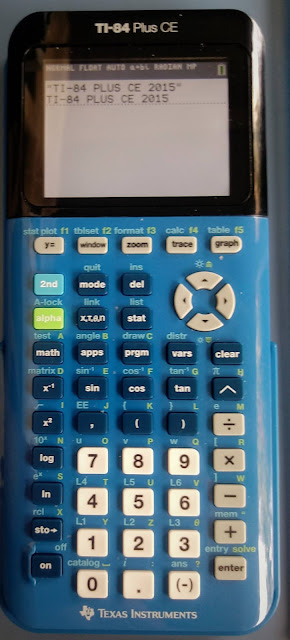
TI-84 Plus CE:  2015


TI-84 Plus CE Python Edition:  2021


Eddie

All original content copyright, © 2011-2021.  Edward Shore.   Unauthorized use and/or unauthorized distribution for commercial purposes without express and written permission from the author is strictly prohibited.  This blog entry may be distributed for noncommercial purposes, provided that full credit is given to the author. 


Saturday, September 25, 2021

Sharp EL-5500III & PC-1403: Spin a Wheel and Random Samples

 Sharp EL-5500III & PC-1403:  Spin a Wheel and Random Samples


Spin a Wheel

With the use of the WAIT command, a FOR loop, and an array of strings, we can simulate the spin of a wheel of a random number of steps.  

Note, any variable can be designated a string by adding a dollar sign to the letter, for example A stores a real number, while A$ is a string. 

In an array, A(n-1) has n elements, designated A(0) to A(n-1).  Example:  A(3) has three elements, A(0), A(1), and A(2).

The program presented has a 12 space wheel.  

Sharp EL-5500III/PC-1403 Program:  Spin a Wheel
RUN 900 (or whatever line you designate)

900 DIM A$(11): REM SPIN THE WHEEL
903 N=15 + RND(30)
906 I=RND(12)-1: REM POINTER
909 REM RND(N) GETS 1 TO N
910 A$(0)="$  500"
911 A$(1)="$  650"
912 A$(2)="$  600"
913 A$(3)="$  800"
914 A$(4)="$  750"
915 A$(5)="LOST TURN"
916 A$(6)="$  900"
917 A$(7)="BONUS PRIZE"
918 A$(8)="$  550"
919 A$(9)="$  700"
920 A$(10)="$1,000"
921 A$(11)="  BROKE"
930 WAIT 30: PRINT "SPIN!"
933 FOR J=1 TO N
936 WAIT 20: PRINT A$(I)
939 I=I+1
942 IF I>11 THEN LET I=0
945 NEXT J
946 REM WAIT W/O TIME RESETS PRINT
948 WAIT: PRINT "YOUR SPIN: ";A$(I)
951 END

RUN 900 in RUN mode will show you a wheel spinning.  One of the best results:  "YOUR SPIN: $1,000".   Good luck and have fun!

Random Sample

This program generates an array from a random sample of integers from 1 to N without replacement.  

To save room, a single array is created and an iterative search is made to check to leave out duplicates.   This will increase the time needed to generate longer lists.

Sharp EL-5500III/PC-1403 Program: Random Sample
RUN 1000 (or whatever line you designate)

1000 PRINT "RANDOM SAMPLE"
1003 INPUT "1 TO N. N? "; N 
1006 INPUT "SIZE? "; S
1009 DIM L(S-1)
1012 FOR I=0 TO S-1
1015 R=RND(N)
1018 REM CHECK
1021 FOR J=0 TO I
1024 IF L(J)=R THEN 1015
1027 NEXT J
1030 L(I)=R
1033 PRINT "L("; I; "): "; R
1036 NEXT I
1039 PRINT "RESULT IN ARRAY L"
1042 END

Example:
Choose 10 numbers from 1 to 45.  

1 TO N.  N?:  45
SIZE? 10

A result (your results will vary):
L(0): 9
L(1): 5
L(2): 8
L(3): 4
L(4): 41
L(5): 26
L(6): 42
L(7): 11
L(8): 10
L(9): 28
RESULTS IN ARRAY L

Swiss Micros DM41X Month:  October 2021

Every Saturday in October 2021 will feature the wonderful Swiss Micros DM41X (which programs will apply to the DM41X, DM41L, and the classic HP 41C family).   See you on the next series! 


Eddie

All original content copyright, © 2011-2021.  Edward Shore.   Unauthorized use and/or unauthorized distribution for commercial purposes without express and written permission from the author is strictly prohibited.  This blog entry may be distributed for noncommercial purposes, provided that full credit is given to the author. 

Monday, September 20, 2021

Calculator Python: Lambda Functions

Calculator Python: Lambda Functions


Introduction to Lambda Functions


Lambda functions are a quick, one expression, one line, python function.   Lambda functions do not require to be named though they can be named for future use if desired.  


The syntax for lambda functions are:


One argument:


lambda  argument : expression


Two or more arguments:


lambda  arg1, arg2, arg3, ...  : expression


The expression must return one result.  


The quick, versatile of lambda functions are make lambda functions one of the most popular programming tools.


Filter, Map, and Reduce


Filter:  uses a lambda function to filter out elements of a list and array using criteria.   For a list, the list command must be used to turn the result into an actual list. 


Syntax using Lambda and List:  


list(filter(lambda  arguments : expression))


Map:  uses a lambda function to apply a function to each element of a list.  Like filter, the list command must be used to turn the result into an actual list.


Syntax using Lambda and Map:


list(map(lambda arguments : expression))


Reduce:  uses a lambda function to use two or more arguments in a recursive function.


Syntax using Lambda:


reduce((lambda arguments : expressions), list)


Note, as of August 31, 2021, that the reduce command is NOT available on any calculator, only on full version of Python 3.  This may change with future updates.  


The following calculators have these commands in their Python programming (as of 8/30/2021):


HP Prime:  lambda, filter, map


Casio fx-CG 50 and fx-9750GIII: lambda, map


Numworks: lambda, filter, map


TI-84 Plus CE Python:  lambda, filter, map


TI-Nspire CX II Python:  lambda, filter, map


Nuwmorks Sample Python File: introlambda.py


from math import *

from random import *

# lambda test


n=randint(10,9999)

tens=lambda x:int(x/10)%10

hunds=lambda x:int(x/100)%10

thous=lambda x:int(x/1000)%10


print(n)

print(tens(n))

print(hunds(n))

print(thous(n))


print("List:")

l1=[1,2,3,4,5,6]

print(l1)


print("Filter demonstration")

print("Greater than 3")

l2=list(filter(lambda x:x>3,l1))

print(l2)

print("Odd numbers")

l3=list(filter(lambda x:x%2!=0,l1))

print(l3)


print("Map demonstration")

print("Triple the numbers")

l4=list(map(lambda x:3*x,l1))

print(l4)

print("exp(x)-1")

l5=list(map(lambda x:exp(x)-1,l1))

print(l5)


Sources


Maina, Susan "Lambda Functions with Practical Examples in Python"  Towards Data Science (membership blog with limited free access per month)  https://towardsdatascience.com/lambda-functions-with-practical-examples-in-python-45934f3653a8  Retrieved August 29, 2021


Simplilearn  "Learn Lambda in Python with Syntax and Examples"  April 28, 2021. https://www.simplilearn.com/tutorials/python-tutorial/lambda-in-python  Retrieved August 29, 2021


All original content copyright, © 2011-2021.  Edward Shore.   Unauthorized use and/or unauthorized distribution for commercial purposes without express and written permission from the author is strictly prohibited.  This blog entry may be distributed for noncommercial purposes, provided that full credit is given to the author. 


Sunday, September 19, 2021

Differences Between HP 32S and HP 32SII

 Differences Between HP 32S and HP 32SII


The HP 32S and HP 32SII are two classic RPN calculators which feature a rich set of scientific calculations, including logarithms, trigonometry, hyperbolic functions, integer part, fraction part, absolute value, statistics, and linear regression (y = mx + b).  Both are keystroke RPN programming programs with a capacity of 390 bytes.  


What are the differences? 


HP 32S


*  Production:  1988 - 1991


*  Keyboard Colors:  dark brown, almost black keys; one orange shift key


*  One key deals with scrolling:  down, with up shifting


HP 32SII


*  Production:  1991 - 2002


*  Keyboard Colors:  dark brown keys, orange shift key, blue shift key (1st edition); black keys, green shift key, pink shift key


*  One key deals with scrolling:  down, with up shifting


*  Has four sets of US/SI conversions:  kg/lb, °C/°F, cm/in, l/gal


*  Pressing the decimal key ( [ . ] ) twice will create fractions and mixed fractions.   The FDISP toggles between decimal approximation and fractions.  


Menu HP 32S HP 32SII
PARTS [ shift ] [ x<>y ]: IP, FP, RN, ABS [ |> ] [ √ ]: IP, FP, ABS (RN is on the keyboard)
PROB [ shift ] [ 3 ]: COMB, PERM, x!, R# [ |> ] e^x
STAT/LR One group of menus Split into four menus
SHOW [ shift ] [ . ] [ |> ] [ ENTER ]
SOLVE, ∫ [ shift ] [ 1 ] SOLVE: [ |> ] [ 7 ]; ∫: [ |> ] [ 8 ]
LOOP: ISG/DSE [ shift ] [ 5 ] ISG: [ <| ] [ 9 ]; DSE: [ |> ] [ 9 ]
TESTS [ shift ] [ × ]: offers < = ≠ > x?y: [ <| ] [ ÷ ], x?0: [ |> ] [ ÷ ]: offers < ≤ = ≠ > ≥

Hewlett Packard would later release updated versions of the 32S with the ill-fated 33S and the better but not perfect 35S.  

Source:

"HP-32S"  Wikipedia.  Last Edited June 28, 2021.  
https://en.wikipedia.org/wiki/HP-32S   Retrieved July 6, 2021

Eddie

All original content copyright, © 2011-2021.  Edward Shore.   Unauthorized use and/or unauthorized distribution for commercial purposes without express and written permission from the author is strictly prohibited.  This blog entry may be distributed for noncommercial purposes, provided that full credit is given to the author. 

DM42 and HP 42S: Quadratic Equation, Characteristic Polynomial, and Eigenvalues

DM42 and HP 42S: Quadratic Equation, Characteristic Polynomial, and Eigenvalues The programs are listed for the Swiss Micros DM42 an...