Showing posts with label Europe. Show all posts

Saturday, July 27, 2024

Spotlight: Texas Instruments TI-30 ECO RS: The Solar TI-30Xa

Spotlight: Texas Instruments TI-30 ECO RS: The Solar TI-30Xa


Quick Facts


Model: TI-30 ECO RS

Company: Texas Instruments

Timeline: 2015 – present (Europe

Type: Scientific calculator

Power: Solar

Display: One line, 10 digits, 2 digit exponents


Introduction


The TI-30 ECO RS is a European all-solar powered version of the battery-powered, specifically the LR44 battery, powered TI-30Xa.


Why did I get the TI-30 ECO RS? Truth be told, I am partial to solar-powered scientific calculators. I still dream of the day a solar powered (even if it is hybrid with battery) graphing calculator, that’s yet to happen. Blue is my favorite color.


Per Texas Instruments, the TI-30 ECO RS was awarded the Blue Angel award, which is a certification for the product being environmental friendly. Along with the calculator being completely solar powered, the TI-30 ECO RS is made from recycled plastic.


Features


The TI-30 ECO RS is a standard and simple scientific calculator that follows the classic TI-30 line:


* One line display, up to 10 digits. Display modes include floating pint, fixed decimal, scientific notation, and engineering notation.

* Arithmetic, powers, roots, exponential and logarithm functions

* Trigonometric functions and inverses

* Hyperbolic functions and inverses

* Fraction calculations, including fraction/decimal conversions. The maximum denominator is 999.

* One-variable statistics including mean, standard deviation, sums

* Combinations, permutations, and factorial of positive integers (up to 69)

* Polar/Rectangular and Decimal/Decimal-Minute-Second conversions

* Three memory registers (M1, M2, M3)


The TI-30 ECO RS follows the algebraic operating system and the standard order of operations is followed with a maximum of four pending operations. There is no implied multiplication.


The calculator uses postfix notation, where some one-number operations are entered after the number. For example, to calculate the sine of 30 degrees, press 30 [ SIN ] (in degrees mode). For the anti-log of 2.6, press 2.6 [ 2nd ] [ LOG ] <10^x>.


TI-30 ECO RS vs. TI-30Xa


Even though the feature set of the TI-30 ECO RS and the TI-30Xa are the same, there are some minor differences.


* The TI-30 ECO RS is solar powered and will never require a separate battery. This is not the first time Texas Instruments implemented the solar only design, as previous models include the TI-108, TI-31, TI-30 SLR+, the classic one-line TI-36X Solar, the classic TI-36 Solar, and the BA-Solar from 1987 are some examples. In the 1980s and 1990s, Texas Instruments used technology named Anylite Technology (TM).

* Pressing the [ON/AC] button clears everything including the memory and statistics registers and resets the calculator to Degrees mode. This is consistent with classic one-line TI solar powered calculators. If you intend to store constants long-term, you may want to consider the battery-powered TI-30Xa instead.

* Calculations on the solar powered TI-30 ECO RS are slightly slower than the TI-30Xa. I am guessing that it is due to the power source.

* Since 2015, both the TI-30 ECO RS and the TI-30Xa are free the logarithm bug (Datamath).

* The TI-30 ECO RS is sold in Europe. Outside of Europe, we have to buy a TI-30 ECO RS online. I was fortunately enough to buy one from an e-bay seller in Virginia.


Source


Woerner, Joerg. “Texas Instruments TI-30 ECO RS (2015)” Datamath Calculator Museum.

Updated May 17, 2016. Accessed June 6, 2024. http://www.datamath.org/Sci/Modern/TI-30ecRS_2015.htm


“Scientific calculator TI-30 ECO RS” Texas Instruments Calculators. 1995-2024. Accessed June 7, 2024. The page is in German. https://education.ti.com/de/produkte/taschenrechner/wissenschaftliche-rechner/ti-30-eco-rs


Eddie


All original content copyright, © 2011-2024. Edward Shore. Unauthorized use and/or unauthorized distribution for commercial purposes without express and written permission from the author is strictly prohibited. This blog entry may be distributed for noncommercial purposes, provided that full credit is given to the author.

Monday, August 8, 2022

Texas Instruments: TI-36X Pro and TI-30X Pro Mathprint

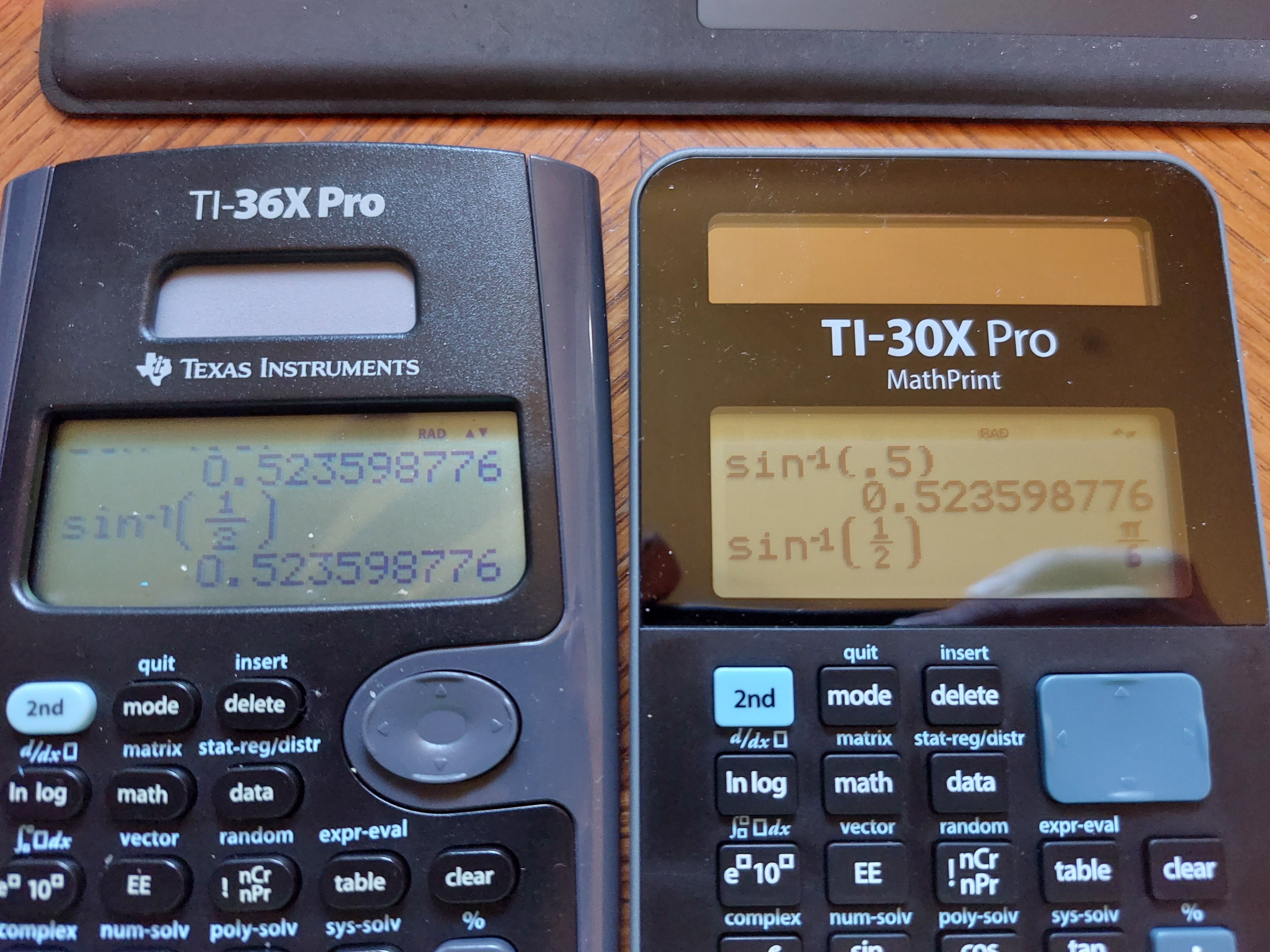
 Essentially, the Texas Instruments TI-36X Pro and the TI-30X MathPrint are functionally equivalent.  What makes the two calculators different?


*  The TI-36X Pro is sold in the United States and in lot of the world, with the TI-30X MathPrint is sold primarily from Europe.  I ordered my TI-30X Pro MathPrint from the United Kingdom.  


Product pages from Texas Instruments:


TI-36X Pro (United States and Canada)

https://education.ti.com/en/products/calculators/scientific-calculators/ti-36x-pro


TI-30X MathPrint (Denmark, in Danish):

https://education.ti.com/da/products/calculators/scientific-calculators/ti-30x-pro-mp#specifications


Australia has a TI-30XPlus MathPrint, which is styled like the TI-30X Pro MathPrint, but without calculus functions.

https://education.ti.com/en-au/products/calculators/scientific-calculators/ti-30x-plus-mp?category=overview


*  Thanks to the body of the calculator being curved, the TI-36X Pro is slightly bigger than the TI-30X Pro MathPrint. 


*  The screen on the TI-36X Pro is a curved trapezoid, while the screen of the TI-30X Pro MathPrint has is rectangular.  


*  The TI-36X Pro has a circular arrow keypad while the TI-30X Pro MathPrint has a rectangular arrow keypad.  


* The TI-30X Pro Math print has black characters, while the TI-36X Pro has blue characters.


* The font on the keys of the TI-30X Pro Math are larger than than the font on the TI-36X Pro's keys.


Here are some pictures.


Either calculator is worth buying.  You  can see my review of the TI-36X Pro from 2011 here:

P.S. I still wish the TI-36X Pro/TI-30X Pro MathPrint had an alpha key instead of one key to press multiple times to get different variables.  That is my biggest gripe. 

Eddie


All original content copyright, © 2011-2022.  Edward Shore.   Unauthorized use and/or unauthorized distribution for commercial purposes without express and written permission from the author is strictly prohibited.  This blog entry may be distributed for noncommercial purposes, provided that full credit is given to the author. 


Sunday, February 21, 2021

TI-84 Plus CE and HP 17BII+: Euclidian Divison

 TI-84 Plus CE and HP 17BII+: Euclidian Division


What is the ├ symbol on the calculator?

(├ the symbol is a vertical line with a horizontal line coming from the center to the right)


In several scientific calculators sold in Europe such as the Texas Instruments TI-40 Galaxy:


http://www.datamath.org/Sci/Galaxy/TI40_Galaxy.htm


and the current TI-Primaire Plus, which is sold in France, 


http://www.datamath.org/Sci/Modern/TI-PrimairePlus.htm


There is a key marked [ ├ ].  Going through the manual for the TI-40 Galaxy, this is the Euclidean Division key, which returns the quotient and remainder of the division.


x ├ y returns two results:

Q = int(x/y)   (quotient)

R = x - frac(x/y) * y   (remainder)


The TI-84 Plus family has the remainder function (I think it is OS 2.5 and later).  Here are several ways to emulate the Euclidian Division function:


TI-84 Plus CE Program:  EUCDIV


Prompt X,Y

{int(X/Y),remainder(X,Y)}


HP 17BII+ Formula:


EUCDIV: 0=IF(S(Q): IP(X÷Y)-Q: MOD(X:Y)-R)


Inputs: X,Y

Outputs:  Q (quotient), R (remainder)


Examples:


25 ├ 7 ->  Q = 3, R = 4

77 ├ 6 ->  Q = 12, R = 5


Can we use the [ a b/c ] fraction key?  


Calculators such as the Casio fx-260 Solar II calculator could be used to simulate the Euclidean division with the [ a b/c ] key.  The fraction would be illustrated in the mixed fraction format.  Let us illustrate:


56 [ a b/c ] 5 [ = ]   11 _ 1 / 5    

(Q = 11,  R = 1, divisor = 5)


125 [ a b/c ] 14 [ = ]  8 _ 13 / 14

(Q = 8,  R = 14, divisor = 14)


So far so good, but...


9314 [ a b/c ] 60 [ = ]  155 _ 7 / 30

Look at the denominator:  it is 30 not in 60, the fraction has been simplified.   Of course, we know that 7/30 = 14/60, hence Q = 155, R = 14. 


Note:  if you use the [ a b/c ] key, be sure to look at the resulting denominator is not the same,  it is not in the Q _ R / D form.  


Eddie


All original content copyright, © 2011-2021.  Edward Shore.   Unauthorized use and/or unauthorized distribution for commercial purposes without express and written permission from the author is strictly prohibited.  This blog entry may be distributed for noncommercial purposes, provided that full credit is given to the author. 


My International Casio Collection (So Far)

 Pictured: Pic 1:  Casio fx-991CN X (China)  Pic 2:  Casio fx-570SPX II Iberia (Spain) Pic 3:  Casio fx-92 Collège (France) All original co...