Showing posts with label Snell's Law. Show all posts

Sunday, March 5, 2023

Radio Shack EC-4000 (equiv. of TI-57): Program Library
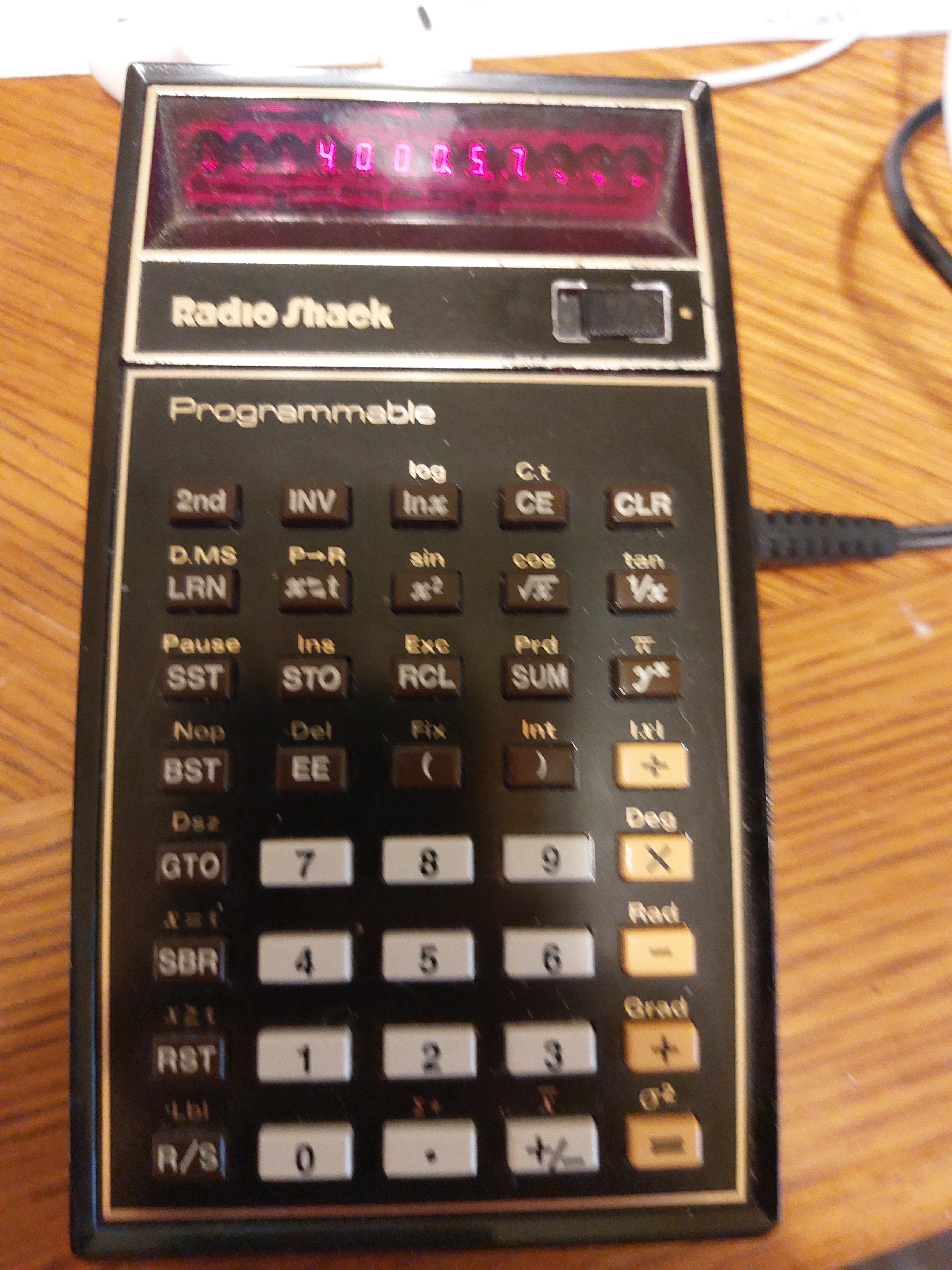
Radio Shack EC-4000 (equiv. of TI-57):   Program Library


Radio Shack EC-4000/TI-57:  Horner's Method


Let's start with a demonstration of Horner's Method, which allows a quick evaluation of polynomials.   For a quadratic polynomial:


p(x) = a * x^2 + b * x + c = x * (a * x + b) + c


The program demonstrates an example polynomial:


p(x) = 3 * x^2 - 4 * x + 9 = x * (3 * x -  4) + 9


Step:  Key Code [ Key ]

00: 32, 1 [ STO 1 ]

01:  55 [ × ]

02:  03  [ 3 ]

03:  65  [ - ]

04:  04 [ 4 ]

05:  85  [ = ]

06:  55 [ × ]

07:  33, 1 [ RCL 1 ]

08:  75  [ + ]

09:  09  [ 9 ]

10:  85 [ = ]

11:  81  [ R/S ]

12:  71  [ RST ]


Examples:

p(0) = 9

p(5) = 64

p(9) = 216


Horner's Method can apply to higher order polynomials.  


Radio Shack EC-4000/TI-57:  Permutation and Factorial


This is to add two of the common probability functions that are missing with on the calculator.  


nPr = n! / (n - r)!


If n = r, then nPn = n!


Store n in R0 (register 0), r in R1 (register 1), then run the program (RST, R/S).


Other registers used:  R2:  nPr,  R7:  n-r+1 


Note that R7 is also the t-register.  


Step:  Key Code [ Key ]

00:  01  [ 1 ]

01:  32, 2  [ STO 2 ]

02:  33, 0  [ RCL 0 ]

03:  65   [ - ]

04:  33, 1  [ RCL 1 ]

05:  75  [ + ]

06:  01  [ 1 ]

07:  85  [ = ]

08:  32, 7 [ STO 7 ]

09:  86, 5 [ LBL 5 ]

10:  33, 0 [ RCL 0 ]

11:  39, 2  [ Prd 2 ]

12:  01  [ 1 ]

13:  -34, 0 [ INV SUM 0 ]

14:  33, 0 [ RCL 0 ]

15:  76  [ x≥t ]

16:  51, 5 [ GTO 5 ]

17:  33, 2 [ RCL 2 ]

18:  81  [ R/S ]

19:  71  [ RST ]


Examples:

n = 6, r = 6:  6P6 = 6! = 720

n = 5, r = 3:  5P3 = 60

n = 11, r = 6:  11P6 = 332,640

n = 52, r = 5:  52P5 = 3.118752 * 10^8


Radio Shack EC-4000/TI-57:  Snell's Law


There are two subroutines in this program listing.  Subroutines accessed by the [ SBR ] key.  


Snell's Law describes, among other things, the relationship between index of refraction of a medium (n) and refraction angle of the direction of light (Θ) is stated by:


n1 * sin(Θ1) = n2 * sin(Θ2)


Subroutine 1:  Solve for n2.  n2 = (n1 * sin(Θ1)) / sin(Θ2)


Subroutine 2:  Solve for Θ2.  Θ2 = arcsin( n1 * sin(Θ1) / n2 )


The registers used are:  R1 = n1, R2 = n2,  R3 = Θ1, R4 = Θ2


Step:  Key Code [ Key ]


// Solve for n2

00:  86, 1  [ LBL 1 ]

01:  50  [ DEG ]

02:  33, 1 [ RCL 1 ]

03:  55  [ × ]

04:  33, 3  [ RCL 3 ]

05:  28  [ SIN ]

06:  45  [ ÷ ]

07:  33, 4 [ RCL 4 ]

08:  28  [ SIN ]

09:  85  [ = ]

10:  32, 2 [ STO 2 ]

11:  81  [ R/S ]


// Solve for Θ2

12:  86, 2  [ LBL 2 ]

13:  50  [ DEG ]

14:  33, 1 [ RCL 1 ]

15:  55  [ × ]

16:  33, 3 [ RCL 3 ]

17:  28  [ SIN ]

18:  45  [ ÷ ]

19:  33, 2 [ RCL 2 ]

20:  85 [ = ]

21:  -28  [ INV SIN ]

22:  32, 4 [ STO 4 ]

23:  81 [ R/S ]


Examples:


Solve for n2:  n1 = 1.000293 (air), Θ1 = 30°, Θ2 = 19°

1.000293 STO 1

30 STO 3

19 STO 4

GSB 1

Result:  n2:  1.5362267


Solve for Θ2:  n1 = 1.000293 (air), Θ1 = 30°, n2 = 1.333 (water)

1.000293 STO 1

30 STO 3

1.333 STO 2

GSB 2

Result:  Θ2:  22.036902


Radio Shack EC-4000/TI-57:  Pseudorandom Number Generation


This program attempts to generate random numbers using the generator:


x_n+1 = frac(997 * x_n + π)


The random numbers are between 0 and 1.  An initial seed will be required 


The calculator does not have fraction and integer parts, so they have to be simulated:


int(x) ≈ x + 1E10 - 1E10

frac(x) = x - int(x), will require a register 


See steps 10 to 23.  


Due to the internal 10 digits and the simulations, expect possible roundoff errors as random numbers are continuously generated.  


Step:  Key Code [ Key ]

00:  55 [ × ]

01:  09  [ 9 ]

02:  09  [ 9 ]

03:  07 [ 7 ]

04:  75  [ + ]

05:  30  [ π ]

06:  85  [ = ]

07:  32, 6 [ STO 6 ]

08:  75  [ + ]

09:  01  [ 1 ]

10:  42  [ EE ]

11:  01  [ 1 ] 

12:  00 [ 0 ]

13:  65  [ - ]

14:  01  [ 1 ]

15:  42  [ EE ]

16:  01  [ 1 ] 

17:  00 [ 0 ]

18:  85 [ = ]

19:  -42  [  INV EE ]

20:  -34,6  [ INV SUM 6 ]

21:  33, 6 [ RCL 6 ]

22:  81  [ R/S ]

23:  71  [ RST ]


Example:


Seed:  0.98

Generation:

0.2015927

0.1294647

0.2178986

0.3864470

0.4292517


Until next time,


Eddie 


All original content copyright, © 2011-2023.  Edward Shore.   Unauthorized use and/or unauthorized distribution for commercial purposes without express and written permission from the author is strictly prohibited.  This blog entry may be distributed for noncommercial purposes, provided that full credit is given to the author. 


Sunday, December 15, 2019

Tandy PC-4: What Can You Do With 1,568 Bytes in Basic?

Tandy PC-4: What Can You Do With 1,568 Bytes in Basic?

On December 1, 2019, reviewed the Tandy Pocket Computer PC-4.  (link here:  http://edspi31415.blogspot.com/2019/12/retro-review-tandy-pc-4-pocket-computer.html ).  The PC-4 comes with 544 bytes, but with an OR-1 RAM card, the memory goes up to 1,568 bytes. 

How much can I fit in 1,568 bytes?  Here's an attempt. 

P0:  Factorial

10 PRINT "N!"
20 INPUT "N",N
25 F=0
30 FOR I=1 TO N
40 F= LOG(I)+F
50 NEXT I
60 E= INT(F)
70 R=10↑( FRAC(F))
80 PRINT N;"! ="
90 PRINT R;"*10↑";E

P1:  Quadratic Equation

100 PRINT "AX↑2+BX+C=0"
105 INPUT "A",A
110 INPUT "B",B
115 INPUT "C",C
120 D=B↑2-4*A*C
125 S=-B/(2*A)
130 T=SQR( ABS(D))/(2*A)
135 IF D<0 300="" font="" then="">
200 R=S-T
205 T=S+T
210 S=R
215 PRINT "X1 =";S
220 PRINT "X2 =";T
225 GOTO 400
300 PRINT "REAL: ";S
305 PRINT "IMAG: ";T
400 PRINT "AGAIN?"
405 INPUT "0 FOR NO ",R
410 IF R≠0 THEN 105
415 END

P2:  Horizontal Curve

10 MODE 4     (Degrees Mode)
15 INPUT "TAN. LNGTH",T    (tangent length)
20 INPUT "ANGLE",D
25 R=T/ TAN(D/2)
30 L=R*D*π/180
35 C=2*R* SIN(D/2)
40 PRINT "R =";R     (radius)
45 PRINT "L=";L     (arc length)
50 PRINT "C =";C    (chord length)
55 END

P3:  Amortizing a Monthly Loan (Annual Principal and Interest)

50 SET F2  (Fix 2)
100 INPUT "LOAN",L
105 INPUT "RATE",I
110 I=I/1200
115 INPUT "YEARS",T
120 N=12*T
125 U=(1-(1+I)↑(-N))/I
130 P= RND(L/U,-2)   (note the -2 in the round command)
135 PRINT "PMT: $";P
140 B=L
200 FOR Y=1 TO T
201 S=0
202 C=0
205 FOR K=1 TO 12
210 E= RND(B*I,-2)
215 S=S+E
220 A=P-E
225 C=C+A
230 B=B-A
235 NEXT K
240 PRINT "YEAR: ";Y
245 PRINT "INT= $";S
250 PRINT "PRN= $";C
255 PRINT "BAL= $";B
260 NEXT Y
270 PRINT "LAST= ";P+B   (last payment)
275 SET N   (floating decimal)
280 END

P4:  Linear Regression, Y=A+BX with correlation, R

100 VAC    (clear variables A-Z)
200 N=N+1   (N: counter)
205 PRINT "POINT ";N
210 PRINT "X",X
215 PRINT "Y",Y
220 C=C+X:F=F+X↑2
230 D=D+Y:G=G+Y↑2
240 E=E+X*Y
245 INPUT "DONE? NO=0 ",Z
250 IF Z=0 THEN 200
300 H = SQR((F-C↑2/N)/N)
305 I= SQR((G-D↑2/N)/N)
310 B=((N*E-C*D)/(N*F-C↑2))
315 A=(D-B*C)/N:R=B*H/I
325 PRINT "SLP=";B
330 PRINT "ITC=";A
335 PRINT "CORR=";R
340 END

P5:  Snell's Law

10 MODE 4      (degrees mode)
15 INPUT "N1",M    (index of refraction - 1st medium)
20 INPUT "INCIDENCE",T   (angle of incidence)
25 INPUT "N2",N     (index of refraction - 2nd medium)
30 H = ASN(M/N* SIN(T))
35 R= SIN(T-H)↑2/ SIN(T+H)↑2
40 R=1/2*R*100
50 PRINT "REFRACTION=";H;"°"
55 PRINT "REFLECT=";R;"%"
60 END

°  (degree character):  EXT mode, SHIFT C
% (percent character):  EXT mode, SHIFT Q

P6:  Rectangular/Polar Conversions

100 MODE 4
105 INPUT "1.P>R 2.R>P",C
110 IF C=1 THEN 200
115 IF C=2 THEN 300
120 GOTO 105
200 INPUT "RADIUS",R
205 INPUT "ANGLE,"T
210 X=R* COS(T)
215 Y=R* SIN(T)
220 PRINT "X=";X
225 PRINT "Y=";Y
230 GOTO 900
300 INPUT "X",X
305 INPUT "Y",Y
310 R= SQR(X↑2+Y↑2)
315 IF X>0 THEN 500
320 IF X<0 600="" font="" then="">
325 IF X=0 THEN 700
500 IF Y≥0 THEN T= ATN(Y/X)
505 IF Y<0 t="ATN(Y/X)+360</font" then="">
510 GOTO 800
600 IF Y≥0 THEN T= ATN(Y/ ABS(X))+180
605 IF Y<0 t="ATN(Y/X)+180</font" then="">
610 GOTO 800
700 IF Y>0 THEN T=90
705 IF Y=0 THEN T=0
710 IF Y<0 t="270</font" then="">
715 GOTO 800
800 PRINT "RADIUS=";R
805 PRINT "ANGLE=";T
900 PRINT "AGAIN (NO=0)",C
905 IF C≠0 THEN 105
910 END

P7:  Area and Circumference on a Circle

10 INPUT "R",R
25 PRINT "C=";2*π*R
35 PRINT "A=";π*R↑2

Remaining:  8 bytes

Eddie

All original content copyright, © 2011-2019.  Edward Shore.   Unauthorized use and/or unauthorized distribution for commercial purposes without express and written permission from the author is strictly prohibited.  This blog entry may be distributed for noncommercial purposes, provided that full credit is given to the author.

Saturday, October 12, 2019

HP Prime: Law of Refraction

HP Prime: Law of Refraction 

Introduction

The program DRAWREFRACT, visually demonstrates the Law of Refraction, or Snell's Law:

n1 sin θi = n2 sin θt

The program asks for n1, θi, and n2; and calculates θt.  The program draws the incident ray (in red) and the refracted ray (in blue).  The calculator is set to Degrees mode and the Function app. 

Note: you can find the angle character ∡, by pressing [SHIFT] [ × ]. 

HP Prime: Law of Refraction: DRAWREFRACT

Program:
EXPORT DRAWREFRACT(n1,θ1,n2)
BEGIN
// EWS 2018-08-20
// drawing Descates law
HAngle:=1; // Degrees
LOCAL θ2,x1,y1,x2,y2;
LOCAL str1,str2;
// window setup
STARTAPP("Function");
STARTVIEW(11,0);  // Decimal zoom
// calculation
θ2:=ASIN(n1*SIN(θ1)/n2);
x1:=RE(16∡(θ1+90));
y1:=IM(16∡(θ1+90));
x2:=RE(16∡(270+θ2));
y2:=IM(16∡(270+θ2));
// plot
RECT();
// draw axis
LINE(0,−16,0,16,0);
LINE(16,0,−16,0,0);
// draw analysis
LINE(0,0,x1,y1,#FF0000h);
LINE(0,0,x2,y2,#0000FFh);
str1:="n = "+STRING(n1)+
", θi = "+STRING(θ1);
str2:="-> n = "+STRING(n2)+
", θt = "+STRING(θ2);
TEXTOUT(str1,−15,−5,4,#FF0000h);
TEXTOUT(str2,−15,−8,4,#0000FFh);
WAIT(0);
// display home
STARTVIEW(−1);
END;

Example

n1 = 1.001
θ = 34.5°
n2= 1.205

DRAWREFRACT(1.001, 34.5, 1.205)

Result:
θt = 28.0678429359°


Eddie

All original content copyright, © 2011-2019.  Edward Shore.   Unauthorized use and/or unauthorized distribution for commercial purposes without express and written permission from the author is strictly prohibited.  This blog entry may be distributed for noncommercial purposes, provided that full credit is given to the author.

Thursday, December 29, 2016

PCalc 42 User Functions ( iOS )

PCalc 42 User Functions ( iOS )


Programs for the iOS App PCalc 42 from Previous Posts (during May 2014):


Time to revisit this app:

PCalc42 Decimal to Degrees-Minutes-Seconds (d.mmssss form): 
D > DMS

Switch to Decimal
Set R0 to X
Truncate X
Set R1 to R0
Subtract X from R1
Multiply R1 by 60
Set R2 to R1
Subtract X from R1
Multiply R1 by 60
Set R2 to R1
Truncate R1
Multiply R1 by 0.01
Add R1 to X
Set R3 to R2
Truncate R3
Subtract R3 from R2
Multiply R2 by 0.006
Add R2 to X

Example:   1.85 in DMS form is 1.51 (1° 51’)

PCalc42 Degrees-Minutes-Seconds (d.mmssss form) to Decimal
DMS > D

Switch to Decimal
Set R0 to X
Truncate X
Set R1 to R0
Subtract X from R1
Multiply R1 by 100
Set R2 to R1
Truncate R1
Subtract R1 from R2
Divide R2 by 60
Multiply R2 by 100
Add R1 to R2
Divide R2 by 60
Add R2 to X

Example:  1.3052 (1° 30’ 52”) in decimal form is 1.514444444


PCalc42 Snell’s Law of Refraction

Input: Y: n1, X: n,  n1 ≤ n2

Switch to Degrees
Invert X
Multiply Y by X
Inverse Sine X

Example:  n1 = 1.33, n2 = 1.50.   Output:  62.4573248455

PCalc42 Doppler Effect (RPN)  (SI Units)

Input:  Z:  emitted frequency (Hz), Y:  receiver velocity (m/s), X: source velocity (m/s)
Output:  observed frequency (Hz) on stack X

Negate X
Add Y to X
RPN Swap
RPN Roll Down
Divide X by 299752458
Add 1 to X
Multiply Y by X
RPN Roll Down

Example: 
Z:  Emitted Frequency:  525 Hz
Y:  Receiver Velocity:  214,000,000 ft/s
X:  Source Velocity:  208,000,000 ft/s

Output:  Observed Frequency:  535.5086711249 Hz

PCalc42 Sums (RPN) Σ m, Σ m^2, Σ m^3

The sum of Σ m^X from m = 1 to m = Y, where X is the power, Y is the power (up to 3).  If Y > 3, an error condition occurs. 

Formulas:
Σ m = (X^2 + X) / 2
Σ m^2 = (2*X^3 + 3*X^2 + X) / 6
Σ m^3 = (X * (X+1))^2 / 4

Set R0 to Y
Truncate X
Skip 3 if X = 1
Skip 7 if X = 2
Skip 16 if X = 3
Error
RPN Roll Down
X To Power of 2
Add R0 to X
Divide X by 2
Stop
RPN Roll Down
X To Power of 3
Multiply X by 2
Set R1 to R0
R1 To Power of 2
Multiply R1 by 3
Add R1 to X
Add R0 to X
Divide X by 6
Stop
RPN Roll Down
Add 1 to X
Multiply X by R0
X To Power of 2
Divide X by 4

Example:
Y = 6, X = 1:  Sum is 21
Y = 6, X = 2:  Sum is 91
Y = 6, X = 3:  Sum is 441

PCalc42 Present Value Factor of a Single Sum

PV:  (1 + Y/100)^-X

Y:  interest rate
X:  periods

Negate X
Divide Y by 100
Add 1 to Y
Y To Power of X
RPN Roll Down

Example:  Y = 7 (7%), X =  5 (n = 5)
Output:  0.7129861795

Happy New Year’s Everyone! See you in 2017!    

Eddie


This blog is property of Edward Shore, 2016.


Numworks (Python): Parallelograms Described by Vectors

Numworks (Python): Parallelograms Described by Vectors Introduction The script drawpgram.py draws a parallelogram constructed by ...