Showing posts with label TI-82. Show all posts

Sunday, September 26, 2021

TI-Eighties Graphing Calculators: A Timeline

 TI-Eighties Graphing Calculators:  A Timeline

(dates are from Wikipedia) - United States

TI-81:  1990

TI-85: 1992


TI-82:  1993


TI-80:  1995 - (not pictured)

TI-83:  1996 - (not pictured)

TI-86:  1996


TI-89 (Original): 1998 - (not pictured)

TI-83 Plus: 1999


TI-83 Plus Silver Edition: 2001


TI-84 Plus: 2004


TI-89 Titanium:  2004


TI-84 Plus Silver Edition: 2004 (not pictured)

TI-84 Plus Silver Edition C:  2013 (not pictured)

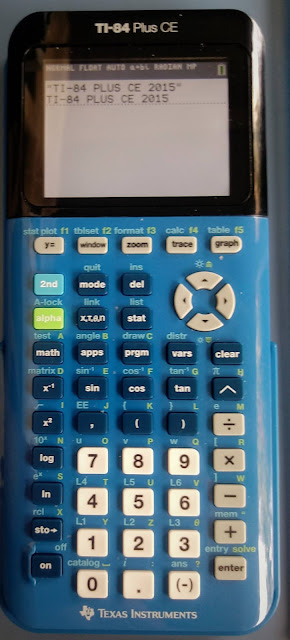
TI-84 Plus CE:  2015


TI-84 Plus CE Python Edition:  2021


Eddie

All original content copyright, © 2011-2021.  Edward Shore.   Unauthorized use and/or unauthorized distribution for commercial purposes without express and written permission from the author is strictly prohibited.  This blog entry may be distributed for noncommercial purposes, provided that full credit is given to the author. 


Saturday, May 15, 2021

Retro Review and Comparison: TI-82 Advanced

 Retro Review and Comparison: TI-82 Advanced


I can officially say that I have a French calculator.  


Quick Facts:


Models:  TI-82 Advanced

Company:  Texas Instruments

Manufactured: 2015-2021

Type:  Graphing

Battery:  4 AAA

Country: France


Keyboard


All the TI-82 Advanced is a French calculator, where the keys and functions are in French.  Examples include:


French:  suppr,  English:  delete


French:  dessin,  English:  draw


French:  annul,  English: clear


French:  rappel,  English: recall


I like the how the keys respond and how comfortable the keys feel.  The screen is a monochrome screen but the contrast between the screen and its text.  


More Like the TI-84 Plus


The TI-82 Advanced is pretty much the equivalent of the TI-84 Plus.  I put together a comparison table between three calculators:


*  The basic TI-82 (United States)

*  TI-82 Advanced

*  TI-84 Plus  (monochrome screen)


The table lists the commands available in several menus including Lists, Distributions, Program Editing, and Variables.  You can download the comparison here.  


Python to Come


In the Fall of 2021, Texas Instruments will release the next version of the TI-82 Advanced: the TI-82 Advanced Edition Python.  The new TI-82 Advanced will retain the classic TI-82 casing, including being powered by AAA batteries, but will have a color screen and have a Python programming mode. 


You can read the about the TI-82 Advanced Edition Python here:


https://education.ti.com/fr/produits/calculatrices/graphiques/ti-82-advanced-edition-python  (French)


https://tiplanet.org/forum/viewtopic.php?p=259509#p259509 (French)


Eddie 

All original content copyright, © 2011-2021.  Edward Shore.   Unauthorized use and/or unauthorized distribution for commercial purposes without express and written permission from the author is strictly prohibited.  This blog entry may be distributed for noncommercial purposes, provided that full credit is given to the author. 


Sunday, February 3, 2019

Calculator Programming: Making FOR, WHILE, and REPEAT Loops with IS>, DS<, GOTO, IF, LBL

Calculator Programming:  Making FOR, WHILE, and 
REPEAT Loops with IS>, DS<, GOTO, IF, LBL

Introduction

Say your programming capabilities on your calculator, BASIC portable computer, or programming app does not have the FOR, WHILE, and REPEAT loop structures.  No worries, there are some workarounds we can use.

Today the programs will be demonstrated with the language of the TI-81 and TI-84 Plus CE, but this blog isn't limited to these two calculators.


Simulating FOR Loops with IS> and DS<

The TI-81 (and every Texas Instruments graphing calculator of that family inclusive to the TI-84 Plus CE) has the commands IS> and DS<.

IS>:  Increment and Skip

Syntax:  IS>(variable, target number)

IS> increases the value stored in a variable by 1 and performs a comparison test.  The next command is excited if the increased value is less than or equal to the target number.

IS>(var, target)
[do this command if var + 1 ≤ target]
[skip to this command if var + 1 > target]

Simulating the FOR Loop:

FOR var = begin TO end*
[commands]
NEXT
[commands after loop is over]


* Syntax varies.  For the TI-84 Plus CE:  For(var,begin, end) : [commands] : End

with:

begin → var
LBL [label]
[commands]
IS>(var, end)
GOTO [label]
[commands after loop is over]

The program PRGM1 demonstrates how to accomplish a FOR loop with IS>.  PRGM1 displays the numbers 1 to 10.  The TI-81 section can be programmed by on the TI-81 and TI-84 Plus CE, which the TI-84+ section is for calculators TI-82 and later.

"TI-81"
1→K
Lbl 1
Disp K
IS>(K,10)
Goto 1
Disp "END"
Wait 2
"TI-84+"
For(K,1,10)
Disp K
End
Disp "END"

DS<   

Decrement and Skip

Syntax:  DS<(variable, target number)

DS< decreases the value stored in a variable by 1 and performs a comparison test.  The next command is excited if the increased value is greater than or equal to the target number.  DS< is the opposite of IS>.

DS<(var, target)
[do this command if var - 1 ≥ target]
[skip to this command if var - 1 < target]

Simulating the FOR Loop:

FOR var = begin TO end STEP -1*
[commands]
NEXT
[commands after loop is over]


* Syntax varies.  For the TI-82 to the TI-84 Plus CE, including TI-80 and TI-73:
For(var,begin, end, -1) [commands] End

with:

begin → var
LBL [label]
[commands]
DS<(var, end)
GOTO [label]
[commands after loop is over]

PRGM2 demonstrates the use of DS< and the associated For loop.


"TI-81"
10→K
Lbl 1
Disp K
DS<(K,1)
Goto 1
Disp "END"
Wait 2
"TI-84+"
For(K,10,1,­1)
Disp K
End
Disp "END"

Simulating WHILE and REPEAT Loops

With the proper use of the IF, LBL, and GOTO we can simulate WHILE and REPEAT loops.

Simulated WHILE Loops

WHILE [condition is true]
[commands]
END

* While is available for TI-82 to the TI-84 Plus CE, including TI-73.

can be simulated by:

LBL [label]
[commands]
IF [while condition] 
GOTO [label]

Simulated REPEAT Loops

REPEAT
[commands]
UNTIL [condition]

* The syntax for the TI-82 to the TI-84 Plus CE, including TI-73 is:
Repeat [condition] : [commands] : End

LBL [label]
[commands]
IF [inverse of the repeat condition] 
GOTO [label]

Example:  If the repeat condition is T>5, then the inverse is T≤5.

PRGM3 is a demonstration program on how all three techniques are used to accomplish this:

Start with 1000.  Take the square root.  Keep going until the calculator gets to 1 (by the precision of the calculator).

"TI-81"
1000→K
Lbl 1
√(K)→K
Disp K
If K≠1
Goto 1
Disp "END"
Wait 2
"84+ WHILE"
1000→K
While K≠1
√(K)→K
Disp K
End
Disp "END WHILE"
Wait 2
"84+ REPEAT"
1000→K
Repeat K=1
√(K)→K
Disp K
End
Disp "END REPEAT"

I hope you find these tips useful and helpful.

Eddie

All original content copyright, © 2011-2019.  Edward Shore.   Unauthorized use and/or unauthorized distribution for commercial purposes without express and written permission from the author is strictly prohibited.  This blog entry may be distributed for noncommercial purposes, provided that full credit is given to the author.

Python – Earth’s Radius and Gravity in US Units

Python – Earth’s Radius and Gravity in US Units Introduction The following script, gravus2.py, estimates the Earth’s gravity i...