Showing posts with label TI-83 Premium CE Python Edition. Show all posts

Sunday, June 8, 2025

HP Prime and TI-84 Plus CE Python: Quartiles of a Data Set

HP Prime and TI-84 Plus CE Python: Quartiles of a Data Set


25th, 50th, and 75th Percentiles


The following code finds five points of a list of data points:


Minimum: the data point of least value

Q1: the first quartile, known as the 25th percentile. The first quartile is median of the lower half of the data.

Median: also known as the 50th percentile, this is the median, or middle point of the data.

Q3: the third quartile, known as the 75th percentile. The third quartile is the median of the upper half of the data.

Maximum: the data point of the most value


The list of data is first sorted in ascending order.


The median is determined as follows:


If the number of data points is odd: Take the number that lies in the middle.

If the number of data points is even: Take the average of the middle two numbers.


The way quartile values are determine vary depending by country and jurisdiction. The program presented uses Method 1, which is used in the United States. (see Source)


If the number of data points is odd: The data is split in half, do not include the median.

If the number of data points is even: The data is split in half.


Python File: quartiles.py, quartile.py


This script does not use any module, so it should work on every calculator that has Python, along with the full-computer editions of Python. Results are shown as floating point numbers, rounded to 5 decimal places.


This was code was made with the HP Prime emulator, and was tested on with an HP Prime, a TI-84 Plus CE Python edition, and a TI-83 Premium CE Python Edition calculator.


# quartiles program

# method 1, median divides data in half

# is used (US method)


# halfway subroutine

def halfway(l):

  n=len(l)

  # get halfway point

  # Python index starts at 0

  h=int(n/2)

  # even

  if n%2==0:

    return(l[h]+l[h-1])/2

  # odd 

  else:

    return(l[h])


print("Use list brackets. [ ]")  

data=eval(input("List of Data: "))


# length of the list

nw=len(data)


# sort the list

data.sort()

print("Sorted Data: "+str(data))


# maximum and minimum

q0=min(data)

q4=max(data)


# get sublists 

h=int(nw/2)

if nw%2==0:

  l1=data[0:h]

  l3=data[h:nw]

else:

  l1=data[0:h]

  l3=data[h+1:nw]


# list check

print("1st half: "+str(l1))

print("2nd half: "+str(l3))


# quartiles, q2 is the median

q1=halfway(l1)

q2=halfway(data)

q3=halfway(l3)


# set up  answer strings

txt1=["min = ","Q1 = ","median = ", 

"Q2 = ","max = "]

results=[q0,q1,q2,q3,q4]

for i in range(5):

  txt2="{0:.5f}"

  print(txt1[i]+txt2.format(results[i]))


Examples


Data Set: [1, 2, 3, 4, 5]

Min = 1.00000

Q1 = 1.50000

Med = 3.00000

Q3 = 4.50000

Max = 5.00000


Data Set: [76, 46, 49, 46, 56, 52, 59, 130, 80]

Min = 46.00000

Q1 = 47.50000

Med = 56.00000

Q3 = 78.00000

Max = 130.00000


Date Set: [55, 35, 40, 50, 60, 50, 55]

Min = 35.00000

Q1 = 40.00000

Med = 50.00000

Q3 = 55.00000

Max = 60.00000


Note: A Way to Format Numbers


To format numbers to have a set number of decimal places, use the code

{ identifier : .5f }.


The identifier can be almost anything, I usually call it 0 for the 1st number to be formatted. The number before the “f” (floating point indicator) is the number of decimal places. For example:


2 decimal places: { identifier : .2f }

5 decimal places: { identifier : .5f }

(spaces added for readability)


The text string will need to have a .format(arg) at the end of the string.


Example code:

n = 14.758119

txt = “The rounded value is {0:.5f}”

print(txt.format(n))


returns 14.75812


Source

Wikipedia. “Quartile” Last edited on February 21, 2025. https://en.wikipedia.org/wiki/Quartile Accessed May 12, 2025.


Eddie


All original content copyright, © 2011-2025. Edward Shore. Unauthorized use and/or unauthorized distribution for commercial purposes without express and written permission from the author is strictly prohibited. This blog entry may be distributed for noncommercial purposes, provided that full credit is given to the author.

Saturday, November 9, 2024

TI-84 Plus CE Python: Drawing Bars

TI-84 Plus CE Python: Drawing Bars


My inspiration for this post was from a class I was taking at brilliant.org. A free plug: brillant.org is a great web service that offers easy to follow and interactive classes in mathematics, physics, and programming. Classes are offered at every level.


Introduction


The following set of scripts draw a set of bars. The blue bar is the base bar, while orange bars are added to the right of the base bar. The user specifies the length of the base (b) and orange bars, known as the increment (c). The length is in pixels. The screen is 320 pixels long.


Each of the scripts uses the TI-specific module TI-draw module. If you have another calculator or platform, another similar drawing module is needed. The scripts were typed on a TI-84 Plus CE Python Edition, but should work on the TI-83 Premium CE Python Edition and TI-Nspire CX II (I haven’t tested either).


BAR1: Static


This script asks the user for the length of the base bar, increment bar, and the number of bars.


Note that show_draw() command end the execution of the script with the drawing on the screen. Press [clear] to exit the screen.


# static bar


from ti_draw import *

print("Positive Integers Only")
b=int(input("base? "))
c=int(input("increment? "))
n=int(input("# of bars? "))

# total
t=b+c*n

# draw
clear()

# base
set_color(0,120,245)
fill_rect(0,80,b,40)

# increment
set_color(255,135,10)
for i in range(n):
  fill_rect(b+i*c,80,c,40)

# text
set_color(0,0,0)
draw_text(0,160,"Total: "+str(t)+" = "+str(b)+" + "+str(n)+" * "+str(c))
draw_text(0,180,"Press [clear] to exit.")

# draw
show_draw()


BAR2: Animate


This script asks the user for the length of the base bar, increment bar, and the number of bars. Only this time the drawing is animated as the number of increment bars is increased from 0 to n.


This script uses another module, time. This is needed for the sleep(s) command, where s is the number of seconds.


# animate bar


from ti_draw import *
from time import *

print("Positive Integers Only")
b=int(input("base? "))
c=int(input("increment? "))
n=int(input("# of bars? "))

# total
t=b+c*n

# range starts at 0
for i in range(n+1):
  clear()
  # base
  set_color(0,120,245)
  fill_rect(0,80,b,40)
  # increment
  set_color(255,135,10)
  for j in range(i):
    fill_rect(b+j*c,80,c,40)
  t=b+c*i
  # text
  set_color(0,0,0)
  draw_text(0,160,"Total: "+str(t)+" = "+str(b)+" +        "+str(n)+" * "+str(c))
  # draw
  sleep(0.5)

# for the screen to stay on the bars at the end
set_color(255,0,0)
draw_text(0,180,"Press [clear] to exit.")
show_draw()


BAR3: Control


Instead of giving a number of increment bars, the user controls the number of bars by pressing the right [ → ] and left [ ← ] keys. Exit by pressing the [ enter ] key.


This script uses the ti_system module. This allows for the wait_key() command, which stops execution until a key is pressed.


Key codes for TI-84 Plus CE Python and TI-83 CE Premium Python Edition:

[ → ]: right key, code 1

[ ← ]: left key, code 2

[ enter ]: enter key, code 5


# bar with get key

from ti_draw import *
from ti_system import *

def drawsub(b,c,n):
  # total
  t=b+c*n
  # draw
  clear()
  # base
  set_color(0,120,245)
  fill_rect(0,80,b,40)
  set_color(255,135,10)
  for i in range(n):
    fill_rect(b+i*c,80,c,40)
  set_color(0,0,0)
  draw_text(0,160,"Total: "+str(t)+" = "+str(b)+" +        "+str(n)+" * "+str(c))
  draw_text(0,180,"<- or ->, [enter] to quit")


print("Positive Integers Only")
b=int(input("base? "))
c=int(input("increment? "))
print("Press <- or ->")


# default value of n
n=0

# max number of incr
m=int((320-b)/c)

# key
k=0

while k!=5:
  k=wait_key()
  # left key
  if k==2 and n>0:
    n-=1
  # right key
  if k==1 and n<m:
    n+=1
  drawsub(b,c,n)

set_color(255,0,0)
draw_text(0,20,"DONE")
show_draw()


Download the scripts here: https://drive.google.com/file/d/1SKCXBm6lYi5cYurm7nqAqI-868lxvqpz/view?usp=sharing


Until next time and in good health,


Eddie


All original content copyright, © 2011-2024. Edward Shore. Unauthorized use and/or unauthorized distribution for commercial purposes without express and written permission from the author is strictly prohibited. This blog entry may be distributed for noncommercial purposes, provided that full credit is given to the author.


Sunday, September 10, 2023

TI-84 Plus CE Python and TI-83 Premium CE Python Edition: Blinking Binary Strings

TI-84 Plus CE Python and TI-83 Premium CE Python Edition:  Blinking Binary Strings


Introduction


The script BINBLANK.py draws a circle's whose color changes based on a list of binary numbers:  green for 1, yellow for 0.  


The code listed is made for the TI-84 Plus CE Python and TI-83 Premium CE Python Edition.  


Program Script: BINBLANK.py


# ews 2023-06-24

# blink of lights: binary bits


from random import *

from ti_system import *

from ti_draw import *


# set subroutines

def black():

  from ti_draw import *

  set_color(0,0,0)

def white():

  from ti_draw import *

  set_color(255,255,255)

def yellow():

  from ti_draw import *

  set_color(255,255,0)

def lime():

  from ti_draw import *

  set_color(0,255,0)

def dcircle():

  from ti_draw import *

  fill_circle(150,100,50)


# using pixels, not coordinates

# initialization

blist=[]

print("Binary String Lighting")

print("Choose 1 or 2:")

print("1. generate random string")

print("2. enter a bit list")


# key press

k=0

# flag

f=0

while f==0:

  k=wait_key()

  if k==143:

    # 1 key

    n=int(input("Number of bits? "))

    blist=[randint(0,1) for i in range(n)]

    f=1

  if k==144:

    # 2 key

    blist=eval(input("List of bits: "))

    # data check

    m=len(blist)

    for i in range(m):

      if blist[i]!=0 and blist[i]!=1:

        1/0

        # force an error and terminate

    f=1


# draw the light

clear()

black()

fill_rect(0,0,319,209)

white()

dcircle()


# loop

for i in range(len(blist)):

  sleep(.1)

  if blist[i]==0:yellow()

  if blist[i]==1:lime()

  dcircle()

  black()

  sleep(.55)

  # reset

  white()

  dcircle()


# end indicator

black()

dcircle()

white()

# no line breaks in draw_text 

draw_text(50,50,"THE END: PRESS CLEAR")

show_draw()


Download the file:  https://drive.google.com/file/d/16nxEe51KEhTIX3p1E0uAzHUxCvElQTWE/view?usp=sharing


Notes:  


Three modules are used:  random, ti_system, and ti_draw.  The modules ti_system and ti_draw are Texas Instruments-specific modules.


The ti_system module allows for a get key type of function called wait_key().   wait_key() stops execution and waits for the user to press a key.   The value of the key is returned.   There are separate key combinations with [ 2nd ] or [ alpha ].  


The [ 1 ] key returns a value of 143.

The [ 2 ] key returns a value of 144. 


Here are some other key values:


[ 3 ]   145

[ 4 ]   146

[ 5 ]   147

[ 6 ]   148

[ 7 ]   149

[ 8 ]   150

[ 9 ]   151

[ 0 ]   142

[ enter ]   5

[ ← ]   2

[ → ]   1

[  ↑  ]  3

[  ↓  ]  4

[ clear ]  9


The script also checks self-entered lists to see that each entry is a 0 or 1.   If not, the program "calculates" 1 ÷ 0 to cause a program-stopping error.  


Eddie


All original content copyright, © 2011-2023.  Edward Shore.   Unauthorized use and/or unauthorized distribution for commercial purposes without express and written permission from the author is strictly prohibited.  This blog entry may be distributed for noncommercial purposes, provided that full credit is given to the author. 


Monday, July 3, 2023

Python: Five-Letter Scramble Game

Python:   Five-Letter Scramble Game


Scripts


scramble.py:  

Python 3


Calculators:

Numworks

TI-83 Premium CE Python Edition

TI-84 Plus CE Python


Python Scramble App:

HP Prime


Download the files here:   

https://drive.google.com/file/d/1wDTGv40HMGnaVoB_00Z9_YM1SQu_mItH/view?usp=sharing


Nuwmorks Page:

https://my.numworks.com/python/ews31415/scramble


Object


The object of the game is to unscramble five-letter words.  You only get one chance, but there is no time limit.   Try to get a high score!  


Note:  I did my best to include to include only words that have one correct permutation, that is you can only rearrange the letters one way.  There are no proper names.   (Hence words like heart/earth, diver/drive, sleet/steel, input/print, scare/cares, etc. are eliminated).   


If you want to know how the code was put together, please let me know.   


Have fun,


Eddie 


All original content copyright, © 2011-2023.  Edward Shore.   Unauthorized use and/or unauthorized distribution for commercial purposes without express and written permission from the author is strictly prohibited.  This blog entry may be distributed for noncommercial purposes, provided that full credit is given to the author. 


Monday, March 13, 2023

Review: TI-83 Premium CE Python Edition

Review: TI-83 Premium CE Python Edition


Quick Facts


Model: TI-83 Premium CE Python Edition

Company: Texas Instruments

Price:  $90 - $130 US Dollars 

Country of Origin:  France

Power:  Rechargeable

USB Cord:  Standard A to Mini-B

Memory:  154,000 bytes RAM, 3MB ROM

Display size:  color, backlit, 240 x 320 pixels

Operating System:  Algebraic

Are programs compatible with TI-84 Plus CE?  Yes, both TI-BASIC and Python programs through TI Connect CE.

Essentially the TI-83 Premium CE Python Edition and TI-84 Plus CE Python (of the United States) are similar.   The French TI-83 Premium CE Python was first released in 2019, two years prior to the TI-84 Plus CE Python.   

I note at this time, March 2023, finding TI-84 Plus CE Python calculators to buy are extremely hard to find due to global chip shortage.   

The TI-83 Premium CE Python Edition is based off of the TI-83 Premium CE but it has an additional ARM chip that gives the calculator the Python, specifically CircuitPython.  We have a similar structure for the TI-84 Plus CE Python.  

My review on the American TI-84 Plus CE Python:  http://edspi31415.blogspot.com/2021/07/review-ti-84-plus-ce-python.html

The rest of the blog is going to highlight some comparisons and unique features.


QPiRac:  The Exact Calculator Engine


I wish the TI-84 Plus CE had this:  exact calculations, which is known as QPiRac.  


Q:  fractions

Pi:  terms of Ï€

Rac:  radicals (square roots)


The TI-36X Pro (and TI-30X Pro MathPrint) also has exact math.   We can convert between approximate and exact answers by pressing the [ <> ] button.  


Keyboard Differences


TI-83 Premium CE Python keypad:


TI-84 Plus CE Python keypad:


A lot of the keys between the TI-83 Premium CE and the TI-84 Plus CE (and their respective Python editions) differ even though the features between the two calculators are pretty much the same.  Keep in mind the keys on the TI-83 Premium CE are in French, while the keys on the TI-84 Plus CE are in English.  


*  The fraction shortcut template is a shortcut is accessed on the TI-84 Plus CE by the key sequence  [ alpha ] [ X,T,θ,n ].   On the TI-83 Premium CE, the fraction template is its own key.


*  The reciprocal function is a primary key on the TI-84 Plus CE, but it is a secondary function of the matrix key, [ matrice ], on the TI-83 Premium CE.


*  Speaking of matrices, the menu is a primary key on the TI-83 Premium CE, mainly the [ matrice ] key.  


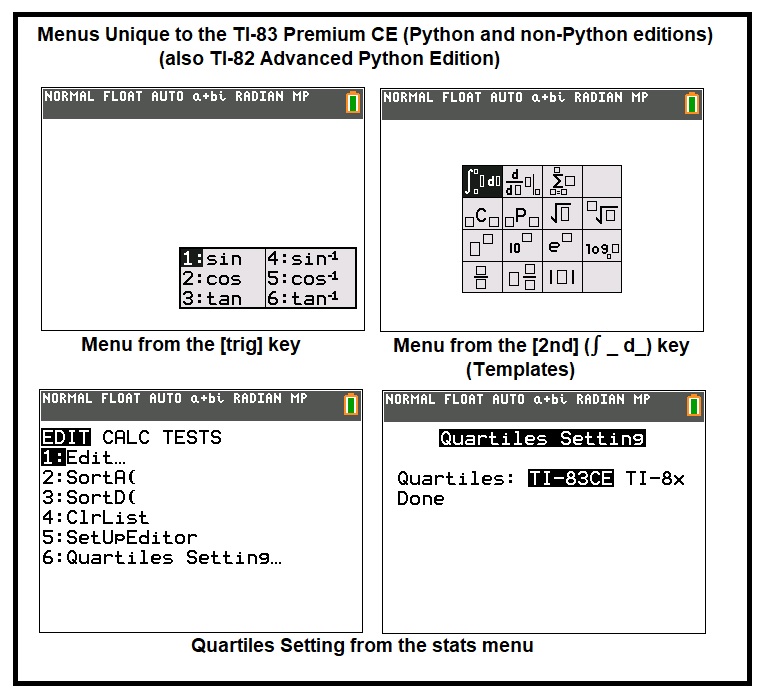
*  Instead of separate keys, all the trigonometric and inverse trigonometric functions are accessed by the [ trig ] key on the TI-83 Premium CE.  


*  The solver and the PlySmlt2 (polynomial and simultaneous equations) are accessed by the [ résol ] key on the TI-83 Premium CE.


*  The TI-83 Premium CE has a template popup menu, accessed by pressing [ 2nd ] [ []/[] ] (∫ [] d []>).


*  The [ annul ] key on the TI-83 Premium CE is the [ clear ] key on the TI-84 Plus CE.


*  The [ suppr ] key on the TI-83 Premium CE is the [ del ] (delete) key on the TI-84 Plus CE.


*  The insérer function on the TI-83 Premium CE is the ins (insert) function on the TI-84 Plus CE.


*  The applications key is moved to the 2nd function on the [ résol ] key.  


*  The pi (Ï€) constant is a 2nd function of the [ ^ ] key on the TI-84 Plus CE, but the 2nd function of the [ trig ] key on the TI-83 Premium CE.  


*  The stats menu on the TI-83 Premium CE has a Quartiles Setting, something that is not present on the TI-84 Plus CE.   I did not realize that there are different methods to determine quartiles.   The options presented are TI-83CE method and TI-8x method.  This is something I have to read about.  


Final Thoughts


I like the TI-83 Premium CE Python Edition, it's got the exact math engine, and it's not just limited to the Home Screen.  The exact math engine extends to the all the apps except for Python.  Even TI-Basics programs have the exact math engine, which is a pleasant surprise.   If you are looking for a TI Python but not an Nspire, the TI-83 Premium CE Python Edition is worth checking out.  

Still hoping for more color options and the base conversions.


Sources


Shore, Edward.   "Review: TI-84 Plus CE Python"  Eddie's Math and Calculator Blog.  July 19, 2021.  http://edspi31415.blogspot.com/2021/07/review-ti-84-plus-ce-python.html


"TI-83 Premium CE"  Wikipedia.  Last Updated October 25, 2021.  Accessed March 2, 2023.  https://en.wikipedia.org/wiki/TI-83_Premium_CE


Woerner, Joerg.  "TI-83 Premium CE Edition Python"  Datamath Calculator Museum.   May 30, 2019.  http://www.datamath.org/Graphing/TI-83PRCE.htm


Eddie


All original content copyright, © 2011-2023.  Edward Shore.   Unauthorized use and/or unauthorized distribution for commercial purposes without express and written permission from the author is strictly prohibited.  This blog entry may be distributed for noncommercial purposes, provided that full credit is given to the author. 


Python – Earth’s Radius and Gravity in US Units

Python – Earth’s Radius and Gravity in US Units Introduction The following script, gravus2.py, estimates the Earth’s gravity i...