Showing posts with label France. Show all posts

Sunday, February 9, 2025

Spotlight: Casio fx-92 Collège

Spotlight: Casio fx-92 Collège


Quick Facts


Model: fx-92 Collège

Company: Casio

Timeline: 2023-present

Type: Scientific with Algorithm programming, 10 digits, Algebraic with Text Writing

Memory: 9 variables (A-F, x, y, z), 900 bytes for a script space

Power: 1 AAA battery


The fx-92 Collège is a scientific calculator designed for French school students. The calculator keys, functions, instructions, and commands are all in French. I purchased this calculator from a Swiss vendor online. The fx-92 Collège is sold in France, and I wish it was sold worldwide.


Modes


The fx-92 Collège has these following modes:


Calcul

Calculate Mode: This is the regular calculator mode. The input and output can be set to 2D input/output or linear. The 2D input/output shows mathematical calculations as they are written naturally. Also, fractions, terms of pi (π), and exact square roots (collectively known as QIRAC) are shown in 2D mode.

Stats

Statistics Mode: 1 and 2 statistics mode. The regression offered is linear regression.

Tableur

Spreadsheet: 45 rows x 5 columns. The spreadsheet has a capacity of 2,380 bytes.

Tabl fonct

Function Table: up to 2 functions, f(x) and g(x)

Équation

Equation Mode: Linear systems of orders 2, 3, or 4

Prod. croix

Ratio mode: Solve for X

A / B = X / D

A / B = C / X

Algo

Algorithmique: Algorithm Mode. This is the programming mode.

Math Box

Math Box: This features four applications:

Lancer de dés: Dice Roll (up to 3 dice, up to 250 rolls of the dice)

Pile ou face: Coin Toss (up to 3 coins, up to 250 coin tosses)

Droite grad.: Graph line intervals, up to 3 (x<a, x≤a, x=a, x>a, x≥a, a<x<b, a≤x<b, a<x≤b, a≤x≤b)

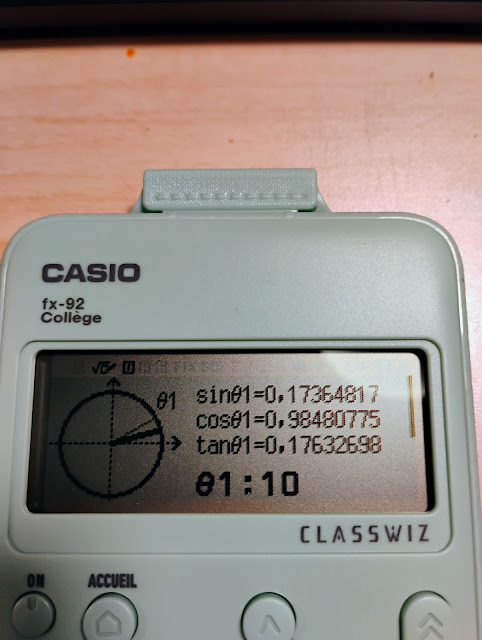
Cercle: Circle app (trigonometric circle, semi-circle, hourly clock (Horloge))


The fx-92 Collège is part of the Casio’s Classwiz series (think fx-991CW and the international fx-82CW). The calculator has a back button, four direction keys, an [ OK ] button, a button acts like a scroll button. The home button (ACCUEIL) calls up the modes while the configuration (CONFIG) shows the set up options.


The calculator uses a comma as a fraction indicator instead of a decimal point to align with how numbers are written in France.


In France, the approximation of √92 is written as 9,591663047.


In the United States, the approximation of √92 is written as 9.591663047.


Mathematical Functions


Some of the featured functions are:


Euclidean division: |-. [ SECONDE ] [ ÷ ]. This function returns the quotient and remainder.

Example: 2025 |- 47 returns Q = 43; R = 4


Last Answer: [ Rép ]. This is the returns the last answer processed by the previous calculation. This is often labeled elsewhere as Ans.


Fraction Simplification: Simp. [ SECONDE ] [ Rèp ]. Simplifies fractions and rational expressions or attempts to give a fraction representation of a decimal.

Example: .5757575757575757 >Simp returns 19/33.


Logarithm and Natural Logarithm: These are not on the keyboard, but instead found in the CATALOG – Analyse fonction menu.


Exponential Function (e^x): The Euler constant (e ≈ 2,718281…) is found by pressing [ CATALOG ], [ ↑ ], selecting Autre (Other) and selecting e.


Catalog-Probabilitè:

%

Factorielle (Factorial: n!)

Permutation (nPr)

Combinasion (Combinatio: nCr)

Nombre alèatoire (Random Number, Ran#)

Entier alèatoire (Random whole number, RandInt#(low; high))


Note arguments are separated by a colon. (;)


Catalog-Calcul numérique:

PGCD: Greatest common divisor (GCD)

PPCM: Least common multiple (LCM)

Valeur absolue: Absolute value (abs, |x|)

Tronc. À l’unité: Shown as Ent when called, this is the integer part function.

Arrondi: Rounds the number to the fix mode settings

Partie entière: The greatest integer less than x.

Arrondi(;): Rounds the number to any number of decimals.

Example: Arond(π; 4) returns 3927 / 1250 = 3,1416


Catalog-Angl/Coord/Sexag…:

This sub menu has angle designations (x°, x^r (radians), x^g (gradients), polar/rectangular conversions, markers for degrees/hours-minute-seconds calculations).


Catalog-Trigonométrique:

All the trigonometric (sin, cos, tan) functions and their inverses. These six functions are already on the keyboard.


Algorithmique Mode: Algorithm


This is the fx-92 Collège’s programming function. There is one program space, which allows up to 900 bytes of memory. Each command takes at least 4 bytes of memory. The language is similar to Scratch.


The output screen is a split screen. On the top, a graph and drawing screen. The dimensions of 191 pixel wide, 48 pixel height. The graph dimensions are x = [-95,96] and y=[-24,24]. Draws can leave the screen, up to ±999. At the bottom is one line where numerical results and per-programmed messages are shown. Below is a table of the commands that are available:


(Créer un algorithme: Create an algorithm)


French

English

Function

Avancer de n

Move forward n

Move the point n points/pixels

Tourner de ⟲ Θ

Turn from ⟲ Θ

Rotate the arrow Θ degrees

S’ orienter à Θ

Orient yourself to Θ

Turn the pointer to angle Θ

Aller à x; y

Go to x; y

Move pointer to point (x,y)

Stylo écrit

Pen writes

Put the pen down to write

Stylo relevè

Pen raised

Raises the pen to stop writing

Metire var á

(Shown as expression → var)

Set var to

(Shown as expression → var)

Makes a calculation and sets it to a variable A – F, or z.

Demander valeur

(Shown as ? → var)

Ask for a value

(Shown as ? → var)

Prompts for a value to be stored in A – F, or z

Commenataire

(shown as one of four comments)

Comment out of four per-programmed strings

“Oui” Yes

“Non” No

“Nombre?” Number?

“Résultat :” Result :

Pauses execution

Afficher résult var

Show result var

Shows the contents of a variable and pauses execution

Style

Style (Style of Cursor)

Fléche: Arrow

Croix: Cross

Attendre

Pause

Pause execution of script

Répéter n ( ↑ )

Repeat n ( ↑ )

Repeat loop, n time (up to 10,000 times). Loop ends at ↑.

Répéter jusqúa cond

Repeat until cond

Repeat a loop until condition cond is met. =, ≠, >, <, ≥, ≤ are present in the CATALOG-ALGO menu

Si Alors (Fin)

If Then (End)

If-Then structure. =, ≠, >, <, ≥, ≤ are present in the CATALOG-ALGO menu

Si Alors Sinon (Fin)

If Then Else (End)

If-Then-Else structure. =, ≠, >, <, ≥, ≤ are present in the CATALOG-ALGO menu


Algorithms start with the pointer at (0, 0) and the pen up. The pointer first starts at angle Θ = 0° (right along the x-axis).

The angle Θ is only accessed in this mode, [CATALOG], Algo, Θ (and only in certain prompts).

The variables x and y refer to the pixel coordinates. They cannot be stored or asked for in this mode.

With each command, you get a prompt screen to fill in the inputs.

When the script pauses, press [ OK ] to continue.  


Also with OUTILS (options):


French

English


Copier & Insérer

Copy & Insert (at Paste)

Press [ OK ] to insert the line.

Insérer linger

Insert Row

Press [ OK ] to insert the line.

Tout supprimer

Delete the Script

To delete a line, press [ ←x ] instead.


The fx-92 Collège is the second Casio calculator to have this type of algorithm mode. It succeeds the fx-92+ Spèicale Collège.

Next Sunday, February 16, we will explore the differences between the fx-92 Collège’s algorithm program and the Turtle module in Python.


Final Thoughts

The algorithm is erased when the calculator is turned off. I wish this wasn’t the case but I can see why the calculator does not retain programs. The fx-92 Collège is designed for teaching basic coding. This is the reason I would like to see this model available readily worldwide, as I think it would sell well. Even though the target audience are middle school students, I think this calculator can be enjoyed by everyone, at any age.

My only gripe: why aren’t the logarithm (log, ln) and exponential (e^x) functions on the keyboard? I get that middle school students probably don’t work with these functions, but the fx-92 Collège is a scientific calculation, and it is customary to have these functions on the keyboard. Not a deal breaker in any stretch of the imagination, just a minor thing for me. I’m glad they are there.

If you get a chance to get this calculator at a reasonable price, buy it. Now I can hope that the AAA battery is used is a universal AAA battery, I probably will have to invest in metric small screwdrivers when it comes time to replace the battery.


Eddie


All original content copyright, © 2011-2025. Edward Shore. Unauthorized use and/or unauthorized distribution for commercial purposes without express and written permission from the author is strictly prohibited. This blog entry may be distributed for noncommercial purposes, provided that full credit is given to the author.

Saturday, May 15, 2021

Retro Review and Comparison: TI-82 Advanced

 Retro Review and Comparison: TI-82 Advanced


I can officially say that I have a French calculator.  


Quick Facts:


Models:  TI-82 Advanced

Company:  Texas Instruments

Manufactured: 2015-2021

Type:  Graphing

Battery:  4 AAA

Country: France


Keyboard


All the TI-82 Advanced is a French calculator, where the keys and functions are in French.  Examples include:


French:  suppr,  English:  delete


French:  dessin,  English:  draw


French:  annul,  English: clear


French:  rappel,  English: recall


I like the how the keys respond and how comfortable the keys feel.  The screen is a monochrome screen but the contrast between the screen and its text.  


More Like the TI-84 Plus


The TI-82 Advanced is pretty much the equivalent of the TI-84 Plus.  I put together a comparison table between three calculators:


*  The basic TI-82 (United States)

*  TI-82 Advanced

*  TI-84 Plus  (monochrome screen)


The table lists the commands available in several menus including Lists, Distributions, Program Editing, and Variables.  You can download the comparison here.  


Python to Come


In the Fall of 2021, Texas Instruments will release the next version of the TI-82 Advanced: the TI-82 Advanced Edition Python.  The new TI-82 Advanced will retain the classic TI-82 casing, including being powered by AAA batteries, but will have a color screen and have a Python programming mode. 


You can read the about the TI-82 Advanced Edition Python here:


https://education.ti.com/fr/produits/calculatrices/graphiques/ti-82-advanced-edition-python  (French)


https://tiplanet.org/forum/viewtopic.php?p=259509#p259509 (French)


Eddie 

All original content copyright, © 2011-2021.  Edward Shore.   Unauthorized use and/or unauthorized distribution for commercial purposes without express and written permission from the author is strictly prohibited.  This blog entry may be distributed for noncommercial purposes, provided that full credit is given to the author. 


Sunday, February 21, 2021

TI-84 Plus CE and HP 17BII+: Euclidian Divison

 TI-84 Plus CE and HP 17BII+: Euclidian Division


What is the ├ symbol on the calculator?

(├ the symbol is a vertical line with a horizontal line coming from the center to the right)


In several scientific calculators sold in Europe such as the Texas Instruments TI-40 Galaxy:


http://www.datamath.org/Sci/Galaxy/TI40_Galaxy.htm


and the current TI-Primaire Plus, which is sold in France, 


http://www.datamath.org/Sci/Modern/TI-PrimairePlus.htm


There is a key marked [ ├ ].  Going through the manual for the TI-40 Galaxy, this is the Euclidean Division key, which returns the quotient and remainder of the division.


x ├ y returns two results:

Q = int(x/y)   (quotient)

R = x - frac(x/y) * y   (remainder)


The TI-84 Plus family has the remainder function (I think it is OS 2.5 and later).  Here are several ways to emulate the Euclidian Division function:


TI-84 Plus CE Program:  EUCDIV


Prompt X,Y

{int(X/Y),remainder(X,Y)}


HP 17BII+ Formula:


EUCDIV: 0=IF(S(Q): IP(X÷Y)-Q: MOD(X:Y)-R)


Inputs: X,Y

Outputs:  Q (quotient), R (remainder)


Examples:


25 ├ 7 ->  Q = 3, R = 4

77 ├ 6 ->  Q = 12, R = 5


Can we use the [ a b/c ] fraction key?  


Calculators such as the Casio fx-260 Solar II calculator could be used to simulate the Euclidean division with the [ a b/c ] key.  The fraction would be illustrated in the mixed fraction format.  Let us illustrate:


56 [ a b/c ] 5 [ = ]   11 _ 1 / 5    

(Q = 11,  R = 1, divisor = 5)


125 [ a b/c ] 14 [ = ]  8 _ 13 / 14

(Q = 8,  R = 14, divisor = 14)


So far so good, but...


9314 [ a b/c ] 60 [ = ]  155 _ 7 / 30

Look at the denominator:  it is 30 not in 60, the fraction has been simplified.   Of course, we know that 7/30 = 14/60, hence Q = 155, R = 14. 


Note:  if you use the [ a b/c ] key, be sure to look at the resulting denominator is not the same,  it is not in the Q _ R / D form.  


Eddie


All original content copyright, © 2011-2021.  Edward Shore.   Unauthorized use and/or unauthorized distribution for commercial purposes without express and written permission from the author is strictly prohibited.  This blog entry may be distributed for noncommercial purposes, provided that full credit is given to the author. 


Monday, October 29, 2018

Countdown: The Numbers Game

Countdown: The Numbers Game

Introduction

The Numbers Game is part of a worldwide famous game show called Countdown.  Countdown is a game show that has two contestants: a champion and a challenger.  There are three type of rounds:

Letters Round: a contestant chooses 9 letters consisting a combination of vowels and constants.  Both contestants have 30 seconds to come up longest valid work possible.

Numbers Round:  this will be described in detail below.

Conundrum:  this is the final round of a game, where both contestants are to solve an anagram (usually made of two or three smaller words) of nine letters.  It is a toss up.  Sometimes one player is so far in the lead that this round is just for show.

In the British game show, a champion who wins 8 straight games retires. 

This game show is enjoyed around the world, mainly in Britain (1982 - present), France (1965 - present) named Des chiffres et des lettres, Serbia (1993 - present) named TV Slagalica, and Turkey (1990 - present) named Bir Kelime, Bir islem. 

Curiously, this game show has never aired in the United States: only two unsold pilots.  Thank goodness for YouTube.

Rules of the Numbers Round

We are given six numbers.  Typical the pool of numbers contain a pair of each integer 1 through 10, one 25, one 50, one 75, and one 100.  Out of the pool, six numbers are selected.

 A target number, also an integer, between 100 to 999 is randomly selected.  Your goal is to create a mathematical sentence using only the following:

* Addition
* Subtraction
* Multiplication
* Division

You want to get to the target number exactly if possible.  Sentences that get near the number, within 10 high or low, are allowed.  On the British game show, the most points are given for hitting the target exactly (10), 7 for being 1-5 away, and 5 for being 6-10 away.  The game show allows 30 seconds. 

All results, including immediate results, must be integers.  Several calculations may be combined.

Using a Deck of Playing Cards

You can simulate a Numbers Round by using a standard deck of playing cards.    Designate the cards as follows:

* Aces count as 1
* 2 - 10 count as their value
* Jack counts as 25
* Queen counts as 50
* King counts as 75
* Joker counts as 100


Use can think of a three digit number for a target, or let a calculator or computer application determine the target numbers. 

Example Games


Drawn Numbers: 1, 3, 4, 6, 7, 25 (Jack) -  Target Number: 528

One possible solution is:

 ( ( 4 - 1 ) × 7 × 25 ) + 3 = 528


Drawn Numbers: 4, 5, 5, 7, 8, 75 (King) - Target Number: 590

There are two ways I found to get the target number:

7 × 75 + (8 + 5) × 5 = 590

8 × 75 - 5 - 5 = 590

If you need more help, watch the videos in the Sources section to get a better idea on how the Numbers Game is played. 

Try These Number Games

See what you can come up with... depending on the draw, it could be difficult and it could be easy.  Have fun!


Drawn Numbers: 4, 5, 5, 7, 8, 8.   Target Number: 598


Drawn Numbers: 1, 2, 3, 6, 25 (Jack), 75 (King).  Target: 118


Drawn Numbers: 1, 2, 3, 3, 6, 6.  Target Number:  102


Drawn Numbers: 2, 4, 6, 7, 9, 50 (Queen).  Target Number: 611

Remember:

1.  Use only the numbers drawn.  You can use a number twice if the number has been drawn twice. 

2. Get close to the target number as possible.

Sources:

Maths Teacher:  "Countdown Numbers Game 6 February 2018" - published 2/11/2018
Link: https://www.youtube.com/watch?v=6D5eVsX-JL8
Retrieved October 29, 2018

Maths Teacher:  "Countdown Numbers Game 29 January 2018" - published 2/12/2018
Link:  https://www.youtube.com/watch?v=QCEvvc4UvRk
Retrieved October 29, 2018

Countdowngoofs: "Countdown - The Most Extraordinary Numbers Game Ever?" - published 2/18/2009
Link:  https://www.youtube.com/watch?v=pfa3MHLLSWI
Retrieved October 29, 2018

Wikipedia "Countdown (game show)"  - last edited 10/22/2018
Link:  https://en.wikipedia.org/wiki/Countdown_(game_show)
Retrieved October 29, 2018

Eddie

All original content copyright, © 2011-2018.  Edward Shore.   Unauthorized use and/or unauthorized distribution for commercial purposes without express and written permission from the author is strictly prohibited.  This blog entry may be distributed for noncommercial purposes, provided that full credit is given to the author.  Please contact the author if you have questions.

-

Retro Review: HP 65

Retro Review: HP 65 Quick Facts Company: Hewlett Packard Years: 1974 - 1977 Type: Scientific, RPN (Reverse Polish Notation) Mem...