Showing posts with label art. Show all posts

Sunday, September 10, 2023

TI-84 Plus CE Python and TI-83 Premium CE Python Edition: Blinking Binary Strings

TI-84 Plus CE Python and TI-83 Premium CE Python Edition:  Blinking Binary Strings


Introduction


The script BINBLANK.py draws a circle's whose color changes based on a list of binary numbers:  green for 1, yellow for 0.  


The code listed is made for the TI-84 Plus CE Python and TI-83 Premium CE Python Edition.  


Program Script: BINBLANK.py


# ews 2023-06-24

# blink of lights: binary bits


from random import *

from ti_system import *

from ti_draw import *


# set subroutines

def black():

  from ti_draw import *

  set_color(0,0,0)

def white():

  from ti_draw import *

  set_color(255,255,255)

def yellow():

  from ti_draw import *

  set_color(255,255,0)

def lime():

  from ti_draw import *

  set_color(0,255,0)

def dcircle():

  from ti_draw import *

  fill_circle(150,100,50)


# using pixels, not coordinates

# initialization

blist=[]

print("Binary String Lighting")

print("Choose 1 or 2:")

print("1. generate random string")

print("2. enter a bit list")


# key press

k=0

# flag

f=0

while f==0:

  k=wait_key()

  if k==143:

    # 1 key

    n=int(input("Number of bits? "))

    blist=[randint(0,1) for i in range(n)]

    f=1

  if k==144:

    # 2 key

    blist=eval(input("List of bits: "))

    # data check

    m=len(blist)

    for i in range(m):

      if blist[i]!=0 and blist[i]!=1:

        1/0

        # force an error and terminate

    f=1


# draw the light

clear()

black()

fill_rect(0,0,319,209)

white()

dcircle()


# loop

for i in range(len(blist)):

  sleep(.1)

  if blist[i]==0:yellow()

  if blist[i]==1:lime()

  dcircle()

  black()

  sleep(.55)

  # reset

  white()

  dcircle()


# end indicator

black()

dcircle()

white()

# no line breaks in draw_text 

draw_text(50,50,"THE END: PRESS CLEAR")

show_draw()


Download the file:  https://drive.google.com/file/d/16nxEe51KEhTIX3p1E0uAzHUxCvElQTWE/view?usp=sharing


Notes:  


Three modules are used:  random, ti_system, and ti_draw.  The modules ti_system and ti_draw are Texas Instruments-specific modules.


The ti_system module allows for a get key type of function called wait_key().   wait_key() stops execution and waits for the user to press a key.   The value of the key is returned.   There are separate key combinations with [ 2nd ] or [ alpha ].  


The [ 1 ] key returns a value of 143.

The [ 2 ] key returns a value of 144. 


Here are some other key values:


[ 3 ]   145

[ 4 ]   146

[ 5 ]   147

[ 6 ]   148

[ 7 ]   149

[ 8 ]   150

[ 9 ]   151

[ 0 ]   142

[ enter ]   5

[ ← ]   2

[ → ]   1

[  ↑  ]  3

[  ↓  ]  4

[ clear ]  9


The script also checks self-entered lists to see that each entry is a 0 or 1.   If not, the program "calculates" 1 ÷ 0 to cause a program-stopping error.  


Eddie


All original content copyright, © 2011-2023.  Edward Shore.   Unauthorized use and/or unauthorized distribution for commercial purposes without express and written permission from the author is strictly prohibited.  This blog entry may be distributed for noncommercial purposes, provided that full credit is given to the author. 


Saturday, March 18, 2023

TI-84 Plus CE: Tracing Polar Equations

TI-84 Plus CE:  Tracing Polar Equations


Traveling Around the Graphs


The programing BLINKING animates a dot around one of four polar equations:


1.  Ellipse


r = b / √(1 - ε^2 * cos^2 θ), where ε = √(a^2 - b^2)/a, a > b


2.  Cardioid


r = a + (1 + cos θ)


3.  3-Leaf Rose


r = a * cos(3 * θ)


4.  Log Spiral


r = a * e^(b * θ)


Notes:


The point alternates through blue (TI-84 Plus CE color 10), green (14), orange (15), and black (12).   The graph itself is light gray (21).  


r1 is the polar equation r1(θ).


Plotting points (not the polar graph) must be in cartesian coordinates (x,y).   


TI-84 Plus CE Program:  BLINKING


"2023-01-15 EWS"

Radian: Polar: FnOff

ZStandard

{10,14,15,12}→L6

Menu("PLOT","ELLIPSE",10,"CARDIOID",11,"3-LEAF ROSE",12,"LOG SPIRAL",13)


Lbl 10

Disp "A≥B"

Prompt A, B

√(A^2-B^2)/A→E

"B/√(1-E^2*cos(θ)^2)"→r1

Goto 20


Lbl 11

Prompt A

"A*(1+cos(θ))"→r1

Goto 20


Lbl 12

Prompt A

"A*cos(3*θ)"→r1

Goto 20


Lbl 13

Disp "A>0, B>0"

Prompt A,B

"A*e^(B*θ)"→r1

Goto 20


Lbl 20

Input "MAX? ",M

Input "NO. STEPS? ",S

M/S→N

FnOn 1

GraphColor(1,21)

0→P: r1(P)→Q

P>Rx(Q,P)→F: P>Ry(Q,P)→G

Pt-On(F,G,1,12)


For(K,1,S)

Wait 0.25

Pt-On(F,G,1,21)

remainder(K,4)+1→C

K*N→P: r1(P)→Q

P>Rx(Q,P)→F: P>Ry(Q,P)→G

Pt-On(F,G,1,L6(C))

End 


Disp "END"


Examples


In all examples, a = 3, b = 2, maximum = 4 * π, steps = 24


Ellipse


Cardioid


3-Leaf Rose


Log Spiral


Source


Harris, John W. and Horst Stocker.  Handbook of Mathematics and Computational Science  Springer:  New York.  2006.  ISBN 0-387-94746-9


Eddie


All original content copyright, © 2011-2023.  Edward Shore.   Unauthorized use and/or unauthorized distribution for commercial purposes without express and written permission from the author is strictly prohibited.  This blog entry may be distributed for noncommercial purposes, provided that full credit is given to the author. 


Sunday, December 19, 2021

Nuwmorks Art with Turtle

Nuwmorks Art with Turtle


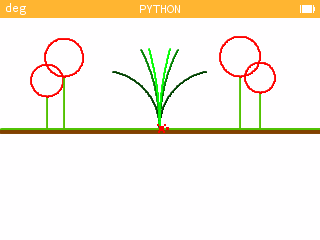
Announcement:   Twelve Days of Integrals starting on December 25, 2021.   Now on to the Python art!

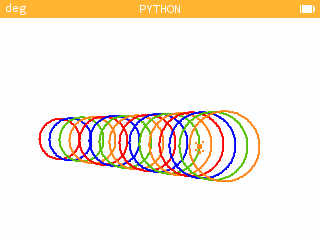
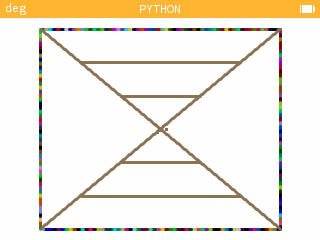
Each picture will have the Nuwmorks script page where the code is located. 


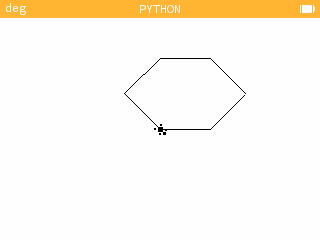
Hexagon


Download code:  

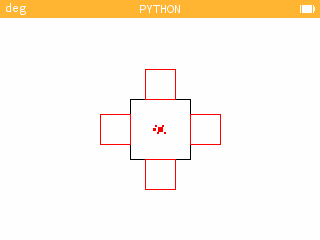
Square on Squares


Download code: 

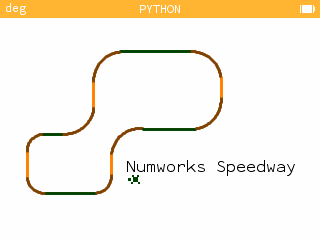
Numworks Speedway


Download Code:  

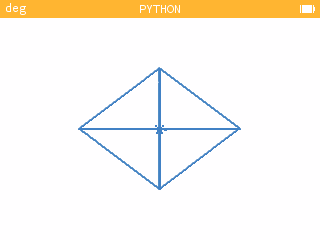
Four-Triangle Crystal


Download Code:


Turtle's Day Off


Download Code:


Looping Circles


Download Code:


Frame


Download Code:


Eddie

All original content copyright, © 2011-2021.  Edward Shore.   Unauthorized use and/or unauthorized distribution for commercial purposes without express and written permission from the author is strictly prohibited.  This blog entry may be distributed for noncommercial purposes, provided that full credit is given to the author. 

Sunday, June 28, 2020

Numworks Python Scripts: Basic Graphics

Numworks Python Scripts:  Basic Graphics

Script:  atari.py

Draws the basic-eight color palette of the classic 1977 Atari 2600.

Atari Palette Python Script


from math import *
from kandinsky import *
# 2020-05-28 atari 2600 colors
# kandinsky module

fill_rect(0,0,320,240,color(245,245,245))

fill_rect(15,15,55,55,color(0,0,0))
fill_rect(85,15,55,55,color(255,0,0))
fill_rect(155,15,55,55,color(255,255,0))
fill_rect(15,85,55,55,color(255,0,255))
fill_rect(155,85,55,55,color(0,255,0))
fill_rect(15,155,55,55,color(0,255,255))
fill_rect(85,155,55,55,color(0,0,255))
fill_rect(155,155,55,55,color(255,255,255))

draw_string("8",107,107)


Script:  firstdigit.py

The tenths digit from n random numbers is extracted and a bar chart is generated based on the results.  I recommend a sample size of at least 20.

firstdigit script example (sample = 100)
A Sample of 100 data points


from math import *
from random import *
from matplotlib.pyplot import *

# set up lists
x=[0,1,2,3,4,5,6,7,8,9]
y=[0,0,0,0,0,0,0,0,0,0]

# user iput
print("EWS 2020-05-29")
print("Bar Chart: First Digit")
print("Recommended at least 20")
n=int(input("n? "))

# generate list
for i in range(n):
  s=int(random()*10)
  y[s]=y[s]+1

# bar plot
h=int(n/2)
d=-int(h/4)
axis([-0.5,9.5,d,h])
bar(x,y)

# turn axis off
axis("off")

# labels at the bottom
# results at top
m=max(y)
for i in range(10):
  text(i-0.25,d+1,str(i))
  text(i-0.25,m+2,str(y[i]))
  
show()

Script:  colorfulrings.py

The script cycles through a set of nine colors, four times.   The Kandinsky module is used to generate the flowery circles as well as cycle through the colors.  This module works with integer pixels.

Color rings script in progress


from math import *
from kandinsky import *
from time import *

# color lists
r=[255,255,255,0,0,0,51,128,255]
g=[0,102,255,128,255,0,102,128,255]
b=[0,0,0,0,0,255,255,128,255]

# angles
a=list(range(128))
for i in range(128):
  a[i]=i/128*2*pi

# draw circles
for k in range(36):
  n=int(fmod(k,9))
  for j in range(50):
    for i in range(128):
      x=int(160+(20+j)*cos(a[i]))
      y=int(120+(20+j)*sin(a[i]))
      set_pixel(x,y,color(r[n],g[n],b[n]))
  sleep(0.1)

Script:  modulusplot.py

Generate a pixel plot of the equation (x^n + y^n) mod m

Modulus Plot example, n = 3.9, m = 15.6
Input Screen  (n = 3.9, m = 15.6)

Modulus Plot result, n = 3.9, m = 15.6


from math import *
from kandinsky import *
print("EWS 2020-05-28")
print("x**n + y**n mod m")
n=float(input("power? "))
m=float(input("modulus? "))

for x in range(320):
  for y in range(240):
    t=fmod(pow(x,n)+pow(y,n),m)  
    c=floor(t/m*255)
    set_pixel(x+1,y+1,color(c,c,c))


Eddie

BLOG UPDATE:
The HP Prime:  Conversion to Binary and IEEE-754 Binary blog entry that was posted on June 27, 2020 may contain errors.  In this case, I have taken that entry back to draft status and my intention is to repost the entry as soon as I can.  Apologies for any inconvenience. 

All original content copyright, © 2011-2020.  Edward Shore.   Unauthorized use and/or unauthorized distribution for commercial purposes without express and written permission from the author is strictly prohibited.  This blog entry may be distributed for noncommercial purposes, provided that full credit is given to the author.

Monday, September 3, 2018

Mathematical Art: TI-84 Plus CE


Mathematical Art:  TI-84 Plus CE


Pixel art generated with the TI-84 Plus CE.  The program is listed below each picture.


Radian:FnOff 

ClrDraw:ZStandard
For(A,­10,10,.1)
For(B,­10,10,.1)

fPart((A^2+B^2)/2)→C
If C=0
Then
Pt-On(A,B,1,BLUE)
Else
Pt-On(A,B,1,RED)
End

End
End


Radian:FnOff 
ClrDraw:ZStandard
For(A,­10,10,.1)
For(B,­10,10,.1)


fPart(sin(A)*cos(B)+cos(A)*sin(B))→C
If 0≤C and C<.25
Then
Pt-On(A,B,1,BLUE)
End
If .25<C and C≤.5
Then
Pt-On(A,B,1,YELLOW)
End

End
End


Radian:FnOff 
ClrDraw:ZStandard
For(A,­10,10,.1)
For(B,­10,10,.1)

e^(sin(A))+10^(cos(B))→C
If C≤2:Pt-On(A,B,1,MAGENTA)
If 2<C and C<5:Pt-On(A,B,1,BLUE)
If C≥5:Pt-On(A,B,1,LTBLUE)

End
End


Radian:FnOff 

ClrDraw:ZStandard
For(A,­10,10,.1)
For(B,­10,10,.1)

iPart(fPart(√(A^2+B^2)/4)*4)→C
If C=1:Pt-On(A,B,1,YELLOW)
If C=2:Pt-On(A,B,1,ORANGE)
If C=3:Pt-On(A,B,1,BROWN)

End
End


Radian:FnOff 
ClrDraw:ZStandard
For(A,­10,10,.1)
For(B,­10,10,.1)

If fPart(A*B/(π/2))≠0 and tan(A*B)<230
Then
e^(tan(A*B))→C
Else
e^(sin(A*B))→C
End
If C≤1:Pt-On(A,B,1,YELLOW)
If 1≤C and C≤2:Pt-On(A,B,1,GREEN)
If C>2:Pt-On(A,B,1,RED)

End
End


Radian:FnOff 
ClrDraw:ZStandard
For(A,­10,10,.1)
For(B,­10,10,.1)

iPart(A*B)/2→C
If fPart(C)=0
Then
sin(A*B)→D
Else
sin(A^3+B^3)→D
End
If D<­0.25:Pt-On(A,B,1,NAVY)
If D>0.25:Pt-On(A,B,1,MEDGRAY)

End
End


Eddie

All original content copyright, © 2011-2018.  Edward Shore.   Unauthorized use and/or unauthorized distribution for commercial purposes without express and written permission from the author is strictly prohibited.  This blog entry may be distributed for noncommercial purposes, provided that full credit is given to the author.  Please contact the author if you have questions.

Friday, July 27, 2018

HP Prime: 3D Graphs July 2018 Gallery


HP Prime:  3D Graphs July 2018 Gallery

All graphs are made with the initial rangers x = [-4, 4], y = [-4, 4], and z = [-4, 4] rotated at different angles.  The function variable for 3D graphs for the HP Prime is FZ# (# is 0-9).  


 z = cos (xy) * cos(2xy) * cos(3xy)

z = e^(-sin(2xy)*cos(xy)/2)

z = cos y * (e^(-x^2/2) – e^(x^2/8))

z = sin(x*y) * cos(x*y) + sin(x*y)^2 * cos(x*y)

z = x^4 * y * cos(x*y) * e^(x*y)

z = ± √(x^2 – y^2)

z = ± |sin(x*y) – cos(x*y) + x* e^y| 
z = y^2 * sin x * Γ(x/6)

z = x * sin(|x^2 + y^2|)
Until next time, have a great weekend and see in you August!

Eddie


 All original content copyright, © 2011-2018.  Edward Shore.   Unauthorized use and/or unauthorized distribution for commercial purposes without express and written permission from the author is strictly prohibited.  This blog entry may be distributed for noncommercial purposes, provided that full credit is given to the author.  Please contact the author if you have questions.


Friday, October 21, 2016

Mathematical Art

Alien:  TI-84 Plus CE

Doppler Bullseye: TI-84 Plus CE

Golden Fan: HP Prime

It's Blue Being Normal: HP Prime

Desert Overshot: HP Prime


This blog is property of Edward Shore, 2016

Friday, December 18, 2015

Mathematical Art with the HP Prime and TI-84 CE (December 18, 2015 edition)

Mathematical Art with the HP Prime and TI-84 Plus CE (December 18, 2015 edition)

More visuals for your pleasure.  Happy Holidays and Merry Christmas,

Eddie


TI 84 Plus CE: Linear Box Illusion 

HP Prime:  Confetti 2016

HP Prime: The Random-Colored Diamond

HP Prime:  Cutting the Line

HP Prime: A Tear

HP Prime: Open Wide

TI-84 Plus CE: Child’s Flowers


This blog is property of Edward Shore. 2015.

Next time will probably be after Christmas!   Thank you all for your support!   Eddie

Sunday, December 13, 2015

Mathematical Art with the HP Prime and TI-84 CE (December 13, 2015 edition)

Mathematical Art with the HP Prime and TI-84 Plus CE (December 13, 2015 edition)

Math is not only fun but can also be creative.  If you want to know I did these plots, please leave a comment below.  Enjoy and best always,

Eddie

HP Prime: Linear Waves

TI -84 Plus CE:  The Arms of Sine

TI-84 Plus CE: Icicles

HP Prime:  Fire From the Flask

TI-84 Plus CE:  Pyramid Illusion

TI-84 Plus CE:  Circular Illusion

HP Prime: Folium Roller Coaster

HP Prime:  Mantra Tiles
This was inspired by this morning's visit to Mantra Coffee in Azusa, CA


The last graphic was inspired by a visit to the Mantra Coffee Company in Azusa, CA (http://www.mantracoffeeco.com/).  


This blog is property of Edward Shore.  2015


Python: Drawing a Ring of Circles

Python: Drawing a Ring of Circles The goal: Draw a number of circles that revolve around the origin (0,0). The center of each circle i...