Showing posts with label random integers. Show all posts

Saturday, December 6, 2025

Basic vs. Python: Numeric Guessing Games (Featuring Casio fx-702P and fx-CG100)

Basic vs. Python: Numeric Guessing Games


Calculators Used


Basic: Casio fx-702P

Python: Casio fx-CG100


Task


Generate two simple number guessing games.


Guess the Number


This is the classic guess the number. The game generates a number (positive integer) at random in a given range. The player guess the number and if it doesn’t match the target number, the player is told whether the target number is lower or higher. The objective is to find the target number in the lowest number of turns.


The pricing game, The Clock Game, from the legendary game show The Price Is Right uses the Guess the Number game for two prizes. The Clock Game, the contestant needs to get the three-digit price correct for each prize within a total of 30 seconds, with the host (Drew Carey or the late Bob Barker) informing the contest whether the correct price is higher or lower.


The code is for a game where the target integer is between 10 and 99.


BASIC: Casio fx-702P


10 PRT "GUESS THE NUMBER"

20 T=INT (RAN#*90+10)

30 C=0

40 G=0


100 INP "GUESS (10-99)",G

110 IF G<10 THEN 100

115 IF G>99 THEN 100

120 C=C+1

130 IF G<T;PRT "HIGHER"

140 IF G>T;PRT "LOWER"

150 IF G=T THEN 200

160 GOTO 100


200 PRT "CORRECT! THE # IS ";T

210 PRT "# GUESSES: ";C


PYTHON: Casio fx-CG100

Script: numguess.py


from random import *


print("Guess the number ")

t=int(random()*90+10)

c=0

g=0


# != means not

while t!=g:

  g=int(input("Guess (10-99)? "))

  c+=1

  if g<t:

    print("HIGHER")

  if g>t:

    print("LOWER")


# exact guess leaves the loop


print("CORRECT! The # is "+str(t)+".")

print("# of guesses: "+str(c))


The major difference between the two programs is that the Basic version uses If statements and Goto line statements, while Python code uses a while loop.


Find the Coin


This is a guessing game where the player is tasked to find a coin in a 10 by 10 grid. The rows and columns are labeled 0 through 9.


BASIC: Casio fx-702P


10 PRT "FIND THE COIN ($)"

30 A=INT (RAN#*10)

40 B=INT (RAN#*10)

50 C=0

60 PRT "GRID 0-9,0-9"


70 INP "X (0-9)",X

80 INP "Y (0-9)",Y

90 R=ABS (A-X)

100 S=ABS (Y-B)

105 C=C+1

110 IF R=S THEN 200

120 PRT S;" ROW";R;" COL"

150 GOTO 70


200 PRT "YOU FOUND IT!"

210 PRT "SCORE= ";C


PYTHON: Casio fx-CG100

Script: findcoin.py


# find the coin, 10 x 10 grid


from random import *

print("FIND THE COIN")

# random integer from 0 to 9

a=randint(0,9)

b=randint(0,9)

c=0

print("GRID 0-9,0-9")


# set up 

r=-1

s=-2


while r!=s:

  x=int(input("X 0-9: "))

  y=int(input("Y 0-9: "))

  r=abs(a-x)

  s=abs(b-y)

  c+=1

  if r==s:

    break

  print(str(s)+" rows "+str(r)+" col")


print("You found it!")

print("SCORE= ",str(c))


Note: Both numguess.py and findcoin.py use the random module, hence it can be adopted on every calculator with a random module. The HP Prime’s random module is urandom.


Have fun, and modify as you like,


Eddie


 All original content copyright, © 2011-2025. Edward Shore. Unauthorized use and/or unauthorized distribution for commercial purposes without express and written permission from the author is strictly prohibited. This blog entry may be distributed for noncommercial purposes, provided that full credit is given to the author.


The author does not use AI engines and never will.

Saturday, October 8, 2022

Drawing Random Numbers with Playing Cards 


An Easy Way to Get Random Numbers

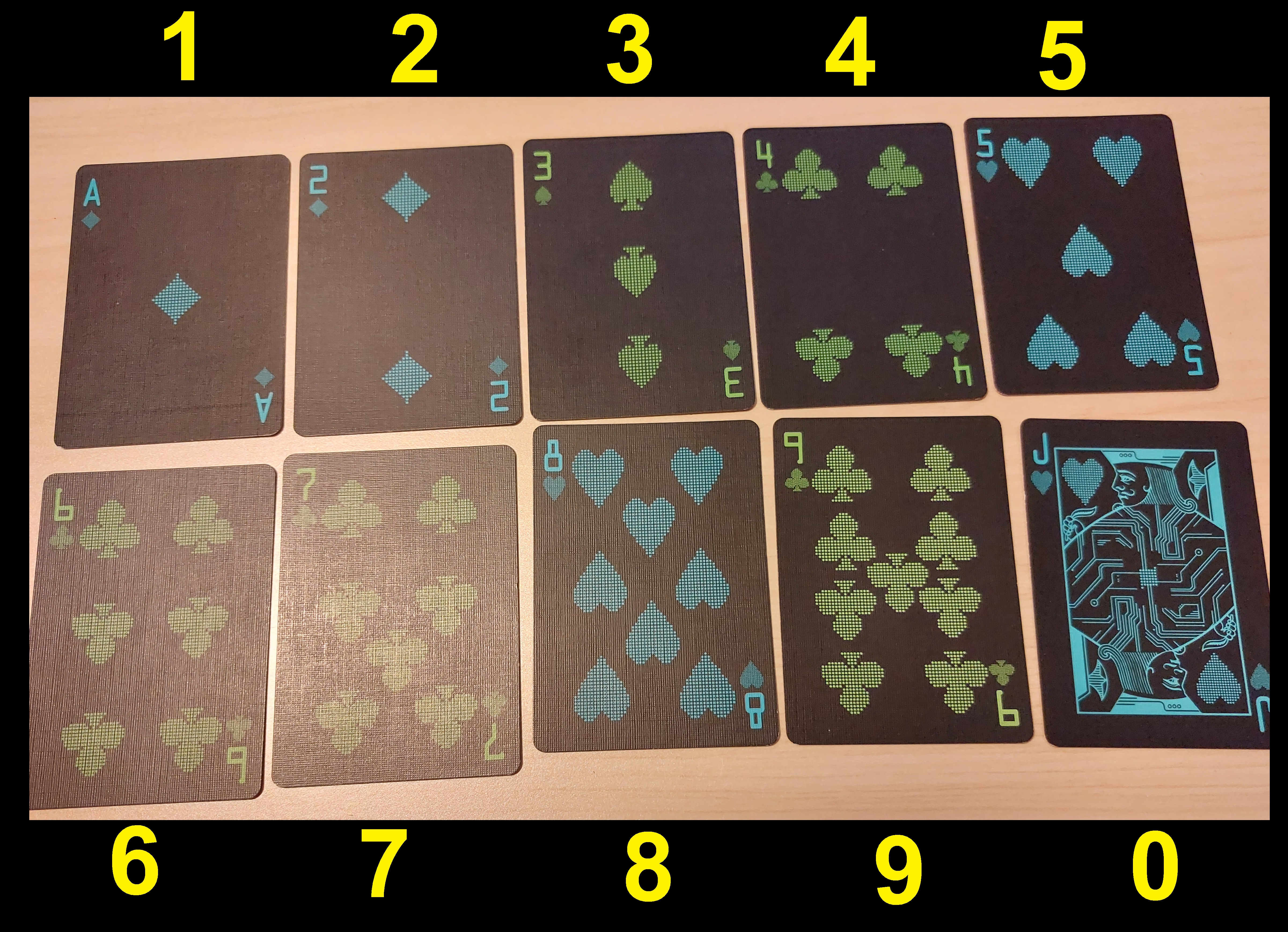
Need an easy and fun way to draw random is to use a playing deck of cards.  No electricity or potentially expensive electronic devices are needed, and your shuffling skills will improve dramatically.  


Take a regular deck of cards, and you will only need 40 cards.  Get all the Aces, ones through nines, and one set of face cards.   Assign the following cards as the following values:


Aces:  1

Twos:  2

Threes: 3

Fours: 4

Fives: 5

Sixes: 6

Sevens: 7

Eights: 8

Nines: 9

Any set of face card or tens: 0  (I use Jacks, see the pictures above.  You can use Queens, Kings, or Tens)


To get a random number:

1.  Shuffle the deck

2.  Draw up to four cards 

3.  That card becomes the random number.  Insert a decimal point anywhere if appropriate.  


Why only up to four cards?  There are only four digits available per deck.  We are generating a samples with no replacement.  


Sample four digit numbers:

8-clubs, Ace-hearts, 2-clubs, 5-diamonds:  8125

2-diamonds, Ace-clubs, 3-clubs, 5-spades:  2135

4-hearts, 8-spades, 3-diamonds, 9-spades: 4839

4-hearts, 3-diamonds, 9-slides, 8-clubs: 4398

Jacks-clubs, Ace-clubs, 2-diamonds, 2-spades: 0122


How many possible permutations are possible with this deck?

2 digits:  nPr(40, 2) = 1560

3 digits:  nPr(40, 3) = 59,280

4 digits:  nPr(40, 4) = 2,193,360


Can we create a program to generate random numbers using this method?  

Yes.   I am using the TI-84 Plus CE to for this program.   The TI-84 has a randIntNoRep function, which generates a list of random integers without replacement.   The nice part of the is we are working with base 10, so the use of a remainder function will give the results we want: 0 through 9.  


Syntax:


Random Sample of Integers Without Replacement:

randIntNoRep(low, high, size of the sample)


Remainder function, which can be used as the modulus function.

remainder(x, y):  returns the remainder of x ÷ y


The program RANDDECK will generate a list and draw a histogram.


TI-84 Plus CE Program:  RANDDECK


"2022-08-16 EWS"

ClrHome

Disp "MAKE A 4 DIGIT,","NUMBER FROM A DECK 0-9"

Input "NO OF TRIALS: ", N

For(I,1,N)

randIntNoRep(1,40,4)→L6

remainder(L6,10)→L6

sum(L6*{1000,100,10,1})→N

If I=1

Then

{N}→L5

Else

augment(L5,{N})→L5

End

End

Pause L5

ClrHome

Disp "PRESS [ENTER] TO"

Pause "DISPLAY HISTOGRAM"

Plot1(Histogram,L5,1,BLUE)

PlotsOn 1

ZoomStat


Here is an example.


Until next time,


Eddie


All original content copyright, © 2011-2022.  Edward Shore.   Unauthorized use and/or unauthorized distribution for commercial purposes without express and written permission from the author is strictly prohibited.  This blog entry may be distributed for noncommercial purposes, provided that full credit is given to the author. 


Saturday, October 30, 2021

Swiss Micros DM41X and HP 41CX: Advanced String Programs

Swiss Micros DM41X and HP 41CX:  Advanced String Programs


Introduction and Generating Random Integers


This blog entry features three programs for the Swiss Micros DM41X and HP 41CX (or a HP 41C with an extended module):


ACODE:  generate a code of random letters


ASAMP:  generate a sample of numbers of digits 0 to 9, where no numbers repeat.  ASAMP accepts up to 9 numbers.   


CRYPT:  allows the user to "add" or "subtract" a code to a word to encrypt it.   CRYPT is a basic form of encryption.   


Both ACODE and ASAMP use a random number generator.  Unfortunately, the HP 41C does not have a random number generator and one must be programmed.  I wanted to avoid reinventing the wheel.   The following formula, obtained from the book An Atlas of Functions (see source), generates random numbers of value 0 ≤ r < 1:


r_n+1 = [ ( (4561 * int(243000 * r_n) + 51349 ) mod 243000 ] ÷ 243000


To convert this into a random integer from a to b: 


randint = int( (b - a + 1) * r) + a


int is the integer function.   The second formula is useful because we don't have to change display modes to execute the calculation.  


Note:


XTOA takes an integer from the stack and appends the associated code to the alpha string.


ATOX takes the left most character, converts it to code, and deposits it on the X stack.  The length of the alpha string is reduced by one.


Codes:

Alphabet:  65 is code for A, 90 is code for Z (all letters inclusive)

Numbers:  48 is code for 0, 57 is code for 57 (all letters inclusive)

# 35

$  36

%  37

&  38

:  58

@  64

[  91

]  93

Σ 126


The system's DATE and TIME are used to generate an initial seed


Swiss Micros DM41X Program:  ACODE


Instructions:

Enter the length, execute ACODE


Example (results will vary):

10 ACODE (may) return CDSJHPNWLD  (10 letters)

11 ACODE -> NVJZJMVVBSV


01 LBL^T ACODE

02 CLA

03 STO 01

04 DATE

05 TIME

06 +

07 2

08 /

09 FRC

10 STO 02

11 LBL 00

12 RCL 02

13 XEQ 01

14 XEQ 02

15 XTOA

16 DSE 01

17 GTO 00

18 AVIEW

19 RTN

20 LBL 01

21 RCL 02

22 243 E3

23 *

24 LASTX

25 X<>Y

26 INT

27 4561

28 *

29 51349

30 +

31 X<>Y

32 MOD

33 LASTX

34 /

35 STO 02

36 RTN

37 LBL 02

38 26

39 *

40 INT

41 65

42 +

43 RTN

44 END


Swiss Micros DM41X Program: ASAMP


Instructions:

Enter the length, execute ASAMP


If the length is greater than 9, an error is generated.  


Example (results will vary):

4 ASAMP can generate results such as 4381, 0361, 4920

7 ASAMP can generate results such as 6732145, 9852067, 1963542


Results are returned as an alpha string


01 LBL^T ASAMP

02 CLA

03 STO 01

04 9

05 X<Y?

06 GTO 03

07 DATE

08 TIME

09 *

10 FRC

11 STO 02

12 LBL 00

13 XEQ 01

14 STO 03

15 POSA

16 -1

17 X=Y?

18 GTO 02

19 GTO 00

20 LBL 02

21 RCL 03

22 XTOA 

23 DSE 01

24 GTO 00

25 AVIEW

26 RTN

27 LBL 01

28 RCL 02

29 243 E3

30 *

31 LASTX

32 X<>Y

33 INT

34 4561

35 *

36 51349

37 +

38 X<>Y

39 MOD

40 LASTX

41 / 

42 STO 02

43 10

44 *

45 INT

46 48

47 +

48 RTN

49 LBL 03

50 0

51 1/X

52 RTN

53 END


Swiss Micros DM41X Program:  CRYPT


Syntax:

Store your word in the Alpha register

Give a key (integer), can be positive or negative

XEQ CRYPT


Example:

Starting alpha string:  MATHS

10 CRYPT returns WKDRC

-10 CRYPT returns MATHS (where you started from)

This allows for two people to have short encoded messages and a secret key.


01 LBL^T CRYPT

02 STO 01

03 ALENG

04 STO 02

05 LBL 00

06 ATOX

07 65

08 - 

09 RCL 01

10 +

11 26

12 MOD

13 65

14 + 

15 XTOA

16 DSE 02

17 GTO 00

18 AVIEW

19 RTN 


You can download all three files (in .raw format) here:  

https://drive.google.com/file/d/1UD8CAILnfe4l2ID_UdoHfFGvaYiWni8J/view?usp=sharing


Thanks to Albert Chan (MoHPC) for feedback on the the programs.  


Source for the Random Number Formula:


Keith Oldham, Jan Mayland,  Jerome Spainer  An Atlas of Functions 2nd Edition Springer:  New York, NY.  2009.  ISBN 9780387488066


Eddie


All original content copyright, © 2011-2021.  Edward Shore.   Unauthorized use and/or unauthorized distribution for commercial purposes without express and written permission from the author is strictly prohibited.  This blog entry may be distributed for noncommercial purposes, provided that full credit is given to the author. 


Monday, August 9, 2021

Numworks: Finding a Numeric Target Game

Numworks:  Finding a Numeric Target Game


Happy Monday!


Introduction


The Python script target.py is a game where the player is tasked to guess a mystery number.   The game has four levels:


Level 0:  Easy.  Range of 50, number between 100 and 999.

Level 1:  Medium.  Range of 100, number is between 1,000 and 9,999.

Level 2:  Difficult.  Range of 250, number is between 10,000 and 99,999. 

Level 3:  Challenge.  Range of 500, numbers if between 100,000 and 999,999.


After each guess you will be told whether the target is higher or lower than your guess.   At the beginning you are given a range where your target number is.


Trick:  I fit a quartic curve to the points (0,50), (1,100), (2,250), and (3,500) and Numworks came up with y = 50*x^2 + 50.   


The script page on my Numwork's account is here:  https://my.numworks.com/python/ews31415/target


Numworks Python Script: target.py


from math import *

from random import *

# 2021-08-03 EWS

# target finding game


# set up

print("**** TARGET ****")

print(" EWS 2021")

print(" ")

print("SELECT MODE")

print("0. EASY")

print("1. MEDIUM")

print("2. DIFFICULT")

print("3. CHALLENGE")

c=int(input())


# variables

# range

r=50*c**2+50

# lower limit

x=10**(c+2)

# upper limit

y=10**(c+3)-1

# score

s=0

# target, limits

t=randint(x+r,y-r)

lx=t-r

ly=t+r


# the game

g=-1

print("The target is between")

print(str(lx)+" and "+str(ly)+".")


while g!=t:

  s+=1

  g=int(input("Guess "+str(s)+"? "))

  if g>t:

    print("LOWER")

  else:

    print("HIGHER")


print(str(g)+" is the target!")

print("Your score is: "+str(s))


Good luck!  


Testing News


According to their website, numworks.com the Numworks calculator is now permitted for SAT, AP, PSAT, and ACT.  Click here for more information:  https://www.numworks.com/calculator/exams/

Note: Some Python Scripts can be Transferred to Different Calculators as is - Check the modules!  

You can download the Python file here.   I was able to transfer the file to a TI-84 Plus CE Python and it runs fine.  Because of the modules used, it should be able to run on any calculator with Python.  Please be aware that the calculator must have the modules installed before attempting to transfer Python scripts between different kinds of calculators.  

Link:  https://drive.google.com/file/d/1g2JjxkeKbk14Pm-qZR_LdW-0B4_BcZik/view?usp=sharing

Eddie


All original content copyright, © 2011-2021.  Edward Shore.   Unauthorized use and/or unauthorized distribution for commercial purposes without express and written permission from the author is strictly prohibited.  This blog entry may be distributed for noncommercial purposes, provided that full credit is given to the author. 


Saturday, June 19, 2021

7000G Retro Month - June 19 Edition

7000G Retro Month - June 19 Edition


Introduction


Welcome to the 7000G Retro Month, which features programming for the classic Casio calculators from the mid/late 1980s:  primarily fx-7000G and fx-7500G.  Since the programming language stays similar throughout the years, programs can be translated to the fx-6300G and later graphing calculators with little to no adjustments.  Non graphic programs should be ported to the fx-4000P, fx-4500P (A), fx-3650p (II), fx-50F Plus (II), and fx-5800P with little to no adjustments.  


7000G Retro Month takes place every Saturday during June 2021.


To make text easier to type, I can going to use the following text friendly symbols for the following:


->  for →


/I for ⊿


=> for ⇒


What do you think?   Unicode or simple text equivalents?  


- - - - - - -- - -- - -


Today's subject revolves around Probability and Random Numbers.  Enjoy!


- - - -- - - -- - -- -- -


Random Integers: Repeats Allowed 


This program allows the user to generate a number of integers between A and B, repeats are allowed.   Each integer is displayed one at a time.


"A"? -> A

"B"? -> B

"N"? -> N

Lbl 1

Int ((B-A+1) Rnd#) /I

Dsz N

Goto 1


Combinatorics


The program allows the user to choose between three options:


1.  PERM:  permutation:  nPr

2.  COMB:  combination:  nCr

3.  COMB REPLACE:  combination with replacements allowed (n+r-1)Cr


"N"? -> N

"R"? -> R

"1. PERM"

"2. COMB"

"3. COMB REPLACE"

? -> K

K=1 => N!÷(N-R)! -> X

K=2 => N!÷(R!(N-R)!) -> X

K=3 => (N+R-1)!÷(R!(N-1)!) -> X

X


Binomial Distribution


This program calculates the sum of probabilities for a binomial distribution:


total probability = ∑( nCr(N,K) p^K (1-p)^(N-K), K=A to B)


Probability:  0 < p < 1


"A"? -> A : "B"? -> B

"N"? -> N : "P"? -> P

0 -> M : Lbl 1

M+(N!×P^A×(1-P)^(N-A))÷(A!(N-A)!) -> M

A+1 -> A

A>B => Goto 2

Goto 1

Lbl 2

M


Confidence Interval


This program generates a confidence interval using one of four probabilities are assigned to the following variables:


F: 99%  (z* ≈ 2.576)

G: 98% (z* ≈ 2.326)

H: 95% (z* ≈ 1.96)

I: 90% (z* ≈ 1.645)


interval = mean ± z* × variance / √n


"CONF INTERVAL"

2.576 -> F

2.326 -> G

1.96 -> H

1.645 -> I

"MEAN"? -> A

"VAR"? -> B

"N"? -> N

"F=.99, G=.98"

"H=.95, I=.90"

? -> J

A-JB÷√N -> E /I

A+JB÷√N -> F


E:  low, F: high


Eddie


All original content copyright, © 2011-2021.  Edward Shore.   Unauthorized use and/or unauthorized distribution for commercial purposes without express and written permission from the author is strictly prohibited.  This blog entry may be distributed for noncommercial purposes, provided that full credit is given to the author. 


Sunday, September 13, 2020

Numworks: Generating a Colorful Matrix

Numworks:  Generating a Colorful Matrix 

(updated 10/18/2021)


Introduction

Today's script generates a 3 x 3 matrix of random integers from 1 - 9 which each of the numbers are assigned a color.  The numbers are displayed in a 3 x 3 grid using the 320 x 240 pixel screen.  

The colors which are assigned to each number are:

1:  Shamrock Green  (0, 158, 96)

2:  Denim Blue (21, 96, 189)

3:  Navy Blue (0, 0, 128)

4:  Indigo (75, 0, 130)

5:  Red (255, 0, 0)

6:  Rose (255, 0, 127)

7:  Brown (101, 67, 33)

8:  Orange (255, 127, 39)

9:  Gold (255, 223, 0)


Numworks Python Script:  colormtx.py


from math import *

from random import *

from kandinsky import *


# 2020-08-25 EWS


# color arrays

# red

mr = [ 0, 21, 0, 75, 255, 255, 101, 255, 255 ]

# green

mg = [ 158, 96, 0, 0, 0, 0, 67, 127, 223 ]

# blue 

mb = [ 96, 189, 128, 130, 0, 127, 33, 39, 0 ]


# set up matrix

mat = [ [ 0, 0, 0 ], [ 0, 0, 0 ], [ 0, 0, 0 ] ]


# generate random numbers, assign colors 

for r in range(3): 

 for c in range(3):

  mat[ r ][ c ] = randint(1,9)

  x = 80 + 80 * c

  y = 60 + 60 * r

  s = mat[ r ][ c ]

  draw_string(str(s), x, y, color(mr[s-1], mg[s-1], mb[s-1]))


Download the code here:  https://my.numworks.com/python/ews31415/colormtx


Gratitude to Brian who let me know about my typo on the last line, it was missing the final right parenthesis.  


Remember that the index of arrays and matrices go from 0 to n-1.  

Examples


Eddie

All original content copyright, © 2011-2020.  Edward Shore.   Unauthorized use and/or unauthorized distribution for commercial purposes without express and written permission from the author is strictly prohibited.  This blog entry may be distributed for noncommercial purposes, provided that full credit is given to the author. 


Saturday, July 18, 2020

HP 41C and HP 42S (also Free42/DM42): Random Tone Generator

HP 41C and HP 42S (also Free42/DM42): Random Tone Generator

Tones

The program RTONE generates a set of random tones (0 through 9).   Since the HP 41C (without additional modules) does not have a pseudo random number generator, a simple generator is included, particularly (Ï€ + x0)^5 = x1.

The HP 42S has a random number generator and it is used in its program.  Performance of RTONE is increased, and is really fast on the Free42 and Swiss Micros DM42. 

The command TONE can refer to indirect registers (stack X for this program) and accepts real numbers between 0 to 9.9999999.  TONE ignores the fractional part.

HP 41C Program: RTONE

01 LBL^T RTONE
02 ^T N?
03 PROMPT
04 INT
05 STO 03
06 ^T SEED?
07 PROMPT
08 LBL 00
09 PI
10 +
11 5
12 Y↑X
13 10
14 MOD
15 TONE IND X
16 DSE 03
17 GTO 00
*END*

HP 42S/Free42/DM42 Program:  RTONE

00 {37-Byte Prgm}
01 LBL "RTONE"
02 "SEED?"
03 PROMPT
04 SEED
05 "N?"
06 PROMPT
07 IP
08 STO 03
09 LBL 00
10 RAN
11 10
12 *
13 TONE IND ST X
14 DSE 03
15 GTO 00
16 END

A fun, little musical program.

Eddie

All original content copyright, © 2011-2020.  Edward Shore.   Unauthorized use and/or unauthorized distribution for commercial purposes without express and written permission from the author is strictly prohibited.  This blog entry may be distributed for noncommercial purposes, provided that full credit is given to the author.

Saturday, July 11, 2020

HP 42S/DM42/Free42: GETKEY Demonstration

HP 42S/DM42/Free42:  GETKEY Demonstration

Good day everyone, hope everything is well with you today!

How GETKEY Works

To find the GETKEY command:  PGM.FCN menu ( [ (shift) ] [  3  ] ), [ ↑ ], (GETK)

GETKEY puts the HP 42S on hold and awaits for you to press a key.  Whatever key you press returns a key code.   Shift+Key combinations are allowed.  Key codes start at the upper left hand corner [ Σ+ ] with key code 1, going right then down, to the bottom right hand corner [ + ] with key code 37.

Hence:
[ Σ+ ] has code 1
[ 1/x ] has code 2
[ √x ] has code 3
[ LOG ] has code 4
and so on.

Shift+Key combinations add 37 to the key code.
[ (shift) ] [ Σ+ ] has code 38
[ (shift) ] [ 1/x ] has code 39
[ (shift) ] [ √x ] has code 40
[ (shift) ] [ LOG ] has code 41
and so on.

There is no key code for the shift key alone.

The key code is returned to the X stack, which can be stored and analyzed.  Pretty simple.

HP 42S/DM42/Free 42 Program:  TABU 

Raw file:  tabulate.raw
Download:  tabulate.raw

Running TABU:

You will see a running total, starting with 0.   Press [ 1 ] to add 1,  [ 2 ] to add 2, or [ 3 ]  to add 3 to the total.   Any other key will exit the program. 

Key codes used:  [ 1 ]:  29,  [ 2 ]:  30,  [ 3 ]:  31

00 { 62-Byte Prgm }
01▸LBL "TABU"
02 0
03 STO 00
04▸LBL 10
05 GETKEY
06 STO 01
07 32
08 X<Y?
09 GTO 11
10 R↓
11 28
12 X>=Y?
13 GTO 11
14 R↓
15 28
16 -
17 STO+ 00
18 CLA
19 "TOTAL: "
20 ARCL 00
21 AVIEW
22 GTO 10
23▸LBL 11
24 CLA
25 "FINAL: "
26 ARCL 00
27 AVIEW
28 .END.

HP 42S/DM42/Free 42 Program:  BUILD

Raw file:  build.raw
Download:  build.raw

Running BUILD:   A mathematical statement is generated with two random integers between -100 and 100.   The RAN command uses the range 0 ≤ n < 1 with n ≠ 1 for all results.   To get the range wanted, I use the subroutine RAN 201 * 100 - IP  (integer(201*RAN) - 100) to get the range -100 ≤ n < 101. 

 Key codes used:  [ + ]:  37,  [ - ]:  32,  [ × ]:  27

Any other key repeats the cycle until one of the acceptable keys are pressed.

00 { 150-Byte Prgm }
01▸LBL "BUILD"
02 ALL
03 XEQ 00
04 STO 01
05 XEQ 00
06 STO 02
07 GTO 01
08▸LBL 00
09 RAN
10 201
11 ×
12 100
13 -
14 IP
15 RTN
16▸LBL 01
17 RCL 01
18 RCL+ 02
19 STO 03
20 RCL 01
21 RCL- 02
22 STO 04
23 RCL 01
24 RCL× 02
25 STO 05
26▸LBL 02
27 CLA
28 "+, -, ×?"
29 AVIEW
30 GETKEY
31 37
32 X=Y?
33 GTO 03
34 R↓
35 32
36 X=Y?
37 GTO 04
38 R↓
39 27
40 X=Y?
41 GTO 05
42 GTO 02
43▸LBL 03
44 CLA
45 ARCL 01
46 ├" + "
47 ARCL 02
48 ├" = "
49 ARCL 03
50 GTO 06
51▸LBL 04
52 CLA
53 ARCL 01
54 ├" - "
55 ARCL 02
56 ├" = "
57 ARCL 04
58 GTO 06
59▸LBL 05
60 CLA
61 ARCL 01
62 ├" × "
63 ARCL 02
64 ├" = "
65 ARCL 05
66 GTO 06
67▸LBL 06
68 AVIEW
69 END

Example results (results will vary):

-53 + -32 = -85
93 - 19 = 74
41 × -15 = -615

And that concludes the demonstration on GETKEY. 

Eddie

All original content copyright, © 2011-2020.  Edward Shore.   Unauthorized use and/or unauthorized distribution for commercial purposes without express and written permission from the author is strictly prohibited.  This blog entry may be distributed for noncommercial purposes, provided that full credit is given to the author.

Friday, April 10, 2020

HP Prime: Drawing Cards and Video Poker

HP Prime:  Drawing Cards and Video Poker

The Function drawcardfx

The function drawcardfx draws a set number of cards from a deck of 52 standard playing cards.

To achieve this effect, I made four lists:

List 1:  A list of all integers 0 to 51.

List 2:  The suits.  I took each of the elements of List 1 MOD 4, giving the answers of 0, 1, 2, 3, respectively.  Each of the modulo are assigned to a suit:

0:  Clubs.  This is character 9827 for the HP Prime.  ♣
1:  Diamonds.  This is character 9826.  (9827 - 1)  ♢
2:  Hearts.  This is character 9825.  (9827 - 2)  ♡
3:  Spades.  This is character 9824.  (9827 - 3) ♠

List 3:  The ranks.  I divided each element of List 1 by 4, take the integer part, then add 1.  For example:  for card number 17:  IP(17/4) + 1 = IP(4.25) + 1 = 4 + 1 = 5.   This is why I let List 1 range for 0 to 51 instead of 1 to 52, since IP(52/4) + 1 = 14 while IP(0/4) + 1 = 1, and I want four 1s, four 2s, four 3s, up to four 13s.  There are 13 ranks in a standard deck of cards.

List 4:  This list starts empty and will hold all the cards drawn in the hand.  Empty lists are allowed in the HP Prime.

I then turned List 2 and List 3 into appropriate strings.  For List 3, I turned each 1 into an Ace (A), 11 into a Jack (J), 12 into a Queen (Q), and 13 into a King (K).

The While loop allows me to pull to generate a sample with no repeats.  If there is an easier way for me to do this on the HP Prime, please let us in the comments.

The function returns a list of strings in the format "(rank) (suit)".

Example:  drawcardfx(5) might return
{"K ♠", "9 ♡", "A ♠", "4 ♢", "K ♣"}
(not bad, pair of Kings)

HP Prime Program: drawcardfx

EXPORT drawcardfx(n)
BEGIN
// 2020-04-01 EWS
// Draws n cards
// single draw
// no print out

LOCAL x,k,t,s;
LOCAL L1,L2,L3,L4;

RANDSEED();

// list of cards
L1:=MAKELIST(x,x,0,51);

L2:=9827-(L1 MOD 4);
L3:=IP(L1/4)+1;

FOR k FROM 1 TO 52 DO
L2(k):=CHAR(L2(k));
L3(k):=STRING(L3(k));
IF L3(k)=="1" THEN L3(k):="A"; END;
IF L3(k)=="11" THEN L3(k):="J"; END;
IF L3(k)=="12" THEN L3(k):="Q"; END;
IF L3(k)=="13" THEN L3(k):="K"; END;
END;

L4:={};

k:=1;

WHILE k≤n DO
t:=RANDINT(1,52);
// if statement
IF L1(t)≠0 THEN
s:=L3(t)+" "+L2(t);
L1(t):=0;
L4:=CONCAT(L4,{s});
k:=k+1;
END;
END;

// end the program
RETURN L4;
END;

A Simple Video Poker Program

The program VIDEOPOKER is simple video poker program.  You are dealt a hand of 5 cards from a standard 52 card deck.  You are then asked to hold every card that you want to keep.  Once you decide which cards to keep, that card is held.  Executing the DRAW option redraws the cards and you are shown your final hand.

This is a very simple program because there is no better or ranking of hands.  This just has the play of the cards.

The game is achieved by having the game draw 10 cards in advance, separating them into groups of 5.

This program will require the function drawcardfx above.

Example Game:
Run VIDEOPOKER - no arguments needed.

Your first hand:
6 ♢
5 ♢
10 ♠
Q ♠
6 ♡

A choose box appears after I press [ Enter ].  Let's say I want to hold the pair of sixes.  So I highlight each of the sixes and press [ Enter ].  After doing this the choose box now reads:

HOLD?
HELD
5 ♢
10 ♠
Q ♠
HELD
DRAW

I now choose draw and I get:
------------------
Final hand:
6 ♢
A ♠
4 ♢
6 ♣
6 ♡

I improved my hand to a set of sixes (three sixes).

HP Prime Program VIDEOPOKER

EXPORT VIDEOPOKER()
BEGIN
// just for fun
// 2020-04-01 EWS
// drawcardfx required
LOCAL c,k,s,t;
LOCAL cardz,L01,L02,Lhand,Lrep,L03;

cardz:=drawcardfx(10);
L01:=SUB(cardz,1,5);
L02:=SUB(cardz,6,10);
Lhand:=L01;
Lrep:={1,2,3,4,5,6};

PRINT();
PRINT("Your first hand:");

FOR k FROM 1 TO 5 DO
PRINT(Lhand(k));
END;
WAIT(0);

L03:=CONCAT(Lhand,{"DRAW"});

WHILE c≠6 DO
CHOOSE(c,"HOLD?",L03);
Lrep(c):=0;
L03(c):="HELD";
END;

FOR k FROM 1 TO 5 DO
IF Lrep(k)≠0 THEN
Lhand(k):=L02(k);
END;
END;


PRINT("-----------");
PRINT("Final hand:");
FOR k FROM 1 TO 5 DO
PRINT(Lhand(k));
END;

END;

Have fun!  If you do modify the program above to involve gambling, please virtual gamble responsibly.

Eddie

All original content copyright, © 2011-2020.  Edward Shore.   Unauthorized use and/or unauthorized distribution for commercial purposes without express and written permission from the author is strictly prohibited.  This blog entry may be distributed for noncommercial purposes, provided that full credit is given to the author.

Earth's Radius by Latitude

Earth's Radius by Latitude Introduction: Calculating the Earth’s Radius In quick, general calculations, we assume that the...