Showing posts with label date calculations. Show all posts

Monday, August 15, 2022

Review: Casio Nursing Calculator SP-100UNSU

Review:  Casio Nursing Calculator SP-100UNSU


It's rare, but there are nursing-based calculators that are available in the market from time to time.  Here is a review of one.


Quick Facts


Model:  SP-100USNU

Company:  Casio

Years:  2022-current

Type:  Nursing 

Batteries: CR2016

Operating Modes:  Chain

Number of Registers: 1

Display:  10 digits, with prompts

Cost:  $39.99 USD


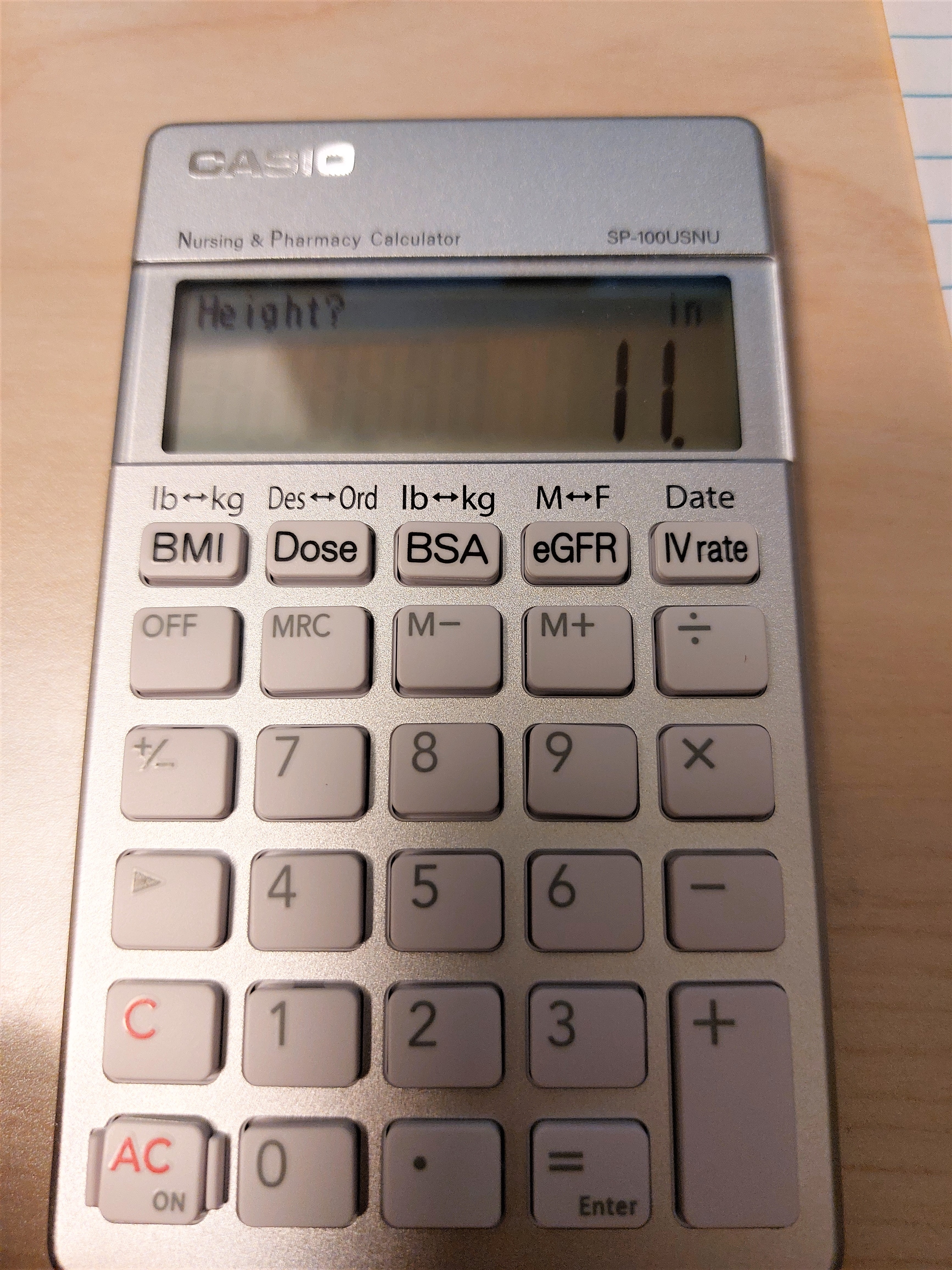
The calculator that I ordered came in an ecology-friendly package, with the calculator wrapped in a bubble wrap pocket.  Unfortunately, it does not have a hard sliding case or the calculator being in a wallet.


The calculator casing has a nice silver finish with white keys.


A Calculator for the Nursing and Pharmacy Industries


The SP-100USNU is built for the nursing and pharmacy industries.  Five of the keys deal with six calculations, which each of the top keys serving as a toggle.  What is great about the SP-100USNU is that the calculator gives prompts and menus as necessary.  The display is crisp and clean.  


[ BMI ]:   Body Mass Index.   Two input modes:  lbs/ft/in,  kg/cm


[ Dose ]:  Does Calculation.   Solve for Ordered Dose given Desired Dose, or solve for Desired Dose given Ordered Dose.  Doses are in mL, with amount of the medicine (per pill, capsule, gummy, etc.) in mg.


[ BSA ]:  Body Surface Area approximation in square meters.  Two input modes:  lbs/ft/in, kg/cm


[ eGFR ]:  Calculate the estimated glomerular filtration rate which assist in diagnosis of chronic kidney disease.   The CKD-EPI equation, which factors a person's skin color (black vs. non-black), sex (male vs. female), weight (for body surface area), creatinine secretion (mg/dL), and the person's age.  What is calculated?   CCr, Creatinine Clearance, in mL/min and eGFR, estimated glomerular filtration rate, in mL/min/1.73m^2.   The average body surface area is estimated to be 1.73 m^2.  


[ IV rate ] (date):  This key toggles between two types of calculations: IV Drip Rate and Date calculation.


IV Drip Rate:  three inputs are needed.   Volume of medicine in mL, time that the IV lasts in minutes, and drop factor in gtts/mL (typically 15 - 20 gtts/mL).  gtts stands for number of drops.  The drip rate is given in gtts/min.  


Date:  Calculate the date functions for all dates in the 21st century (January 1, 2000 to December 31, 2099).  

1.  Before:  calculate the date before the base date.  

2.  After:  calculate the date after the base date.  

3.  Period: calculate the days between dates.


The formulas are given at the back of box (expect for CCr and the date calculations) and listed in the manual (expect for date calculations).   Hence the box and the manual is a neat reference.   


Link to the manual, which has to be downloaded:  https://support.casio.com/storage/en/manual/pdf/EN/004/SP-100USNU_EN.pdf


Regular Calculator  


The SP-100USNU is also a regular four function calculator.  Unfortunately neither the percent function (%) nor the square root function (√) are present.  I would think that the nursing profession would work with percentages. We do have memory calculations (M+, M-, MRC).


Also you may need access to a conversion table (via calculator, book, internet, all of the above) to do common conversions.   I would have loved to see that present here too.


Conversion Factors


1 kg = 2.20462 lb

1 in = 2.54 cm

1 L = 1000 mL

1 hr = 60 min


During the prompts, we can execute side calculations before entering the required entry in the prompt.


Final Thoughts


I did not like the fact that that calculator does not have the % and the √ functions.  It would be nice if conversion factors were included (especially with the money).  However, the formulas included make a great specialized calculator.   


Eddie 


All original content copyright, © 2011-2022.  Edward Shore.   Unauthorized use and/or unauthorized distribution for commercial purposes without express and written permission from the author is strictly prohibited.  This blog entry may be distributed for noncommercial purposes, provided that full credit is given to the author. 


Monday, May 20, 2019

Intensity/Illumination, Days Since Jan. 1, Derivatives: HP 20S and 21S

Intensity/Illumination, Days Since Jan. 1, Derivatives: HP 20S and 21S

Table of contents

1.  Intensity and Illumination
2.  Days Since January 1
3.  Numerical Derivative

Disclaimer: I believe the key codes for the programs in this blog entry are the all the same even though the HP 20S and HP 21S have slightly different codes.  Format:   Step  Key: Key Code.  I took turns programming the HP 20S and HP 21S.

1.  Intensity and Illumination

The follow equation relates the luminous intensity (measured in candelas, cd) and illuminance (measured in lux) of a light source.  The equation assumes the light source radiates a spherical matter.

E = I / R^2

E = illuminance
I = luminous intensity
R = radius of the sphere's light (meters)

LBL A:  Solve for E
LBL B:  Solve for I
LBL C:  Solve for R

Registers:
R0 = E
R1 = I
R2 = R

Store the following values in the register and execute the appropriate label.

Program:

01  LBL A:  61,41,A
02 RCL 1:  22, 1
03 ÷:  45
04 RCL 2:  22, 2
05 x^2:  51, 11
06 =: 74
07 STO 0:  21, 0
08 R/S:  26
09 LBL B:  61,41,B
10  RCL 0: 22,0
11  *:  55
12  RCL 2: 22,2
13  x^2:  51,11
14  =:  74
15  STO 1: 21, 1
16  R/S:  26
17  LBL C: 61,41,C
18  RCL 1: 22,1
19 ÷: 45
20 RCL 0: 22,0
21  =:  74
22 √:  11
23 STO 2: 21, 2
24 R/S:  26

Example 1:
R1 = I = 400, R2 = R = 2.
Solve for E,  XEQ A returns 100

Example 2:
R0 = E = 180, R2 = R = 3
Solve for I, XEQ B returns 1620

Example 3:
R1 = I =420, R0 = E = 195
Solve for R, XEQ C returns 1.467598771

2.  Days Since January 1

Calculate the number of days since January 1.  For more information, please see:  http://edspi31415.blogspot.com/2019/03/ti-84-plus-and-hp-41c-number-of-days.html

Input:
R1:  day
R2: month
R3: 0 if we are working in a non-leap year, 1 if we are working in a leap year

Output:
R4:  number of days since January 1

Program:

01 LBL A: 61,41,A
02 RCL 1:  22,1
03 STO 4: 21, 4
04 3:  3
05 5:  5
06 STO - 4:  21,65,4
07 RCL 2: 22,2
08  INPUT:  31
09  2:  2
10  x ≤ y?:  61,42
11  GTO 2:  51,41,2
12  RCL 2: 22,2
13  *:  55
14  3:  3
15  0:  0
16  . : 73
17 6:  6
18  +:  75
19  1:  1
20  .  : 73
21  6:  6
22  =:  74
23  IP:  51, 45
24  STO + 4:  21,75,4
25  RCL 3:  22,3
26  STO + 4:  21,75,4
27  RCL 4: 22,4
28  RTN:  61, 26
29  LBL 2:  61,41,2
30  RCL 2:  22,2
31   *:  55
32  3:  3
33  0:  0
34  .  : 73
35  6:  6
36  +:  75
37  3:  3
38  6:  6
39  8:  8
40:  .  : 73
41  8:  8
42 =: 74
43  IP:  51,45
44  STO + 4:  21,75,4
45  3:  3
46  6:  6
47  5:  5
48  STO - 4:  21,65,4
49  RCL 4:  22,4
50  RTN:  61,26

Example 1:
1/1/2019 - 5/7/2019  (non-leap year)
R1:  7,  R2:  5,  R3:  0
Result:  R4 = 126

Example 2:
1/1/2020 - 11/14/2020  (leap year)
R1:  14,  R2:  11, R3:  1
Result:  R4 = 318

3.  Numerical Derivative

f'(x0) ≈ ( f(x0 + h) - f(x0 - h) ) / ( 2*h )

x = point
h = small change of x, example h = 0.0001

LBL A:  Main Progam
LBL F:  f(X), where R0 acts as X

Input variables:
R1 = h
R2 = point x0

Used variables:
R0 = x   (use R0 for f(x), LBL F)

Calculated Variables:
R3 = f'(x)

Radians mode will be set.

Program:

01  LBL A:  61,41A
02  RAD:  61,24
03  RCL 2:  22,2
04  +:  75
05  RCL 1:  22, 1
06  =:  74
07  STO 0:  21,0
08 XEQ F:  41,F
09  STO 3:  21, 3
10  RCL 2: 22,2
11 -:  65
12 RCL 1: 22,1
13 =:  74
14 STO 0: 21,0
15 XEQ F:  41,F
16 STO - 3:  21,65,3
17 2:  2
18 STO ÷ 3:  21,45,3
19  RCL 1:  22,1
20 STO ÷ 3: 21,45,3
21  RCL 3:  22,3
22 R/S:  26
23 LBL F:  61,41,F
...
xx  RTN:  61,26  (end f(X) with RTN)

Example:  e^x * sin x

LBL F
RCL 0
e^x
*
RCL 0
SIN 

RTN

R1 = 0.0001
R2 = x0 = 0.03
Result:  1.060899867

R1 = 0.0001
R2 = x0 = 1.47
Result:  4.7648049


Note:  I am going on vacation this week and I have jury duty in June. So far, I have blog entries scheduled to be posted throughout June 22.  I plan to have a weekly post every Saturday in June.  - E

Eddie

All original content copyright, © 2011-2019.  Edward Shore.   Unauthorized use and/or unauthorized distribution for commercial purposes without express and written permission from the author is strictly prohibited.  This blog entry may be distributed for noncommercial purposes, provided that full credit is given to the author.

Sunday, March 10, 2019

TI-84 Plus and HP 41C: Number of Days After January 1

TI-84 Plus and HP 41C:  Number of Days After January 1

Introduction

The program DATENO calculates the number of days from January 1.  The program prompts whether we are working in a leap year or not. 

With D = Day and M = Month, the days between January 1 and any other date within the calendar year is:

If M = 1 and M = 2 Then
DATE# = int(30.6 * M + 368.8) + D - 400

Otherwise,
DATE# = int(30.6 * M + 1.6) +D - 35  (non-leap year)
DATE# = int(30.6 * M + 1.6) + D - 34  (leap year)

TI-84 Plus Program: DATENO

"DAYS AFTER JANUARY 1"
"2019-03-07 EWS"
Input "MONTH: ",M
Input "DAY: ",D
Disp "0:NO, 1:YES"
Input "LEAP YEAR? ",L
If M≥3
Then
int(30.6*M+1.6)+D-35+L→T
Else
int(30.6*M+368.8)+D-400→T
End
Disp T

HP 41C/DM 41L Program:  DATENO

(^T:  beginning of an alpha string)

01 LBL^T DATENO
02 ^T MONTH
03 PROMPT
04 STO 01
05 ^T DAY?
06 PROMPT
07 STO 02
08 ^T LEAP? N=0,L=1
09 PROMPT
10 STO 03
11 RCL 01
12 3
13 X<=Y?
14 GTO 00
15 30.6
16 RCL 01
17 *
18 368.8
19 +
20 INT
21 RCL 02
22 +
23 400
24 -
25 GTO 01
26 LBL 00
27 RCL 01
28 30.6
29 *
30 1.6
31 +
32 INT
33 RCL 02
34 + 
35 35
36 - 
37 RCL 03
38 + 
39 LBL 01
40 STO 04
41 END

Examples

Days between January 1 and February 16  (M = 2, D = 16):  46

Days between January 1 and October 1 (M = 10, D = 1):
(Non-leap year):  273
(Leap year): 274

Eddie

All original content copyright, © 2011-2019.  Edward Shore.   Unauthorized use and/or unauthorized distribution for commercial purposes without express and written permission from the author is strictly prohibited.  This blog entry may be distributed for noncommercial purposes, provided that full credit is given to the author.

Friday, May 15, 2015

HP Prime Firmware 7820 Released

HP Prime Software Version 7820

DISCLAIMER: I am not an employee of Hewlett Packard.  

Rev. 7820, 4/27/2015.


You can also find the link here:  http://www.hpmuseum.org/forum/thread-3820.html

The above link provides files for the calculator, connectivity kit, and emulator.

Shout out to Tim Wessman, cyrille de brébisson, and the HP Calculator Group. 

Let’s take a look at some of the new features with Version 7820 (4/27/2015):


Draw a Function


This blows me away.  I don’t think posting still pictures shows this new feature justice.   You can sketch a function by your finger (or mouse if you are using the hardware), and Prime draws a function that fits your sketch.  Furthermore, the function is defined and can be analyzed just as if you typed the functions on the Symb screen.  The sketch function draws functions of the following types:  linear, quadratic, exponential, natural logarithmic, and sinusoidal. To access this feature, go to the Plot screen, select Menu, then
Fcn, and Sketch… (option 1). 


Date Functions


One of my favorite calculator functions of all time is the days between dates function.  Usually, this function is found mostly on financial calculators and some graphing calculators.  I am happy to report that the days between dates function (DDAYS) has finally made it to the HP Prime (a user program is no longer needed). 
DDAYS(date1, date2):  calculate the days between date1 and date2.  Dates follow this format:  yyyy.mmdd.  This is the international date format (ISO standard): year, month, date.

DATEADD(date, n):  This determines the date n days from the specified date, where n can be positive (determining a future date) or negative (determining a past date).

DAYOFWEEK(date):  Returns the day of the week of a certain date.
1 – Monday
2 – Tuesday
3 – Wednesday
4 – Thursday
5 – Friday
6 – Saturday
7 – Sunday

These functions are found in the catalog or if you are in programming mode, through the Cmds-More menu.

Product Template


A new template to calculate the product of the function is added.  This template works well in both the Home and the CAS modes.

Pie Graph and Other 1-Variable Stat Plots


The HP Prime has an official pie graph feature in the Statistics1Var app.  Additional plots also include dot, stem and leaf, and control.  Stem and leaf plots are tables where numbers are arranged by their last digit (leaf) by their first digit(s) (stem).

Renaming of Columns, Mark Options in the Statistics Apps


Columns that used in the Statistics1Var and Statistics2Var apps are no longer restricted to the names C0 – C9.   Each column can contain up to 10,000 entries.  In the Symb menu, you can determine the color of the regression curve (2Var) and the markers.

To note, the symbolic variables of the Statistics2Var have changed.  Gone are the S1Type through the S5Type.  The variables S1 through S5 have been expanded.  S1 through S5 are lists containing the following items:

{ independent column,  dependent column, frequency column (can be blank), regression equation, plot type, color of the plot, mark type, color of the mark}

Plot Types:
1 – Linear
2 – Logarithmic
3 – Exponential
4 – Power
5 – Exponent
6 – Inverse
7 – Logistic
8 – Quadratic
9 – Cubic
10 – Quartic
11 – Trigonometric
12 – Median-Median (new plot type)
13 – User Defined

Mark Types:
1 – small open circles
2 -  boxes
3 -  thin “X”s
4 -  crosses
5 -  thick diamonds
6 -  thick “X”s
7 -  solid circles
8 -  thin diamonds
9 -  large open circles


Expanded EDITLIST and EDITMAT


Both EDITLIST and EDITMAT have expanded capabilities.  You can add a title and make said list/matrix read-only.  The general format is:

EDITLIST(list variable or list, title as a string, read-only indicator)

EDITMAT(matrix variable or matrix, title as a string, read-only indicator)

The read-only indicator only needs to have any number other than zero to make such object read-only.  Both the title and read-only indicator arguments are optional.

Universal Setting Variables and Application Basic Setting Variables

The HP Prime now differentiates between universal setting variables (HAngle, HFormat, etc.) from application specific setting variables (AAngle, AFormat, etc.). 

Additional Distribution Functions


New density, cumulative, and inverse (lower tail) distribution functions are available for the following distributions:

Beta:  beatad, beatad_cdf, betad_icdf
Exponential: exponential, exponential_cdf, exponential_icdf
Gamma:  gammad, gammad_cdf, gammad_icdf
Geometric:  GEOMETRIC, GEOMETRIC_CDF, GEOMETRIC_ICDF
Negative Binomial: negbinomial, negbinomial_cdf, negbinomial_icdf
Uniform:  uniform, uniform_cdf, uniform_icdf
Weibull:  weibull, weibull_cdf, weibull_icdf

All these functions can be found in the catalog.

Additional random number generators based on the binomial, chi square, fisher, geometric, Poisson, and student distribution has been added in the catalog.  The new random generators have the prefix “rand”. 


Programming:  Running the Programs through the Catalog ([Shift] + [ 1 ]) allows non-real input


It used to be that if you ran programs through the Program Catalog, we could only input real numbers as entries.   Thankfully, that is no longer the case.  Now we can input lists, matrices, and complex numbers.

One Directional Limits


The limit function now allows the use of plus and minus symbols to determine one-directional limits.  It won’t sing One Direction songs though (thankfully!).

This is just a few of the new features.  There is A LOT more detailed information about the above and all the new features, including improved copy and paste procedures, 1 way ANOVA analysis, display of graphic objects G0 through G9 on the home screen, and upper and lower case text conversion functions, included in the documentation of the new firmware. 

All the future programs posted on this blog will be done using the Version 7820 firmware. 

--------------------------------------------------------------------------------------------------------

The Museum of HP Calculators

Here a great place to discuss calculators, specifically HP calculators.  It is a really great place for HP calculator owners.  The link to the forum is here:  http://www.hpmuseum.org/forum/.

-------------------------------------------------------------------------------------------------------

Eddie


This blog is property of Edward Shore.  2015.

Wednesday, April 20, 2011

HP 10bii+ Review


This is the review of the Hewlett Packard HP 10bii+ financial calculator.


The HP 10bii+ is a substantial upgrade to the HP 10bii. Hewlett Packard finally utilized the keyboard to its fullest, adding many functions such as depreciation, probability distribution calculations, bonds, expanded statistic capabilities, and depreciation just to name a few.

For this review, I have worked out all the examples prescribed in the manual provided. I also worked some of the examples with other finance calculators (10bii, 12c, 17bii+, 30b) just to see if the calculators have consistent answers. I am happy to report that the 10bii+ is consistent with the other financial calculators.

As for speed, I would state from the testing I did so far, the speed of the 10bii+ is pretty much on par with the 12c (two-battery edition) and the 30b.

The Keyboard

The colors on the keyboard are nicer and brighter than its predecessors. I can actually see the blue shifted functions in all levels of light and angles. The keys are tactile and easy to push. No missed keystrokes during normal operation.

Thankfully, the HP 10bii+ it can take a spill and clean up easily, and no, I did not plan that. I was able to clean the calculator immediately and it works in perfect order.

Memory

The 10bii+ sports 20 memory registers: 0 through 9 and .0 through .9. Store arithmetic is provided, but not recall arithmetic. There is a dedicated M register with three keys dedicated to it: →M (store to M), RM, and M+. I really like this feature, which allows me to calculate a sum of a large amount of numbers. The M register has been a feature on the 10b series since the beginning.

The memory allocation for cash flows and data points are as follows:
* Up to 45 cash flows can be stored.
* Up to 45 data points can be stored - if you want the full statistical features of the 10bii+.

There is a catch though. The 10bii+ allows space dedicated for 15 cash flows and 15 data points. There are 30 slots that are shared between cash flows and data points. Once the slots are filled, and you will no longer be able to store cash flows. However, the manual states that you can continue to add data points at a cost: you can no longer review data points and the only have linear regression available. More on cash flows and statistics later.

One nit picky point, the STO function is still a shifted function (orange). Personally, I like STO to be a primary function (unshifted), but no big deal.

You can also recall mostly anything by first pressing RCL then the variable or storage register you want.

Mathematics

With the new 10bii+, you gain a ton of new mathematics functions:
* The constant π = 3.141592653589793...
* Trigonometric functions: sine, cosine, tangent and their inverses. Just remember if you want inverses, activate INV first (blue shift, M+ key)
* Hyperbolic functions and their inverses
* Permutations and Combinations
* The factorial function now serves ALL real numbers from -252.999999999 (nine 9s) to 253.119. I like this a lot, became the gamma function is one my favorite functions. Γ(x) = (x - 1)!
* Random Numbers from 0 to 1.
* Radian and Degree modes, but not angle conversions.

Calculator Forensics asin(acos(atan(tan(cos(sin(9))))))

Degree Mode: 8.99999864267

Chain or Algebraic

The 10bii+ offers to operating modes: Chain or Algebraic. Chain mode is obvious: any operations act immediately on the displayed number. Order of operations are ignored. The Algebraic mode is not of the "enter the entire expression and then press enter" type. For one argument functions, enter the number first then press the function.

Example:

2 ln(12.5) + sin(30°) would require the key presses

2 x 12.5 [orange shift] [2 key for LN] + 30 [blue shift] [÷ key for SIN] =

(answer 5.55145728862)

I wish HP would have implement RPN (Reverse Polish Notation) mode - even if the mode just turned the left and right parenthesis into swap the x and y registers (x<>y) and roll the stack down one level (R↓), respectively.

Last Answer... and a Bug?

The 10bii+ offers a last answer feature, which is new to the 10b series. The last answer is what was in the display when the equals key (or any key that finishes an operation, I think) was last pressed. The last answer can be accessed by pressing RCL =.

But there is a bug. While working the example on page 41 of the manual:

Here is how it was presented in the manual:

50 INPUT (Display: 50)
22 + 14 [orange shift] [% key for %CHG] (Display: -28. last answer is supposed to have 36)
60 INPUT (Display: 60)
RCL = (Here the display is supposed to say 36, but I get 60 instead)
[orange shift] [% key for %CHG] (Display is supposed to say -40, instead I get 0)

My guess is that pressing INPUT also loads the displayed number in the last answer register.

Two Ways to Operate Two Argument Commands

The 10bii+ presents two ways to work with two argument commands: use of the INPUT, and the direct, "in-line" way.

The INPUT way is the classic way in the 10b series: number or operations, INPUT key, number or operations, function key(s).

The direct way is: number, function key(s), number, = key. Personally, I prefer this method - more straight forward.

You get the option with: combination, permutation, Student's t Distribution functions, percent change, DATE function, days between dates function.

Time Value of Money

The time value of money keys on the 10bii+ work (nearly) exactly like the time value of money keys work on any other HP calculator. The interest key (I/YR) works with annual interest rate (the 12c series work with the periodic interest rate). Solving time value of money problems are straight forward: enter the known amounts, press the variable to be solved for by just pressing the key. No compute key necessary.

For those of you new to HP financial calculators, Chapter 5: Picturing Financial Problems and Chapter 6: Time Value of Money on the full manual provide an excellent introduction and a good set of practice problems regarding time value of money.

New: a dedicated clear time value of money function. No more C ALL required - nice!

Profit Calculations

Calculations regarding cost, price, margin, and markup follow the model of the time value of money application. Enter the known information, then press the key of the desired variable to solve for it.

Cash Flows

At first glance, it looks like the cash flow application was untouched. Not so. This application is updated - BIG TIME.

First we get not one, but two ways of entering repeated cash flows:

The classic way:
Cash flow, CFj key, frequency, [orange shift], [CFj key for Nj]....

And the INPUT way, which I am a fan of:
Cash flow, INPUT key, frequency, CFj key

Next, like the time value of money registers, there is an all important clear cash flows sequence.

Third, when net present value (NPV) is calculated, you also calculate net future value (NFV). NFV is accessed by the SWAP function after NPV is calculated.

Finally, we can now review cash flows and their frequencies. This is done by simply pressing RCL CFj. Cash flows and frequencies can be reviewed, added, inserted, and deleted.

Date Calculations

One of my favorite calculator features have finally made it to the 10bii+: date functions! Dates can be entered in U.S. Format (mm.ddyyyy) and International Format (dd.mmyyyy). Two functions are available: Days between Dates and Date Addition. For example, if today is April 21, 2011 - then I am alive a grand total of 12,456 days. :)

Bonds

If you are familiar with the bond functions on the 12c, them you should at home with the 10bii+. There are separate storage registers for Settlement Date, Maturity Date, Coupon Rate, and Call Amount. You can calculate the price of the bond, yield to maturity, and the accrued interest. With many dedicated keys to bonds, you can keep track of what each variable contains.

Breakeven

The breakeven application is similar to the time value of money application. Enter amounts for the known variables then solve for the ones you want.

Depreciation

Straight Line, Sum of the Years Digits, and Declining Balance are available. Too bad declining balance with crossover is not (for calculating depreciation for tax purposes). The depreciation functions use the time value of money variables:

N for number of periods
I/Y for declining rate (if applicable)
PV for cost
FV for salvage value

The depreciation functions calculate the year's depreciation, and the remaining book value. The functions only work in whole years - meaning you will not be able to set up the first month. If you want to work with non-integers (say the asset has 5 1/2 years), you can calculate the first five years, but the calculating the sixth year returns 0. A possible work around in this Case is to use the remaining book value from year 5 as the 6th (and final) year of depreciation.

Statistics and Distributions

The statistics application is similar to the cash flow application. You can review entries and edit them, there is a clear data points sequence, and you can easily find the most common statistics measurements (mean, deviation, sums).

I was surprised to find that the 10bii+ has six regressions:
1. Linear, y = m x + b
2. Logarithmic, y = m ln x + b
3. Exponential, y = b exp(m x)
4. Power, y = b x^m
5. Exponent, y = b m^x
6. Inverse, y = m/x + b

The variables m, b, and the correlation coefficient (r) can be found by pressing the orange shift, the appropriate key, the orange shift key again, and then swap. The 10bii+ also features best fit (Regression 0). However, to find which regression fit the data points better, you will have to attempt to either predict x or y, or calculate a weighted average. One thing that can be improved is that the 10bii+ actually stating the best fit when it is activated.

The 10bii+ also has lower tail normal distribution and Student's t distribution CDF function and their inverses. I think labeling the distribution functions LTND (lower tail normal distribution) and Student (lower tail student's distribution) may have been better than z <>p and df,t <> p , respectively. But it works, and works well.

What's Impressive

* A well written full manual, which is available on CD or online. Now if the writers finish the last example in Chapter 13...
* The ability to review and edit cash flows and data points.
* Distribution functions and the fact that the factorial function coves real numbers
* Date functions, bonds, and depreciation have been added
* Unlike the 30b, you don't have to dig through menus to find functions, everything for the most part is on the keyboard

Wish List

* RPN mode
* When best fit mode is activated, you are told what regression model is selected without having to calculate a prediction first
* A better case, something similar to the one used for the 17bii+
* A "K" indicator when the constant function is used

Manual Curiosities

This covers Edition 1

* Page 41: RCL = does not work (well) after pressing INPUT
* Page 119: the paragraph comparing standard deviation and population deviation is repeated four times on this page
* Page 154: net future value example is not complete

Recommendation

I would recommend purchasing the 10bii+. It is a very solid calculator good for the entry level while having a lot of easy to use finance applications. Hewlett Packard has stepped up their game by updating the 10b series.

Great work, Hewlett Packard!

Hewlett_Packard's_HP_10bii+_Page


Monday, April 18, 2011

HP 10bii+ First Look

Hi Everyone!

I am going to present a first look at the new Hewlett Packard HP 10bii+ financial calculator. This is a continuation of HP's 10b's series.

A Little History

Hewlett Packard first introduced us to the HP 10b series with the classic HP 10b in 1988. The original featured time value of money calculations, interest conversions, 14 cash flows, with each flow allowed to be repeated up to 99 times, linear regression, percent change, and profit solvers (cost-sell-margin-markup).

The original HP 10b had 15 storage registers, however 6 of them were for statistics.

In 2001, Hewlett Packard updated the HP 10b with the HP 10bii. The function set remained pretty much the same, except there were only 10 memory registers. The trade off was that all the statistics measurements had dedicated registers.


In 2011, Hewlett Packard introduced the next member of the 10b line, the HP 10bii+. Here is a picture of it:


The 10bii+ At A Glance

From the picture alone, I can tell that the Hewlett Packard really packed this calculator with features. In addition to the features that the 10b line already has, the 10bii+ adds:

* Bond Calculations
* Days Between Dates Calculations
* Breakeven Calculations
* Depreciation
* Trigonometry and Hyperbolics
* Random Numbers
* Distributions: Normal and Student's t
* Proper Algebraic Mode. Calculator can be made to follow the proper order of operations.

No RPN (Reverse Polish Notation), bummer, but not a deal breaker.

One of the first features I noticed on the 10bii+ was that the factorial function is now extended to the real numbers. This is what happens when I try to calculate 2.5! on the 10bii:


I get an error message. Now when I calculate 2.5! On the HP 10bii+:


I get 2.5! = 3.3234 (to four decimal places). This is already seems like this a serious upgrade to the HP 10bii+.

In my next post I will review the many new features of the HP 10bii+. At first glance the 10bii+ looks impressive. I wish that the case that comes with it was not so snug.

What's in the Package

* Calculator
* Case
* Quick Start Guide
* CD containing the full manual in many languages, and I mean many languages: English, Spanish, French, Arabian, Japanese, Portuguese, and Italian just to new a few.


Earth's Radius by Latitude

Earth's Radius by Latitude Introduction: Calculating the Earth’s Radius In quick, general calculations, we assume that the...