Showing posts with label conversions. Show all posts

Sunday, January 25, 2026

Spotlight: Casio fx-451 Calculator

Spotlight: Casio fx-451 Calculator


Quick Facts


Model: fx-451

Company: Casio

Type: Solar Scientific Algebraic

Memory: 1 (store, recall, exchange (X←→M), sum (M+), subtract (M-))

Years in Production: 1985 to 1987 per calculator.org (https://www.calculator.org/calculators/Casio_fx-451.html)

Display: 10 digits


Casio Ledudu’s page on the fx-451: https://casio.ledudu.com/pockets.asp?lg=eng&type=1016


Folding Calculator Power


The Casio fx-451 is a folding scientific calculator. On the left side, there are the arithmetic keys, the shift, mode, and on keys, the display (10 digits), and the solar panel that operates the calculator. The right side has touch, rubber-like, membrane keys. The right side has all the scientific, statistical, fraction, base conversion, and imperial/metric conversions.


You can see my review of the fx-450 from 2018 here: https://edspi31415.blogspot.com/2018/07/retro-review-casio-fx-450-calculator.html


The available modes for the fx-451 are:


. (decimal point): SD (Standard Deviation), single variable statistics. Statistics functions are marked in blue.

0: DEC. Decimal mode. This is also the calculator’s normal/computation mode.

1: BIN. Binary integer mode (base 2). Boolean logic operators are available and are marked in green.

2: OCT. Octal integer mode (base 8). Boolean logic operators are available and are marked in green.

3: HEX. Hexadecimal integer mode (base 16). Boolean logic operators and the letter digits A-F (A=10 to F=15), are available and are marked in green.

4: DEG. Degree angle mode.

5: RAD: Radians angle mode.

6: GRA: Gradians angle mode.

7: FIX: Fixed point decimal setting

8: SCI: Scientific notion decimal setting.

9: NORM: Floating point decimal setting. Numbers less than 0.01 are shown in scientific notation form.


The engineering keys, [ENG] and [←ENG], temporarily show the number in display using scientific notation where the exponents are in multiples of 3 (i.e. 10^-6, 10^-3, 10^0, 10^3, 10^6, etc.)


Like many Casio scientific calculators, the fx-451 sports the fraction key [a b/c], allowing both entry of fractions (proper and mixed), and conversions between fractions and decimal approximations.


In addition, the fx-451 has nine scientific constants. (by pressing [SHIFT] [1-9]).  The constants are:


1. Speed of Light (c)

2. Plank’s constant (h)

3. Universal gravitational constant (G)

4. Electron charge (e)

5. Mass of an electron (me)

6. Atomic mass constant (u)

7. Avogadro’s constant (Na)

8. Boltzmann constant (k)

9. Molar volume of ideal gas (Vm)


All units are in SI units, and are listed with the constant on the keyboard.


The fx-451 Adds Imperial/Metric Conversions


(fx-450 (top), fx-451 (bottom))


The fx-451 is a later version of the fx-450 and has added a set of eight imperial/metric conversions:


Temperature: degrees Fahrenheit/Celsius

Length: inches/millimeters

Volume: gallons/liters, ounces/grams

Mass: pounds/kilograms

Energy: calories/Joules

Pressure: inches of Mercury/kilopascals, atm/megapascals


Conversions are called by the two arrow keys [ ← ] and [ → ], and are they are marked in gold. I always find conversions to be a welcome addition to any calculator.


Solar Power


Like it’s cousin, the fx-450, the fx-451 operates only by solar and light power, hence no other batteries are required.


This is a fun calculator to have, and Casio does a really good job of including lots of features even in its basic scientific calculators.


Eddie


All original content copyright, © 2011-2026. Edward Shore. Unauthorized use and/or unauthorized distribution for commercial purposes without express and written permission from the author is strictly prohibited. This blog entry may be distributed for noncommercial purposes, provided that full credit is given to the author.


Monday, November 11, 2024

Spotlight: TI-55 from 1977

Spotlight: TI-55 from 1977


TI-55 with pouch and AC adapter


Welcome to a special Monday Edition of Eddie’s Math and Calculator Blog.


Today, we have the original TI-55! Thankfully, I have the AC-adapter.


Quick Facts


Model: TI-55

Company: Texas Instruments

Timeline: 1977- 1979

Type: Scientific, Programmable

Memory: 32 programming steps, 10 memory registers

Power: AC adapter, 2 “AA” NiCd rechargeable batteries


TI-55, plugged in and working


Timeline of the TI-55


The original TI-55 was released in 1977 by Texas Instruments. It is the most basic programmable calculator in Texas Instrument’s line during the late 1970s, which the product line includes the TI-57 (Radio Shack EC-4000) and TI-58/58C/59.


The TI-55 was later updated in the 1980s twice. The TI-55 II was released in 1981. The good news of the update: memory increased to 56 steps, the sign, absolute value, fraction part, integer part functions, and numerical integration were added. Bad news, a crummy, unworkable keyboard! The keyboard was corrected with the TI-55 III in 1986. Even though it would be unofficial, I would consider the final version to be the TI-60 (no suffix) that would last from 1988 into the early 1990s.


Features and Keyboard


* Trigonometry

* Hyperbolic Trigonometry

* Logarithms, Anti-logarithms

* 8 sets of conversions: in/mm, gal/L, lb/kg, °F/°C, degrees/grads, grads/radians, degrees-minutes-seconds (DMS)/decimal degrees, polar/rectangular, all marked in blue font.

* Linear regression

* Storage Arithmetic

* Constant function for repeated calculation by pressing [ 2nd ] (Const). On later TI calculators, such as the TI-30Xa, this would be labeled as K.

* Simple programming up to 32 steps


The [ 2nd ] (CA) (marked in green): clears everything, including programs and registers.


The keyboard of the unit I bought is clean and all of the keys respond well. Knock on wood it stays that way.


Storage Arithmetic


The TI-55 has 10 memory registers, registers are numbered 0 to 9. Register arithmetic works as follows:


[ STO ] n: stores the number to register n

[ SUM ] n: adds the number to register n (STO+)

[ INV ] [ SUM ] n: subtracts the number from register n (STO-)

[ 2nd ] (Prod) n: multiplies the number to register n (STO×)

[ INV ] [ 2nd ] (Prod) n: divides the number by register n (STO÷)

[ 2nd ] (Exc) n: exchanges the number with the contents in register n (x<>n)


Memory registers 0 and 1 are free to use, but the rest of them can be affected depending on what mode the calculator is in.


Conversions


There are eight sets of conversions that are marked in light blue on the calculator marked in this format: a ⋅ b


Pressing [ 2nd ] before the key performs the conversion from a to b (left to right, →).

Pressing [ INV ] [ 2nd ] before the key performs the conversion from b to a (right to left, ←).


Example:

[ 2nd ] [ 4 ] (in ⋅ mm): convert from inches (in) to millimeters (mm)

[ INV ] [ 2nd ] [ 4 ] (in ⋅ mm): convert from millimeters (mm) to inches (in)


Polar-Rectangular Conversions:

To Rectangular: r [ x<>y ] θ [ 2nd ] (P ⋅ R): y [ x<>y ] x

To Polar: x [ x<>y ] y [ INV ] [ 2nd ] (P ⋅ R): θ [ x<>y ] r


Statistics and Linear Regression


In single variable statistics, the y variable is used instead of the customary x. The one-variable results are:


[ 2nd ] (S. Dev): sy (sample deviation)

[ 2nd ] (Mean): y-bar (arithmetic mean)

[ 2nd ] (Var): σy^2 (population variance)

[ RCL ] [ 5 ]: Σy

[ RCL ] [ 6 ]: Σy^2

[ RCL ] [ 7 ]: n


For linear regression (y = a * x + b), enter the x data point first, press [ x<>y ], enter the y point, finally press [ Σ+ ]. The [ 2nd ] (Σ-) is used to erase points. Since statistics is accumulated in registers, we can enter as many points as we like.


[ 2nd ] (Corr): correlation (r)

[ 2nd ] (Slope): slope (a)

[ 2nd ] (Intcp): y-intercept (b)

Predict with x’ and y’.


The TI-55 working primarily with the y variable carries over into linear regression mode too:

[ 2nd ] (S. Dev): sy (sample deviation)

[ INV ] [ 2nd ] (S. Dev): sx (sample deviation)

[ 2nd ] (Mean): y-bar (arithmetic mean)

[ INV ] [ 2nd ] (Mean): x-bar (arithmetic mean)

[ 2nd ] (Var): σy^2 (population variance)

[ INV ] [ 2nd ] (Var): σx^2 (population variance)

[ RCL ] [ 2 ]: Σx

[ RCL ] [ 3 ]: Σx^2

[ RCL ] [ 4 ]: Σxy

[ RCL ] [ 5 ]: Σy

[ RCL ] [ 6 ]: Σy^2

[ RCL ] [ 7 ]: n


The TI-55 has a feature called automatic line trend entry. That is we can enter data points as:

(n, y1)
(n + 1, y2)

(n + 2, y3)

and so on.


Start with entering n [ x<>y ] y1 [ Σ+ ]. Then just enter the rest of the y-data: y2 [ Σ+ ], y3 [ Σ+ ], and so on. The x values n + 1, n + 2, etc. are entered automatically. It sounds like a nice, convenient, possibly underrated feature that is worth exploring. I think this also works on the TI-57, TI-58/58C/59, and TI-66, but please don’t quote me on it.


Keystroke Programming


The TI-55 has basic algebraic programming, which can hold up to 32 steps (step numbers 00 to 31). The programming module is basic: no loops as far as goto/labels, no prompts, and no comparisons (although some tests can be used using backdoor methods such as 1/0).

There are only four commands:


[ 2nd ] (R/S): Run-Stop

[ 2nd ] (Rst): Reset, go to step 00 and continue execution.

[ 2nd ] (Lrn): This sequence is the toggle between learn (program) mode and calculator mode.

[ 2nd ] (Sst): Single Step through the program.


The TI-55 is in program mode when the display is in the format: SS RC.

SS: step number

RC: key code. R is the row number coming from the top down, C is the column code is the column going left to right. The left most column: C = 1 (unshifted), C = 6 (shifted). Right most column: C = 5 (unshifted), C = 0 (shifted).


There are couple of exceptions:


Pressing [ 2nd ] adds 5 to the column number. For example, [ % ] has the code 22, while the [ 2nd ] (Δ%) sequence has the code 27. The steps with the [ 2nd ] key are merged, while the [ INV ] key (key code 21) is not.


Pressing a number key gives RC in the format 0#. The [ 9 ] gives the key code 09.


SS represents the current step you are on. 05 00 means that you are on step 5 and nothing has been entered. To review codes, we must use Rst (reset) and Sst (single step).


A sample program: f(x) = x^2 + 1.


32

x^2

75

+

01

1

85

=

86

R/S

87

Rst


Hidden Secrets


The TI-55 has hidden key codes, which I have yet to explore, but here is an article from rskey.org:

https://www.rskey.org/CMS/the-library/?view=article&id=98


Source


Woerner, Joerg. “Texas Instruments TI-55” Datamath. December 5, 2001. Retrieved November 11, 2024. http://www.datamath.org/Sci/MAJESTIC/TI-55.htm


Manual: http://www.datamath.net/Manuals/TI-55_US.pdf


To those in the United States, Happy Veteran’s Day! Gratitude, take care, and be safe,


Eddie


All original content copyright, © 2011-2024. Edward Shore. Unauthorized use and/or unauthorized distribution for commercial purposes without express and written permission from the author is strictly prohibited. This blog entry may be distributed for noncommercial purposes, provided that full credit is given to the author.

Saturday, February 10, 2024

Spotlight: Aristo Multilog Nr. 970 Slide Rule

Spotlight: Aristo Multilog Nr. 970 Slide Rule


Release Year:  1954


Santa Barbara and Carpentaria, California, are two of my favorite places to visit.   While on vacation in December 2023 in Santa Barbara, I bought a Aristo Nr. Slide Rule at Antique Alley.  


Not only did the slide rule have a nice, hard case, the slide rule is large. The slide rule also has a functional description of each scale.  I also like the slide rule uses two colors, black and brown, to distinguish the scales from each other.  


Side 1:


LL00:   e^(-0.001X)

K:  X^3  (K = D^3)

A:  X^2  (A = D^2)

CF:  πX  

CIF:  1/(πX)

L:  lg X  (log X)

CI:  1/X

C:  X

D:  X

DI:  1/X

LL0:  e^(0.001X)


Side 2:


LL01:  e^(-0.01X)

LL02:  e^(-0.1X)

LL03:  e^(-X)

DF:  πX

B:  X^2

T:  ∡tg   (tan X, X is in degrees, tan D° = T)

ST:  ∡arc  (tan X, sin X)

S:  ∡sin  (arcsin X, sin D° = T) 

C:  X

D:  X 

LL3:  e^X  (LL3 = e^D)

LL2:  e^(0.1X)

LL1:  e^(0.01X)


As a bonus, the slide rule came with a reference card.  One one side is the Dietzgen Slide Rule Conversion Tables  (U.S. and SI units, 1950), and other side is a table of common areas, surface areas, volumes, and trigonometric properties of the right triangle.   I don't know if this was standard addition when the Aristo Multilog Nr. 970 was sold.  


This may be my favorite slide rule:  not only the scales are large (and as a result easier on the eyes to read), but the fact that there are function descriptions on the scales is a big plus.  


Eddie


All original content copyright, © 2011-2024.  Edward Shore.   Unauthorized use and/or unauthorized distribution for commercial purposes without express and written permission from the author is strictly prohibited.  This blog entry may be distributed for noncommercial purposes, provided that full credit is given to the author. 


Sunday, December 10, 2023

HP 71B and HP 75C: Degrees and DMS Conversions

HP 71B and HP 75C:  Degrees and DMS Conversions


At default, the HP 71B and HP 75C do not have conversions between degrees and degrees-minutes-seconds.   Here are two short programs to remedy this and can be used as subroutines.  The language used is BASIC.


HP 71B and HP 75C Code:  DMS to Degrees.  File Name: DMS2D


10 INPUT "d, m, s? ": H, M, S

20 D=SGN(H)*(ABS(H)+M/60+S/3600)

30 PRINT D; "°"


HP 71B and HP 75C Code:   Degrees to DMS.   File Name:  D2DMS


10  INPUT "DEC DEG? "; D

20 G=SGN(D) @ D=ABS(D) @ H=IP(D)

30 M=IP(FP(D)*60)

40 S=FP(FP(D)*60)*60

50 PRINT G*H; "°"; M; "m"; S; "s"


Notes:  


1.  The degree character, °, can be typed by the following combinations:

HP 71B:  g, CTRL, A

HP 75C:  CTL + A


2.  When entering DMS, separate degrees, minutes, and seconds by commas.  For negative degrees in DMS format, enter the negative sign in front of degrees.  


3.  Repeating decimals (like 42.606666666...) may produce approximate conversions.  


Examples to Try


43.25° ←→ 43° 15m 0s 


-63.27°  ←→ -63° 16m 12s


42.60166667° ←→ 42° 36m 6s  (about)


Eddie


All original content copyright, © 2011-2023.  Edward Shore.   Unauthorized use and/or unauthorized distribution for commercial purposes without express and written permission from the author is strictly prohibited.  This blog entry may be distributed for noncommercial purposes, provided that full credit is given to the author. 


Monday, July 24, 2023

Review: Pen + Gear SS-6613 Scientific Calculator

Review:  Pen + Gear SS-6613 Scientific Calculator


For some of us, it's already near back-to-school season.  Need a scientific calculator and on a budget?  The Pen+Gear SS-6613, which I purchased from WalMart for five bucks, may be fit. (or really, at least one to hold you over)


Quick Facts


Model: SS-6613

Company: Pen + Gear 

Production Years:  2022 - present

Power:  Battery, 1.5V

Type:  Scientific

Operating System:  Algebraic

Memory Registers:  9:  A, B, C, D, E, F, X, Y, M 

Display:  Two lines.  10-digit numbers


The display has two lines.  The top line is for equations and expressions.  The bottom line is for results.  


Features


The feature set of the Pen + Gear calculator is similar to the Casio fx-991 MS series.  You get a lot a mileage for a five dollar calculator (that isn't an app).


Complex Mode:   complex mode arithmetic with polar/rectangular conversions


Statistics:  Single data (SD) and two-variable data statistics.  Normal distribution functions (lower tail area, mid area, and upper tail area), conversion to z (labeled t) functions are included.   The six regression models available are:  linear, logarithmic, exponential, power, inverse, and quadratic.  


Equation mode:  

Unknowns:  2 or 3:  2 x 2 or 3 x 3 linear systems

Degree: 2 or 3:  roots of quadratic or cubic polynomials


Matrices:  3 matrices up to 3 rows and 3 columns.   Functions include row reduction form, transpose, inverse (by the [ X~1 ] key), and determinant.


Vectors:  3 vectors, either 2D or 3D.  Cross product (by the [ × ] key), dot product, norm (via Abs, but it's hidden)


40 scientific constants and U.S.-SI conversions.   Constants and conversions are called up by number codes, so don't lose the paper manual that comes with the calculator.  


We also get multi-expression feature, which allows us to connect calculations with a colon (:).  However, on the Pen + Gear, this is a hidden feature as the colon is not printed on the calculator.  The colon is called up by pressing [ ALPHA ] [ SDX ].


The manual to the equivalent Casio fx-991MS is presented into two manuals:


Basic Operations, Complex Numbers, Statistics, Equations:

https://support.casio.com/pdf/004/fx115MS_991MS_E.pdf


Matrices, Vectors, Integration, Derivative, Constants, Conversions:

https://support.casio.com/pdf/004/fx570MS_991MS_E.pdf


Batteries


A major difference is the battery used.   Instead of a AA battery, a coin battery (I'm thinking AR44 or LR44) but the manual states the battery is 1.5 volts.   The battery is attached to the calculator's motherboard which will need careful removal.  I am thinking that company expects the user to buy a new calculator when the battery runs out.  I would prefer a better battery compartment.  


Keyboard


Wow, the keyboard.   First, all the text is in white.  No differentiation between the shifted functions, regular functions, and alpha letters.  Also the manufacture used plain text, which does not include advance math characters and Greek characters. 


Here are the all the keyboard quirks I could find:


[ SHIFT ] (Pai):   π  

[ SHIFT ] (sqrt3):  ³√

[ X~1 ]:  x⁻¹

[ SDX ]:  ∫ dx

[ YX ]:  ^ 

[ SHIFT ] (sqrtX):  √

[ SHIFT ] (10x): 10^x

[ SHIFT ] (ex):  e^x

[ SHIFT ] (R<Q):  r∠θ

[ SHIFT ] (<):  ∠


The strangest is the Pai for pi (π).  Theta, θ, could have been substituted with ang (for angle).   I could understand the rest of it.   


Hidden:


[ ALPHA ] [ SDX ]:  colon  ( : )

[ ALPHA ] [ ) ]:  abs  (absolute value, available only in complex and vector modes)


The keyboard is the weakest point of this calculator.  


Final Thoughts


The Pen + Gear SS-6613 Scientific Calculator has a lot of features for a low-cost calculator.  Unfortunately, the lack of keyboard color and math characters are what hold me back from giving this calculator a full recommendation.  Experienced users only. 


Eddie


All original content copyright, © 2011-2023.  Edward Shore.   Unauthorized use and/or unauthorized distribution for commercial purposes without express and written permission from the author is strictly prohibited.  This blog entry may be distributed for noncommercial purposes, provided that full credit is given to the author. 


Monday, August 15, 2022

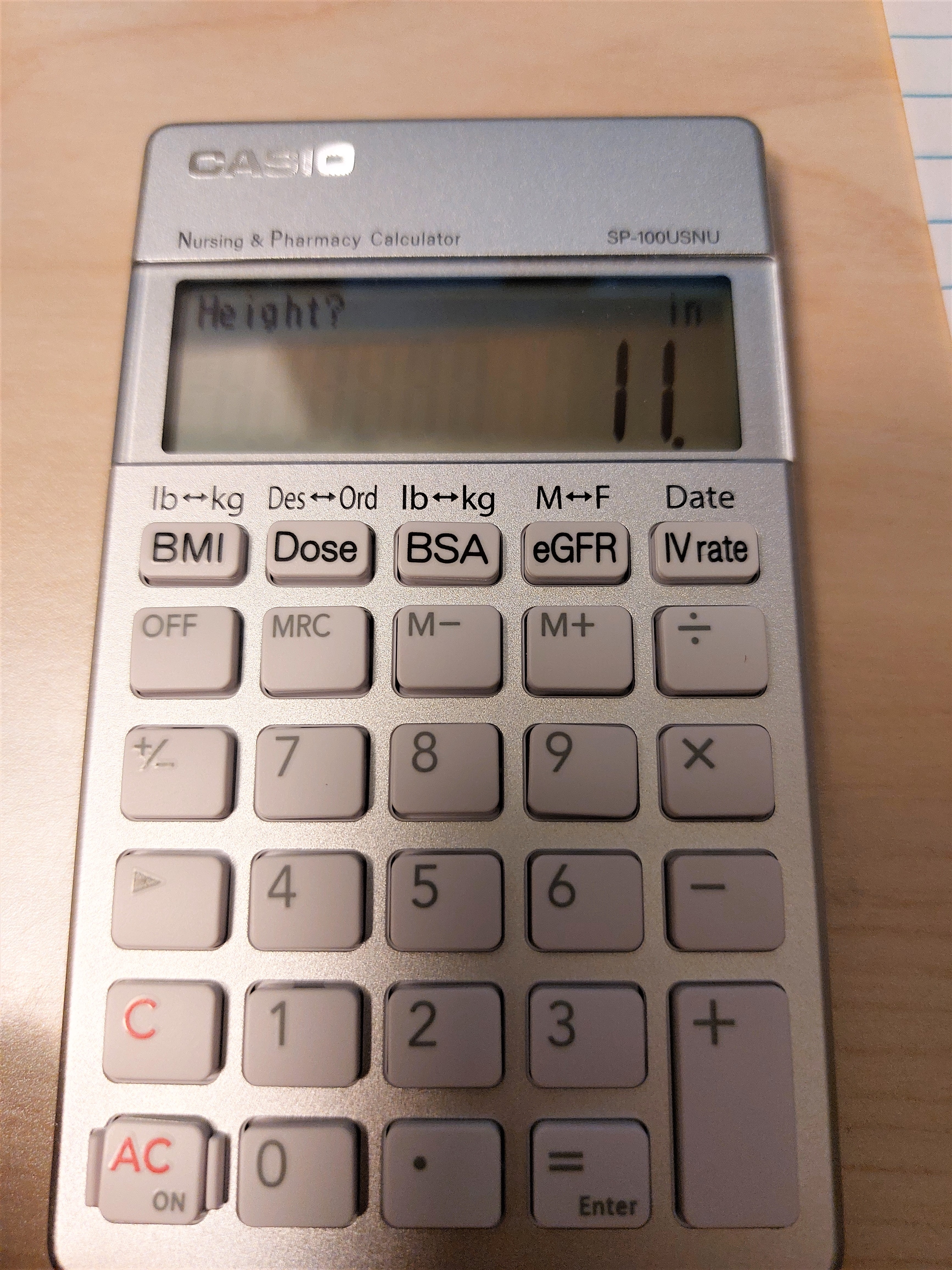
Review: Casio Nursing Calculator SP-100UNSU

Review:  Casio Nursing Calculator SP-100UNSU


It's rare, but there are nursing-based calculators that are available in the market from time to time.  Here is a review of one.


Quick Facts


Model:  SP-100USNU

Company:  Casio

Years:  2022-current

Type:  Nursing 

Batteries: CR2016

Operating Modes:  Chain

Number of Registers: 1

Display:  10 digits, with prompts

Cost:  $39.99 USD


The calculator that I ordered came in an ecology-friendly package, with the calculator wrapped in a bubble wrap pocket.  Unfortunately, it does not have a hard sliding case or the calculator being in a wallet.


The calculator casing has a nice silver finish with white keys.


A Calculator for the Nursing and Pharmacy Industries


The SP-100USNU is built for the nursing and pharmacy industries.  Five of the keys deal with six calculations, which each of the top keys serving as a toggle.  What is great about the SP-100USNU is that the calculator gives prompts and menus as necessary.  The display is crisp and clean.  


[ BMI ]:   Body Mass Index.   Two input modes:  lbs/ft/in,  kg/cm


[ Dose ]:  Does Calculation.   Solve for Ordered Dose given Desired Dose, or solve for Desired Dose given Ordered Dose.  Doses are in mL, with amount of the medicine (per pill, capsule, gummy, etc.) in mg.


[ BSA ]:  Body Surface Area approximation in square meters.  Two input modes:  lbs/ft/in, kg/cm


[ eGFR ]:  Calculate the estimated glomerular filtration rate which assist in diagnosis of chronic kidney disease.   The CKD-EPI equation, which factors a person's skin color (black vs. non-black), sex (male vs. female), weight (for body surface area), creatinine secretion (mg/dL), and the person's age.  What is calculated?   CCr, Creatinine Clearance, in mL/min and eGFR, estimated glomerular filtration rate, in mL/min/1.73m^2.   The average body surface area is estimated to be 1.73 m^2.  


[ IV rate ] (date):  This key toggles between two types of calculations: IV Drip Rate and Date calculation.


IV Drip Rate:  three inputs are needed.   Volume of medicine in mL, time that the IV lasts in minutes, and drop factor in gtts/mL (typically 15 - 20 gtts/mL).  gtts stands for number of drops.  The drip rate is given in gtts/min.  


Date:  Calculate the date functions for all dates in the 21st century (January 1, 2000 to December 31, 2099).  

1.  Before:  calculate the date before the base date.  

2.  After:  calculate the date after the base date.  

3.  Period: calculate the days between dates.


The formulas are given at the back of box (expect for CCr and the date calculations) and listed in the manual (expect for date calculations).   Hence the box and the manual is a neat reference.   


Link to the manual, which has to be downloaded:  https://support.casio.com/storage/en/manual/pdf/EN/004/SP-100USNU_EN.pdf


Regular Calculator  


The SP-100USNU is also a regular four function calculator.  Unfortunately neither the percent function (%) nor the square root function (√) are present.  I would think that the nursing profession would work with percentages. We do have memory calculations (M+, M-, MRC).


Also you may need access to a conversion table (via calculator, book, internet, all of the above) to do common conversions.   I would have loved to see that present here too.


Conversion Factors


1 kg = 2.20462 lb

1 in = 2.54 cm

1 L = 1000 mL

1 hr = 60 min


During the prompts, we can execute side calculations before entering the required entry in the prompt.


Final Thoughts


I did not like the fact that that calculator does not have the % and the √ functions.  It would be nice if conversion factors were included (especially with the money).  However, the formulas included make a great specialized calculator.   


Eddie 


All original content copyright, © 2011-2022.  Edward Shore.   Unauthorized use and/or unauthorized distribution for commercial purposes without express and written permission from the author is strictly prohibited.  This blog entry may be distributed for noncommercial purposes, provided that full credit is given to the author. 


Sunday, June 12, 2022

TI-65 Programs

TI-65 Programs


Conversions:  Miles and Kilometers 


TI-65 Conversion:  

F1:  Miles to Kilometers

F2:  Kilometers to Miles


00  2nd 53.53     LBL F1

01  38     ×

02   6     6

03   3     3

04   3     3

05   6     6

06   0     0

07  39     =

08  3rd 25     in-cm

09  28     ÷

10   1     1

11  15     EE

12   5     5

13   39   =

14   -15   INV EE    // remove scientific notation

15   2nd 52    RTN


16   2nd 53.54     LBL F2

17   38     ×

18   1      1

19   15    EE

20   5      5

21   -3rd 25     INV in-cm

22   28     ÷

23   6      6

24   3      3

25   3      3

26   6      6

27   0      0

28   39   ×

29   -15      INV EE

30   2nd 52    RTN


4.9 mi to km:

4.9 [ F1 ]

Result:  7.8857856  km


150 km to mi: 

150 [ F2 ]

Result:  93.20567884 mi


Conversions:  RGB (Red/Green/Blue) Color Code and Hexadecimal Codes


TI-65 Conversions:

F1:  RGB to Hexadecimal

F2:  Hexadecimal to RGB


00   2nd 53.53      LBL F1

01    38     ×

02    1       1

03    6       6

04    18     y^x

05    4       4

06    39     =

07    12.0    STO 0

08    51    R/S

09    38    ×

10    2      2

11    5      5

12    6      6

13    39    =

14    12.59   STO+

15    0      0

16    51    R/S

17    12.59    STO+

18    0       0

19    13.0    RCL 0

20    3rd 13   HEX

21    2nd 52  RTN


22    2nd 53.54   LBL F2

23    12.0   STO 0

24    3rd 12    DEC

25    28      ÷

26    1        1

27    6        6

28    18      y^x

29    4        4

30    39      =

31    2nd 27   INTG

32    51     R/S

33    38     ×

34    1       1

35    6       6

36    18     y^x    

37    4       4

38    39     =

39    12.49  STO-

40    0      0

41    13.0    RCL 0

42    28    ÷

43    2      2

44    5      5

45    6      6

46    39    =

47   2nd 27   INTG

48   51     R/S

49   38     ×

50   2       2

51   5       5

52   6       6

53   39     =

54  12.49   STO-

55   0        0

56   13.0   RCL 0

57   2nd 52  RTN


RGB to HEX:   red  [ F1 ]  green [ R/S ] blue [ R/S ] 

Example:  Red:  108, Blue:  4, Green: 82

108 [ F1 ]  4 [ R/S ] 82 [ R/S ]

Result:  6C0452  (HEX mode)


HEX to RGB:   [ 3rd ] (HEX) hex code [ F2 ]  

Example:  Hex Code: 3401D2

[ 3rd ] (HEX) 3401D2 [ F2 ] 

Result:  52 (red) [ R/S ], 1 (green) [ R/S ], 210 (blue)


Electronics:  Primary Filter and Voltage Gain


F1:  Calculate frequency.  f = 1 ÷ ( 2 * π * R * C ).   

Syntax:  R [ F1 ] C [ R/S ]

R = resistance in ohms ( Ω )

C = capacitance in farads ( F )

f = frequency in Hertz (Hz)


F2:  Voltage Gain.  G = 20 * log( E_output ÷ E_input ).  

Syntax:  E_output [ F2 ] E_input [ R/S ]

E_output = output voltage ( V )

E_input = input voltage ( V )

G = voltage gain in decibels ( dB )


Source:  Casio fx-61f User's Manual


00  2nd 53.53  LBL F1

01  38    ×

02  51    R/S

03  38    ×

04  2      2

05  38    ×

06  2nd 17  π

07  39    =

08  34    1/x

09 2nd 52  RTN


10  2nd 53.54  10

11  28    ÷

12  51    R/S

13  39    =

14  2nd 32  LOG

15  38   ×

16  2     2

17  0     0

18  39   =

19  2nd 52  RTN


R = 8400 Ω, C = 0.05*10^-6 F

8400 [ F1 ] 0.05E-6 [ R/S ]

Result:  3.789403407E2 Hz


E_output = 54 V, E_input = 28 V

54 [ F2 ] 28 [ R/S ]

Result:  5.70471457 dB


Eddie


All original content copyright, © 2011-2022.  Edward Shore.   Unauthorized use and/or unauthorized distribution for commercial purposes without express and written permission from the author is strictly prohibited.  This blog entry may be distributed for noncommercial purposes, provided that full credit is given to the author. 


Earth's Radius by Latitude

Earth's Radius by Latitude Introduction: Calculating the Earth’s Radius In quick, general calculations, we assume that the...