Showing posts with label Casio fx-9750GII. Show all posts

Thursday, October 6, 2022

Matrices in Python without Numpy: Part 4

Matrices in Python without Numpy:  Part 4


We have a good set of tools through out the first three parts.  


For today's blog, let mat1 = [ [ 2, -3, 4 ], [ 1, 5, 7 ] [ 4, 8, -6 ] ]


Screenshots are made using an emulator on my.numworks.com. 


Row Multiply and Add


rowop(matrix, row1, scalar, row2)


Multiplies row1 by a scalar and adds the results to row2.  The matrix is permanently changed.


def rowop(M,r1,s,r2):

  c=len(M[0])

  MT=M

  for k in range (c):

    MT[r2][k]=MT[r1][k]*s+MT[r2][k]

  return MT


Upper Triangle Matrix


utri(matrix)


Changes the matrix to an upper triangular form.  All the elements below the diagonals are zero.  Due to the algorithm, row 0 cannot have a zero or an error occurs.  The algorithm is not perfect.  


def utri(M):

  MT=M

  c=len(M[0])

  for j in range(c-1):

    for k in range(j+1,c):

      rowop(MT,j,-MT[k][j]/MT[j][j],k)

  return MT


Determinant Using the Upper Triangle Matrix


det(matrix)


Calculates the determinant by first transforming the matrix into an upper triangle matrix.


def det(M):

  MT=utri(M)

  d=1

  for k in range(len(MT[0])):

    d*=MT[k][k]

  return d


Please be aware that floating point limitations of Python. 


The determinant should be -322. 


This concludes the series.  


Happy computing,


Eddie 


Source:


Ives, Thom.  "BASIC Linear Algebra Tools in Pure Python without Numpy or Scipy"  Integrated Machine Learning & AI  December 11, 2018.  https://integratedmlai.com/basic-linear-algebra-tools-in-pure-python-without-numpy-or-scipy/


All original content copyright, © 2011-2022.  Edward Shore.   Unauthorized use and/or unauthorized distribution for commercial purposes without express and written permission from the author is strictly prohibited.  This blog entry may be distributed for noncommercial purposes, provided that full credit is given to the author. 


Wednesday, October 5, 2022

Matrices in Python without Numpy: Part 3

Matrices in Python without Numpy:  Part 3


Today's functions will focus on exact calculations for determinants and inverses for certain sizes:  2 x 2 and 3 x3.  


In the following examples:


mat2 = [ [ 11, 2 ] , [ -8, 4 ] ]

mat3 = [ [ 11, 2, 3 ], [ 4, 51, 6 ], [ 17, 8, 19 ] ]


Screenshots are made using an emulator on my.numworks.com. 


Determinants


det2(matrix):  determinant of a 2 x 2 matrix

det3(matrix):  determinant of a 3 x 3 matrix


def det2(M):

  if len(M)==2 and len(M[0])==2:

    return M[0][0]*M[1][1]-M[0][1]*M[1][0]

  else:

    return "not a 2 x 2 matrix"


def det3(M):

  if len(M)==3 and len(M[0])==3:

    m10=M[1][0]

    m20=M[2][0]

    m11=M[1][1]

    m21=M[2][1]

    m12=M[1][2]

    m22=M[2][2]

    t=M[0][0]*det2([[m11,m12],[m21,m22]])

    t-=M[0][1]*det2([[m10,m12],[m20,m22]])

    t+=M[0][2]*det2([[m10,m11],[m20,m21]])

    return t

  else:

    return "not a 3 x 3 matrix"


Inverses


inv2(matrix):  inverse of a 2 x 2 matrix

inv3(matrix):  inverse of a 3 x 3 matrix


def inv2(M):

  if len(M)==2 and len(M[0])==2:

    MT=newmatrix(2,2)

    t=det2(MT)

    MT[0][0]=M[0][0]*1/t

    MT[0][1]=-M[1][0]*1/t

    MT[1][0]=-M[0][1]*1/t

    MT[1][1]=M[1][1]*1/t

    return MT

  else:

    "not a 2 x 2 matrix"


def inv3(M):

  if len(M)==3 and len(M[0])==3:

    t=det3(M)

    A=newmatrix(3,3)

    A[0][0]=det2([[M[1][1],M[1][2]],[M[2][1],M[2][2]]])/t

    A[0][1]=det2([[M[0][2],M[0][1]],[M[2][2],M[2][1]]])/t

    A[0][2]=det2([[M[0][1],M[0][2]],[M[1][1],M[1][2]]])/t

    A[1][0]=det2([[M[1][2],M[1][0]],[M[2][2],M[2][0]]])/t

    A[1][1]=det2([[M[0][0],M[0][2]],[M[2][0],M[2][2]]])/t

    A[1][2]=det2([[M[0][2],M[0][0]],[M[1][2],M[1][0]]])/t

    A[2][0]=det2([[M[1][0],M[1][1]],[M[2][0],M[2][1]]])/t

    A[2][1]=det2([[M[0][1],M[0][0]],[M[2][1],M[2][0]]])/t

    A[2][2]=det2([[M[0][0],M[0][1]],[M[1][0],M[1][1]]])/t

    return A

  else:

    "not a 3 x 3 matrix"


The functions inv2, inv3, and det3 require det2.  I am using mprint to print matrices as they are supposed to appear.  Please see the blog post on October 3 for the code for mprint. 


Coming up in Part 4, row operations, upper triangular matrices, and determinants of matrices of any size. 


Happy computing,


Eddie 


Source:


Ives, Thom.  "BASIC Linear Algebra Tools in Pure Python without Numpy or Scipy"  Integrated Machine Learning & AI  December 11, 2018.  https://integratedmlai.com/basic-linear-algebra-tools-in-pure-python-without-numpy-or-scipy/


All original content copyright, © 2011-2022.  Edward Shore.   Unauthorized use and/or unauthorized distribution for commercial purposes without express and written permission from the author is strictly prohibited.  This blog entry may be distributed for noncommercial purposes, provided that full credit is given to the author. 


Tuesday, October 4, 2022

Matrices in Python without Numpy: Part 2

Matrices in Python without Numpy:  Part 2


Let's continue from yesterday.  


Screenshots are made using an emulator on my.numworks.com. 


Matrix Addition


madd(matrix 1, matrix 2)


Adds matrix 1 to matrix 2.  The dimensions of both matrices must be the same.


def madd(A,B):

  # dimension check

  if len(A) != len(B) or len(A[0]) != len(B[0]):

    return "Dimensions of A and B mismatch"

  else:

    M=newmatrix(len(A),len(A[0]))

    for i in range(len(A)):

      for j in range(len(A[0])):

        M[i][j]=A[i][j]+B[i][j]

    return M


In this example screen shot:


mat1 = [ [ 8, -2 ], [ -4, 7 ] ]

mat2 = [ [ 1, 3 ], [ 5, 6 ] ]


Matrix addition is communitive.  Hence,  mat1 + mat2 = mat2 + mat1.


Matrix Multiplication


mmult(mat1, mat2)


Multiplies mat1 to mat2.  Here the number of columns of mat1 must be the same as the rows of mat2.  


Matrix multiplication is not communitive.  Hence, mat1 * mat2 ≠ mat2 * mat1


def mmult(A,B):

  # dimension check

  if len(A[0]) != len(B):

    return "Columns of A != Rows of B"

  else:

    M=newmatrix(len(A),len(B[0]))

    for i in range(len(A)):

      for j in range(len(B[0])):

        t=0

        for k in range(len(A[0])):

          t +=A[i][k]*B[k][j]

        M[i][j]=t

    return M


Note that both madd and mmult require newmatrix.  See yesterday's post for the code for newmatrix. 


Next time, we will work with determinants and inverses.


Happy computing,


Eddie 


Source:


Ives, Thom.  "BASIC Linear Algebra Tools in Pure Python without Numpy or Scipy"  Integrated Machine Learning & AI  December 11, 2018.  https://integratedmlai.com/basic-linear-algebra-tools-in-pure-python-without-numpy-or-scipy/


All original content copyright, © 2011-2022.  Edward Shore.   Unauthorized use and/or unauthorized distribution for commercial purposes without express and written permission from the author is strictly prohibited.  This blog entry may be distributed for noncommercial purposes, provided that full credit is given to the author. 


Monday, October 3, 2022

Matrices in Python without Numpy: Part 1

Matrices in Python without Numpy:  Part 1


Introduction


Python is a wonderful programming language and is a welcome addition to graphing calculators such as:


*  TI nSpire CX II  and TI nSpire CX II CAS

*  TI-84 Plus CE Python (it's become hard to find and hopefully it won't be the case in 2023)

*  HP Prime

*  Casio fx-CG 50

*  Casio fx-9750GIII and fx-9860GIII

*  Numworks

*  From France:  TI-83 Premium Python, TI-82 Advanced Edition Python, Casio Graph fx-35+ E II


As I understand at time, there is no numpy module for any of the calculators*.   


But we want to work with matrices.  So we will need to program code to allow work with matrices.  Welcome to the Matrices in Python without Numpy series!


* There is a linalg module for the HP Prime.  


This series will cover:


*  creating matrices and other basics

*  adding and multiplying matrices

*  determinant and inverse of 2 x 2 and 3 x 3 matrices

*  upper triangular matrices and general determinant


In this series, a single Python file is created, matrix.py.   Each of the commands are going to be a separate function within a define structure.   This allows matrix.py to imported into other Python scripts by from matrix import *.  


Entering Matrices


Use square brackets to enter matrices:  


[ [ M11, M12, M13, ... ] , [ M21, M22, M23, ... ] , [ M31, M32, M33, ... ] ] 


Each row enclosing elements per column, and each row is separated by a comma.  All the rows are enclosed in square brackets.  


In this sense, matrices in this sense are nested lists.  Call elements by:


Call a row:   matrix[row]

Call the last row:  matrix[-1]

Call an element:  matrix[row][column]


Number of rows:  len(matrix)

Number of columns:  len(matrix[0])


Remember, in Python, indices start with 0 and go to row-1, column-1.  We will stick with the index convention to stay consistent.  


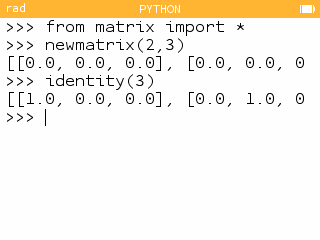
Screenshots are made using an emulator on my.numworks.com


Creating and Printing Matrices


newmatrix(number of rows, number of columns).  


The matrix will be filled with zeros.


Code:

def newmatrix(r,c):

  M = []

  while len(M)<r:

    M.append([])

    while len(M[-1])<c:

      M[-1].append(0.0)

  return M


identity(size)


Creates an identity matrix, a square matrix with ones in the diagonal, zeroes everywhere else.  The identity matrix a fundamental matrix.


Code:


def identity(n):

  M = newmatrix(n,n)

  for i in range(n):

    M[i][i]=1.0

  return M


So far, we see resulting matrices in a row or scroll off the screen.  Let's make it so we can see matrices as they are written.  


mprint(matrix)


Prints a matrix in text form.


def mprint(M):

  for r in M:

    print([x+0 for x in r])


List comprehension is a very powerful tool in Python.


In the following examples, we will store a 3 x 3 matrix:


mat1 = [ [ 1, 2, 3 ] , [ 4, 5, 6 ] , [ 7, 8, 9 ] ] 


transpose(matrix)


The transpose function flips a matrix on it's diagonal.  For each element:


M^T:   M(row, col) → M^T(col, row)


def transpose(M):

  # get numbers of rows

  r=len(M)

  # get number of columns

  c=len(M[0])

  # create transpose matrix

  MT=newmatrix(c,r)

  for i in range(r):

    for j in range(c):

      MT[j][i]=M[i][j]

  return MT


scalar(matrix, factor)


Next, we have scalar multiplication, multiply each element of the matrix by the factor.


def scalar(M,s):

  r=len(M)

  c=len(M[0])

  MT=newmatrix(r,c)

  for i in range(r):

    for j in range(c):

      MT[i][j]=s*M[i][j]

  return MT


mtrace(matrix)


Finally, we have the a trace of a matrix.  The trace is the sum of all the diagonals of a square matrix.  If the matrix is not square, an error occurs.


def mtrace(M):

  r=len(M)

  c=len(M[0])

  MT=newmatrix(r,c)

  if r !=c:

    return "Not a square matrix"

  else:

    t=0

    for i in range(r):

      t+=M[i][i]

    return t


In Python != means not equal.  


Coming in Part 2, let's add and multiply matrices.  


Happy computing,


Eddie 


Source:


Ives, Thom.  "BASIC Linear Algebra Tools in Pure Python without Numpy or Scipy"  Integrated Machine Learning & AI  December 11, 2018.  https://integratedmlai.com/basic-linear-algebra-tools-in-pure-python-without-numpy-or-scipy/


All original content copyright, © 2011-2022.  Edward Shore.   Unauthorized use and/or unauthorized distribution for commercial purposes without express and written permission from the author is strictly prohibited.  This blog entry may be distributed for noncommercial purposes, provided that full credit is given to the author. 


Sunday, May 24, 2020

Casio Comparison: fx-9750GII vs. fx-9750GIII

Casio Comparison:  fx-9750GII vs.  fx-9750GIII

Casio claims the fx-9750GIII is comparable to the TI-84 Plus.  But what about its predecessor: fx-9750GII? 

Casio fx-9750GII full shot of the calculator
Casio fx-9750GII

Screen: Casio fx-9750GII

Case and Back: Casio fx-9750GII

Casio fx-9750GIII full shot of the calculator
Casio fx-9750GIII

Screen: Casio fx-9750GIII

Case and Back: Casio fx-9750GIII


In the United States, we have a new graphing calculator from Casio, the fx-9750GIII.  It is an upgrade of the fx-9750GII in several ways:

*  A new Python programming mode
*  The spreadsheet and geometry modes are added
*  Storage memory of 3 MB is allocated to hold geometry, python, and flash files.  This is an addition to the about 61K of regular memory.
*  The fx-9750GIII now has textbook input and output options.   In textbook mode, you can control whether output defaults to exact answers (fractions, square roots, terms of pi) or approximate answers.

The fx-9750GIII's case is slightly smaller than the fx-9750GII, but the width is the same.  The fx-9750GIII has a lighter body as well.  I really like the lighter feel of the fx-9750GIII.  The fx-9750GIII's back has a 3D feel to it, which is nice.  I am also impressed with the keyboard and the color contrast. 

The package I purchased did not have a USB cord.   I believe the proper cord is a mini USB cord, probably can use the cord that came with the fx-9750GII (and similar calculators) and it should be fine. 

Performance wise, the two calculators are about even, with the fx-9750GIII slightly faster. I only did a little bit of testing so far.   Neither of them are slouches. 

For a more detailed comparison, you can download a PDF comparison here:
https://drive.google.com/open?id=1bMC27Mbjw4N41qv8CZ1UD5qTJopbAVZC

(PDF document created with LibreOffice Writer)

Eddie

All original content copyright, © 2011-2020.  Edward Shore.   Unauthorized use and/or unauthorized distribution for commercial purposes without express and written permission from the author is strictly prohibited.  This blog entry may be distributed for noncommercial purposes, provided that full credit is given to the author.

First Look: HP 16C Collector's Edition

 First Look: HP 16C Collector's Edition I just got the HP 16C Collector's Edition.   This is the famous HP 16C that specializes in c...