Showing posts with label loan. Show all posts

Saturday, April 18, 2026

DM41X: Interest Rate of a Forward-Forward Agreement

DM41X: Interest Rate of a Forward-Forward Agreement


A Future Interest Contract: Forward-Forward Agreement


A forward-forward agreement (yes, forward-forward is not a typo, that is what’s really called) is a financial transaction which starts on a forward date and ends on another forward date. An example transaction involves one party borrowing a sum amount to be paid back, only at the same time to deposit such amount in another short-term investment. The forward-forward rate, which I designate as FFR, is combined interest rate taking both transactions at the same time. The FFR is calculated as such:


FFR = [ (1 + IL * DL ÷ 365) ÷ (1 + IS * DS ÷ 365) – 1 ] * (365 ÷ (DL – DS))


IL: interest rate for the longer period, in decimal

DL: length of the long period

IS: interest rate for the shorter period, in decimal

DS: length of the short period

365: number of days in a year. It gets replaced with 360 if a 30/360 year is used.


If the loan lasts longer, the FFR represents the interest cost.

If the deposit lasts longer, the FFR represents the interest earned.


DM41X and HP 41C Code: FFR


01 LBL T^FFR

02 ^T FWD-FWD RATE

03 AVIEW

04 PSE

05 ^T LONG TRM DYS?

06 PROMPT

07 STO 01

08 STO 06

09 ^T LONG TRM %?

10 PROMPT

11 STO 02

12 %

13 365

14 /

15 1

16 +

17 STO 05

18 ^T SHORT TRM DYS?

19 PROMPT

20 STO 03

21 ST- 06

22 ^T SHORT TRM %?

23 PROMPT

24 STO 04

25 %

26 365

27 /

28 1

29 +

30 ST/ 05

31 RCL 05

32 1

33 -

34 365

35 *

36 RCL 06

37 /

38 2

39 10↑X

40 *

41 STO 07

42 ^T FFR=_

43 ARCL 07

44 AVIEW

45 RTN


Notes:

^T: It starts an alpha string.

Line 42: ^T FFR+_: The underscore is used as a space

Alpha strings are abbreviated in attempt for the message to fit the screen without scrolling.

Periods are assumed to be one year or less, and a 365-day year is assumed.


Examples


Example 1:

Longer Period (borrow): 49 days, 11%

Shorter Period (deposit): 30 days, 8%

Result: FFR= 15.6340


Example 2:

Longer Period (borrow): 63 days, 10.2%

Shorter Period (deposit): 31 days, 11.1%

Result: FFR= 9.2410


Source


Steiner, Bob. Mastering Financial Calculations. Second Edition. Prentice Hall: Financial Times. 2007. ISBN 978-0-273-70444-7. pp. 68-70


Eddie


All original content copyright, © 2011-2026. Edward Shore. Unauthorized use and/or unauthorized distribution for commercial purposes without express and written permission from the author is strictly prohibited. This blog entry may be distributed for noncommercial purposes, provided that full credit is given to the author.

Sunday, July 13, 2025

fx-3900PV Programs: Finance Factors

fx-3900PV Programs: Finance Factors


I’m revisiting the fx-3900Pv, which seems to be a hit. The last set of programs from May 3 of this year: https://edspi31415.blogspot.com/2025/05/casio-fx-3900pv-linear-system-poisson.html


Remember: When using the ENT (enter/input) command, we must enter a valid number and then the next step. The number that precedes ENT is not counted as a step and is not recorded.


Example: x + 9


In LRN (learn) mode (Mode EXP):

ENT (enter any number)

+

9

=


Casio fx-3900Pv: Simple Interest


maturity amount = principal amount * (1 + 0.01 * I%) * N ÷ 360

interest accrued = maturity amount – principal amount


I% = annual interest rate

N = number of days


The Act/360 method is used.


Code (23 steps):

ENT # enter principal amount (PV)

Kin 1

×

(

1

+

.

0

1

×

ENT # enter interest rate

×

ENT # enter number of days

÷

3

6

0

)

=

HLT # pause, display maturity amount

-

Kout 1

= # display interest accrued, end program


Example 1:


Inputs:

Principal Amount: 1,000.00

Rate: 5%

Number of Days: 30


Output (rounded to 2 decimal places)

Maturity Amount: 1,004.17

Interest Accrued: 4.17


Example 2:


Inputs:

Principal Amount: 360.00

Rate: 8%

Number of Days: 90


Output (rounded to 2 decimal places)

Maturity Amount: 367.20

Interest Accrued: 7.20


Casio fx-3900Pv: Compound Interest Factor with Compounding Periods


The following program calculates the compound interest factor:


factor = (1 + I% ÷ PYR) ^ (YRS × PVR)


where

I% = annual interest rate

PYR = payments per year (compounding periods)

YRS = number of years (N)


The factor is used in simple compound interest problems:


FV = PV × factor


where:

FV = future value

PV = present value


Code (19 steps):

(

1

+

.

0

1

×

ENT # enter interest rate

÷

ENT # enter payments per year

Kin 1

)

x^y

(

ENT # enter number of years

×

Kout 1

)

=


Example:

Find the compound interest interest factor for: I% = 5%, 12 payments a year, 4 years


Factor: 1.220895351


If an investor expects a $5,000.00 payoff, what should the investor pay?

PV = FV ÷ X

Keys: (with the answer from program displayed: [ 1/x ] [ × ] 5000 [ = ])

PV (rounded): 4,0953.36


Casio fx-3900Pv: Loan Annuity Factor


The following program calculates the loan annuity factor:


factor = ( ( 1 - ( 1 + I% ÷ PYR ) ^ (-YRS × PYR) ) ÷ ( I% ÷ PYR )


where

I% = annual interest rate

PYR = payments per year (compounding periods)

YRS = number of years (N)


The factor is used in loan problems without balloon payments, and assume that the payments occur at the end of each period (ordinary annuity):


PV = PMT × factor


where:

PV = present value

PMT = periodical payments


Code (30 steps):

ENT # enter interest rate

÷

ENT # enter payments per year

Kin 2

×

.

0

1

=

Kin 1 # K1 = I% ÷ PYR

ENT # enter number of years

×

Kout 2

=

Kin 2 # K2 = YRS × PYR = N

(

1

-

(

1

+

Kout 1

)

x^y

Kout 2

+/-

)

÷

Kout 1

=


Example:

A student buys a car at $35,619 (after taxes and fees). The student gets a six year loan at 5.7% and pays at the end of each month. What is the payment?


PMT = PV ÷ factor

where PV = 35619, I% = 5.7, PYR = 12 (monthly payments), YRS = 6


Running the program with inputs 5.7, 12, 6: 60.85819003

Payment: [ 1/x ] [ × ] 35619 [ = ]: 585.28 (rounded)


Casio fx-3900Pv: Sinking Fund Factor (Savings Account)


The following program calculates the sinking factor (used for savings accounts):


factor = ( (1 + I% ÷ PYR) ^ (YRS × PYR) – 1 ) ÷ (I% ÷ PYR)


The factor is used in determining the future value of savings plans with regular deposits made at the end of each period:


FV = PMT × factor


Code (29 steps):

ENT # enter interest rate

÷

ENT # enter payments per year

Kin 2

×

.

0

1

=

Kin 1 # K1 = I% ÷ PYR

ENT # enter the number years

×

Kout 2

=

Kin 2 # K2 = YRS × PYR

(

(

1

+

Kout 1

)

x^y

Kout 2

-

1

)

÷

Kout 1

=


Example:


A child’s parents opens up an account on the child’s first birthday. The parents contribute $200.00 per month for the next 18 years. The account pays a fixed rate of 3% per month. What is the value of the fund when the child turns 18?


Note: The account is opened on the child’s first birthday, hence 17 years pass.


FV = PMT × factor

where PMT = 100, I% = 3, PYR = 12, YRS = 17


Running the program with inputs 3, 12, 17: 265.69267

Future Value: [ × ] 200 [ = ]: 53,138.54 (rounded)


Until next time, stay safe and sane,


Eddie


All original content copyright, © 2011-2025. Edward Shore. Unauthorized use and/or unauthorized distribution for commercial purposes without express and written permission from the author is strictly prohibited. This blog entry may be distributed for noncommercial purposes, provided that full credit is given to the author.


The content on this blog is 100% generated by humans. The author does not use AI engines and never will.


Saturday, February 15, 2025

HP Prime and fx-CG 50: Percentage of a Mortgage Paid

HP Prime and fx-CG 50: Percentage of a Mortgage Paid


Introduction


The program PERMORTGAGE for the HP Prime, and PERMORT for the Casio fx-CG 50 calculates the percentage of mortgage paid off any time during the mortgage’s term.


Inputs:

N = The length of the mortgage (or loan) in number of monthly payments. The payments are assumed to be made at the end of the month.

R = The annual rate of the mortgage. Assume that this loan is fixed.

L = The amount of the loan.

D = The number of payments already made.


Assume that there is no balloon payment.


The % of mortgage paid is calculated by the following steps:


Step 1: Let P by the monthly payment: P = PMT(N, R, L, 0, 12, 12)

(the last two arguments are payments per year and compounding periods per year, both set at 12)


Both calculators featured use the cash flow convention. That is, all cash inflows (receipts) are positive and cash outflows (payments) are negative. In this case, the monthly payment (P) and balance remaining (B) are negative.


Step 2: Let B be the approximate balance using the FV (future value) function:

B = FV(D, R, L, P, 12, 12)


Step 3: Calculate the % of mortgage paid:

T = (1 + B / L ) * 100%


HP Prime Program Code: PERMORTGAGE


Syntax: PERMORTGAGE( nterm, rate, loan, npaid )

nterm = number of monthly payments for the entire term. Example for a 30 year term, nterm = 360

rate = annual rate of a mortgage

loan = loan amount

npaid = number of payments made


Result: % of the principal paid


Code:


EXPORT PERMORTGAGE(nt,rate,loan,np)

BEGIN

// n term, rate, loan,,n paid

// Percent of a Mortgage Paid

// Monthly payments assumed, end mode assumed

// Assume no balloon payment

// EWS 2024-11-01


LOCAL pymt,prct,baln;

pymt:=Finance.TvmPMT(nt,rate,loan,0,12,12);

baln:=Finance.TvmFV(np,rate,loan,pymt,12,12);

// PMT and FV will be negative

prct:=(1+baln/loan)*100;

RETURN prct;

END;


Casio fx-CG 50 Program: PERMORT


The program asks for a single calculation or range of calculations which is stored in Matrix Mat A. (The first row is has two zeros, and is used as a “header”.) The first column is the number of payments made, the second is the percentage of mortgage (loan) paid.


Code:


PmtEnd

“N (TERM)”? → N

“RATE”? → R

“LOAN AMT”? → L

Menu “TYPE”,”SINGLE”,1,”RANGE”,2

Lbl 1

Cmpd_PMT(N,R,L,0,12,12) → P

Cmpd_FV(D,R,L,P,12,12) → B

(1+B÷L)×100 → T

“PERCENT PAID =”

T

Stop

Lbl 2

“N1”? → A

“N2”? → B

“STEP”? → C

[ [ 0 ] [ 0 ] ] → Mat A

For A → D To B Step C

Cmpd_PMT(N,R,L,0,12,12) → P

Cmpd_FV(D,R,L,P,12,12) → B

(1+B÷L)×100 → T

Augment(Mat A, [ [ D ] [ T ] ]) → Mat A

Next

Trn Mat A → Mat A

“IGNORE TOP ROW - “

“ [ N PER ]” ◢

Mat A

Stop


Example


$100,000 loan over 30 years (360 payments). Screen shots were taking with the HP Prime emulator.


Percent of Mortgage Paid Example


Note that the % paid takes on a curve, the later we get into the term, the more principal is paid off. This program can be a demonstration of how amortization works.


Until next time,


Eddie


All original content copyright, © 2011-2025. Edward Shore. Unauthorized use and/or unauthorized distribution for commercial purposes without express and written permission from the author is strictly prohibited. This blog entry may be distributed for noncommercial purposes, provided that full credit is given to the author.
Saturday, July 9, 2022

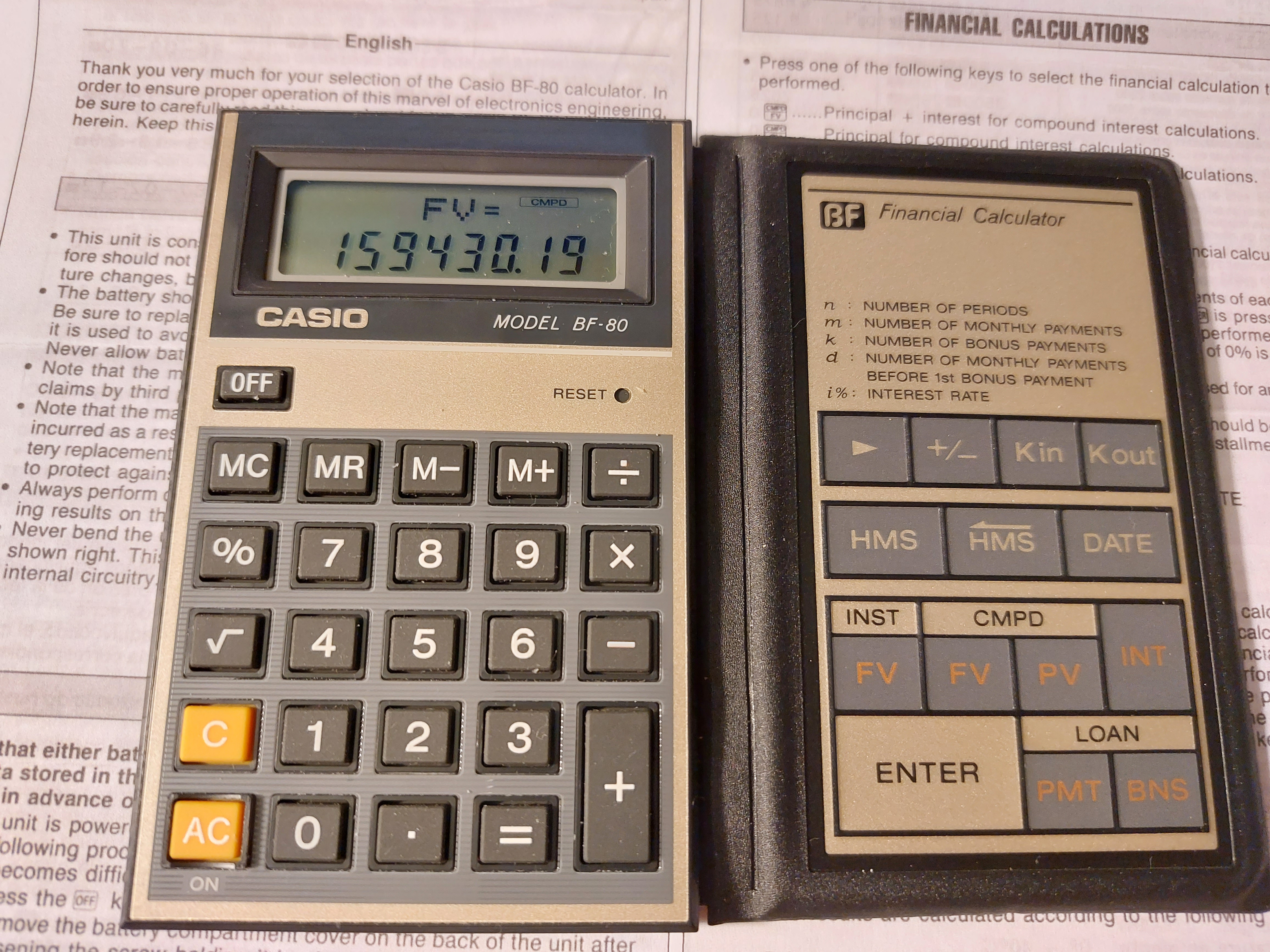
Retro Review: Casio BF-80

Retro Review:   Casio BF-80


A folding calculator with easy-to-calculate finance prompts.  


Quick Facts


Model:  BF-80  (Easy Banker Financial)

Company:  Casio

Years:  1985 (production run is probably the late 1980s)

Type:  Finance

Batteries: 1 x CR-2016

Operating Modes:  Chain

Number of Registers: 2 User registers:  M,  Kin/Kout 

Display:  2 lines


Features


The BF-80 is a dual-leaf calculator.  On the left side, you have a regular four-function calculator, including memory functions, percent, and the square root function.


On the right side is where all the financial functions the BF-80 are located:


[ Kin ]/[ Kout ]:  The BF-80's other user memory register.  Unlike register M, there is no register arithmetic.


[ HMS ]/[ <HMS ]:  Convert decimal to/from hours-minutes-seconds.  Use the [ HMS ] key to enter parts of time.  


Example:  Add 3.5 hours to 11:30:00

11 [ HMS ] 30 [ HMS ] [ + ] 3.5 [ = ] 

Result:  15°0°0 (15:00:00)


[ DATE ]:  The date key leads two of my favorite functions of all time:  days between dates and calculating a future date.   The format is yy - mm - dd  (no dashes for 21st century dates).  Years are entered as four digits, from 1901 to 2099.  


For most, if not all, calculators, the cash flow convention is not used.  


INST-FV:  Calculates the future value of an annuity.  Interest rate is entered as periodical rate. Note that deposits are made at the beginning of each period (annuity due).  The INST indicator turns on. 


Example:  I pay $500 a month in an account that pays 5% interest for 10 years.

[ INST FV ]   (INST indicator is on)

PMT?  500 [ ENTER ]

i%?  5 [ ÷ ] 12 [ = ] [ ENTER ] 

n?  10 [ ÷ ]  12 [ = ] [ ENTER ]

FV= 77964.641

Pressing [ INT ] gives the interest earned:  17964.641.


CMPD-FV:  Calculates the future value of a lump sum (present value).  The CMPD indicator turns on, and INT gives the accumulated interest.


CMPD-PV:  Calculates the present value of a future lump sum (future value).  The CMPD indicator turns on, and INT gives the accumulated interest.  


Both CMPD calculations use this equation:

FV = PV * (1 + i%)^n


LOAN-PMT:  Calculates the monthly payment of a loan due at the end of each month.  The loan is to paid without a balloon payment.  The LOAN indicator turns on.


PV?:  amount to be financed

i%?:  annual interest rate

m?:  number of monthly payments


Example:  What is the monthly payment of $8,293.00 loan with 6% interest over 6 years?

[ LOAN PMT ] (LOAN indicator is on)

PV? 8293 [ ENTER ]

i%?  6 [ ENTER ] (no dividing by 12 in LOAN mode)

m? 6 [ × ] 12 [ = ] [ ENTER ] (still enter the number of months)

PMT = 137.43896

Pressing [ INT ] gives the accumulated interest paid on the loan:  -1602.6051


LOAN-BNS:  Calculates the bonus payment of a separate (side) loan given the number of bonus payments and it's cycle.


k = number of bonus payments

d = number of months to the first bonus payment

PV = bonus loan amount

i% = annual interest rate of the bonus loan


Example:  What is the payment of a bonus loan of $4,412.00 with 3% interest.  The firs bonus cycle is every 3 months from the loan date, with 15 bonus payments.

[ LOAN BNS ]  (LOAN indicator is on)

PV?  4412 [ ENTER ]

i%?  3 [ ENTER ]  (annual rate, like LOAN-PMT)

k?  15 [ ENTER ] (number of bonus payments)

d?  3 [ ENTER ] (number of months prior to the first bonus payment)

BNS = 328.21123

Pressing [ INT ] gives the accumulated interest:  -511.16857


I guess that this is for loans where payments are due every few months instead of every month.  


The Percent Key


The percent key on the BF-80 works like most Casio calculators with a percent key.   


To add a percent:  n [ × ] p [ % ] [ + ]

To subtract a percent:  n [ × ] p [ % ] [ - ]

To find a percent ratio:  part [ ÷ ] whole [ % ]

Percent change:  new [ - ] old [ % ]


A Neat Calculator - An 1980s Version of a Smartphone App 


For it's time, the BF-80 offers calculator with quick, prompting calculations for the on-the-go business and finance student or profession.  Today, in the 2020s, the calculator of this time definitely would  be a smartphone app.  


Surprisingly buying a BF-80 was incredibly reasonable.   


Coming up:


July 11 - July 15, 2022:  TI-58 and TI-59 Week

Next Regular Blog:  July 10, 2022, then  July 23, 2022


Eddie


All original content copyright, © 2011-2022.  Edward Shore.   Unauthorized use and/or unauthorized distribution for commercial purposes without express and written permission from the author is strictly prohibited.  This blog entry may be distributed for noncommercial purposes, provided that full credit is given to the author. 


Sunday, May 15, 2022

Python: Financial Functions (2nd Edition)

Python:  Financial Functions (2nd Edition)


This is an update to the python file, which I first released on May 17, 2020:


https://edspi31415.blogspot.com/2020/05/numworkscasio-micropythonpython.html


I am able to transfer and test the python file to a Numworks calculator through the online editor, and TI-84 Plus CE Python through the TI Connect CE.  Because only the math module is used, the python file can be run in most, if not all calculators with Python, as well as Python 3.  


What is included?


*  time value of money calculations

*  net present value and internal rate of return

*  net present value (xnpv) and internal rate of return (xirr) when periods between flows are not consistent, a 365 day-year is assumed

*  simple interest:  calculating interest, total, and solving for principal

*  profit calculations: cost-sell-markup

*  adding sales tax

*  percent change

*  present and future value uniform stream factors

*  compound interest calculations of a single stream:  solve for present value, future value, number of periods, and periodic interest

*  days between dates

*  specific applications:  monthly payment, PITI, qualifying loan amount, sinking fund, expressing a list of amounts as a percent of the sum, prorating an amount among a list of flows


Download the Python file and the instructions (pdf file) here:

https://drive.google.com/file/d/1l7Xg9dM-RHfekKkU7A1Wjay76-yVc56S/view?usp=sharing


Size: about 3,800 bytes.  


Eddie


All original content copyright, © 2011-2020.  Edward Shore.   Unauthorized use and/or unauthorized distribution for commercial purposes without express and written permission from the author is strictly prohibited.  This blog entry may be distributed for noncommercial purposes, provided that full credit is given to the author. 


Sunday, May 17, 2020

Numworks/Casio MicroPython/Python: Financial Functions

Numworks/Casio MicroPython/Python:  Financial Functions 

My first python script for the Numworks calculator:  finance.py

Great calculator and glad I finally have one. 

Introduction

The following scripts creates the user functions for the following financial functions:

pchg(old, new):  Returns the percent change between two numbers
Example:  pchg(1400,2600) returns 85.71

taxlplus(amt, tax): Adds the tax rate to an amount. amt + tax%.  Results are rounded up to 2 decimal places.
Example:  taxplus(59,9.5) returns 64.6

uspv(n,i):  Takes n (number of payments) and i (periodic interest rate) and calculates the uniform present value factor.  PV = PMT * USPV.  Future value is assumed to be 0.
Example:  n = 36 payments, i = 0.25%.  uspv(36,0.25) returns 34.39

usfv(n,i):  Takes n (number of payments) and i (periodic interest rate) and calculates the uniform future value factor.  FV = PMT * USFV.  Present value is assumed to be 0.
Example:  n = 36 payments, i = 0.25%.  usfv(36,0.25) returns 37.62

mopmt(yrs,rate,loan):  Calculates the monthly payment of a loan with monthly payments.  Payments are assumed to be due at the end of each month.   Results are rounded to up to 2 decimal places. 
Example:  Loan of $238,000 for 30 years at 4.28% annual rate.  mompt(30,4.28,238000) returns 1175.0

annrate(ppy,cpy,rate):  Calculates the equivalent annual rate given ppy (payments per year), cpy (compounding payments per year), rate (estimated periodic rate).
Example:  ppy = 12, cpy = 2, periodic rate = 0.74%.   annrate(12,2,0.74) returns 9.0459

Source for annrate:
Roger F. Farish and The Staff of the Texas Instruments Learning Center.  Calculator Analysis for Business and Finance.  Texas Instruments, Inc.  1977.  ISBN 0-89512-015-1

sinkfund(yrs,rate,pymt):  Calculates the balance of a sink fund (savings account)  of monthly deposits.   Number of years and the annual interest rate are needed.  Deposits are assumed to be due at the end of each month.   Results are rounded to up to 2 decimal places. 
Example:  Monthly deposits of $400.00 for 5 years, at a rate of 2.9%.  sinkfund(5,2.9,400) returns 25793.77

piti(yrs,rate,loan,tax,insur):   Calculates the monthly payment of a mortgage given:  the term of the loan in years (yrs), the annual interest rate (rate), the mortgage (loan), the annual property tax (tax), and the annual property insurance (insur).  Payments are assumed to be due at the end of each month.  Results are rounded to up to 2 decimal places.
Example:  piti(30,3.3,160000,1349,240) returns 833.15

qualinc(inc,debt,taxins,rate,yrs):  Calculates the qualifying amount given the following parameters:  monthly income (inc), monthly debt payments (debt), monthly proper taxes and insurance (taxins), interest rate (rate), and term of the mortgage in years (yrs).   Mortgage payments are assumed to be due at the end of each month.   The standard debt:income ratio of 28:36 is used.  Results are rounded to up to 2 decimal places.
Example:  qualinc(4485,375,126.83,5.30) returns 207288.6


Python Script: finance.py

# 2020-04-12 EWS

from math import *

# percent change
def pchg(old,new):
  pch=(new-old)/old*100
  return pch

# add sales tax  
def taxplus(amt,tax):
  total=amt*(1+0.01*tax)
  return round(total,2)

# uniform pv factor pv=pmt*uspv
def uspv(n,i):
  factor=(1-(1+0.01*i)**(-n))/(0.01*i)
  return factor

# uniform fv factor fv=pmt*usfv
def usfv(n,i):
  factor=((1+0.01*i)**n-1)/(0.01*i)
  return factor
  
# monthly payment
def mopmt(yrs,rate,loan):
  pymt=loan/uspv(yrs*12,rate/12)
  return round(pymt,2)
  
# equivalent annual rate
def annrate(ppy,cpy,rate):
  irate=cpy*100*((1+0.01*rate)**(ppy/cpy)-1)
  return irate
  
# sinking fund
def sinkfund(yrs,rate,pymt):
  sink=pymt*usfv(yrs*12,rate/12)
  return round(sink,2)

# piti
def piti(yrs,rate,loan,tax,insur):
  pymt=loan/uspv(yrs*12,rate/12)+(tax+insur)/12
  return round(pymt,2)

# qualifying income 28:36 ratio
def qualinc(inc,debt,taxins,rate,yrs):
  a=min(inc*0.36-debt,inc*0.28)-taxins
  qual=a*uspv(yrs*12,rate/12)
  return round(qual,2)

Eddie

All original content copyright, © 2011-2020.  Edward Shore.   Unauthorized use and/or unauthorized distribution for commercial purposes without express and written permission from the author is strictly prohibited.  This blog entry may be distributed for noncommercial purposes, provided that full credit is given to the author.

Wednesday, March 6, 2019

HP 12C and HP 11C: Loan Amount Using the Annual Loan Constant

HP 12C and HP 11C:  Loan Amount Using the Annual Loan Constant

Introduction

The program calculates the theoretical loan amount using the following factors:

*  NOI:  Net Operating Income. The estimated net operating income the property is expected to earn annually.  An average is usually used.

*  DCR:  Debt Coverage Ratio.  The ratio of net operating income to annual debt service, describing a company's ability to pay its debts.  Generally, the larger the DCR, the better.  We really don't want DCR to be below 1.

*  Number of payments per year, number of years, and annual interest rate of the potential loan. 

The ALC, or the annual loan constant is calculated by:

*  Either divided the annual debt service by the loan amount (when the amount is known), or

*  Determining the periodic payment to amortize a $100 loan given number of payments and interest rate.

Set up:
Number of payments -> N
Interest Rate -> I%YR  (or periodic interest rate -> i)
-100 -> PV
0 -> FV
Solve for PMT

The ALC is expressed as a percentage. 

The theoretical loan amount is calculated by:

Loan = NOI / (DCR * ALC%)

HP 12C Program: Loan Amount Using the Annual Loan Constant

Instructions:
Store the following:
NOI in R1
DCR in R2
Number of payments per year in R3
Number of periods in [ n ]
Periodic Interest rate in [ i ]

Program:
Step;  Key;  Code
01;  1;  1
02;  0;  0
03;  0;  0
04;  CHS;  16
05;  PV;  13
06;  0;  0
07;  FV;  15
08;  PMT;  14
09;  RCL 3;  45, 3
10;  *;  20
11;  RCL 2; 45, 2
12;  x<>y;  34
13;  %;  25
14;  RCL 1; 45, 1
15;  x<>y;  34
16;  ÷;  10
17;  GTO 00;  43, 33, 00

(* HP 12C Platinum, step 17:  GTO  000; 43, 33, 000)

HP 11C Program:    Loan Amount Using the Annual Loan Constant

Instructions:
Store the following:
NOI in R1
DCR in R2
Number of payments per year in R3
Number of periods in R4
Periodic Interest rate in R5

Program:
Step; Key; Code
001;  LBL A; 42, 21, 11
002;  1;  1
003;  ENTER; 36
004;  ENTER; 36
005;  RCL 5;  45, 5
006; %;  43, 14
007;  +;  40
008;  RCL 4;  45, 4
009;  CHS;  16
010;  y^x; 14
011;  *;  30
012;  1;  1
013;  RCL 5; 45, 5
014;  %;  43, 14
015;  x<>y;  34
016;  R↓;  33
017;  ÷;  10
018;  1;  1
019;  0;  0
020;  0;  0
021;  x<>y; 34
022;  ÷;  10
023;  RCL 3; 45, 3
024;  *;  20
025;  RCL 2; 45, 2
026;  x<>y; 34
027;  %;  43, 14
028;  RCL 1; 45, 1
029;  x<>y;  34
030;  ÷; 10
031;  RTN; 43, 32

Examples

Example 1: 

NOI:  $58,000.00
DCR:  1.25
P/Y:  12
Number of Years: 30
Annual Interest Rate:  5%

Loan Amount:  $720,288.92

Example 2:

NOI:  $40,000.00
DCR:  1.35
P/Y:  12
Number of Years: 20
Annual Interest Rate:  6.8%

Loan Amount: $323,464.95

Source: 

Goldman, Mark H. and Stephen D. Messner "HP 12C Real Estate Applications Handbook"  Hewlett Packard Rev. B. March 1984

Eddie

All original content copyright, © 2011-2019.  Edward Shore.   Unauthorized use and/or unauthorized distribution for commercial purposes without express and written permission from the author is strictly prohibited.  This blog entry may be distributed for noncommercial purposes, provided that full credit is given to the author.

First Look: HP 16C Collector's Edition

 First Look: HP 16C Collector's Edition I just got the HP 16C Collector's Edition.   This is the famous HP 16C that specializes in c...