Showing posts with label cash flow. Show all posts

Monday, December 19, 2022

Review: Casio FC-200V 2nd Edition
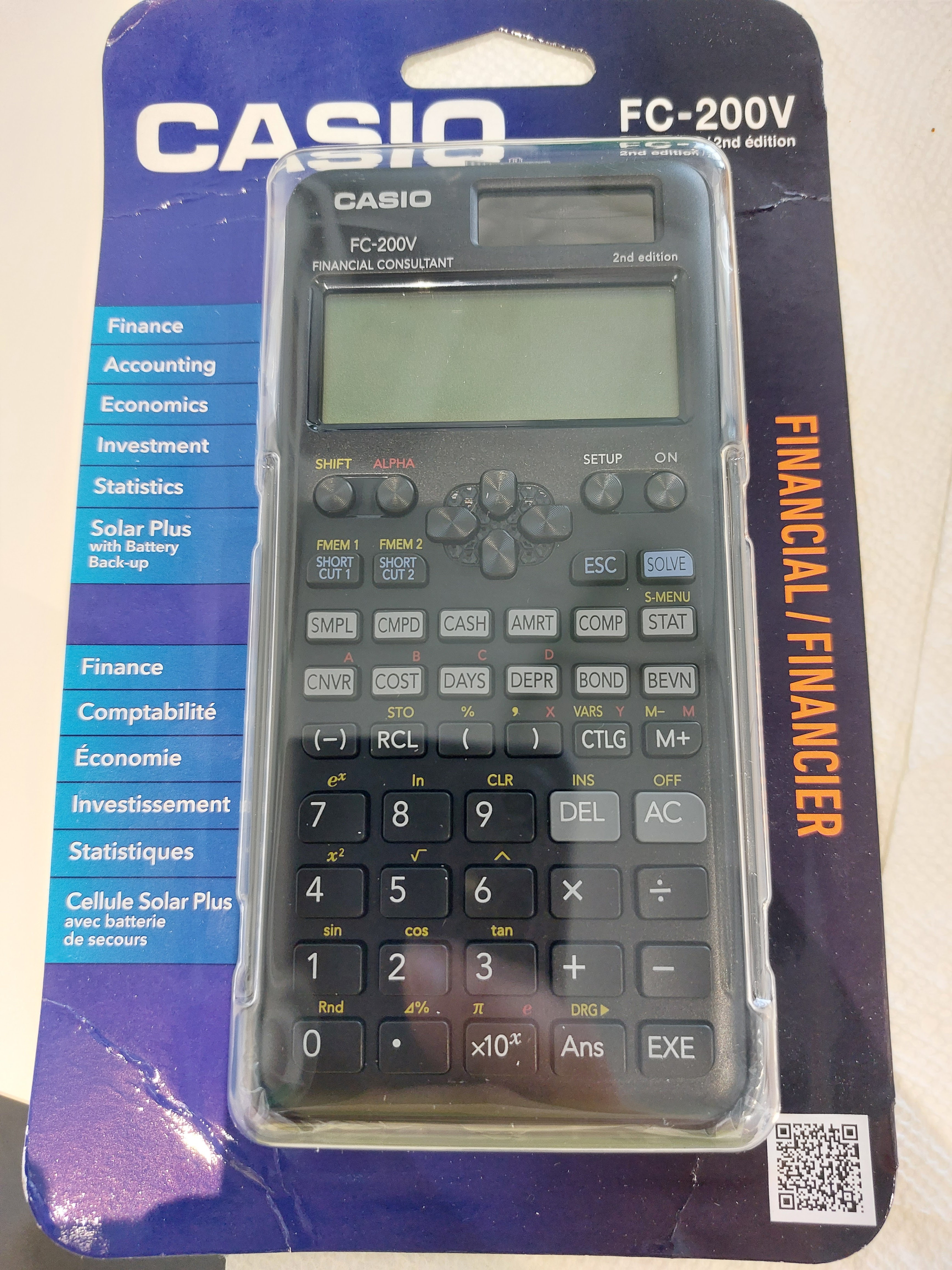
Review:  Casio FC-200V 2nd Edition


Quick Facts


Model:  FC-200V 2nd Edition

Company:  Casio

Years:  October 2022 - present

Type:  Finance 

Batteries:  Solar and Battery (1 LR44)

Memory: 7 memory registers

System:  Algebraic with Order of Operations

Contrast Setting


The Financial 2nd Edition 


Ten years ago I reviewed the FC-200V "1st edition", which had the gold keyboard.  To be honest, I the cash flow problem I had was probably due to operator error (me).  


The gold 1st edition was released in 2004 and 18 years later, we have the black 2nd edition.  The 2nd edition follows Casio updating the scientific calculators such as fx-115 ES, fx-300 ES, and fx-300 MS.  According to Casio, the redesign are more environmental friendly and more durable than their previous editions.   


Like the fx-115 ES 2nd Edition, the keyboard FC-200V 2nd Edition feels responsive and looks clean.  


The two rows of light gray keys features the worksheets and modes of the FC-200V:


SMPL:  Simple Interest

CPMD:  Compound Interest (Time Value of Money)

CASH:  Cash Flows

AMRT:  Amortization (of compound interest)

COMP:  Compute mode, main mode

STAT:  Statistics

CNVR:  APR/EFF Conversions

COST:  Cost/Sell/Profit Margin Solver

DAYS:  Days Between Dates and Date Calculation

DEPR:  Depreciation

BOND:  Bond Calculations

BEVN:  Breakeven Calculations


The sticker on the case lists all of variables used in the calculator, as well as how to set the contrast on the screen.   


The available regressions are:


A+Bx:  Linear

+Cx^2:  Quadratic

ln X:  Logarithmic

e^X:  Exponential

A∙B^X:  Exponential (any base)

A∙X^B: Power

1/X:  Inverse


We can store up to 80 single data points, or 40 pairs of data points.  Turning STAT mode on in SETUP will give us access to the frequency column.  However this reduces the maximum number of data points to 40 and 26, respectively. 


The types of depreciation models available are:


SL:  Straight Line

FP:  Fixed Percentage

SYD: Sum of the Year's Digits

DB:  Declining Balance


Some of the variables are shared with the time value of money variables:


n = life of the asset

I% = percentage or declining balance factor

PV = cost

FV = residual value or salvage value


The Cash Flow worksheet features the following calculations:


NPV:  net present value

IRR:  internal rate of return

PBP:  payback period

NFV:  net future value 


Be aware that the data entry is shared with the statistics mode.   The first data point is still marked data point 1.  Data point 1 is the initial cash flow, typically labeled CF0 in most calculators.  I wish that the FC-200V had two separate lists in memory for cash flows and statistics to reduce confusion.  Turning STAT mode on in SETUP will allow for each point to have a frequency.   


Switch between statistics and cash flow modes will clear the list of data points.   This is one of the few areas where data does not transfer between applications.  


There is a FC-100V which is battery powered but does not have depreciation, bonds, and breakeven calculations.   The FC-100V 2nd Edition is currently available outside of the United States.  


I think the FC-200V could have used a QR code command on the calculator like the fx-991 EX.  However, we get a QR code on the calculator's case which gives access to the user manual.  


One of my favorite features is the ability to store two expressions through SHORT CUT 1 and SHORT CUT 2, and two functions with the FMEM1 and FMEM2.  FMEM1 and FMEM2 are the only way to assign access some of the functions such as rectangular/polar conversions, arcsine, arccosine, arctangent, factorial, and absolute value to the keyboard.


Variables


The FC-200V has seven variables independent of the financial variables: A, B, C, D, X, Y, and M.  M has the memory add (M+) and memory subtract (M-) that Casio has on scientific calculators.  We can enter variables with the ALPHA key.  However, the store key brings up a menu and this is the only way to store variables.  


The Percent Key and the Percent Change Key


The percent key works like the percent function on scientific algebraic calculators, just dividing its argument by 100.  The percent key (Δ%) also had idiosyncrasies to it.  Just typing Δ% execute the function immediately. 


To add y percent to x:  x + x * y% or x * (1 + y%)

To subtract y percent from x:  x - x * y% or x * (1 - y%)

To calculate percent change from x to y:  x - y Δ%

To calculate (y + x)/x * 100%:  x + y Δ%

To calculate sale price:   cost * profit margin Δ%


The manual makes a great reference, not only detailing the operations of the calculator, but also lists reference formulas.  You will have to find it online, as the calculator only gets quick start guides in English, Spanish, and French.


Final Thoughts


The FC-200V 2nd Edition is a feature rich financial calculator and its pretty easy to use, if you are willing to work with the idiosyncrasies.  


Source


Casio.  "FC-200V-2 Financial"  Retrieved December 3, 2022.  https://www.casio.com/us/scientific-calculators/product.FC-200V-2/


Eddie


All original content copyright, © 2011-2022.  Edward Shore.   Unauthorized use and/or unauthorized distribution for commercial purposes without express and written permission from the author is strictly prohibited.  This blog entry may be distributed for noncommercial purposes, provided that full credit is given to the author. 


Saturday, December 21, 2019

Retro Review: Casio FC-100 Financial Calculator

Retro Review:  Casio FC-100 Financial Calculator


Quick Facts:

Model:  FC-100
Company:  Casio
Type:  Finance
Years:  1987 - 1991
Display:  10 digits
Batteries:  1 CR 2035

I paid $18 on eBay, I suspect that the original price was somewhere in the $20 - $30 neighborhood. 

All the Basics Are Covered

Time Value of Money

The FC-100 has the following financial features:

Time Value of Money:  The standard cash convention is used, where cash inflows are positive, cash outflows are negative.  The [COMP] key is used to compute the needed variable.  There are two keys dedicated to amortization.  Given the number of payments:

[AMRT]:  principal paid on the nth payment, interest paid on the nth payment, balance after the first n payments

[ACC]:  accumulated principal on the first n payments, accumulated interest on the first n payments

Similar to the Hewlett Packard HP 12C, the 12× multiplies the number of years by 12 and stores the result in n (number of payments), while the 12÷ divides the annual interest rate and stores the result in i% (periodic rate). 

Cash Flows

The FC-100 can store up to 16 cash flows.  The two calculations available are net present value and initial rate of return (NPV and IRR, respectively).  The interest rate is entered using the [ i% ] key.  We can clear all the cash flows quickly by KAC (pressing [SHIFT] [ Min ]). 

Days Between Dates

There are two modes that deal with date setting:  actual (365) and 30/360 year.  There are two functions:  days between dates and adding/subtracting dates.  Only days between dates is available on the 365 setting. 

What is cool about the FC-100, is the dates are allowed between January 1, 1900 and December 31, 2099. This is pretty impressive for a calculator of the late 1980s.  Dates in the 1900 century are entered with two-digit years while dates in the 2000 century are entered with four-digit years. 

The result of any calculation will include the day of the week (0 for Sunday, 6 through Saturday).

Statistics

Single variable and linear regression are available.  The FC-100 uses the six registers for statistical sums:

K1 = ⅀x^2
K2 = ⅀x
K3 = n
K4 = ⅀y^2
K5 = ⅀y
K6 = ⅀xy

Memory Registers

Another theme of Casio calculators from the 1980s are the use of independent memory registers K1 through K6.  Store data by using Kin, recall data by using Kout.  Storage arithmetic is also available.  An independent memory register M is available.

Keyboard

The FC-100 has an on-off switch on the side of the keyboard.  I like this placement.

The keyboard is clean, the keys are nice and responsive.  I like the size of the keys of the numeric and arithmetic keys (brown).  The keys on the top four rows (in ivory) are smaller in size, a little smaller than I like.  However, the keys are comfortable to press. 

Verdict

The Casio FC-100 is a great user-friendly financial calculator. 

Source:
"Casio FC-100 (FINANCIAL CONSULTANT)"  calculator.org  https://www.calculator.org/calculators/Casio_FC-100.html  Retrieved December 6, 2019

Eddie

All original content copyright, © 2011-2019.  Edward Shore.   Unauthorized use and/or unauthorized distribution for commercial purposes without express and written permission from the author is strictly prohibited.  This blog entry may be distributed for noncommercial purposes, provided that full credit is given to the author.

Friday, June 7, 2019

Casio fx-5800P: Cash Flow Program (Pierre Gillet)

Casio fx-5800P:  Cash Flow Program (Pierre Gillet)

Introduction:  Cash Flows Using the Stat List

Today's program comes from Pierre Gillet, who emailed me a set of programs to calculate net present value (NPV) and internal rate of return (IRR) for the Casio fx-5800P.  A key feature is that these programs use the statistical lists List X and List Freq from the SD mode.

There are three programs listed:

"NPV":  calculates Net Present Value.  Store the interest rate in decimal in variable X in Comp mode before running "NPV".

"SOLVE":  solves for the Internal rate of return (IRR) using the secant method.  Again, use decimals for interest rates.  For the IRR, your YTARGET is always 0.

"YFX":  The function to solve.  In this case, YFX refers the program to "NPV".

The programs here are from Pierre Gillet and are presented with permission.

Casio fx-5800P program "NPV"  (Pierre Gillet) 

Notes:
1.  Small n  is from the Statistics variable n.  [ FUNCTION ], 7:  STAT, 2: VAR, 1: n
2.  Call up the Stat lists by:  [ FUNCTION ], 7: STAT, 1: LIST  (1: List, 2:  Freq, or type X for List X)

0 → Y : 1 → U : 2 → W 
Lbl 1
U + List Freq[W] → V
Lbl 2
Y (1 + X) + List X[W] → Y
Isz U
U < V ⇒ Goto 2
Isz W
U < n ⇒ Goto 1
List X[1] + Y ÷ ( ( 1 + X ) ^ ( n - 1 ) ) → Y

Casio fx-5800P program "SOLVE"  (Pierre Gillet)

Note:  Keep recycling the loop with [ EXE ] until an error occurs.  The final result is the IRR (stored in X).

Note: The frequency of the first data point (X[1]) is not considered in the calculation.

"X1" ? → A
"X2" ? → B
"YTARGET" ? → T
A → X : Prog "YFX"
Y - T → R
B → X : Prog "YFX"
Y - T → S
Lbl 1
B - S ( B - A ) ÷ ( S - R ) → C
C → X ⊿
Prog "YFX" : Y - T → Q
A → B : R → S : C → A : Q → R
Goto 1

Casio fx-5800P program "YFX"  (Pierre Gillet)

Prog "NPV"

Example

Go to SD mode.  Make sure that the Frequency is turned on by pressing [ SHIFT ],  ( SETUP), 5: STAT, 1: FreqOn

Data:  List X, Freq
-5600, 1
1300, 1
2500, 1
3000, 1

NPV:  interest rate of 8%.  (store 0.08 in X)

Result:  $128.55

Solve for IRR,  run SOLVE with guesses X1 = 0, X2 = .15, and YTARGET = 0.

Final result:  0.0912 (9.12%)

Thank you Pierre Gillet!

Note: I wasn't called to jury duty - back to normal life for me.  I'm also posting this a day early. 

Eddie

All original content copyright, © 2011-2019.  Edward Shore.   Unauthorized use and/or unauthorized distribution for commercial purposes without express and written permission from the author is strictly prohibited.  This blog entry may be distributed for noncommercial purposes, provided that full credit is given to the author.

Earth's Radius by Latitude

Earth's Radius by Latitude Introduction: Calculating the Earth’s Radius In quick, general calculations, we assume that the...