Showing posts with label conic sections. Show all posts

Monday, December 11, 2017

HP Prime: Perigee and Apogee of a Conic Section

HP Prime:  Perigee and Apogee of a Conic Section

Introduction

The program CONICAP determines three characteristics of a conic section:

Eccentricity:
E = 0, circle
0 < E < 1, ellipse
E = 1, parabola (this case is not covered)
E > 1, hyperbola

Periapsis (Perigee):
The point on the conic section where it is closest to a primary focus (which is designated at one of the two foci F or F’).

Apoapsis (Apogee):
The point on the conic section where it is furthest away from a primary focus.  Note for a hyperbola and a parabola, the apogee is ∞. 

 The inputs are the lengths of the semi-major axis (A) and the semi-minor axis (P).  For a hyperbola, input A as negative. 


HP Prime Program CONICAP

EXPORT CONICAP(A,P)
BEGIN
// EWS 2017-12-10
// Fundamentals Of Astrodynamics
// ABS(A)≥P
LOCAL E;
E:=√(1-P/A);
PRINT();
PRINT("Perigee: "+STRING(A*(1-E)));
IF A≥0 THEN
PRINT("Apogee: "+STRING(A*(1+E)));
END;
PRINT("Eccentricity: "+E);
IF E==0 THEN
PRINT("Circle");
END;
IF E>0 AND E<1 THEN
PRINT("Ellipse");
END;
IF E>1 THEN
PRINT("Hyperbola");
END;
END;

Examples


A = 8, P = 3
A = 5, P = 5
A = -8, P = 3
Perigee
1.67544467966
5
1.38083151968
Apogee
14.3245553203
5
N/A
Eccentricity
0.790569415042
0
1.17260393996

Source:
Roger R. Bate, Donald D. Mueller, Jerry E. White.  Fundamentals of Astrodynamics Dover Publications: New York.  1971. ISBN-13: 978-0-486-60061-1

Eddie


This blog is property of Edward Shore, 2017.

Monday, November 9, 2015

HP Prime Geometry App Tutorial Part 7: Conic Sections and Equations

HP Prime Geometry App Tutorial Part 7: Conic Sections and Equations

In today’s lesson we will work conic sections and showing the equations for each of the conic sections.

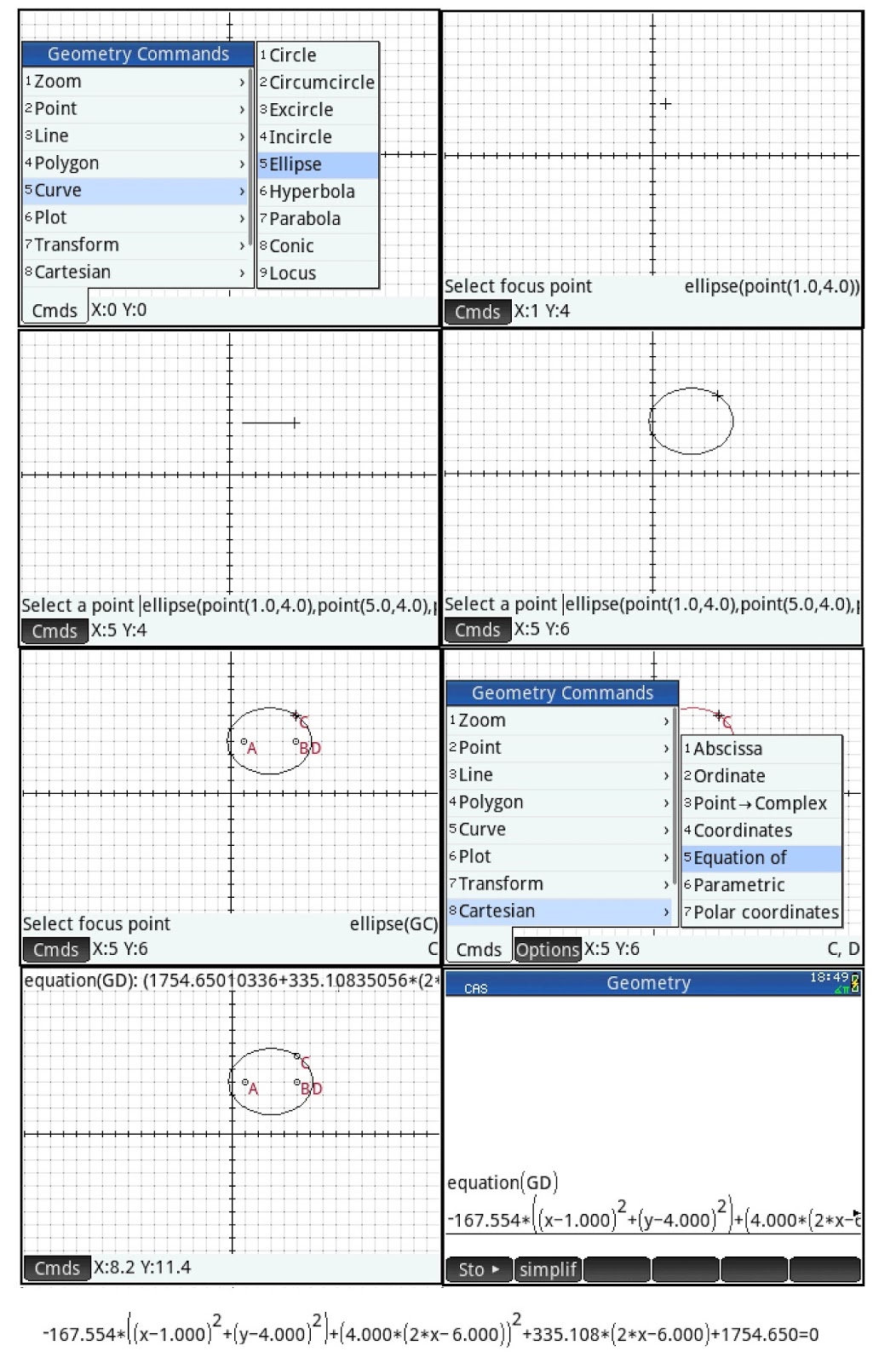
Drawing an Ellipse and Display its Equation

Command:  ellipse(focus point 1, focus point 2, point on the ellipse)

Draw an ellipse with foci (1,4) and (5,4) and the point on the ellipse on (5,6).

1.  Press (Cmds), 5 for Curve, 5 for Ellipse. 
2.  Go to the point (1,4) and press [ Enter ].
3.  Go to the point (5,4) and press [ Enter ].
4.  Go to the point (5,6) and press [ Enter ].

The next step is to display its equation. 

5.  Press (Cmds), 8 for Cartesian, 5 for Equation of.
6.  Select the ellipse and press [ Enter ].  In this example the equation is named GD.
7.  To see the whole equation, press [ CAS ] and execute the equation(GD) command.
8.  Press the up button to highlight the equation and press (Show).  Scroll to see the entire equation.


Drawing a Hyperbola and Display its Equation

Command:  hyperbola(focus point 1, focus point 2, point on the hyperbola)

Drawn a hyperbola with foci (-2, -2) and (-4, 2) with point (-9, 2).

1.  Press (Cmds), 5 for Curve, 6 for Hyperbola. 
2.  Go to the point (-2,-2) and press [ Enter ].
3.  Go to the point (-4,-2) and press [ Enter ].
4.  Go to the point (-9,2) and press [ Enter ].

The next step is to display its equation. 

5.  Press (Cmds), 8 for Cartesian, 5 for Equation of.
6.  Select the ellipse and press [ Enter ].  In this example the equation is named GD.
7.  To see the whole equation, press [ CAS ] and execute the equation(GD) command.
8.  Press the up button to highlight the equation and press (Show).  Scroll to see the entire equation.


Drawing a Parabola and Display its Equation

Command:  parabola(focus point, directrix line)

Draw a parabola with focus point (0,-5) and (0,3) is on the directrix line.

1.  Press (Cmds), 5 for Curve, 7 for Parabola. 
2.  Go to the point (0,-5) and press [ Enter ].
3.  Go to the point (0,3) and press [ Enter ].

The next step is to display its equation. 

4.  Press (Cmds), 8 for Cartesian, 5 for Equation of.
5.  Select the ellipse and press [ Enter ].  In this example the equation is named GC.
6.  To see the whole equation, press [ CAS ] and execute the equation(GC) command.
7.  Press the up button to highlight the equation and press (Show).  Scroll to see the entire equation.


On the next part, we will work with rotating geometric objects.   Thank you and see you next time,

Eddie


This blog is property of Edward Shore – 2015.  

Python: Combination Functions (Micropython)

Python: Combination Functions (Micropython) This is a set of combination functions. Programmed with a Casio fx-CG 100 but should ...