Showing posts with label 3D graphing. Show all posts

Friday, July 27, 2018

HP Prime: 3D Graphs July 2018 Gallery


HP Prime:  3D Graphs July 2018 Gallery

All graphs are made with the initial rangers x = [-4, 4], y = [-4, 4], and z = [-4, 4] rotated at different angles.  The function variable for 3D graphs for the HP Prime is FZ# (# is 0-9).  


 z = cos (xy) * cos(2xy) * cos(3xy)

z = e^(-sin(2xy)*cos(xy)/2)

z = cos y * (e^(-x^2/2) – e^(x^2/8))

z = sin(x*y) * cos(x*y) + sin(x*y)^2 * cos(x*y)

z = x^4 * y * cos(x*y) * e^(x*y)

z = ± √(x^2 – y^2)

z = ± |sin(x*y) – cos(x*y) + x* e^y| 
z = y^2 * sin x * Γ(x/6)

z = x * sin(|x^2 + y^2|)
Until next time, have a great weekend and see in you August!

Eddie


 All original content copyright, © 2011-2018.  Edward Shore.   Unauthorized use and/or unauthorized distribution for commercial purposes without express and written permission from the author is strictly prohibited.  This blog entry may be distributed for noncommercial purposes, provided that full credit is given to the author.  Please contact the author if you have questions.


Saturday, November 11, 2017

Casio fx-CG 10, fx-CG 20, fx-CG 50 Update to Software Version 3.1

Casio fx-CG 10, fx-CG 20, fx-CG 50 Update to Software Version 3.1

If you want to see my original review of the fx-CG 50, please click here: 

What’s New with Software Version 3.1
  
Major Graph3D App Update!

Wow!  Casio hit it out of park with their updated 3D Graph mode.

When I first reviewed the Casio fx-CG 50 last June, one of the new features highlighted was the 3D Graph mode.  At the time, the mode was limited to lines, planes, spheres, and cylinders.  A good start, but limited mode. 

Not anymore.  First, the update added cones to the template.


The 3D Graph mode has become an official graphing mode because the mode now has functional graphing in the form of Z(X,Y).


It doesn’t stop there.  The mode also offers parametric graphing in the form of (X(S,T), Y(S,T), Z(S,T)).  This might be my favorite part of the Graph 3D app.


Finally, you can rotate Y(X) functions either by X or Y axis, to give a really neat visualization of functions.


The update adds analysis for planes and lines.  Analysis includes intersection points and relational type analysis (intersection vs. orthogonal vs. rotational vs. parallel, etc.)


QR Codes Added to the Catalog

QR (Quick Response) codes, those small square bar codes that people scan with their smartphones to connect to certain webpages, have been added to most of the commands in the Catalog.  Any QR reader should do.  A successful reading of the bar code leads to Casio’s online manual. 


Count on Casio continuing the use of QR codes, in both graphing and non-graphing models.  Recall that the fx-991 EX Classwiz has QR codes to display stat plots and screen shots through Casio’s Casio EDU+ software and app. 

Yes, QR codes generated by the catalog can be read by the Casio EDU+ app. 

For more details, click here:

Wish List

I wish in the next update, Casio increases the number of colors to display text and graphs, currently there are still seven (black, blue, red, magenta, green, cyan, and yellow).  At least put an RGB function. 

I think a differential equation graph mode or type would fit well with this series, even if it is just in the form of y’ = f(x,y,constants) and the Runge Kutta 4th order method is used. 

I suspect the next hardware of this series will have memory increased to at least 256MB or more.   This series of calculators deserves to have such increase because of all the great things this series offers!

Download Links


Please keep in mind you will need to install the Graph3D for the fx-CG 10 and fx-CG 20 Add-In separately.  The Graph3D already comes with the fx-CG 50.


The era of third-dimensional graphing is here to stay!

Eddie

This blog is property of Edward Shore, 2017.

Saturday, June 17, 2017

Casio fx-CG50 Review (updated 3/2/2018)

Casio fx-CG50 Review


Company:  Casio
Type: Scientific/Graphing
Price:  (about) $119
Battery: 4 AAAs
Memory: 60 KB RAM, 14 MB Flash
Colors:  Can display up to 65,536 colors, graphing and text can be use up to 8 colors

I’m going to focus more on the new and updates in this review.
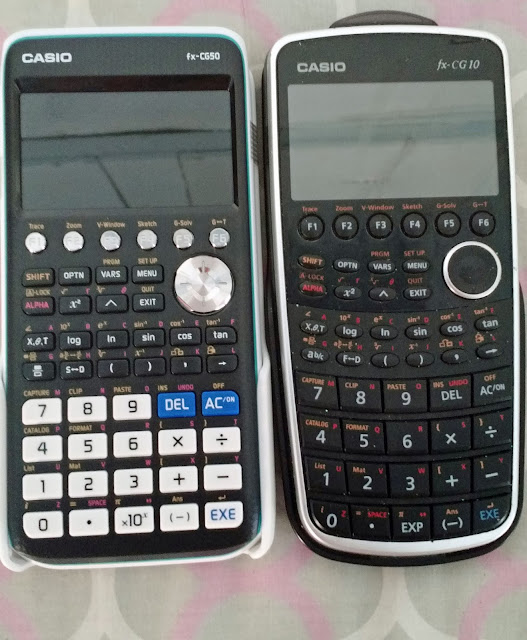

2017 fx-CG50 on the left, 2011 fx-CG10 on the right


Keyboard

The fx-CG50 is an update of the popular 2011 Casio Prizm (model fx-CG10 or fx-CG20).  The fx-CG50 has an updated keyboard, in the style of the new fx-260 SOLAR and Casio FX-991 ES.  As a result, the keys are easier to read, more consistent to the touch and size.  In the previous keyboard (fx-CG10/20), the number keys were large but the function keys were very small.

The Screen

Like the previous fx-CG10/20, the diagonal of the screen is 3.17 inches.  However, the screen of the fx-CG50 is brighter. 

Processing Speed

Although I wasn’t able to find anything about the chip or its speed, the fx-CG50 seems to operate faster in accounts.   

I tested a sample program:

For 1 → A To 1000
ClrText
Locate 2,1,A
Next

On the fx-CG10, the program took 1 minute, 24.83 seconds to complete.  With the fx-CG50, the program took just 34.87 seconds, a reduction of 58.89%.

General Features
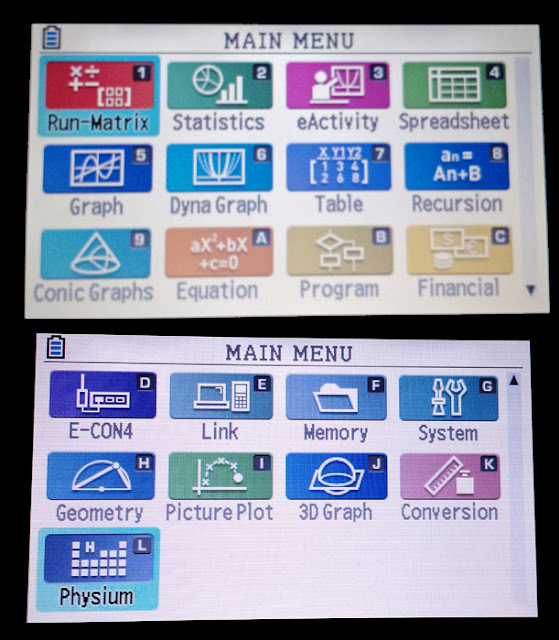
fx-CG50 Menu selection screen

* Financial Solver: Time Value of Money, Days between Dates, Bonds
* Recursive, Polar, Function, Parametric, Inequality, and Conic Section Graphing
* General Function Solver
* Polynomial Solver: up to the 6th degree, coefficients must be real, but roots can be complex numbers
* Simultaneous Equation Solver:  up to 6 x 6 linear equations, can include complex numbers
* Number of Statistic Regressions (curve fitting): 12

Also textbook entry, calculus, and full complex number (yes that includes exponential, logarithms, and trigonometric functions of complex numbers – yes I’m happy about this!**).  Base calculations include binary, octal, decimal, and hexadecimal integers.

** As of OS 3.10, trig functions no longer accept complex numbers.  Why Casio why?  (3/2/2018)

Additional modes include Geometry, Conversion, and Spreadsheet.  3D graphing is new to the fx-CG50.

Graphs can be used in one of 8 colors: black, blue, red, magenta, green, cyan, yellow, and white.  This palette is the same of the SECAM palette shown on certain Atari 2600 machines.  (Link:  https://en.wikipedia.org/wiki/List_of_video_game_console_palettes#Atari_2600 )

3D Graphing

The 3D graphing mode offers one of four possible types: line, plane, sphere, and cylinder.  Each of the types offer various formats to enter coefficients.  Keep in mind these are the only four types of 3D graphs offered.  The graph has full zoom features and it is pretty snappy with regards to rotation.  


Physium

Physium is included with the fx-CG50.  There are two features with the Physium:  Periodic Table and Physical Constants.

Periodic Table:  an underrated feature.  You can display the entire table, or zoom in to a portion of the table.  The atomic weight of each element can be stored in a variable (A through Z).


Physical Constants:  Choose between 39 physical constants from five categories: Universal (speed of light, electric constant, Newton’s constant of gravitational, etc.), Electromagnetic constants, Atomic & Nuclear constants, Physico-Chemical constants (Avogardo constant, molar gas constant, etc), and three Adopted Values (Josephson constant, Klitzing constant, standard acceleration of gravity).  Units are in SI.


Verdict

If you don’t have a Casio fx-CG10/20 and are interested in getting the updated version, go for it.  I also think getting the update is worth it primarily for the faster processing speed, brighter screen, and much better keyboard as far as contrast on the labels and key size.  Obviously Casio is very consistent with the programming language, so if you are upgrading from a previous non-color or three-color version, you should feel right at home with the fx-CG50.  The one thing I wish the fx-CG50 had was more RAM instead of only the 60KB from fx-CG10.  It’s not terrible, but given the TI-84 Plus CE has 128K RAM, Casio should have at least matched that amount.

Eddie


This blog is property of Edward Shore, 2017

HP 67 Collection: October 2026

HP 67 Collection: Oct ober 2026 All examples are done in FIX 4. (DSP 4) Earth's Gravity at a Specific Latitude The true ea...