Showing posts with label software update. Show all posts

Thursday, January 27, 2022

Numworks Update 17.2 - Highlights

 Numworks Update 17.2 - Highlights


Update is available at:

https://www.numworks.com/


The Numworks website will detect your calculator and will offer the update.


Here are some quick highlights:


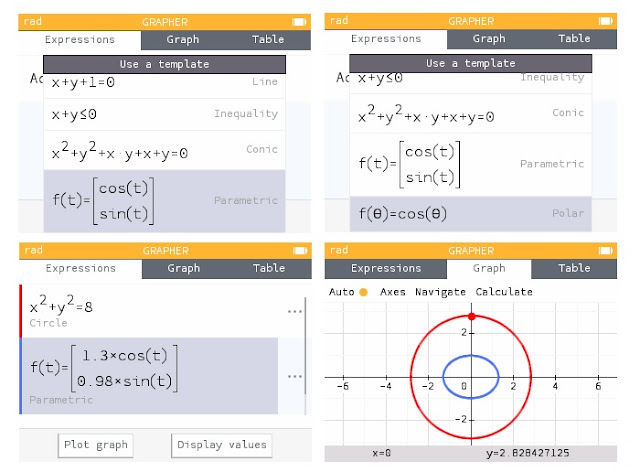
Extended graphing capabilities in Grapher.  In addition to functions f(x), lines, inequalities, conic sections, parametric equations, and polar equations can be graphed.  Different type of graphs can be plotted on the same screen.


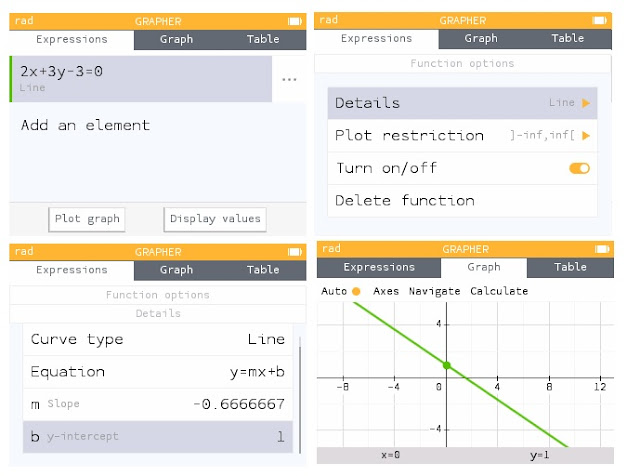
Detail next to a line in Grapher (three dots) will display the slope and y-intercept.  Not pictured:  additional details added to Conic graphs.


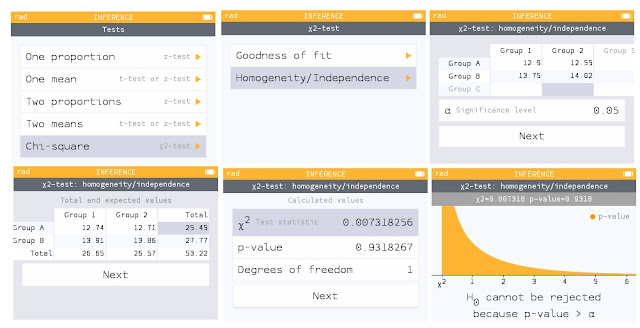
Major update to the Probabilities application, named Inference, includes tests and intervals.   Pictured here is a Chi-Square test of Independence.


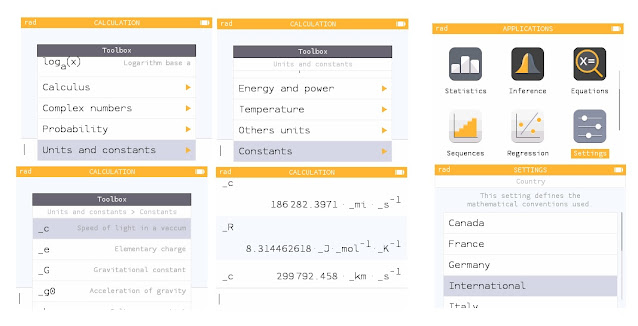
The toolbox contains scientific constants.  The units are determined by the Country setting in the Settings.  International is the SI units.   


The [ x, n, t ] cycles between x, n, t, and Θ.


For all the details (translation may be required):  https://www.numworks.com/calculator/update/version-17/


Eddie


All original content copyright, © 2011-2022.  Edward Shore.   Unauthorized use and/or unauthorized distribution for commercial purposes without express and written permission from the author is strictly prohibited.  This blog entry may be distributed for noncommercial purposes, provided that full credit is given to the author. 


Tuesday, September 15, 2020

New TI-Nspire CX/CX II Update

 New TI-Nspire CX/CX II Update

Texas Instruments offers a software update:  5.2.   New to version 5.2:  Python.  

Both the handheld software and computer software have the new update.  

To update now, click here:

https://education.ti.com/en/product-resources/whats-new

Eddie 

All original content copyright, © 2011-2020.  Edward Shore.   Unauthorized use and/or unauthorized distribution for commercial purposes without express and written permission from the author is strictly prohibited.  This blog entry may be distributed for noncommercial purposes, provided that full credit is given to the author. 


Sunday, October 21, 2018

Casio fx-CG50: Version 3.20: Python Comes to Casio!

Casio fx-CG50:  Version 3.20:  Python Comes to Casio!


The Casio fx-CG 50 joins the HP Prime and the French calculator NumWorks to add Python to its list of programming modes.  The Python mode comes by a software update. 
This update is only for the newest Casio fx-CG 50.  I'm not sure if Python will be available for any other Casio models yet. 

The Python is Micro Python 1.9.4.  Below are screenshots of the Python mode in action.  I typed in the OCTA program from the User's Guide as an example.


Get Version 3.20 here:  https://edu.casio.com/products/graphic/fxcg50/

Click under OS Update Information.

Also consider getting the updated User's Guide.  The Python programming module is discussed in Chapter 17.  The user's guide can be found here:

https://support.casio.com/storage/en/manual/pdf/EN/004/fx-CG50_Soft_v320_EN.pdf

Eddie

All original content copyright, © 2011-2018.  Edward Shore.   Unauthorized use and/or unauthorized distribution for commercial purposes without express and written permission from the author is strictly prohibited.  This blog entry may be distributed for noncommercial purposes, provided that full credit is given to the author.  Please contact the author if you have questions.

Saturday, November 11, 2017

Casio fx-CG 10, fx-CG 20, fx-CG 50 Update to Software Version 3.1

Casio fx-CG 10, fx-CG 20, fx-CG 50 Update to Software Version 3.1

If you want to see my original review of the fx-CG 50, please click here: 

What’s New with Software Version 3.1
  
Major Graph3D App Update!

Wow!  Casio hit it out of park with their updated 3D Graph mode.

When I first reviewed the Casio fx-CG 50 last June, one of the new features highlighted was the 3D Graph mode.  At the time, the mode was limited to lines, planes, spheres, and cylinders.  A good start, but limited mode. 

Not anymore.  First, the update added cones to the template.


The 3D Graph mode has become an official graphing mode because the mode now has functional graphing in the form of Z(X,Y).


It doesn’t stop there.  The mode also offers parametric graphing in the form of (X(S,T), Y(S,T), Z(S,T)).  This might be my favorite part of the Graph 3D app.


Finally, you can rotate Y(X) functions either by X or Y axis, to give a really neat visualization of functions.


The update adds analysis for planes and lines.  Analysis includes intersection points and relational type analysis (intersection vs. orthogonal vs. rotational vs. parallel, etc.)


QR Codes Added to the Catalog

QR (Quick Response) codes, those small square bar codes that people scan with their smartphones to connect to certain webpages, have been added to most of the commands in the Catalog.  Any QR reader should do.  A successful reading of the bar code leads to Casio’s online manual. 


Count on Casio continuing the use of QR codes, in both graphing and non-graphing models.  Recall that the fx-991 EX Classwiz has QR codes to display stat plots and screen shots through Casio’s Casio EDU+ software and app. 

Yes, QR codes generated by the catalog can be read by the Casio EDU+ app. 

For more details, click here:

Wish List

I wish in the next update, Casio increases the number of colors to display text and graphs, currently there are still seven (black, blue, red, magenta, green, cyan, and yellow).  At least put an RGB function. 

I think a differential equation graph mode or type would fit well with this series, even if it is just in the form of y’ = f(x,y,constants) and the Runge Kutta 4th order method is used. 

I suspect the next hardware of this series will have memory increased to at least 256MB or more.   This series of calculators deserves to have such increase because of all the great things this series offers!

Download Links


Please keep in mind you will need to install the Graph3D for the fx-CG 10 and fx-CG 20 Add-In separately.  The Graph3D already comes with the fx-CG 50.


The era of third-dimensional graphing is here to stay!

Eddie

This blog is property of Edward Shore, 2017.
Classic RPN Stack Operations

  Classic RPN Stack Operations Starting Stack: T:  d Z:  c Y:  b X:  a OVER :   Copies b to the Z and X stacks, while leaving ...