Showing posts with label firmware update. Show all posts

Saturday, April 8, 2023

New OS Update for Casio Classpad II

New OS Update for Casio Classpad II


Per TIPlanet:  Casio has released a new OS version (2.01.7002).   Among the changes includes the new off-screen when the Classpad is turned off with Casio's new logo "Boost Your Curiosity".  

The updates do not include the Python programming language (I don't think).

The calculators included are the fx-CP400 and fx-CP500.


TIPlanet's News Link with Downloads (in French):

https://tiplanet.org/forum/viewtopic.php?p=271577#p271577


Casio's Download Resources Page:

https://edu.casio.com/download_service/en/download/index.html


For those of you who celebrate, Happy Easter!


Eddie 

All original content copyright, © 2011-2023.  Edward Shore.   Unauthorized use and/or unauthorized distribution for commercial purposes without express and written permission from the author is strictly prohibited.  This blog entry may be distributed for noncommercial purposes, provided that full credit is given to the author. 


Saturday, July 9, 2022

Numworks: Version 19.2 Is Available

Numworks:  Version 19.2 Is Available


19.2 Is Here

The full upgrade to software 19.2 is for Numworks N0110 and N0120 models.  Only some of the features will be available for the oldest version N0100. 

How do I know which version I have?  

1.  Press the Yellow Home button.

2.  Go down to Settings and press [ EXE ]

3.  Go down to the last option in the menu, About, and press [ → ]. 

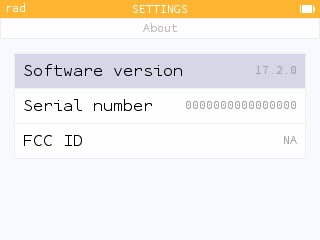
4.  You will see the Software Version.  The last five characters of the FCC ID will tell you what model of Numworks you have.


To update your calculator, just open a browser like Google Chrome, plug in your calculator, go to the numworks.com website.  


Features

Some of the features of 19.2 are (from the Numworks page):


*  The Statistics App now offers four plots: Histogram, Boxplot, Cumulative Frequencies, Normal Probability Plot

*  Median-Median and Exponential regressions are added.

*  Lists are now available everywhere, including the main Calculation app.   List elements are accessed by using the parenthesis (example:  list(1)).  Unlike Python, the first element is designated as element 1.

*  Plots in the Grapher app can be set to any one of seven colors of the user's choosing.

*  Significant tests now include a graphical result in the Inference App

*  The memory for the Python app is increased from 32,000 to 42,000 bytes

*  In the Application menu, each of the apps are assigned to a shortcut key as follows:

1:  Calculation

2:  Grapher

3:  Solver

4:  Statistics (one variable stats)

5:  Regression (two variable stats)

6:  Inference

7:  Sequences

8:  Python

9:  Settings


More information here:  https://www.numworks.com/calculator/update/version-19/


Eddie 

All original content copyright, © 2011-2022.  Edward Shore.   Unauthorized use and/or unauthorized distribution for commercial purposes without express and written permission from the author is strictly prohibited.  This blog entry may be distributed for noncommercial purposes, provided that full credit is given to the author. 


Thursday, January 27, 2022

Numworks Update 17.2 - Highlights

 Numworks Update 17.2 - Highlights


Update is available at:

https://www.numworks.com/


The Numworks website will detect your calculator and will offer the update.


Here are some quick highlights:


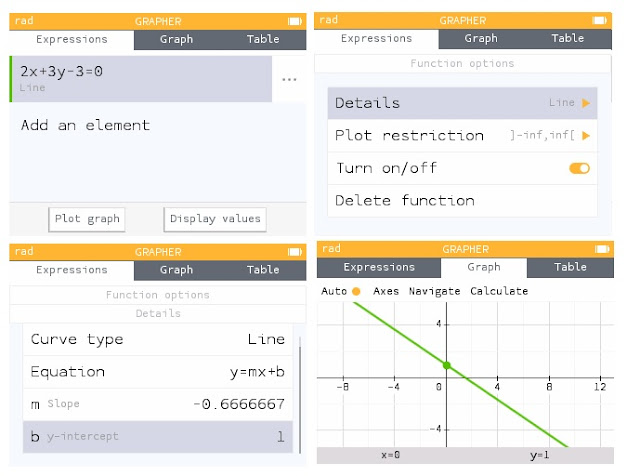
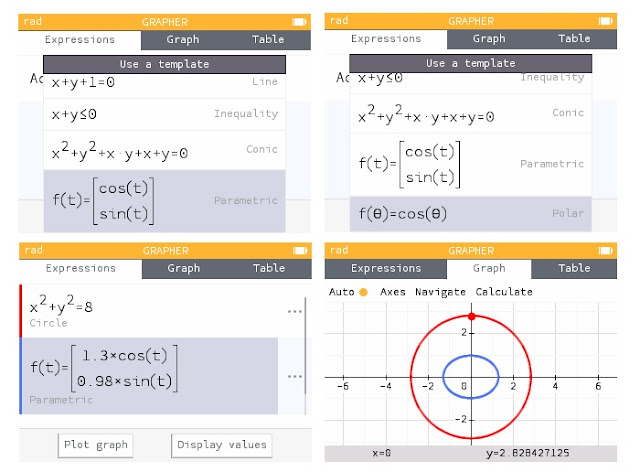
Extended graphing capabilities in Grapher.  In addition to functions f(x), lines, inequalities, conic sections, parametric equations, and polar equations can be graphed.  Different type of graphs can be plotted on the same screen.


Detail next to a line in Grapher (three dots) will display the slope and y-intercept.  Not pictured:  additional details added to Conic graphs.


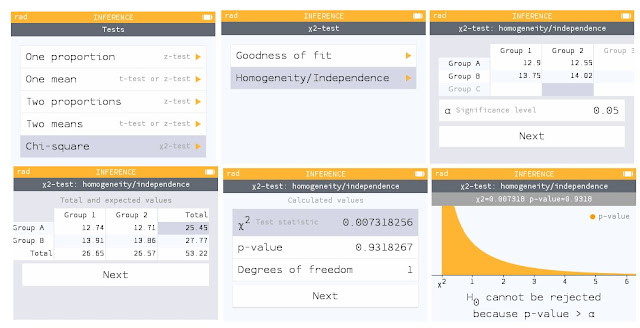
Major update to the Probabilities application, named Inference, includes tests and intervals.   Pictured here is a Chi-Square test of Independence.


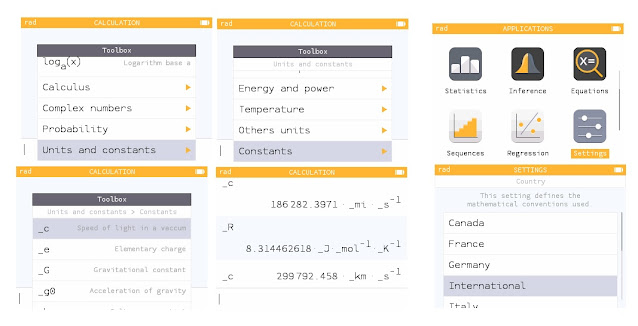
The toolbox contains scientific constants.  The units are determined by the Country setting in the Settings.  International is the SI units.   


The [ x, n, t ] cycles between x, n, t, and Θ.


For all the details (translation may be required):  https://www.numworks.com/calculator/update/version-17/


Eddie


All original content copyright, © 2011-2022.  Edward Shore.   Unauthorized use and/or unauthorized distribution for commercial purposes without express and written permission from the author is strictly prohibited.  This blog entry may be distributed for noncommercial purposes, provided that full credit is given to the author. 


Sunday, October 3, 2021

HP Prime Python: Complex Number Arithmetic and Lambert Function - and Firmware Update!

 HP Prime Python:  Complex Number Arithmetic and  Lambert Function

HP Prime Python:  Complex Number Arithmetic and  Lambert Function - and Firmware Update!


Firmware Update!


There is a new firmware update (10/1/2021) - v. 14596 for both the Hardware versions (Version 1 and Version 2) of the HP Prime.   The link to the MHPoC entry and download links:  


HPMoC Thread:

https://www.hpmuseum.org/forum/thread-17538-post-152707.html#pid152707


HP Prime Hardware 1 Download:

https://www.hpcalc.org/details/7469


HP Prime Hardware 2 Download:

https://www.hpcalc.org/details/7783


Now on to complex numbers and the Lambert function.


Python File Introduction

A work around of having separate Python files is to create separate apps for each application.  Both applications are available to download at the blog. 


Complex Number Arithmetic


The HP Prime App "Python-Complex Arithmetic" performs the four arithmetic functions on two complex numbers.


Script:


from cmath import *

print("Complex Number Arithmetic")

x1=float(input("real_1: "))

# input values are not auto printed

print(x1)

y1=float(input("imag_y: "))

print(y1)

z1=complex(x1,y1)

print("z1 = "+str(z1))


x2=float(input("real_2: "))

print(x2)

y2=float(input("imag_2: "))

print(y2)

z2=complex(x2,y2)

print("z2 = "+str(z2))


print()

print("z1 + z2 = "+str(z1+z2))

print("z1 - z2 = "+str(z1-z2))

print("z1 * z2 = "+str(z1*z2))

print("z1 / z2 = "+str(z1/z2))


Example:

x1 = 9

y1 = -8  (use [ +/- ] to enter negative numbers)


x2 = -1

y2 = 4


Results:

z1 = 9-8j

z2 = -1+4j


z1 + z2 = 8-4j

z1 - z2 = 10-12j

z1 * z2 = 23+44j

z1 / z2 = -2.411764705882353-1.647058823529412j


Lambert W Function


The HP Prime App "Python-Lambert W Function" approximates the Lambert W function.   The Python script estimates w given complex number z using Newtons Method:


w * e^w = z


Script:


from cmath import *

print("Lambert W Function - approx")

print("w * exp(w) = z, find w")

zr=float(input("z_real: "))

print(zr)

zj=float(input("z_imag: "))

print(zj)

z=complex(zr,zj)

w0=complex(1,1)

w1=complex(1,1)


while abs(w1)>1*10**-10:

 w1=(w0*exp(w0)-z)/(exp(w0)+w0*exp(w0))

 w0=w0-w1


# round low parts to zero

# z.real, z.imag are read only

wr=w0.real

if abs(wr)<1*10**-10:

 wr=0

wj=w0.imag

if abs(wj)<1*10**-10:

  wj=0

w0=complex(wr,wj)


print("w = "+str(w0))


Example:


Input:  -1.57079362679 (about π/2)

Result:  approx -1.223152769062088e-06+1.57079554811127j  


Input:  2+3j

Result:  approx 1.090076534485791+0.5301397207748389j


Source:

Wikipedia.  "Lambert W Function" Last updated June 13, 2021.   

https://en.wikipedia.org/wiki/Lambert_W_function Retrieved July 9, 2021


Download both apps here (zip file):  

https://drive.google.com/file/d/1MX5G-1MJidb2ZmoBVe57GpiUnYvY5BqD/view?usp=sharing


Eddie

All original content copyright, © 2011-2021.  Edward Shore.   Unauthorized use and/or unauthorized distribution for commercial purposes without express and written permission from the author is strictly prohibited.  This blog entry may be distributed for noncommercial purposes, provided that full credit is given to the author. 


Sunday, May 23, 2021

Firmware Update: Swiss Micros DM42 - DMCP 3.21/DM42-3.19, Free42, and Offscreen Images

Firmware Update:   Swiss Micros DM42 - DMCP 3.21/DM42-3.19, Free42, and Offscreen Images


Firmware Update


Swiss Micros released a firmware update to the Swiss Micros DM42 calculator.  The current versions are:


* DMCP 3.21

* DM42-3.19


Download the file here:


https://technical.swissmicros.com/dm42/firmware/


This firmware brings the DM42 in alignment with Firmware 3.0.3 of Free42 by Thomas Okken.  Click here for details:


https://thomasokken.com/free42/history.html


Furthermore, you download the latest version of Free42 here:


https://thomasokken.com/free42/#doc


Steps:


1.  Plug in the DM42 into the PC.

2.  Activate USB Disk.  Press [ shift ] [ 0 ] (SETUP), 1. File, 3.  Activate USB Disk.

3.  Transfer the file (see Tip below) to the root directory of the calculator (hardware).

4.  Exit USB Disk on your calculator.  The firmware should update itself automatically.


Detailed instructions and other ways to update firmware can be found here, refer to sections 6.2 for the quick update or 6.3 for an alternative method:


https://technical.swissmicros.com/dm42/doc/dm42_user_manual/#quick_update_guide


Tip:  When transferring the bin file to the calculator, you want to transfer the combination bin file DCMP_flash_3.21_DM42-3.19.bin.   You need both the DCMP and DM42 files for the calculator to run.   


New Comparison Functions


X=?, X>?, X<?, X≤?, X≥?, X≠?


These tests compare the contents of the X Register to any other stack (T,Z,Y,L) or variable.   


Example:

R01 = 33

X:  25


X>? 01 returns No (next program step will be skipped)

X<? 02 returns Yes (next program step will be executed)


0=?, 0>?, 0<?, 0≤?, 0≥?, 0≠?


These tests are similar to the above except this comparison of any target stack or variable to zero.   


Both can be found in the CATALOG-PRGM menu.  In CATALOG, scroll to the PRGM submenu.


Writing Program Lines with X2LINE and A2LINE


Found in the CATALOG-MISC menu, X2LINE and A2LINE creates a program line from the X-stack and Alpha register, respectively.  This allows the user to create program lines outside of the program editor.  I don't know how this can be effective when it comes to executing functions, but they are here.


Enhanced VARMENU Command


The VARMNU1 allows the user to select variables without having to assign values to other variables first.  Found in the CATALOG-PRGM menu.


Longer String Creation with XSTR


I think this going to be my new favorite command besides the new comparison functions.  The XSTR allows for creation of strings of any length, beating the six-character limit of ASTO.  Found in the CATALOG-PRGM menu.


Example:

CLA

XSTR "FREE 42/DM 42"

ARCL ST X

XSTR " 2021"

ARCL ST X


Alpha Register:  "FREE 42/DM42 2021"


Off Images for the DM42 and DM41X


Off images must be the size of 400 x 240 pixels and be 1-color (monochrome) .bmp files.  


Carbon Canyon Park, Brea, CA - April 2021


Polar Butterfly - Plotted on an HP Prime - 2020


Mojave Narrows Park, Victorville, CA - May 2021


Laguna Beach, CA - March 2021


Eddie


All original content copyright, © 2011-2021.  Edward Shore.   Unauthorized use and/or unauthorized distribution for commercial purposes without express and written permission from the author is strictly prohibited.  This blog entry may be distributed for noncommercial purposes, provided that full credit is given to the author. 


Friday, January 24, 2020

HP Prime: Firmware Update

HP Prime:  Firmware Update

Here's the latest firmware update for the HP Prime.  This version fixes bugs, makes the commands ROUND and TRUNC work with numbers with units, updates the CAS system to 1.5, and allows adjustments for screen refresh rate. 

There are two versions for download.  Which version to download depends on the hardware of the HP Prime you have. 

You have the G2 version if your calculator has the G2 symbol on the back of the calculator.  You can also press [Help], scroll up to About HP Prime.  If your hardware version is D, your HP Prime has Hardware G2.  If neither of the previous statements is the case, then download the Hardware G1 version. 

It's very important that you download the correct version to your calculator!

Hardware G1 - 2.1.14425 dated 1/16/2020:

https://www.hpcalc.org/details/7469


Hardware G2 - 2.1.14433 dated 1/21/2020:

https://www.hpcalc.org/details/7783

These files are from the hpcalc.org, check this site for many programs and text files for various HP Graphing calculators. 

Eddie

All original content copyright, © 2011-2020.  Edward Shore.   Unauthorized use and/or unauthorized distribution for commercial purposes without express and written permission from the author is strictly prohibited.  This blog entry may be distributed for noncommercial purposes, provided that full credit is given to the author.

DM42 and HP 42S: Quadratic Equation, Characteristic Polynomial, and Eigenvalues

DM42 and HP 42S: Quadratic Equation, Characteristic Polynomial, and Eigenvalues The programs are listed for the Swiss Micros DM42 an...