Saturday, July 25, 2020

Fun with the 71B '20

Fun with the 71B '20

Differential Equations:  Runge Kutta Method 4th Order

Find a numerical solution to the differential equation:

dy/dx = f(x, y)

x is the independent variable, y is the dependent variable.  You define f(x,y) on line 10.   For example, dy/dx = sin(x * y) should have this as line 10:

10 DEF FNF(X,Y) = SIN(X*Y)

Line 5 is a remark line.  Remarks are followed by exclamation points on the HP 71B.

HP 71B Program: RK4 

Size: About 300 - 330 bytes

5 ! FNF(X,Y) = dY/dX
10 DEF FNF(X,Y) = [ insert f(x,y) here ]
15 DESTROY X,Y,H,K1,K2,K3,K4
20 INPUT "X0? "; X
25 INPUT "Y0? "; Y
30 INPUT "STEP? "; H
40 K1 = FNF(X,Y)
45 K2 = FNF(X+H/2,Y+H*K1/2)
50 K3 = FNF(X+H/2,Y+H*K2/2)
55 K4 = FNF(X+H,Y+H*K3)
60 X=X+H
65 Y=Y+H*(K1+2*K2+2*K3+K4)/6
80 DISP "(";X;",";Y;")" @ PAUSE
85 DISP "NEXT? Y/N"
90 A$=KEY$
95 IF A$="Y" THEN 40
99 IF A$="N" THEN DISP "DONE" @ END ELSE 85

Example:
dy/dx = sin(x * y) with inital condition y(0) = 0.5,  h = 0.2 * π

First three results:
( .628318530718 , .607747199386 )   ( [ f ] [ +] (CONT), [ Y ] )
( 1.25663706144, 1.02432288082 )
( 1.88495559216, 1.51038862362 ) 

Hyperbolic Functions

[ S ] = sinh(x)
[ C ] = cosh(x)
[ A ] = asinh(x)
[ H ] = acosh(x)
[ X ]  to exit

HP 71B Program: HYP

Size:  401 bytes
acosh(x) requires that | x | ≥ 1

100 DESTROY A,X
115 DISP "sinh S/A, cosh C/H, X"
120 A$=KEY$
125 IF A$="S" THEN INPUT "X? ";X @ CALL SINH(X)
130 IF A$="C" THEN INPUT "X? ";X @ CALL COSH(X)
135 IF A$="A" THEN INPUT "X? ";X @ CALL ASINH(X)
140 IF A$="H" THEN INPUT "X? ";X @ CALL ACOSH(X)
145 IF A$="X" THEN 150 ELSE 115
150 DISP "DONE" @ END
200 SUB SINH(X)
205 DISP (EXP(X)-EXP(-X))/2 @ PAUSE
210 END SUB
300 SUB COSH(X)
305 DISP (EXP(X)+EXP(-X))/2 @ PAUSE
310 END SUB
400 SUB ASINH(X)
405 DISP LOG(X+SQR(X^2+1)) @ PAUSE
410 END SUB
500 SUB ACOSH(X)
510 DISP LOG(X+SQR(X^2-1)) @ PAUSE
515 END SUB

Example:
X = 2.86

sinh(2.86) returns 8.70212908815
cosh (2.86) returns 8.75939784845
asinh(2.86) returns 1.77321957441
acosh(2.86) returns  1.71190019325

Arithmetic-Geometric Mean

The arithmetic-geometric mean (AGM) is found by the iterative process:

a = 0.5 * (x + y)
g = √(x * y)

The values of a and g are stored into x and y, respectively.  The process repeats until the values of a and g converge.   A tolerance of 10^(-9) is used to display an 8-digit approximation.

HP 71B Program: AGM

Size:  148 Bytes

10 DESTROY X,Y,A,B
15 DISP "AGM(X,Y)" @ WAIT .5
20 INPUT "X? ";X
25 INPUT "Y? ";Y
30 A=.5*(X+Y)
35 G=SQR(X*Y)
40 X=A
45 Y=G
50 IF ABS(X-Y)>1E-9 THEN 30
55 DISP USING 60;X
60 IMAGE 10D.8D    // (10 digit integer parts with rounding to 8 decimal places)
65 END

Example:
AGM(178, 136)

Result:  156.29380544

Pythagorean Triple Generator

Given two positive integers m, n; where m > n, a Pythagorean triple is generated with the following calculations:

a = 2*m*n
b = m^2 - n^2
c = m^2 + n^2

Properties:

a^2 + b^2 = c^2
Perimeter: p = a + b + c
Area: r = a * b / 2

HP 71B Program: PYTHTRI

Size: 217 bytes

10 DESTROY M,N,A,B,C,R,P
20 DISP "M>N, INTEGERS" @ WAIT .5
25 INPUT "M? "; M
30 INPUT "N? "; N
35 A=2*M*N
40 B=M^2-N^2
45 C=M^2+N^2
50 P=A+B+C
55 R=A*B/2
60 DISP 'A = ';A @ PAUSE
65 DISP 'B = ';B @ PAUSE
70 DISP 'C = ';C @ PAUSE
75 DISP 'PERIM.=';P @ PAUSE
80 DISP 'AREA =';R
85 END

Example:
M = 16, N = 11

Results:
A = 352, B = 153, C = 377, P = 864, R = 23760

Impedance of An Alternating Current

The program ALTCURR calculates the impedance (magnitude and phase angle) of a sinusoidal alternating current consisting of one resistor, one capacitor, and one inductor in a series.

HP 71B Program: ALTCURR

Size: 210 bytes

10 DESTROY F,L,C, R,W,Z,T
15 DEGREES
20 INPUT "FREQUENCY? ";F
25 INPUT "INDUCTANCE? ";L
30 INPUT "CAPACITANCE? ";C
35 INPUT "RESISTANCE? ";R
40 W=2*PI*F
45 Z=SQR(R^2+(W*L-1/(W*C))^2)
50 T=ATAN((W*L-1/(W*C))/R)
55 DISP "MAGNITUDE= "; Z @ PAUSE
60 DISP "PHASE ANGLE = "; T

Example:
F = 152 Hz
L = 4.75E-3 H  (4.75 mH)
C = 8E-6 F  (8 μF)
R = 6400 Ω

Results: 
Magnitude:  6401.24704262
Phase Angle: -1.1309750812°

Source:
Rosenstein, Morton.  Computing With the Scientific Calculator Casio.  Japan. 1986.  ISBN 1124161430


Eddie

All original content copyright, © 2011-2020.  Edward Shore.   Unauthorized use and/or unauthorized distribution for commercial purposes without express and written permission from the author is strictly prohibited.  This blog entry may be distributed for noncommercial purposes, provided that full credit is given to the author.

Sunday, July 19, 2020

Solving Systems of Quadratic Equations

Solving Systems of Quadratic Equations

This blog entry looks at four systems of quadratic equations.

In each system, A, B, C, D, E, and F are constants and we are trying to solve for x and y.  Note:  please verify each solution but substituting the computed x and y back in the equations. 

System 1

A* x^2 + B* y = C
D* x^2 + E *y = F

A * x^2 + B * y = C
-A/D * (D * x^2 + E * y) = F * -A/D

I'm going to solve for y first. 

A* x^2 + B * y = C
-A * x^2 - (A * E)/D * y = -(A * F)/D

(B - A * E / D) * y = C  - (A * F)/D

y = (C  - A * F / D) / (B - A * E / D)

Let y0 = y and now solve for x:

A * x^2 + B * y0 = C
A * x^2 = C - B * y0
x^2 = 1 / A * (C - B * y0)
x = ±√( 1 / A * (C - B * y0) )

Summary:

A* x^2 + B* y = C
D* x^2 + E *y = F

y = (C  - A * F / D) / (B - A * E / D)
x = ±√( 1 / A * (C - B * y) )

Example:

Pictures are generated by the HP Prime emulator.


x^2 + 5 * y = 10
4 * x^2 + 4 / 9 * y = 100

A = 1, B = 5, C = 10, D = 4, E = 4/9, F = 100

y = (C  - A * F / D) / (B - A * E / D)
y = (10 - 1 * 100 / 4) / (5 - 1 * 4/9 / 4)
y = -135 / 44 ≈ -3.068181818

x^2 = ±√( 1 / 1 * (10 - 5 * -135/44) )
x^2 = ±√( 1115 / 44 )
x ≈ ±5.033975476

The two points are:
( 5.033975476, -3.0681818)
( -5.033975476, -3.0681818)

System 2

A * x^2 + B * y^2 = C
D * x^2 + E * y^2 = F

We'll start with solving for x:

A * x^2 + B * y^2 = C
-B * D / E * x^2 - B * y^2 = -B * F / E

(A - B * D / E) * x^2 = C - B * F / E

x^2 = (C - B * F / E) / (A - B * D / E)

x = ±√( (C - B * F / E) / (A - B * D / E) )

Let x0 = x

A * x0^2 + B * y^2 = C
B * y^2 = C - A * x0^2
y^2 = 1 / B * (C - A * x0^2)

y = ±√( 1 / B * (C - A * x0^2) )

Summary:

A * x^2 + B * y^2 = C
D * x^2 + E * y^2 = F

x = ±√( (C - B * F / E) / (A - B * D / E) )
y = ±√( 1 / B * (C - A * x0^2) )

Example:


3 * x^2 + y^2 = 25/16
36 * x^2 + y^2 = 4

A = 3, B = 1, C = 25/16, D = 36, E = 1, F =4

x = ±√( (25/16 - 1 * 4 / 1) / (3 - 1 * 36 / 1) )
x = ±√( 13/176 ) ≈ ± 0.271778653

x^2 = 13/176

y = ±√( 1 / 1 * (25/16 - 3 * 13/176) )
y = ±√( 59/44 ) ≈ ± 1.157976291

Solutions:

(0.271778653, 1.157976291)
(0.271778653, -1.157976291)
(-0.271778653, 1.157976291)
(-0.271778653, -1.157976291)

System 3

A * x^2 + B * y^2 = C
D * x^2 + E * y = F

A * x^2 + B * y^2 = C
-A / D * (D * x^2 + E * y) = F * -A / D

A * x^2 + B * y^2 = C
-A * x^2 + -A * E / D * y = -A * F / D

B * y^2 + -A * E / D * y = C - A * F / D

B * y^2 + -A * E / D * y  + (A * F / D - C) = 0

Once y is solved for, then:

A * x^2 = C - B * y^2
x^2 = 1 / A * (C - B * y^2)
x = ±√ ( 1 / A * (C - B * y^2) )

Summary:

A * x^2 + B * y^2 = C
D * x^2 + E * y = F

B * y^2 + -A * E / D * y  + (A * F / D - C) = 0
x = ±√ ( 1 / A * (C - B * y^2) )

Example: 


49/16 * x^2 + 16 * y^2 = 64
x^2 + 7 * y = 5

A = 49/16, B = 16, C = 4, D = 1, E = 7, F = 5

B = 16
-A * E / D = -343/16
A * F / D - C = -779/16

y1 ≈ -1.19804377
x1 ≈ ±3.659362053

y2 ≈ 2.538548127
x2 ≈ ±3.573490854i

Solutions (real numbers):
( 3.659362053, -1.19804377)
( -3.659362053, -1.19804377)

System 4

A * x^2 + B * y^2 = C
D * x + E * y = F

E * y = F - D * x
y = F/E - D/E * x
y^2 = (D/E)^2 * x^2 - 2 * D * F / E^2 * x + (F/E)^2

A * x^2 + B * ((D/E)^2 * x^2 - 2 * D * F / E^2 * x + (F/E)^2) = C
A * x^2 + B * ((D/E)^2 * x^2 - 2 * D * F / E^2 * x + (F/E)^2) - C = 0
A * x^2 + B * (D/E)^2 * x^2 - (2 * B * D * F / E^2) * x + ( B * (F/E)^2 - C ) = 0

Once the solutions for x are found, solve for y by:
y = F/E - D/E * x

Summary:

A * x^2 + B * y^2 = C
D * x + E * y = F

(A + B * (D/E)^2) * x^2 + (-2 * B * D * F / E^2) * x + ( B * (F/E)^2 - C ) = 0
y = F/E - D/E * x

Example 4:


5 * x^2 + 6 * y^2 = 15
-10 * x + 13 * y = 2

A = 5, B = 6, C = 15, D = -10, E = 13, F = 2

A + B * (D/E)^2 = 1445/169
-2 * B * D * F / E^2 = 240/169
B * (F/E)^2 - C = -2511/169

x1 ≈ 1.2537792907
y1 ≈ 1.105994544

x2 ≈ -1.403882873
y2 ≈ -0.926063748

I hope you find this helpful.

Eddie

All original content copyright, © 2011-2020.  Edward Shore.   Unauthorized use and/or unauthorized distribution for commercial purposes without express and written permission from the author is strictly prohibited.  This blog entry may be distributed for noncommercial purposes, provided that full credit is given to the author.

Saturday, July 18, 2020

HP 41C and HP 42S (also Free42/DM42): Random Tone Generator

HP 41C and HP 42S (also Free42/DM42): Random Tone Generator

Tones

The program RTONE generates a set of random tones (0 through 9).   Since the HP 41C (without additional modules) does not have a pseudo random number generator, a simple generator is included, particularly (π + x0)^5 = x1.

The HP 42S has a random number generator and it is used in its program.  Performance of RTONE is increased, and is really fast on the Free42 and Swiss Micros DM42. 

The command TONE can refer to indirect registers (stack X for this program) and accepts real numbers between 0 to 9.9999999.  TONE ignores the fractional part.

HP 41C Program: RTONE

01 LBL^T RTONE
02 ^T N?
03 PROMPT
04 INT
05 STO 03
06 ^T SEED?
07 PROMPT
08 LBL 00
09 PI
10 +
11 5
12 Y↑X
13 10
14 MOD
15 TONE IND X
16 DSE 03
17 GTO 00
*END*

HP 42S/Free42/DM42 Program:  RTONE

00 {37-Byte Prgm}
01 LBL "RTONE"
02 "SEED?"
03 PROMPT
04 SEED
05 "N?"
06 PROMPT
07 IP
08 STO 03
09 LBL 00
10 RAN
11 10
12 *
13 TONE IND ST X
14 DSE 03
15 GTO 00
16 END

A fun, little musical program.

Eddie

All original content copyright, © 2011-2020.  Edward Shore.   Unauthorized use and/or unauthorized distribution for commercial purposes without express and written permission from the author is strictly prohibited.  This blog entry may be distributed for noncommercial purposes, provided that full credit is given to the author.

Sunday, July 12, 2020

HP Prime: Pythagorean Triangle Search

HP Prime: Pythagorean Triangle Search

Three Integers Make a Right Triangle

A Pythagorean triple is a trio of positive integers a, b, and c, that describe the lengths of a right triangle, where a and b are the lengths of the sides while c is the length of the hypotenuse. 

The variables a, b, and c follow the Pythagorean Theorem:

a^2 + b^2 = c^2

Where the following measurements perimeter and area are calculated as:

p = perimeter = a + b + c
r = area = a * b / 2

With two positive integers m and n where m > n, Euclid gives a formula where a, b, and c are generated:

a = 2 * m * n
b = m^2 - n^2
c = m^2 + n^2

This can easily verified to satisfy the Pythagorean Theorem:

a^2 + b^2 = c^2
(2*m*n)^2 + (m^2 - n^2)^2 = (m^2 + n^2)^2
4*m^2*n^2 + m^4 - 2*m^2*m^2 + n^4 = m^4 + 2*m^2*m^2 + n^4
4*m^2*n^2 + m^4 - 4*m^2*m^2 + n^4 = m^4 + n^4
m^4 + n^4 = m^4 + n^4

The following program PYTHRI asks you for m and n and generates a Pythagorean triple.  Make sure that m > n. 

HP Prime Program PYTHRI

EXPORT PYTHTRI()
BEGIN
// 2020-06-13 EWS
// r: area
LOCAL a,b,c,p,r,m,n;
INPUT({m,n},"Pythagorean Triple
 Generator",{"m = ","n = "},
{"m > n, m,n ∈ Z+","m > n, m,n ∈ Z+"});
a:=2*m*n; b:=m^2-n^2; c:=m^2+n^2;
p:=a+b+c; r:=a*b/2;
PRINT();
PRINT(a+"^2+"+b+"^2="+c+"^2");
PRINT("a = "+a);
PRINT("b = "+b);
PRINT("c = "+c);
PRINT("perimeter = "+p);
PRINT("area = "+r);
END;

Can We Go the Other Way?

Let's say we have the area and the perimeter of a right triangle.  Can we find a Pythagorean triple?  In order to do so, we need to solve for m and n, and make sure that m and n are positive integers. 

Recall that:

a = 2 * m * n
b = m^2 - n^2
c = m^2 + n^2

Perimeter:

p = a + b + c
p = 2 * m * n + m^2 - n^2 + m^2 + n^2
p = 2 * m^2 + 2 * m * n

Area:

r = a * b / 2
r = m * n * (m^2 - n^2)
r = m^3 * n - m * n^3

Let's solve for n in the perimeter equation:

p = 2 * m^2 + 2 * m * n
p - 2 * m^2 = 2 * m * n
Since m is a positive integer, m ≠ 0 and by dividing by 2 * m:
p / (2* m) - m = n

Substitute in the area equation:

r = m^3 * n - m * n^3
r = m^3 * (p / (2* m) - m) - m * (p / (2* m) - m)^3

The program IPYTHTRI attempts to find a Pythagorean triple by solving for m in the above equation.   A first initial guess of 0 is used, but the initial guess  uses powers of 10 for any further iterations that are needed. 

Should a triple not be found, the program will indicate the finding.  Perfect search is not guaranteed.

If a suitable solution is found, then the program calculates and displays a, b, and c.

HP Prime Program IPYTHTRI
(inverse PYTHTRI)

EXPORT IPYTHTRI()
BEGIN
// 2020-06-13 EWS
// r: area
LOCAL a,b,c,p,r,m,n,k;
INPUT({p,a},"Pythagorean Triple
 Search",{"p = ","r = "},
{"perimeter","area"});
// search for integers
FOR k FROM 0 TO 7 DO
m:=fsolve(X^3*(p/(2*X)-X)
-X*(p/(2*X)-X)^3-a,X,10*k);
IF (FP(m)==0) AND (m>0) THEN
BREAK;
END;
END;
n:=p/(2*m)-m;
PRINT();
PRINT("m = "+m);
PRINT("n = "+n);
IF (FP(m)==0) AND (FP(n)==0) THEN
PRINT("Integer Solutions Found");
a:=2*m*n; b:=m^2-n^2; c:=m^2+n^2;
PRINT(a+"^2+"+b+"^2="+c+"^2");
PRINT("a = "+a);
PRINT("b = "+b);
PRINT("c = "+c);
ELSE
PRINT("No integer solutions found");
END;
END;

Examples
(p = perimeter, r = area)

m = 5, n = 3
a = 30, b = 16, c = 34
p = 80, r = 240

m = 11, n = 6
a = 132, b = 85, c = 157
p = 374, r = 5610

m = 18, n = 14
a = 504, b = 128, c = 520
p = 1152, r = 32256

m = 164, n = 133
a = 43624, b = 9207, c = 44585
p = 97416, r = 200,823,084

Source:
Pythagorean triple.  Wikipedia.  Last Edited June 13, 2020.  https://en.wikipedia.org/wiki/Pythagorean_triple  Accessed June 13, 2020

Eddie

All original content copyright, © 2011-2020.  Edward Shore.   Unauthorized use and/or unauthorized distribution for commercial purposes without express and written permission from the author is strictly prohibited.  This blog entry may be distributed for noncommercial purposes, provided that full credit is given to the author.

Saturday, July 11, 2020

HP 42S/DM42/Free42: GETKEY Demonstration

HP 42S/DM42/Free42:  GETKEY Demonstration

Good day everyone, hope everything is well with you today!

How GETKEY Works

To find the GETKEY command:  PGM.FCN menu ( [ (shift) ] [  3  ] ), [ ↑ ], (GETK)

GETKEY puts the HP 42S on hold and awaits for you to press a key.  Whatever key you press returns a key code.   Shift+Key combinations are allowed.  Key codes start at the upper left hand corner [ Σ+ ] with key code 1, going right then down, to the bottom right hand corner [ + ] with key code 37.

Hence:
[ Σ+ ] has code 1
[ 1/x ] has code 2
[ √x ] has code 3
[ LOG ] has code 4
and so on.

Shift+Key combinations add 37 to the key code.
[ (shift) ] [ Σ+ ] has code 38
[ (shift) ] [ 1/x ] has code 39
[ (shift) ] [ √x ] has code 40
[ (shift) ] [ LOG ] has code 41
and so on.

There is no key code for the shift key alone.

The key code is returned to the X stack, which can be stored and analyzed.  Pretty simple.

HP 42S/DM42/Free 42 Program:  TABU 

Raw file:  tabulate.raw
Download:  tabulate.raw

Running TABU:

You will see a running total, starting with 0.   Press [ 1 ] to add 1,  [ 2 ] to add 2, or [ 3 ]  to add 3 to the total.   Any other key will exit the program. 

Key codes used:  [ 1 ]:  29,  [ 2 ]:  30,  [ 3 ]:  31

00 { 62-Byte Prgm }
01▸LBL "TABU"
02 0
03 STO 00
04▸LBL 10
05 GETKEY
06 STO 01
07 32
08 X<Y?
09 GTO 11
10 R↓
11 28
12 X>=Y?
13 GTO 11
14 R↓
15 28
16 -
17 STO+ 00
18 CLA
19 "TOTAL: "
20 ARCL 00
21 AVIEW
22 GTO 10
23▸LBL 11
24 CLA
25 "FINAL: "
26 ARCL 00
27 AVIEW
28 .END.

HP 42S/DM42/Free 42 Program:  BUILD

Raw file:  build.raw
Download:  build.raw

Running BUILD:   A mathematical statement is generated with two random integers between -100 and 100.   The RAN command uses the range 0 ≤ n < 1 with n ≠ 1 for all results.   To get the range wanted, I use the subroutine RAN 201 * 100 - IP  (integer(201*RAN) - 100) to get the range -100 ≤ n < 101. 

 Key codes used:  [ + ]:  37,  [ - ]:  32,  [ × ]:  27

Any other key repeats the cycle until one of the acceptable keys are pressed.

00 { 150-Byte Prgm }
01▸LBL "BUILD"
02 ALL
03 XEQ 00
04 STO 01
05 XEQ 00
06 STO 02
07 GTO 01
08▸LBL 00
09 RAN
10 201
11 ×
12 100
13 -
14 IP
15 RTN
16▸LBL 01
17 RCL 01
18 RCL+ 02
19 STO 03
20 RCL 01
21 RCL- 02
22 STO 04
23 RCL 01
24 RCL× 02
25 STO 05
26▸LBL 02
27 CLA
28 "+, -, ×?"
29 AVIEW
30 GETKEY
31 37
32 X=Y?
33 GTO 03
34 R↓
35 32
36 X=Y?
37 GTO 04
38 R↓
39 27
40 X=Y?
41 GTO 05
42 GTO 02
43▸LBL 03
44 CLA
45 ARCL 01
46 ├" + "
47 ARCL 02
48 ├" = "
49 ARCL 03
50 GTO 06
51▸LBL 04
52 CLA
53 ARCL 01
54 ├" - "
55 ARCL 02
56 ├" = "
57 ARCL 04
58 GTO 06
59▸LBL 05
60 CLA
61 ARCL 01
62 ├" × "
63 ARCL 02
64 ├" = "
65 ARCL 05
66 GTO 06
67▸LBL 06
68 AVIEW
69 END

Example results (results will vary):

-53 + -32 = -85
93 - 19 = 74
41 × -15 = -615

And that concludes the demonstration on GETKEY. 

Eddie

All original content copyright, © 2011-2020.  Edward Shore.   Unauthorized use and/or unauthorized distribution for commercial purposes without express and written permission from the author is strictly prohibited.  This blog entry may be distributed for noncommercial purposes, provided that full credit is given to the author.

Friday, July 10, 2020

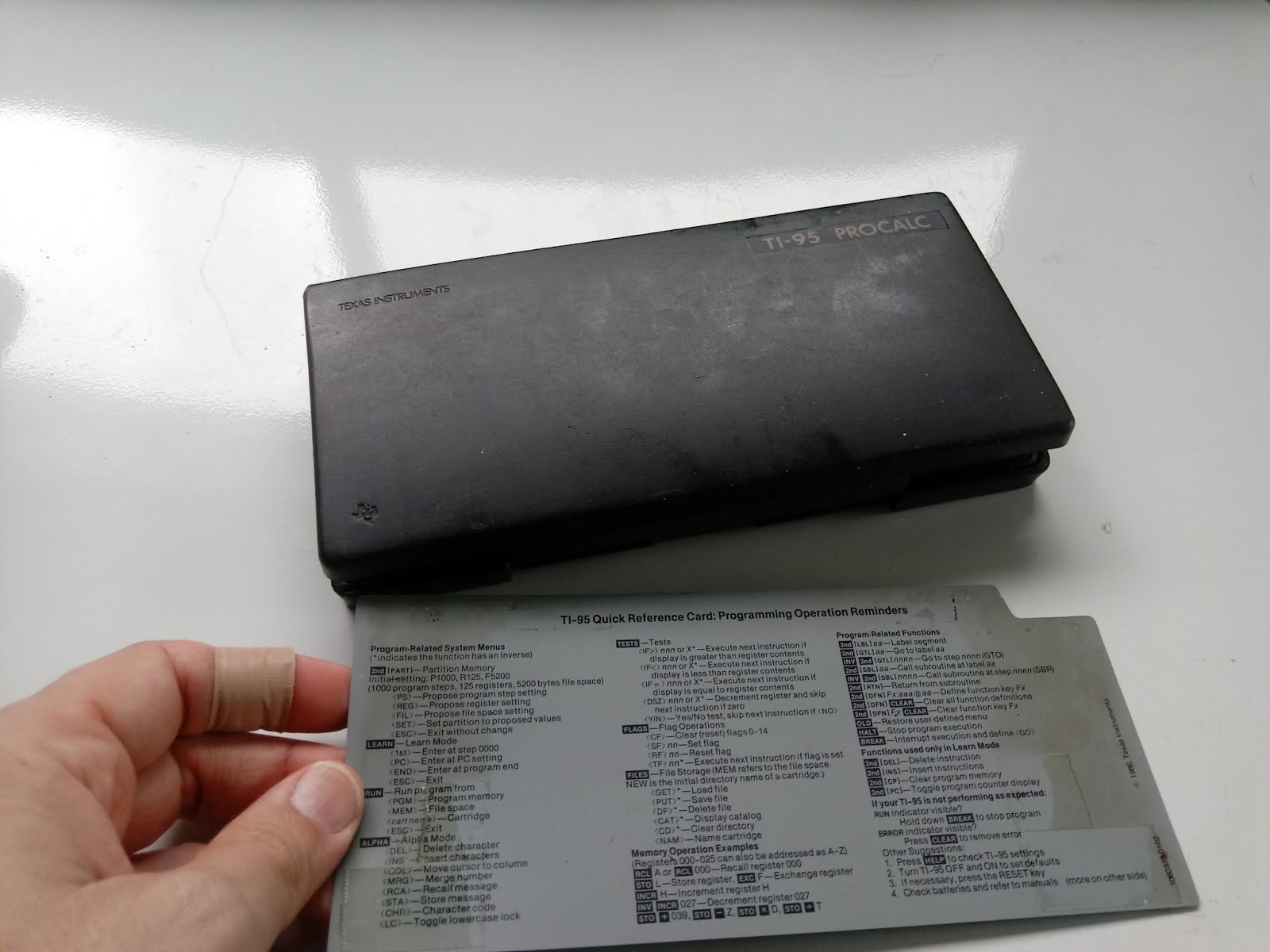
Retro Review: TI-95 Procalc

Retro Review:  TI-95 Procalc 


This review covers the calculator itself, not any of the optional accessories which includes a thermal printer and cassette interface. 


Quick Facts:

Model:  TI-95 Procalc
Company:  Texas Instruments
Type:  Scientific, Keystroke Programmable
Years:  1985-1987
Display:  10 digits for numerical answers, 16 alpha-numeric display
Batteries:  4 AAAs
Logic:  Algebraic (AOS)
Original Price:  $200.00.  I paid $60 I bought it on eBay.

Memory:
Registers:  26 alpha registers, up to 900 numeric registers (three digit registers)
Programming Steps: up to 7,200 steps, default set at 1,000 steps.
Storage Memory:  up to 8,000 bytes, set to 5,200 bytes by default.

A separate 8K RAM can be added for an additional 8,000 bytes of memory.

The QWERTY Keyboard and Other Unique Features

One look at the keyboard and one may mistake the TI-95 Procalc as a BASIC Programming calculator.  However, the TI-95 Procalc is a keystroke programmable calculator.   We'll talk about the programming later.

The TI-95 Procalc is one of the first calculators to contain function keys, F1 through F5.

In addition to the standard functions including trigonometry, logarithms, roots, powers, factorials, hyperbolic functions, and statistics including linear regression:

The number menu [ NUM ] has functions including integer part (INT), fractional part (FRC), random numbers between 0 and 1 (R#), round the number displayed to fix number settings (RND), sign function (SGN), lowest common multiple (LCM), prime factors (PF), and absolute value (ABS).

The LCM soft key has two functions:

(LCM) :   lowest common multiple. 
 Example:  4 [ x~t ] 6 (LCM) returns LCM = 12.

(LCM) [ x~t ]: greatest common divisor.
Example:  25 [ x~t ] 40 (LCM) [ x~t ] returns 5   (GCD(25, 40) = 5)

(PF) returns the biggest prime factor of an integer.  To get additional prime factors, repeat the keystrokes [ x~t ] (PF).

Example:  28
28 [ NUM ] [ --> ] ( PF ) returns  f = 2
[ x~t ] ( PF ) returns f = 2
[ x~t ] ( PF ) returns f = 1  (When you reach f = 1, press [ x~t ] to get the last prime factor, 7)
28 = 2 * 2 * 7 = 2^2 * 7

The conversions menu [CONV] contain several types of conversions:

MET (Metric):
(F - C)  °F -> °C  (left to right),  [INV] (F - C) does °C -> °F  (right to left)
All of the conversions follow this pattern.
(G - L)  gallon and litre
(# - K)  pounds (#) and kilograms (kg)
(i - m)  inches (i) and millimetres (m)
(f - M)  feet and meters

DMS:  convert to D.MMSSS from degrees
INV DMS:  convert degrees to D.MMSSSS

ANG:  convert between Degrees (D), Radians (R), and Grads (G)

P-R:
r [ x~t ] θ [ P-R ] results:  y [ x~t ] x  (polar to rectangular)
x [ x~t ] y [ INV ] [P-R] results: θ [ x~t ] r   (rectangular to polar)

BAS:  (Bases)
DEC: convert to base 10 and set the TI-95 Procalc to Decimal Mode
HEX:  convert to base 16 and set the TI-95 Procalc to Hexadecimal Mode
OCT:  convert to base 8 and set the TI-95 Procalc to Octal Mode
2sC:  convert to 2's complement format
UNF:  convert to un-formatted display mode

Two things to note:
1.  Hexadecimal numbers A-F are accessed with the [ 2nd ] key.
2.  There are no conversions to binary integers

The FUNC key has three operations:

QAD:  Find the roots, real or complex, of the quadratic equation a*x^2 + b*x + c = 0

CUB:  Find the roots of the cubic equation a*x^3 + b*x^2 + c*x + d = 0

SYS:  This is not a solver for system of equations.  Instead, it allows the user to turn system protection on or off.  With system protection off, the user can edit specific bytes of memory.  The aim for unprotected system memory mode is to assist the user in assembly programming.

Fun Fact:  FIX 9 sets the TI-95 Procalc to floating mode.

One more fun fact:  The factorial functions accepts arguments of both integers and integers in the form of n + 1/2.   The latter can include negative numbers.  You will not see this in any other standard scientific calculator (outside the CAS-enabled factorials).

Help: But Not What You Expect

The HELP key does not give help on the specific functions.   Instead, the HELP key asks the user "SET NORMAL MODE?".  Yes resets the TI-95 to decimal mode, floating standard mode (removes Fix settings), degree mode, and sets memory partition to default (1000 program steps, 125 numeric registers, and 5200 bytes for files).  A No asks the user whether to reset any specific mode that is set to default.

Files, Files, and More Files

The FILES key is where you would store, load, and delete program and data files.  Files have three characters (fixed so the file "A   " has A followed by two spaces).  FILES is also where you access the 8K RAM or additional RAM cartridges.   It's pretty neat how the FILES system works once it is learned.

The ALPHA Register

Similar to the HP 41C and HP 42S, the TI-95 Procalc has a 16 character ALPHA register.  The ALPHA register is used to display results and prompt messages.  Numeric registers call be recalled into the ALPHA register.

Example:  11 is stored in register A.  ANSWER = is in the ALPHA register.  Pressing (COL) 16, moves the cursor to column 16.   (MRG) A places 11 at the 16th space justified right.

ALPHA register:   ANSWER =     11.

MRG = recalls the number from the display/last answer.

The ALPHA register can contain lower case letters and ASCII characters simular to the TI-58/59 family.

Keystroke Programming

The TI-95 Procalc has algebraic keystroke programming with labels, tests against numeric registers, increase and decrease by 1 (INCR and INV INCR, respectively) functions, define menus (DEF), the use of ALPHA register.

Unique is the YES/NO function.  Y/N creates a two function menu (F1: YES, F2: NO) and works like the rest of the test commands.

Y/N
(do if YES is pressed)
(skip to here if NO is pressed)

Labels are two characters which can contain both numbers and letters.  Go to and subroutines to labels are use the commands GTL and SBL.

The halt command, HLT, stops program execution.  While the break command, BRK temporarily stops the program execution to display the current result and sets F1 to GO.

Storage arithmetic is permitted.

Example program:  PRF which automates the prime factors of an integer.

TI-95 Procalc Program: Prime Factors

1 
STO A
'NUMBER?' 
BRK
LBL 00
PF 
'FACTOR = '
COL 16 
MRG =
BRK
IF= A
GTL 01
x~t
GTL 00
LBL 01
x~t
'FINAL = '
COL 16
MRG =
HLT  

(50 steps)

Example: 158
'NUMBER?' 158 (GO)
'FACTOR=        2.'  (GO)
'FACTOR=        1.'  (GO)
'FINAL=        79.'

158 = 2 * 79

The TI-95 Procalc comes with a har dcase and a gray help card.

Verdict

I like this calculator, having a solid set of functions with adjustable programming space.   Having the 8K RAM card, which came with the calculator when I bought it, allows me store programs on the card without having to worry about storage space as much.

There are several things I have to get used to: the program steps scroll horizontally instead of vertically, and both the break (BRK) and halt (HLT) operate differently from the modern definition.  Thankfully both the operating and programming manuals are still available online through the Datamath website.

The price point is pretty high at $200.00, as the TI-95 Procalc was set as Texas Instruments' high end programmable keystroke programmable.

The Datamath page has an emulator:  http://www.datamath.org/Graphing/TI-95.htm

Eddie

Source:

Woerner, Joerg.  "Texas Instruments TI-95 PROCALC"  Datamath  http://www.datamath.org/Graphing/TI-95.htm  Last Edited December 5, 2001.  Accessed June 22, 2020.

All original content copyright, © 2011-2020.  Edward Shore.   Unauthorized use and/or unauthorized distribution for commercial purposes without express and written permission from the author is strictly prohibited.  This blog entry may be distributed for noncommercial purposes, provided that full credit is given to the author.
Sunday, July 5, 2020

Casio fx-991EX and fx-115ES Plus: Velocity Conversions

Casio fx-991EX and fx-115ES Plus: Velocity Conversions

The Casio fx-991EX Classwiz and Casio fx-115ES Plus calculators, among others, have 40 conversions in various areas. 

Keystrokes

Keystrokes: Casio fx-115ES Plus

[ SHIFT ] [ 8 ], enter the required two digit code

The conversions we'll be working with this blog entry:

ft → m, 03
m → ft, 04
yd → m, 05
m → yd, 06
mile → km, 07
km → mile, 08
km/hr → m/s, 19
m/s → km/hr, 20

Keystrokes:  Casio fx-991EX Classwiz

[ SHIFT ] [ 8 ].    The conversions will be grouped by category (length, area, volume, etc).

ft → m, 1, 3
m → ft, 1, 4
yd → m, 1,5
m → yd, 1,6
mile → km, 1, 7
km → mile, 1, 8
km/hr → m/s, ↓, 1, 1
m/s → km/hr, ↓, 1, 2

km/hr  (kilometers per hour) vs mph (miles per hour)

The calculators mentioned does not have a direct conversion between km/hr and mph.  However, because the time frame is the same (per hour), we can use the km/mile conversions (since 1 hour = 1 hour and no time conversion part is required, only the length).

Example 1:  150 km/hr to mph

150 km>mile returns 93.20567884

150 km/hr = 9320567884 mph

Example 2:  65 mph to km/hr

65 mile>km = 104.60736

65 mph = 104.60736 km/hr

More Examples

Example 3:  5.8 ft/s to m/s

Again, since the time portion is the same (second to second), we only have to worry about length.

5.8 ft>m returns 1.76784

5.8 ft/s = 1.76784 m/s

Example 4:  110 ft/s to km/hr

Now we are converting both length and time.   There are no direct time conversions on the calculators featured, so we have to use the manual conversion. 

Remember that 1 hr = 3600 s and 1 km = 1000 m. To convert from m to km, divide by 1000 and to convert from 1/s to 1/hr, multiply by 3600 (note: 1/s to 1/hr)

(110 ft>m) ÷ 1000 × 3600 returns 120.7008

110 ft/s = 120.7008 km/hr

Example 5:  40 m/s to km/hr

Here is another example where we both have to convert the length (m to km) and time component (1/s to 1/hr).   This is similar to the Example 3.  However, the Casio calculators featured on this blog has conversions between m/s and km/hr (velocity section).

40 m/s>kh/hr returns 144 km/hr

40 m/s = 144 km/hr

Example 6:  100 ft^2 to m^2

The calculators have two area conversions (acre/m^2).   However, we can use the same length conversion twice to make other areas.

100 ft>m ft>m returns 9.290304

100 ft^2 = 9.290304 m^2

Example 7:  1 mi to yd by using the conversions available

(1 mi>km × 1000) m>yd returned 1760

(1 km = 1000 m)

1 mi = 1760 yd

A Cautionary Tale

Example 8:  1 acre to ft^2

1 acre>m^2 m>ft m>ft returns 43559.99545

However, as defined, 1 acre = 43560 ft^2. 

Lesson:  use caution when chaining conversions, 100% accuracy isn't guaranteed.

Eddie

All original content copyright, © 2011-2020.  Edward Shore.   Unauthorized use and/or unauthorized distribution for commercial purposes without express and written permission from the author is strictly prohibited.  This blog entry may be distributed for noncommercial purposes, provided that full credit is given to the author

Friday, July 3, 2020

Casio fx-9750GIII: Sequence of Rotated Points

Casio fx-9750GIII: Sequence of Rotated Points

Introduction

The program ROTSEQ generates a 2 row matrix from the sequence:

[ [ x_n+1 ] [ y_n+1 ] ] = A * [ [ cos θ, -sin θ ] [ sin θ, cos θ ] ] * [ [ x_n ] [ y_n ] ]

The required inputs are:
You will set the angle mode to Degree, Radian, or Gradian
A = multiplier
θ = angle
x1 = initial x point
y1 = initial y point
N = number of steps

Casio fx-9750GIII Program ROTSEQ

This can be used on most if not every modern Casio Graphing calculator.

"EWS 2020-06-07"
Menu "ANGLE","DEGREE",1,"RADIAN",2,"GRADIAN",3
Lbl 1:Deg:Goto 4
Lbl 2:Rad:Goto 4
Lbl 3:Gra:Goto 4
Lbl 4
"F=A*MAT*[[X][Y]]"
"A"?->A
"θ"?->θ
"X1"?->X
"Y1"?->Y
"STEPS"?->N
[[X][Y]]->Mat A
Mat A->Mat B
For 1->I To N
[[cos θ,-sin θ][sin θ,cos θ]]*Mat A->Mat A
Augment(Mat B,Mat A)->Mat B
Next
"FINAL RESULTS:"◢
Mat B

Example

A = 0.5
θ = 10 grads  (Gradian mode)
x1 = 1
y1 = -1
N = 5  (5 steps)

I don't think I ever used gradian angle units on this blog before, so why not?

Results are shown and rounded to 2 decimal places

Mat B:

[ 1.00   1.14   1.26   1.34   1.40   1.41 ]
[ -1.00  -0.83  -0.64 -0.44  -0.22  0.00 ]

The next blog post will be on July 5 since tomorrow will be the 4th of July (Happy Birthday, United States). 

Eddie

All original content copyright, © 2011-2020.  Edward Shore.   Unauthorized use and/or unauthorized distribution for commercial purposes without express and written permission from the author is strictly prohibited.  This blog entry may be distributed for noncommercial purposes, provided that full credit is given to the author.

Sunday, June 28, 2020

Numworks Python Scripts: Basic Graphics

Numworks Python Scripts:  Basic Graphics

Script:  atari.py

Draws the basic-eight color palette of the classic 1977 Atari 2600.

Atari Palette Python Script


from math import *
from kandinsky import *
# 2020-05-28 atari 2600 colors
# kandinsky module

fill_rect(0,0,320,240,color(245,245,245))

fill_rect(15,15,55,55,color(0,0,0))
fill_rect(85,15,55,55,color(255,0,0))
fill_rect(155,15,55,55,color(255,255,0))
fill_rect(15,85,55,55,color(255,0,255))
fill_rect(155,85,55,55,color(0,255,0))
fill_rect(15,155,55,55,color(0,255,255))
fill_rect(85,155,55,55,color(0,0,255))
fill_rect(155,155,55,55,color(255,255,255))

draw_string("8",107,107)


Script:  firstdigit.py

The tenths digit from n random numbers is extracted and a bar chart is generated based on the results.  I recommend a sample size of at least 20.

firstdigit script example (sample = 100)
A Sample of 100 data points


from math import *
from random import *
from matplotlib.pyplot import *

# set up lists
x=[0,1,2,3,4,5,6,7,8,9]
y=[0,0,0,0,0,0,0,0,0,0]

# user iput
print("EWS 2020-05-29")
print("Bar Chart: First Digit")
print("Recommended at least 20")
n=int(input("n? "))

# generate list
for i in range(n):
  s=int(random()*10)
  y[s]=y[s]+1

# bar plot
h=int(n/2)
d=-int(h/4)
axis([-0.5,9.5,d,h])
bar(x,y)

# turn axis off
axis("off")

# labels at the bottom
# results at top
m=max(y)
for i in range(10):
  text(i-0.25,d+1,str(i))
  text(i-0.25,m+2,str(y[i]))
  
show()

Script:  colorfulrings.py

The script cycles through a set of nine colors, four times.   The Kandinsky module is used to generate the flowery circles as well as cycle through the colors.  This module works with integer pixels.

Color rings script in progress


from math import *
from kandinsky import *
from time import *

# color lists
r=[255,255,255,0,0,0,51,128,255]
g=[0,102,255,128,255,0,102,128,255]
b=[0,0,0,0,0,255,255,128,255]

# angles
a=list(range(128))
for i in range(128):
  a[i]=i/128*2*pi

# draw circles
for k in range(36):
  n=int(fmod(k,9))
  for j in range(50):
    for i in range(128):
      x=int(160+(20+j)*cos(a[i]))
      y=int(120+(20+j)*sin(a[i]))
      set_pixel(x,y,color(r[n],g[n],b[n]))
  sleep(0.1)

Script:  modulusplot.py

Generate a pixel plot of the equation (x^n + y^n) mod m

Modulus Plot example, n = 3.9, m = 15.6
Input Screen  (n = 3.9, m = 15.6)

Modulus Plot result, n = 3.9, m = 15.6


from math import *
from kandinsky import *
print("EWS 2020-05-28")
print("x**n + y**n mod m")
n=float(input("power? "))
m=float(input("modulus? "))

for x in range(320):
  for y in range(240):
    t=fmod(pow(x,n)+pow(y,n),m)  
    c=floor(t/m*255)
    set_pixel(x+1,y+1,color(c,c,c))


Eddie

BLOG UPDATE:
The HP Prime:  Conversion to Binary and IEEE-754 Binary blog entry that was posted on June 27, 2020 may contain errors.  In this case, I have taken that entry back to draft status and my intention is to repost the entry as soon as I can.  Apologies for any inconvenience. 

All original content copyright, © 2011-2020.  Edward Shore.   Unauthorized use and/or unauthorized distribution for commercial purposes without express and written permission from the author is strictly prohibited.  This blog entry may be distributed for noncommercial purposes, provided that full credit is given to the author.

Sunday, June 21, 2020

TI-84 Plus CE: Bitwise Operations

TI-84 Plus CE:  Bitwise Operations

Introduction

The programs NOT, AND, OR, and XOR are presented for the TI-84 Plus CE for integer in decimal base.

NOT

For integers x > 0, the NOT function is defined as:

Σ( 2^n * ( floor(x/2^n) mod 2 + 1 ) mod 2 ) from n = 0 to floor(log(x)/log(2))

However, observing the NOT operation on scientific calculators, the not function can  be used for integers:

-(x + 1)

TI-84 Plus CE Program NOT

"2020-05-11 EWS"
Disp "NOT(X), X>0"
Prompt X
­(X+1)→N
Disp "NOT X = ",N

Examples:

NOT 192:  Returns -193

NOT -52:  Returns 51

AND

For positive integers x, y and for x ≥ y, the AND function is defined as:

Σ( 2^n * ( [ floor(x/2^n) mod 2 ] * [ floor(y/2^n) mod 2 ] ) from n = 0 to floor(log(x)/log(2))


TI-84 Plus CE Program AND

"2020-05-11 EWS"
Disp "X AND Y, X≥Y"
Prompt X,Y
0→T
For(N,0,X-fPart(X))
(X/2^N)-fPart(X/2^N)→A
2*fPart(A/2)→A
(Y/2^N)-fPart(Y/2^N)→B
2*fPart(B/2)→B
T+2^N*A*B→T
End
Disp T

Examples:

145 AND 37:  Returns 1

226 AND 125:  Returns 96

OR

For positive integers x, y and for x ≥ y, the OR function is defined as:

Σ( 2^n *
[ [ ( floor(x/2^n) mod 2) + ( floor(y/2^n) mod 2 ) + ( floor(x/2^n) mod 2 * floor(y/2^n) mod 2) ] mod 2 ] from n = 0 to floor(log(x)/log(2))

TI-84 Plus CE Program OR

"2020-05-11 EWS"
Disp "X OR Y, X≥Y"
Prompt X,Y
0→T
For(N,0,X-fPart(X))
(X/2^N)-fPart(X/2^N)→A
2*fPart(A/2)→A
(Y/2^N)-fPart(Y/2^N)→B
2*fPart(B/2)→B
T+2^N*2*fPart((A+B+A*B)/2)→T
End
Disp T

Examples:

145 OR 37:  Returns 181

226 OR 125:  Returns 255

XOR

For positive integers x, y and for x ≥ y, the XOR function is defined as:

Σ( 2^n * [ [ floor(x/2^n) + floor(y/2^n) ] mod 2 ]  from n = 0 to floor(log(x)/log(2))

TI-84 Plus CE Program XOR

"2020-05-11 EWS"
Disp "X XOR Y, X≥Y"
Prompt X,Y
0→T
For(N,0,X-fPart(X))
(X/2^N)-fPart(X/2^N)→A
2*fPart(A/2)→A
(Y/2^N)-fPart(Y/2^N)→B
2*fPart(B/2)→B
T+2^N*2*fPart((A+B)/2)→T
End
Disp T

Examples:

145 XOR 37:  Returns 180

226 XOR 125:  Returns 159

Eddie

Source:

“Bitwise Operation”  Wikipedia.  Page last edited May 10, 2020.  Accessed on May 11, 2020.
Link:  https://en.wikipedia.org/wiki/Bitwise_operation

Eddie

All original content copyright, © 2011-2020.  Edward Shore.   Unauthorized use and/or unauthorized distribution for commercial purposes without express and written permission from the author is strictly prohibited.  This blog entry may be distributed for noncommercial purposes, provided that full credit is given to the author.

Saturday, June 20, 2020

HP 41C: Decimal Bitwise Operations

HP 41C: Decimal Bitwise Operations

The document covers the following operations:

NOT:  for integers
AND:  for positive integers
OR:  for positive integers
XOR:  for positive integers
Simple conversions between Binary and Decimal bases (integers up to 1023)

No extra or additional modules required.  Should work for the Swiss Micros DM41 and any emulators.

Download the PDF here: https://drive.google.com/file/d/1g7fhB4ehH0CNMizKOGpZ7bJTcLfBIVUA/view?usp=sharing

Eddie

All original content copyright, © 2011-2020.  Edward Shore.   Unauthorized use and/or unauthorized distribution for commercial purposes without express and written permission from the author is strictly prohibited.  This blog entry may be distributed for noncommercial purposes, provided that full credit is given to the author.

Sunday, June 14, 2020

TI-84 Plus CE: Complex Recurring Sequences

TI-84 Plus CE:  Complex Recurring Sequences

The program CMPXSEQ generates a matrix table for the complex recurring series:

C = (P + B * Q) / (1 + A)

where:
P and Q are complex constants
A = z_0
B = z_1
C = z_2

Restated, this recursion series becomes:

z_2 = (P + z_1* Q) / (1 + z_0)

In its current operating system (5.4.0), the TI-84 Plus CE's recurring sequence graphing mode cannot accept complex numbers.   Therefore a program is required.  Furthermore, matrices on the TI-84 Plus CE do not handle complex numbers.   It is required to break the complex numbers into parts.   For completeness I added both the rectangular and the polar parts of complex numbers:  real part, imaginary part, radius, and angle (dependent on angle mode).

TI-84 Plus CE Program CMPXSEQ  (text)

"EWS 2020-04-28"
ClrHome
a+bi
Disp "C=(P+B*Q)/(1+A)","COMPLEX","C=Z(N), B=Z(N-1), A=Z(N-2)"
Prompt P,Q
Input "Z0?",A
Input "Z1?",B
Input "NO OF STEPS?",N
{5,N+1}→dim([E])
For(I,0,N)
(P+Q*B)/(1+A)→C
I→[E](1,I+1)
real(C)→[E](2,I+1)
imag(C)→[E](3,I+1)
abs(C)→[E](4,I+1)
angle(C)→[E](5,I+1)
B→A
C→B
End
[E]^T→[E]
Disp "RESULT = [E]","[REAL,IMAG,ABS,ANGLE]"


Results are stored in matrix E.  ^T is the transpose function. 

Examples

Tables generated using the LibreOffice Numbers desktop app and results verified with the TI-84 Plus CE. 

Example 1:
P = 1
Q = i
z_0 = A = 2i
z_1 = B = -2


Example 2:
P = -i
Q = 1
z_0 = A = 2i
z_1 = B = -2


Example 3:
P = 1-i
Q = 1+i
z_0 = A = 2i
z_1 = B = -2


Have a great Sunday and week,

Eddie

All original content copyright, © 2011-2020.  Edward Shore.   Unauthorized use and/or unauthorized distribution for commercial purposes without express and written permission from the author is strictly prohibited.  This blog entry may be distributed for noncommercial purposes, provided that full credit is given to the author.

Saturday, June 13, 2020

Graph Gallery Series with GeoGebra

Graph Gallery Series with GeoGebra

The following graphs are from one to five terms of an infinite series of the form:

Σ f(n,x) from n = 0 to ∞

I use the GeoGebra online graphing tool, it is a great online, and free, graphing, mathematics, and geometry app.  Check GeoGebra out at https://www.geogebra.org. 

Enjoy!

Series 1: 

Σ( n * x ) from n = 0 to ∞

Σ( n * x ) from n = 0 to ∞


Series 2:

Σ( x^n * e^(-n*x) ) from n = 0 to ∞

Σ( x^n * e^(-n*x) ) from n = 0 to ∞


Series 3:

Σ( x^(-n) ) from n = 0 to ∞

Σ( x^(-n) ) from n = 0 to ∞


Series 4:

Σ( n * erf((n * x) / (n + 1)) ) from n = 0 to ∞

Σ( n * erf((n * x) / (n + 1)) ) from n = 0 to ∞


Series 5:

Σ( n * sin x + sin( x * n ) ) from n = 0 to ∞

Σ( n * sin x + sin( x * n ) ) from n = 0 to ∞


Series 6:

Σ( x^(-n) * cos( x * n ) ) from n = 0 to ∞

Σ( x^(-n) * cos( x * n ) ) from n = 0 to ∞
One of my favorite pictures.  I used this as a wallpaper on my PC.  Eddie 


Eddie

All original content copyright, © 2011-2020.  Edward Shore.   Unauthorized use and/or unauthorized distribution for commercial purposes without express and written permission from the author is strictly prohibited.  This blog entry may be distributed for noncommercial purposes, provided that full credit is given to the author.

HP 42S/DM42/Free 42: Two Functions Programmed Three Different Ways

HP 42S/DM42/Free 42: Two Functions Programmed Three Different Ways Introduction In 1979, Electro Scientific Industries (esi)...