Showing posts with label ohm's law. Show all posts

Sunday, August 10, 2025

The Product Formula Chart Aid: P = A × B

The Product Formula Chart Aid: P = A × B


A Learning and Memorization Aid


A lot of mathematical formulas, basic relationships in physics and other applications are often in the form of:


P = A × B


where P is the product of two factors, A and B.


Examples include:


Distance: distance = velocity × time

Ohm’s Law: power = current × voltage

Newton’s Second Law: force = mass × acceleration


A chart in a shape of a circle (some people use a triangle) can be used to illustrate the relationship between the three variables.  I see charts of this time in various math books and videos applied to many applications.  An example is Ohm's Law as illustrated by Electrician U (skip to https://youtu.be/-oHzc_DbaGw?t=17).


P = A × B,  A = P ÷ B,  B = P ÷ A


Going across means multiply, while vertically means divide.


P = A × B

A = P ÷ B

B = P ÷ A


Hope you find this helpful,


Eddie


Source:  

Electrician U.  "5 Formulas Electricians Should Have Memorized!"  March 15, 2023.   https://www.youtube.com/watch?v=-oHzc_DbaGw.  Accessed May 27, 2025


All original content copyright, © 2011-2025. Edward Shore. Unauthorized use and/or unauthorized distribution for commercial purposes without express and written permission from the author is strictly prohibited. This blog entry may be distributed for noncommercial purposes, provided that full credit is given to the author.


All posts are 100% generated by human effort.  The author does not use AI engines and never will.


Sunday, September 17, 2023

Filling the Memory of a Casio fx-4000P

Filling the Memory of a Casio fx-4000P


How many programs does it take to fill the 550 step memory?   Here are six programs that pretty much does the job.   I purposely aimed for descriptive prompts and messages. 


Spaces are added for readability.  


Here's are the six programs:


Prg 1:  Approximating the cumulative distribution function of the Normal Curve - to 3 decimal places


Mode +:  COMP,  Number of Steps: 82


"Z≥0" : ?→Z : Fix 3 : 1 - ((1+.196854 Z +.115194 Z² + .000344 Z^3 + .019527 Z^4)^ -4) ÷ 2 : Rnd : Norm : "AREA=" ◢ Ans → A


Source:  Abramowitz and Stegun, Handbook of Mathematical Functions. 1972.


Examples:


Z = 1.6

Results:  AREA = 0.945


Z = 1

Results:  AREA = 0.841


For best results, enter a positive Z.  


Prg 2:  Binomial Distribution PDF with Mean and Variance 


Mode +: COMP, Number of Steps: 86


"P(WIN)" : ?→P : "TRIALS" : ?→T : "WINS" : ?→N : "PDF=" ◢ T nCr N × P x^y N × (1-p) x^y (T-N) ◢ "MU=" ◢ T P  ◢ "VAR=" ◢ Ans (1 - P)


Note:  The combination function, nCr, is shown on the screen as a lone solid C.  I have the nCr for clarification.  


P(WIN):  probability of a successful event

TRIALS:  number of events

WINS:  number of successful events

PDF:  probability of we get the number of successful events

MU:  expected value, mean - depending on P(WIN) and TRIALS

VAR:  variance - depending on P(WIN) and TRIALS


Example:


P(WIN) = 0.7,  TRIALS = 25, WINS = 10

Results:  PDF = 1.324897424 x 10^-3, MU= 17.5, VAR= 5.25   


Prg 3:  Angles of a triangle given 3 side lengths in Degrees - Solve a SSS (side-side-side) Triangle


Mode +: COMP,  Number of Steps: 86


Deg : "A" : ?→A : "B" : ?→B : "C" : ?→C : "<A=" ◢ cos^-1 ((A² + B² - C²) ÷ (-2 B C))  → D ◢ "<B=" ◢ sin^-1(B sin D ÷ A) → E ◢ "<C=" ◢ 180-D-E→F 


Angle <A  (stored in D) is opposite of side with length A

Angle <B (stored in E) is opposite of side with length B

Angle <C (stored in F) is opposite of side with length C


Degrees mode is set in the program.  


Example:

Triangle with lengths A = 24, B = 60, C = 44

Results:  <A = 20.04997572,  <B = 58.99241697, <C = 100.9576073


Prg 4:   Free Fall with Air Resistance (from Ke!san)  

Assume coefficient is standard at k = 0.24 kg/m

(angle is not needed, hyperbolic trig does not depend on angle unit)


Site:  https://keisan.casio.com/exec/system/1231475371

(last retrieved:  February 27, 2023)


Mode +:  COMP,  Number of Steps:  88


.24 → K : 9.80665 → G : "MASS" : ?→M : "DIST" : ?→D : √(M ÷ G ÷ K) → X : "TIME=" ◢ 

X cosh^-1 (e(D K ÷ M)) → T ◢ "VEL=" ◢ X G tanh(T ÷ X) → V


SI units are assumed.


Example:

MASS = 68 kg, DIST (free fall distance) = 1874 m

Results:  TIME = 39.27745305 s, VEL (velocity at free fall) = 52.71191359 m/s


Prg 5:  Sums of 1 to n for k, k^2, k^3, and K^4


Mode +:  COMP, Number of Steps:  83


"1 TO..." : ?→N : "K =" ◢ N (N+1) ÷ 2 → S ◢ "K²=" ◢ S (2 N + 1) ÷ 3 → T ◢ 

"K◢3=" ◢ S² → U ◢ "K◢4=" ◢ T (3 N² + 3 N - 1) ÷ 5 → V 


The power character, x^y can not be used in a string or an error occurs.  The stop character, ◢, can be used.  


K:   Σ (K from K = 1 to K = N)

K²:  Σ (K^2 from K = 1 to K = N)

K◢3:  Σ (K^3 from K = 1 to K = N)

K◢4:  Σ (K^4 from K = 1 to K = N)


Example:  

N = 9

Results:

K:  45

K²:  285

K◢3:  2025

K◢4:  15333


Prg 6:  Simple Ohm's Law Wheel/Volts, Current, Resistance:  "PIE" chart


Mode +:  COMP, Number of Steps: 121


Lbl 0 : "ENT 0 TO SLV" ◢ "I" ◢ ?→I : "V" ◢ ?→ V : "R" ◢ ?→R : I=0 ⇒ Goto 1 : V=0 ⇒ Goto 2:  R=0 ⇒ Goto 3: Goto 0:  Lbl 1:  "I="  ◢ V ÷ R → I ◢ Goto 4: Lbl 2: "V=" ◢ I R → V ◢ Goto 4: Lbl 3: "R=" ◢ V ÷ I → R ◢ Lbl 4: "END"


I:  current (amps, A)

V: voltage (volts, V)

R:  resistance (ohms, Ω)


The inputs will be in this order.  Enter a zero for the variable you want to solve for.  


Examples:


Solve for I:  I = 0, V = 12, R = 3

Result:  I = 4


Solve for V:  I = 20, V = 0, R = 30

Result:  V = 600


Solve for R:  I = 17, V = 120, R = 0

Result:  R ≈ 7.05


Total Number of Programs: 6

Total Steps Used: 121 (I only have 4 left)


Eddie


All original content copyright, © 2011-2023.  Edward Shore.   Unauthorized use and/or unauthorized distribution for commercial purposes without express and written permission from the author is strictly prohibited.  This blog entry may be distributed for noncommercial purposes, provided that full credit is given to the author. 


Saturday, August 14, 2021

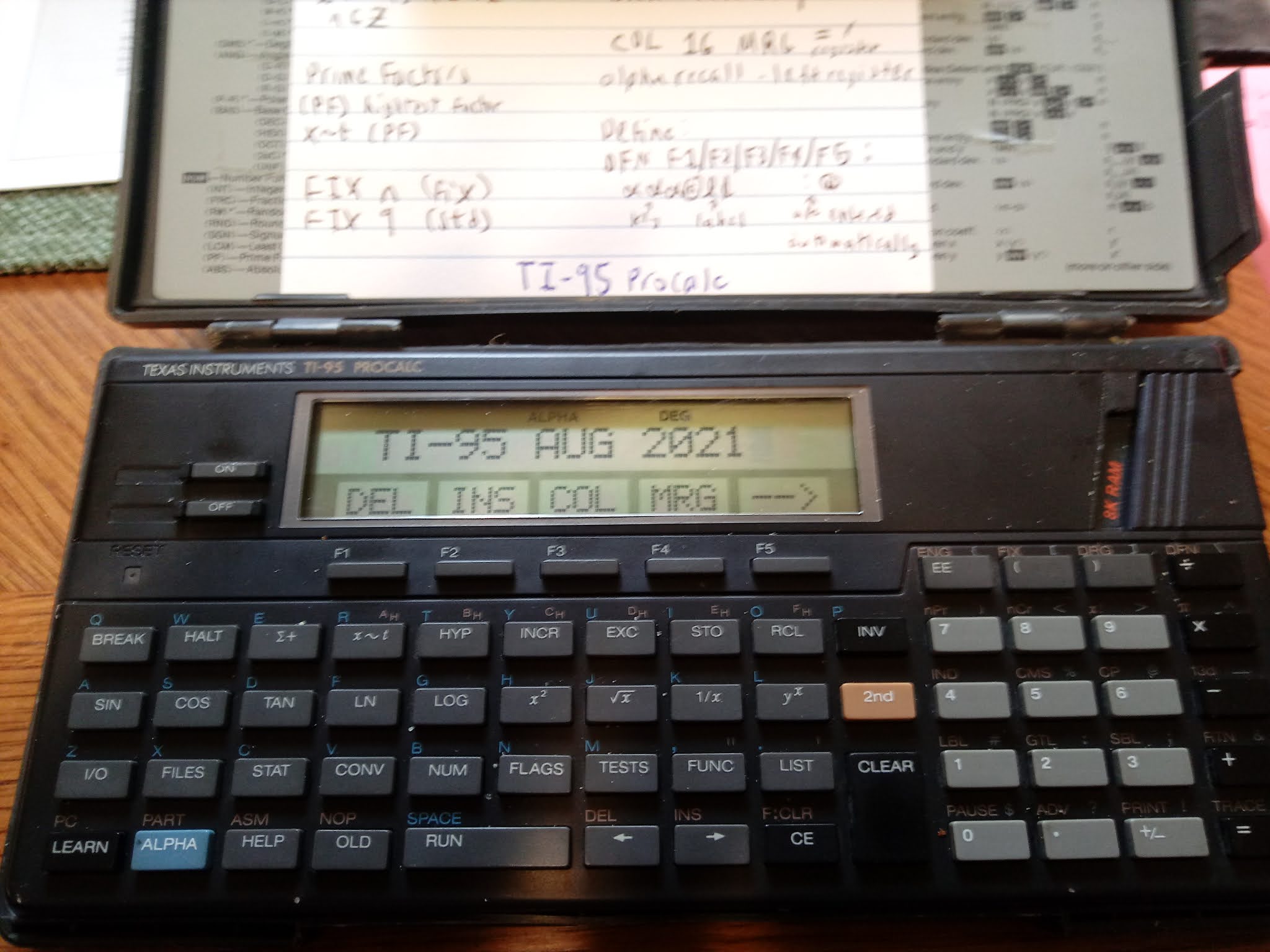
TI-95 ProCalc: Solving Equations With 2 Known Values, Solve for the Third Variable


TI-95 ProCalc: Solving Equations With 2 Known Values, Solve for the Third Variable 


Introduction

The two programs presented on today's blog will show an approach to program a solver where:

*  Values for two variables are known
*  The third variable is solved for automatically

We will make use of TI-95 ProCalc's user flags 01, 02, and 03 to determine which variable has entries and which variable is to be solved for.   I stored 2 into a variable (in this case, C) to count down the number of values are entered.  These programs assume that the user will always enter values for two different variables without the need to review or edit values entered.

Keys:
F1:  first variable - controlled by user flag 01
F2:  second variable - controlled by user flag 02
F3:  third variable - controlled by user flag 03

TI-95 ProCalc's flag operations:
RF:  reset flag, clear flag
SF:  set flag
TF:  tests whether a flag is set
INV TF: tests whether a flag is reset

All the variables and their values, entered or solved for, are shown at the end.

Ohm's Law

R = V / I
R = resistance in Ohms (Ω)
V = voltage in Volts (V)
I = current in Amps (A)

The program reminds the user of what units are expected in the beginning.

CHAR 244 adds Ω to the alpha string.

The alpha string '   TO ENTER' has three spaces at the beginning of the string to allow room for C.   C is merged at space 2.  

Housekeeping Items: 

RF 01 RF 02 RF 03:  Resets the flags 01, 02, and 03 at the end of the program. 

DFN CLR:  Clears the defined keys F1 - F5. 

TI-95 ProCalc File OHM
Size:  224 bytes

0 STO I STO R STO V 2 STO C

RF 01 RF 02 RF 03 CLR

'OHM'S LAW' PAU CLR

'UNITS: ' CHR 244 ',A,V' PAU

LBL A0   

CLR '   TO ENTER'  COL 02 MRG C

DEF F1: R @A1  

DEF F2: I @A2

DEF F3: V @A3

HLT 

LBL A1 STO R SF 01 DSZ C GTL A0 GTL B0

LBL A2 STO I ST 02 DSZ C GTL A0 GTL B0

LBL A3 STO V SF 03 DSZ C GTL A0 GTL B0

LBL B0 

INV TF 01 SBL B1

INV TV 02 SBL B2

INV TF 03 SBL B3

CLR 'R=' COL 16 MRG R BRK

CLR 'I=' COL 16 MRG I BRK

CLR 'V=' COL 16 MRG V  RF 01 RF 02 RF 03 DFN CLR HLT

LBL B1 RCL V / RCL I = STO R RTN

LBL B2 RCL V / RCL R = STO I RTN

LBL B3 RCL I * RCL R = STO V RTN


Examples

I = 10 A, R = 1500 Ω;  Result:  V = 15,000 V

R = 200 Ω, V = 240 V; Result:  I = 1.2 A

I = 15 A, V = 110 V; Result: = 7.333333333 Ω


Right Triangle

This programs solves any of the following variables, from knowing the other two vales: 

X:  run
Y:  rise
R:  hypotenuse

In addition, the angle (Θ) is calculated where Y is considered the opposite side and X the adjacent side.

CHECK ANG MODE:  a prompt to check angle mode, just in case you are not in the desired angle mode.   The program runs in any angle mode.

CHR 242: adds Θ to the alpha string

TI-95 ProCalc File TRI
Size:  248 bytes

0 STO X STO Y STO R STO A 2 STO C

RF 01 RF 02 RF 03 CLR

'CHECK ANG MODE' BRK 

LBL A0   

CLR '   TO ENTER'  COL 02 MRG C

DEF F1:ADJ@A1  

DEF F2:ADJ@A2

DEF F3:HYP@A3

HLT 

LBL A1 STO X SF 01 DSZ C GTL A0 GTL B0

LBL A2 STO Y ST 02 DSZ C GTL A0 GTL B0

LBL A3 STO R SF 03 DSZ C GTL A0 GTL B0

LBL B0 

INV TF 01 SBL B1

INV TV 02 SBL B2

INV TF 03 SBL B3

( RCL Y / RCL X ) INV TAN = STO A

CLR 'X=' COL 16 MRG X BRK

CLR 'Y=' COL 16 MRG Y BRK

CLR 'R=' COL 16 MRG R BRK

CLR CHR 242 '=' COL 16 MRG 

A RF 01 RF 02 RF 03 DFN CLR HLT

LBL B1 ( RCL R x^2 - RCL Y x^2 ) SQR = STO X RTN

LBL B2 ( RCL R x^2 - RCL X x^2 ) SQR  = STO Y RTN

LBL B3 ( RCL X x^2 + RCL Y x^2 ) SQR = STO R RTN

Examples

All examples are in degrees mode.

X = 3, Y = 4
Results:  R = 5, Θ = 53.13010235°

X = 11.8, R = 19.9
Results:  Y = 16.02404443, Θ = 53.63231539°

Y = 27, R = 54.4
Results:  X = 47.22668737, Θ = 29.75706329°

Commas added to the results for readability.  

Eddie

All original content copyright, © 2011-2021.  Edward Shore.   Unauthorized use and/or unauthorized distribution for commercial purposes without express and written permission from the author is strictly prohibited.  This blog entry may be distributed for noncommercial purposes, provided that full credit is given to the author. 


Monday, June 28, 2021

Review: Calculated Industries ElectricCalc Pro (Model 5070)

Review:  Calculated Industries ElectricCalc Pro (Model 5070)


Quick Facts


Model Number:  5070

Company:  Calculated Industries

Year of Production:  2014 - present

Operating System:  Chain

Batteries: 1 x CR 2016

Memory Register:  1 independent (M), memories M1 - M9

Upgradable Chip:  Base Model is set for 2014, chips are available for 2017 and 2020 (and I presume 2023 given how often NEC updates their code)

Cost:  Retail:  $99.95, but sells for anywhere from $59 to as high as $129.  Do your shopping carefully!  


Product Page:  https://www.calculated.com/mobile/prd160/ElectriCalc-Pro-5070-Electrical-Code-Calculator.html


Make Sure Your ElectricCalc Is Up to Code 


Bought new or in box, the calculator comes in a blue Armadillo Gear case.  Often, the ElectricCalc Pro comes with the latest chip (2020) already installed or in my case, my calculator had the 2017 chip installed and the 2020 chip in a separate package.   Installation is simple and you just need a Phillips screwdriver.  


Currently, the ElectricCalc handles code for the following years:

1996

1999

2002

2005

2008

2011

2014

2017 (2017 or 2020 chip required)

2020 (2020 chip required)


Set your jurisdiction by pressing [ Set ] [ ÷ ].  The first preference is the NEC, which you can scroll by pressing [ + ] and [ - ].


Many calculations depend on the NEC code such as wire size, voltage drop, ground conductor wire size, and conduit sizes for wires.   Many of the calculations display the reference table.   Because of the stored values for the NEC codes, the ElectricPro already proves its value.  


Wire Insulation can be selected:


[ Set ] [ 7 ]:  75°C wire insulation (167°F)

[ Set ] [ 9 ]:  90°C wire insulation (194°F)

[ Set ] [ 6 ]:  60°C wire insulation (140°F)


We can work with copper and aluminum wires with the [ Set ] [ 4 ] toggle.   


Ohm's and Kirchhoff's Law


The ElectricCalc Pro has the following keys to work with Ohm's Law:


[ Set ] [ V ] ( R ):  Resistance in Ohms (Ω)

[ Set ] [ Volts ] (Vdc):  Voltage in Volts (V)

[ Set ] [ Amps ] (Idc):  Current in Amps (A)


Likewise, the keys work with Kirchhoff's Law:


[ VA ]:  Volt-Amps

[ Volts ]:  Voltage in Volts (V)

[ Amps ]:  Current in Amps (A)


1 Phase vs 3 Phase


Select 1 Phase mode by pressing [ Set ] [ 1 ].  For 3 Phase, press [ Set ] [ 3 ].   


What is great about the ElectricCalc Pro, the settings will be displayed at all times.  


Verdict


The keyboard of the ElectricCalc Pro work well and the keys give good feedback.  Like the other Calculated Industries calculators, the calculators hold data specific to the industry.  


And like the Calculated Industries calculators, having the ElectricCalc Pro opens up a new world of knowledge.   I'm glad to have the calculators in my collection.  


Eddie


All original content copyright, © 2011-2021.  Edward Shore.   Unauthorized use and/or unauthorized distribution for commercial purposes without express and written permission from the author is strictly prohibited.  This blog entry may be distributed for noncommercial purposes, provided that full credit is given to the author. 

Saturday, May 19, 2018

Update to the Big Font Math Reference

Original post:  https://edspi31415.blogspot.com/2018/04/april-11-2018-seven-years.html

I added several sections to the Big Math Reference document, which you can download on the right side of the blog.

What is added:

* Days Between Dates Algorithm
*  Astronomy Formulas: Kepler's 3rd Law, Parallax, Luminosity, Schwartzchild Radius
*  Physics:  Projectile Motion, Linear Motion, Angular Motion
*  Electronics:  Ohm's Law, Resistance

Eddie

The MU Key on a Four Function Calculator and Programs for the DM42/HP 42S

  The MU Key on a Four Function Calculator and Programs for the DM42/HP 42S Not too long ago, I purchased this very colorful, four funct...