Showing posts with label TI-36X Pro. Show all posts

Saturday, August 26, 2023

Scientific Calculators: Maxima and Minima

Scientific Calculators: Maxima and Minima


Introduction


This blog entry covers four calculators:


Casio fx-991CW

Casio fx-991EX Classwiz

Texas Instruments TI-36X Pro

Texas Instruments TI-30X Pro Math Print


Here is how to find extremum of any general function f(x) and g(x).   This method will tell you where the extremum is located, but not whether the extremum is a minimum or a maximum.  


The extremum of a function can be found by finding the root of the function's derivative:


d/dx f(x) = 0


The steps required are:


1.  Solve d/dx f(x) = 0 to get x.  

2.  Calculate y.  This is easier if we can store the function in f(x) or g(x).


Two methods to find the x point of extremum:


1.  Extremum using f(x) (or g(x))

2.  Extremum using direct entry method


The example used is to find the extremum of e^(sin x) with an initial guess x=1.  We'll be focusing on the x point only.  


Casio fx-991CW 


Either method can be used.   In the Solver Mode, the function button ( [f(x)] ) is available to define f(x) (or g(x)).   Since we are finding a root, we don't have to include the "=0" at the end.


The equation to be used in the solver is:


d/dx( f(x) ) | x = x      (MathIO input)


f(x) can be referenced or typed directly, like:


d/dx( e^(sin(x)) ) | x = x


Casio fx-991EX Classwiz


The direct entry method must be used.  The accuracy may vary for the last digits.  Not as accurate as the fx-991CW. 


Note:  Extremum for quadratic and cubic equations (fx-991CW only) are automatically calculated through the Solver-Polynomial feature of both the fx-991CW and fx-991EX.  


Texas Instruments TI-36X Pro and TI-30X Pro MathPrint


Either method can be used.   f(x) (and g(x) for the TI-30X Pro MathPrint), is edited through the [table] key.   When the function is edited, press [ 2nd ] [ mode ] (quit) to exit the table.    To enter Numeric Solver Mode, press [ 2nd ] [ sin sin^-1 ] (num-solv).  


The solver has the format:

[ ] = [ ]


In this case, we will need to include the 0 on either side of the template.  


Finding extremum is fairly simple.


For the example, the extremum e^(sin x) around x = 1 is x = π/2 (≈ 1.570796327).  


Eddie


All original content copyright, © 2011-2023.  Edward Shore.   Unauthorized use and/or unauthorized distribution for commercial purposes without express and written permission from the author is strictly prohibited.  This blog entry may be distributed for noncommercial purposes, provided that full credit is given to the author. 


Sunday, August 6, 2023

Integer Division with Scientific Calculators

Integer Division with Scientific Calculators


Integer Division


A popular function of European scientific and fraction-featured calculators is the integer division function (also known as Euclidean division).  Integer division between two numbers (typically positive integers) return both the quotient and the remainder.


Example:  

456 int÷ 78 returns a quotient of 5 and a remainder of 66.


Here's a way to execute integer division with various calculators.


TI-36X Pro and TI-30X Pro Math Print


Integer division can be easily accomplished by using two functions:


Quotient:  Either int(x/y) or iPart(x/y)


Remainder:  mod(x,y)


Example:   456 int÷ 78

int(456/78) = 5,  mod(456, 78) = 66


Casio fx-991EX and Casio fx-991CW


Assuming x and y are positive integers, what we do depends on whether y is prime or composite.  We will assume that MathIO mode is activated.  


If y is prime:  We can divide x ÷ y, and change the result into a mixed format.


Example:  6140 int÷ 47

47 is prime.

Key in 6140 ÷ 47.  Change the result into a mixed format.  The result is 130 30/47.


Then the quotient is 130, the remainder is 47.


If y is not prime, we will not be able to do this because the fractions are always simplified to the irreducible form.


Then we will have to use the following steps:

1.   Divide x by y.   Take note of the integer portion (you may have to change the format to mixed fraction or decimal format first).   

2.  For the remainder, execute this formula:   x - quotient * y.  


Example:  5518 int÷ 32

32 is not prime.


1.  Calculate the quotient:  5518 ÷ 32 = 172 1/4.  Note that the integer part, 172 is the quotient.

2.  Calculate the remainder:  5518 - 172 * 32 = 14.  


Then the quotient is 172, the remainder is 14.  


Hewlett Packard HP 41C/Swiss Micros DM41X


Program Code:


01  LBL ᵀ INTD

02  x<>y

03  STO Z

04  x<>y

05  ST/ Z

06  MOD

07  x<>y

08  INT

09  x<>y

10  END


Eddie


All original content copyright, © 2011-2023.  Edward Shore.   Unauthorized use and/or unauthorized distribution for commercial purposes without express and written permission from the author is strictly prohibited.  This blog entry may be distributed for noncommercial purposes, provided that full credit is given to the author. 


Monday, August 8, 2022

Texas Instruments: TI-36X Pro and TI-30X Pro Mathprint

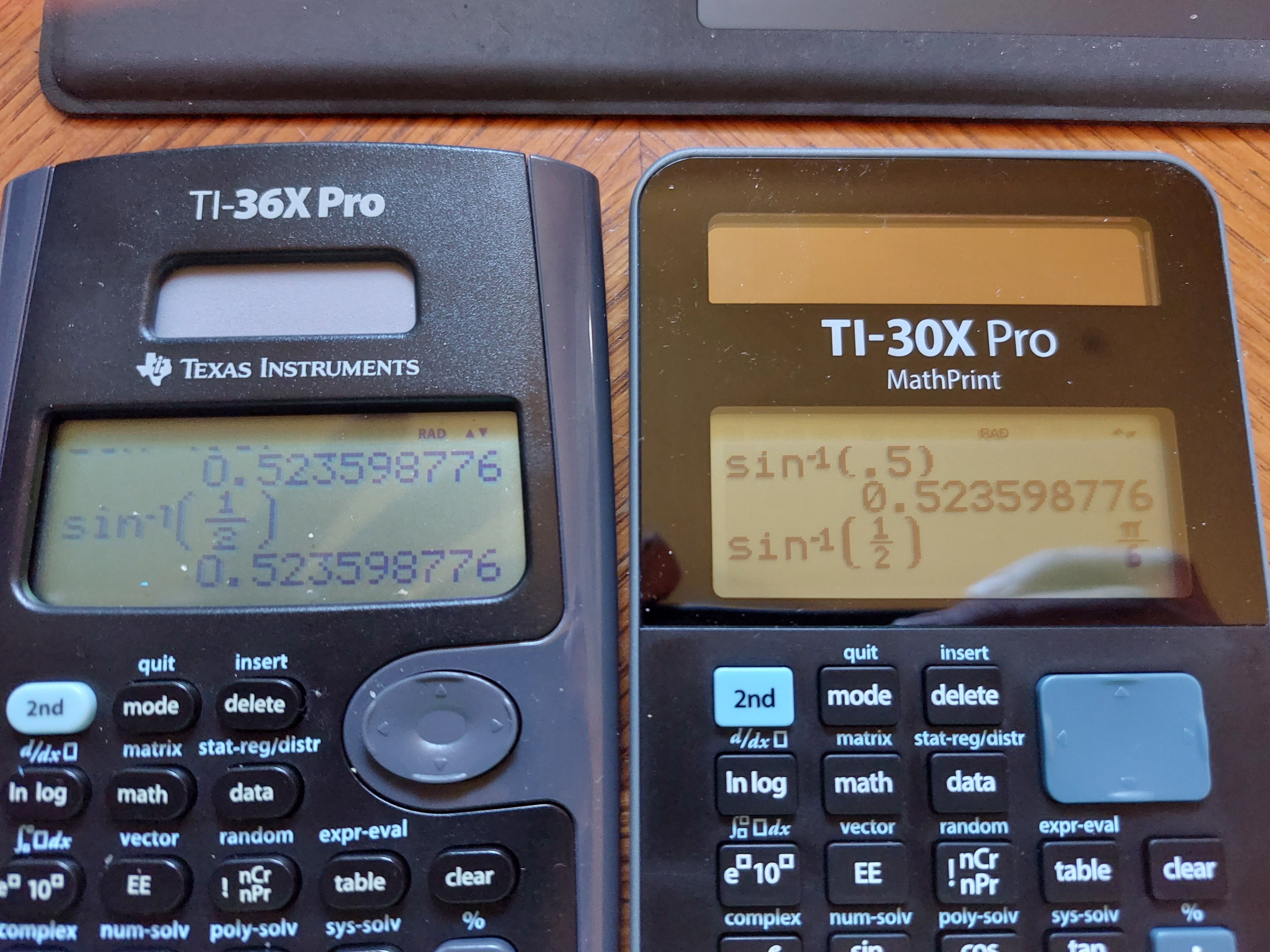
 Essentially, the Texas Instruments TI-36X Pro and the TI-30X MathPrint are functionally equivalent.  What makes the two calculators different?


*  The TI-36X Pro is sold in the United States and in lot of the world, with the TI-30X MathPrint is sold primarily from Europe.  I ordered my TI-30X Pro MathPrint from the United Kingdom.  


Product pages from Texas Instruments:


TI-36X Pro (United States and Canada)

https://education.ti.com/en/products/calculators/scientific-calculators/ti-36x-pro


TI-30X MathPrint (Denmark, in Danish):

https://education.ti.com/da/products/calculators/scientific-calculators/ti-30x-pro-mp#specifications


Australia has a TI-30XPlus MathPrint, which is styled like the TI-30X Pro MathPrint, but without calculus functions.

https://education.ti.com/en-au/products/calculators/scientific-calculators/ti-30x-plus-mp?category=overview


*  Thanks to the body of the calculator being curved, the TI-36X Pro is slightly bigger than the TI-30X Pro MathPrint. 


*  The screen on the TI-36X Pro is a curved trapezoid, while the screen of the TI-30X Pro MathPrint has is rectangular.  


*  The TI-36X Pro has a circular arrow keypad while the TI-30X Pro MathPrint has a rectangular arrow keypad.  


* The TI-30X Pro Math print has black characters, while the TI-36X Pro has blue characters.


* The font on the keys of the TI-30X Pro Math are larger than than the font on the TI-36X Pro's keys.


Here are some pictures.


Either calculator is worth buying.  You  can see my review of the TI-36X Pro from 2011 here:

P.S. I still wish the TI-36X Pro/TI-30X Pro MathPrint had an alpha key instead of one key to press multiple times to get different variables.  That is my biggest gripe. 

Eddie


All original content copyright, © 2011-2022.  Edward Shore.   Unauthorized use and/or unauthorized distribution for commercial purposes without express and written permission from the author is strictly prohibited.  This blog entry may be distributed for noncommercial purposes, provided that full credit is given to the author. 


Sunday, July 10, 2022

Calculus: Scaled Integration

Calculus:  Scaled Integration


Introduction


The take the integral:


∫( f(x) dx, A, B) 


The integral can be transformed to new limits C and D via linear transformation:


∫( f(x) dx, A, B) → ∫( g(y) dy, C, D)


Where the interval [ C, D ] has the smaller range than [ A, B ].


Set the transformation to:


y = m*x + β


C = m*A + β

D = m*B + β


Solving for m, β:


(C - D) = (A - B) * m

m = (C - D) / (A - B)


and


β = C - A * m = D - B * m


Solving y = m*x + β for x:


x = 1/m * (y - β)


Taking the derivative of both sides:


dx = 1/m  dy


The transformed integral:


∫( f(x) dx, A, B) → 1/m * ∫( f(1/m * (y - β)) dy, C, D)


Examples


Example 1:  


∫(x^2 - 5 dx, 10 ,16) but scale the integration interval to [1, 2].


A = 10, B = 16, C = 1, D = 2

m = (1 - 2)/(10 - 16) = 1/6,  1/m = 6

β = 1 - 10 * 1/6 = -2/3

x = 6 * (y + 2/3) = 6 * y + 4


Transformed Integral:

6 * ∫( (6*y + 4)^2 - 5 dy, 1, 2) = 1008


Example 2:


∫( e^x * ln(x + 2) dx, 0, 5) but scale the integration to [0, 1].


A = 0, B = 5, C = 0, D = 1

m = -1/-5 = 1/5,  1/m = 5

β = 0 - 0 * 1/5 = 0

x = 5 * y


Transformed Integral:

5 * ∫( e^(5 * y) * ln(5 * y + 2) dy, 0, 1) ≈ 262.8586594


Numerical integrals were calculated with the TI-36X Pro.  


When trying the Simpson's rule or Trapezoid rule, I find the smaller range does not really give better estimates.  But I am presenting the technique and if this helps in the future, great.  


Coming up:


July 11 - July 15, 2022:  TI-58 and TI-59 Week

Next Regular Blog:  July 23, 2022


Eddie  


All original content copyright, © 2011-2022.  Edward Shore.   Unauthorized use and/or unauthorized distribution for commercial purposes without express and written permission from the author is strictly prohibited.  This blog entry may be distributed for noncommercial purposes, provided that full credit is given to the author. 


Sunday, August 8, 2021

TI-36X Pro's Keyboard Gets an Uplift

TI-36X Pro's Keyboard Gets an Uplift


The TI-36X Pro from Texas Instruments gets a keyboard uplift: the arithmetic, enter, arrow pad, and fraction/decimal keys are no longer metallic with hard to read symbols. Instead they are dark gray with white symbols, which are much easier to read and better to push. No other software changes or additions detected (yet). The price is still the same. This is probably closest the United States is going to get to the keyboard of the European TI-30X Pro Mathprint. The new 36X Pros are manufactured in the Philippines, while they used to be manufactured in China.


Packaging

New Keyboard
Old Keyboard


Back cases (Old on the left: China with an extra Reset button, New on the right: Philippines without that button)

Note: The same text with these pictures appear on my Instagram page. (Account edpicsgram).


Eddie

All original content copyright, © 2011-2021.  Edward Shore.   Unauthorized use and/or unauthorized distribution for commercial purposes without express and written permission from the author is strictly prohibited.  This blog entry may be distributed for noncommercial purposes, provided that full credit is given to the author. 

Saturday, March 14, 2020

TI-36X Pro: Using f(x) in Calculus

TI-36X Pro: Using f(x) in Calculus

The TI-36X Pro Calculator has a table function where you can store a function in the form f(x) and use it for build a short table.  But did you know the function can be used in outside calculations like calculating the derivative and the integral?

It's fairly easy to do. 

1.  Press the [ table ] key and select 2: Edit Function
2.  Enter f(x).  Use the variables key [ x ytzabcd ] to enter x. 
3.  Press [ enter ], [ 2nd ] [ mode ] (quit)

To recall f(x):

1.  Press the [ table ] key and select 1: 1(. 
2.  The function call f( is inserted.   You can use this to make calculations on the home screen.

Below are screen shots of an example, with f(x) set as 3x^2 + 3.


Eddie

All original content copyright, © 2011-2020.  Edward Shore.   Unauthorized use and/or unauthorized distribution for commercial purposes without express and written permission from the author is strictly prohibited.  This blog entry may be distributed for noncommercial purposes, provided that full credit is given to the author.

Tuesday, April 16, 2019

My Blog Turns 8!

My Blog Turns 8!


It turns out last year I was a bit early on declaring my blog's birthday.  My first blog was not on April 11, 2011 but on April 16, 2011.  Here it is:

https://edspi31415.blogspot.com/2011/04/hi-everyone-this-is-my-very-first-blog.html

Not too exciting, I know.  The first mathematical topic I did was reviewing the HP 10BII+ financial calculator:

A first look on April 18, 2011:

https://edspi31415.blogspot.com/2011/04/hp-10bii-first-look.html

And here was my review of it on April 20, 2011:

https://edspi31415.blogspot.com/2011/04/10bii-review.html

What followed is a popular review of my blog, the review of the Texas Instruments TI-36X Pro, which was posted on April 27, 2011:

https://edspi31415.blogspot.com/2011/04/ti-36-pro-review.html

I just want to give a big shout out and thanks to each and every one of you.  I am happy and fortunate to share my love of mathematics and calculators with all of you.  Here's to many more years, readers!

Eddie Shore

All original content copyright, © 2011-2019.  Edward Shore.   Unauthorized use and/or unauthorized distribution for commercial purposes without express and written permission from the author is strictly prohibited.  This blog entry may be distributed for noncommercial purposes, provided that full credit is given to the author.

Saturday, January 5, 2019

Solar Scientific Calculators: Dealing with Integrals with Infinite Limits

Solar Scientific Calculators:  Dealing with Integrals with Infinite Limits

Integrals with Infinite Limits

Today's post deals with integrals with infinite limits in the forms:

∫( f(x) dx, x = a to x = ∞)

∫( f(x) dx, x = -∞ to x = ∞)

∫( f(x) dx, x = -∞ to x = a)

One method to deal with these integrals, as suggested by W.A.C. Mier-Jedrzejowicz Ph. D. (see the source), is to use the substitution

x = tan θ

Then:

dx = dθ/cos^2 θ

and θ = atan x.

Also, as x approaches π/2, tan x approaches +∞.

And, as x approaches -π/2, tan x approaches -∞.

With the substations, let's test four integrals on four solar-powered scientific calculators:

1.  Casio fx-991EX Classwiz
2.  Sharp EL-W516T
3.  Texas Instruments TI-36X Pro
4.  Casio fx-115ES Plus

Set the calculator to radians mode. 


Example 1:  ∫(1/x^2 dx, x = 1 to x = ∞) = 1

∫(1/x^2 dx, x = 1 to x = ∞)

with the substitutions x = tan θ and dx = dθ/(cos^2 θ):

∫( 1/tan^2 θ * dθ/cos^2 θ, θ = atan 1 to θ = π/2)

∫( 1/sin^2 θ * dθ, θ = atan 1 to θ = π/2)

We can evaulate the integral straight away.  Here are the results:

1.  Casio fx-991EX Classwiz
Time: 1.37 seconds
Answer: 1

2.  Sharp EL-W516T
Time: 38 seconds
Answer: 1

3.  Texas Instruments TI-36X Pro
Time: 4.5 seconds
Answer: 1

4.  Casio fx-115ES Plus
Time: 4.2 seconds
Answer: 1

A promising start.

Example 2:  ∫(e^(-0.5*x^2), x = 0 to x = ∞) ≈ 1.25331413732

∫(e^(-0.5*x^2), x = 0 to x = ∞)

with the substituions, this becomes:

∫(e^(-0.5 * tan^2 θ)/cos^2 θ dθ, θ = atan 0 to θ = π/2)

atan 0 = 0

But look at the denominator, we have cos^2 θ.  Since cos^2 π/2 = 0, there will be a problem.  Let's use an approximation of π/2 of 1.5708.

∫(e^(-0.5 * tan^2 θ)/cos^2 θ dθ, θ = 0 to θ = 1.5708)

Here are the results:

1.  Casio fx-991EX Classwiz
Time: 15.4 seconds
Answer: 1.253314137

2.  Sharp EL-W516T
Time: 1 minute, 8 seconds
Answer: errors out

3.  Texas Instruments TI-36X Pro
Time: 36 seconds
Answer: 1.253314138

4.  Casio fx-115ES Plus
Time: 1 minute, 6.8 seconds
Answer: 1.253314137

Example 3:  ∫(x^2*e^-x dx, x = 0 to x = ∞) = 2

∫(x^2*e^-x dx, x = 0 to x = ∞)

with the substitutions and simplification, we get:

∫( (sin^2 θ * e^(-tan θ))/cos^4 θ dθ, θ = 0 to θ = π/2)

Like the last situation, there is a potential problem with the denominator.  Let's see if we can use an approximation of π/2, this time using 1.57 in hopes to cut the calculation time down.

∫( (sin^2 θ * e^(-tan θ))/cos^4 θ dθ, θ = 0 to θ = 1.57)

Here are the results:

1.  Casio fx-991EX Classwiz
Time: 27 seconds
Answer: 2

2.  Sharp EL-W516T
Time: 1 minute, 34 seconds
Answer: 1.999999999

3.  Texas Instruments TI-36X Pro
Time: 1 minute, 9 seconds
Answer: 2

4.  Casio fx-115ES Plus
Time: 1 minute, 6.8 seconds
Answer: 1.253314137

Example 4:  ∫( e^-x/x^2 dx, x = 1 to x = ∞) ≈ 0.148495506776

∫( e^-x/x^2 dx, x = 1 to x = ∞)

with the substitutions and simplification, we get:

∫( e^(-tan θ)/sin^2 θ dθ, θ = 0 to θ = π/2)

I'm going to use the 1.57 approximation again and set the integral as:

∫( e^(-tan θ)/sin^2 θ dθ, θ = 0 to θ = 1.57)

Here are the results:

1.  Casio fx-991EX Classwiz
Time: errors out immediately
Answer: N/A

2.  Sharp EL-W516T
Time: 1 minute, 6 seconds
Answer: error

3.  Texas Instruments TI-36X Pro
Time: 7 seconds
Answer: 0.148495519

4.  Casio fx-115ES Plus
Time: errors out after 1 second
Answer: N/A

Some Observations

1.  Not all calculations of improper integrals will be successful.

2.  Out of the four calculators tested, from the four calculations:  the Casio fx-991ES is the fastest, but I found the most successful with the Texas Instruments TI-36X Pro.

3.  Be ready to spend a little for calculations by using this method.

Source:

Mier-Jedrzejowic, W.A.C. Ph.D.  Extend Your 41  London, UK 1985  ISBN 0-9510733-0-03

Eddie

All original content copyright, © 2011-2019.  Edward Shore.   Unauthorized use and/or unauthorized distribution for commercial purposes without express and written permission from the author is strictly prohibited.  This blog entry may be distributed for noncommercial purposes, provided that full credit is given to the author.  Please contact the author if you have questions.

Monday, September 3, 2018

Retro Review: Texas Instruments TI-36X Solar


Retro Review:  Texas Instruments TI-36X Solar

Continuing on the Labor Day 2018 of posts, I now present a retro review of a scientific calculator I couldn’t put down as a young student: the TI-36X Solar. For the class of non-programmable solar scientific calculators back in the day, the TI-36X was the one of the high end calculators. 

If you are expecting a review of the multi-line (and current) TI-36X Pro, then please click here:  https://edspi31415.blogspot.com/2011/04/


General Information

Company:  Texas Instruments
Type:  Solar Scientific Algebraic (postfix)
Display:  10 digits with 2 digit exponents (power of 10)
Power:  Solar
Memory:  3 (store, recall, sum (M+), exchange)
Years:  1991 - 2011
Original Cost: $15 - $20
Documentation:  Manual, Quick Reference Card

Texas Instruments no longer manufactures new TI-36X Solar calculators, so if you want one, pawn shops or internet websites such as eBay would be the place to get one.

Features

* Logarithmic and trigonometric calculations
* Base conversion and Boolean logic
* Linear Regression (intercept is labeled ITC, slope labeled SLP, correlation labeled COR)
* Fractions with conversion and improper fraction conversion (automatic simplification)
* Combinations and permutations
* Eight Scientific Constants and Ten Metric-US Conversions

Scientific Constants ( [3rd], (CONST), appropriate key)

C:  speed of light
g:  Earth’s gravitational constant
me: Mass of an electron
e:  electron charge
h:  Plank’s constant
Na:  Avogadro’s constant
R:  Ideal Gas Constant
G:  Universal Gravitational Constant

Metric-US Conversions

Centimeters/Inches  (1 in = 2.54 cm)
Liters/Gallons  (1 gal = 3.785411784 L)
Pounds/Kilograms (1 lb = 0.45359237 kg)
Fahrenheit/Celsius Temperature
Grams/Ounces (1 oz = 28.34952313 g)

The Exchange Key ([x<>y]) key does a lot  

The TI-36X makes good use of the exchange key, and it is a non-shifted key which facilitates easy operation.  In addition in allowing users to interchange arguments (i.e. switching the subtrahend and minuend in a subtraction calculation), the exchange key allows for:

* Entering n and r in combination and permutation calculations
* Entering x and y in Rectangular to Polar conversions
* Entering r and θ in Polar to Rectangular conversions
* Entering x and y in paired-data statistics (linear regression)

Modes

DEC:  Decimal representation, floating decimal mode, normal calculations
BIN, OCT, HEX:  Binary, Octal, Hexadecimal integer modes, respectively.  Boolean functions such as AND, OR, and NOT only work in these integer modes
STAT 1:  1 Variable Statistics
STAT 2:  2 Variable Statistics/Linear Regression


TI-36X Solar:  1991 keyboard, 1996 keyboard, 2004 keyboard

Keyboard Design and History

The design of the keyboards of the TI-36X Solar evolved over the years.  The first major design was rectangular, most of the keys were black with light font.  The arithmetic keys were at first dark gray, then blue.  This was the shortest keyboard in length.  The calculator had a slide hard case.

Then in 1993, the TI-36X Solar had a keyboard with a rounded edge at the bottom of the keyboard.  The 1996 version is slightly longer in size, with the yellow 2nd key and blue-purple 3rd key.  Constants were labeled in green. 

The final design of the TI-36X came in 2004, with an even bigger keyboard.  This time the keyboard was silver with the royal blue 2nd key, lime green 3rd key, and constants marked in maroon.  This is the most readable keyboard, however the 2004 version needs more light to operate than its previous versions.  This version also had a snap on case. 

With the exception of the 1993 revamp, the keys were plastic.  The 1993 version had rubber keyboards.  The keys generally had a good response to them. 

Of the three TI-36X Solar calculators I have now (just purchased one with the 1991 original style keyboard), the manufacturing dates where 12/1990 (1991 keyboard), 6/2000 (1996 keyboard), and 6/2010 (2004 keyboard). 

TI-35X, the battery operated version of the TI-36X Solar, 1993 keyboard with rubber keys

The TI-36X Solar had a battery operated version, named the TI-35 Plus.  I have a TI-35X in a 1993 version keyboard with the rubber keys. 

The TI-36X Solar was itself a successor to the TI-36 Solar.  The TI-36 Solar lacked constants, English-US conversions, fractions, and linear regression, but had complex number arithmetic. 

The successor the TI-36X Solar is the TI-36X Pro, which has a multi-line screen, adds among other things, integration, derivatives, function tables, textbook input/output, matrices, and additional regression types.

My introduction to the TI-36X Solar was when in I was in middle school back in the early 1990s.  I couldn’t put this calculator down.  I wished I remembered to use the hard cover because one day I had the TI-36X Solar in my pocket with a pencil.  The pencil poked through the solar panel and it was the end of it. 
  
Verdict

The TI-36X Solar is a feature rich scientific calculator and as I said before, one of the line non-programming solar scientific calculators at the time.  The keyboard is responsive, you have a nice set of common constants and conversions.  I like the layout of the keyboard.  This is a good calculator to pick up, even if it is just for collection purposes.   For a retro calculator, the TI-36X Solar is a definite recommend from me. 

Source:

Woerner, Jorgen.  “TI-36X Solar” Datamath http://www.datamath.org/Sci/Modern/TI-36XSOLAR.htm 

Eddie

All original content copyright, © 2011-2018.  Edward Shore.   Unauthorized use and/or unauthorized distribution for commercial purposes without express and written permission from the author is strictly prohibited.  This blog entry may be distributed for noncommercial purposes, provided that full credit is given to the author.  Please contact the author if you have questions.

Saturday, March 24, 2018

Favorite Solar Calculators – Six Years Later


Favorite Solar Calculators – Six Years Later

Favorite Solar Calculators – Reading that Blog Entry Today

On June 10, 2012, I listed some of my favorite solar calculators of all time: 

I still love the TI-25X Solar, I wish the screens weren’t so damn fragile!  I went through two of them. 

I have two fx-115 ES Plus calculators, one gray and one black.  The black looks much better!

Maybe one day I’ll get the BA 35 Solar again from eBay.  Maybe I will give the Casio FC-200V a second shot. 

As of March 2018, Casio fx-3650pII is the current edition of the fx-3650P.  The fx-3650PII is in the shape of the fx-115ES/991ES/300ES/82ES Plus.  That’s about it from what I can get from research:  still four program areas with 360 steps and 7 variables.


No, Casio still currently sells the fx-3650PII only outside the United States, which means for us Americans, we have to order online.  An open invite to Casio to stock the office stores and university stores with this model in the States is extended. 

The current Sharp EL-W516 edition, the EL-516WT, eliminated the formula storage, eliminated the catalog, and reduced the definable keys from 4 to 3, I am not happy about that.


Three More Inductees

I have three more to add to the list I posted in 2012:


Casio fx-991EX Classwiz – 2015 – Present

The Classwiz model is the next step in Casio solar powered calculators.  They have an icon menu, like their graphing calculators, and there is an [OPTN] key that allows users to specific mode-specific functions.  Modes includes computation (COMP), complex numbers (arithmetic, polar/rectangular conversions), base integers, matrices up to 4 x 4, vectors, statistics, distributions, basic spreadsheets up to 5 x 45, equation solving, inequalities and ratios.  The newest feature is the QR function that will take a screen shot of the calculator, or in some cases, statistical graphs, which can be retrieved from the Casio QR Website or app.


I can only hope the next iteration the Classwiz and the fx-3650P or fx-50FII merge so programming will be included.


TI-30 SLR+ – 1987 – 1990s

This is a bigger version of the TI-25X Solar (TI-30X Solar internationality).  This calculator completely runs on solar and light power.  What I look about this better than the TI-25X are the keys and the fact the display isn’t so fragile.  See my detailed blog of it here:  https://edspi31415.blogspot.com/2014/09/ti-30-slr-and-memories-of-school.html


Casio fx-260 Solar II (we can included the Casio fx-260 Solar, fx-82 Solar, fx- 82 Solar II)
Original fx-260 Solar/fx-82 Solar:  2000s – present
Current fx-260 Solar II/fx-82 Solar II: 2017 – present

I don’t know what I was thinking when I skipped this model last time.  The fx-260 offers a wide variety of functions:  trigonometry, logarithms, fractions, degrees and degrees-minute-second conversions, polar/rectangular conversions, and one variable statistics.  This is great calculator for those who want a small, compact, calculator that attacks the basics.  The fx-260 series is completely solar powered.  Pictured is the newer fx-260 Solar II, which the mode markers have been mode to the back of the calculator case.  Can’t beat the classics. 


Eddie

This blog is property of Edward Shore, 2018.

Thursday, August 18, 2016

TI-34 II, TI-34 Multiview, TI-36X Pro: Stored Operations and Recurring Sequences

TI-34 II, TI-34 Multiview, TI-36X Pro: Stored Operations and Recurring Sequences 


Although not known as programming calculators, we can program small macros on the Texas Instruments TI-34 II, TI-34 Multiview, and TI-36X Pro calculators through the stored operation feature. You can store up to two operations on the TI-34 II and TI-34 Multiview, while only one operation can be stored on the TI-36X Pro.   The elementary calculator TI-15 also has this feature.  

Executing the stored operation types whatever is stored.  For example if op=+11, then pressing 12 [op]* shows 12+11 on the screen.  

There are limits to what can be programmed with this operation:

1.  For functions f(X), X is assumed to be entered, as once the operation is executed, what is stored is typed out. 
2. There are no loops or IF-THEN-ELSE structures, hence the extent of the the stored operation is meant for quick calculations. I believe there is a 40 character limit. 
3. For certain operations, you may need to enter certain functions or left hand parenthesis before executing the operation.  
4. With the last answer command (Ans), we can program recurring sequences with one initial condition.  We will discuss this later. 


General Steps for the TI-34 II and TI-34 Multiview:

1.  Press [2nd] [OP1] (set op1, >OP1) to edit your macro.  Press [Clear] if necessary.  
2. When done, press [ENTER]
3. Enter your variable, press [OP1].  The calculation is automatically made. 

The steps are similar for OP2. 

General steps for the TI-36X Pro (TI-30X Pro Multiview if you are outside the United States):

1.  Press [2nd] [ * ] (set op) to edit your macro.  Press [Clear] if necessary.  
2. When done, press [ENTER]
3. Enter your variable, press [2nd] [ ) ] (op). The calculation is automatically made.  

For the TI-15, the [OP1]/[OP2] has required repeated presses.  First for the edit mode, second to store the operation, subsequent presses execute the operation.  The TI-15 may have limited application, as in one step arithmetic macros.  I don't know if more complex macros can be programmed for the TI-15, since I do not own one.  For this post, I will focus on the TI-34 II, TI-34 Multiview, and TI-36X Pro.

Let's go over a few examples. 


Example 1: Area of a circle.   

The area of the circle is A = π * r^2.  Assume r will be in the display.  

Set up the operation.  Press [2nd], (set op 1/2)*, [x^2], [ * ], [ π ].  The screen will read: 

op=²*π, op1=²*π, or op2=²*π

Don't freak at this display, it is correct.  Press [ENTER].  Remember, this will be attached to the calculation whenever the stored operation is executed. 

*Refer to the instructions above for your particular calculator. 

Now enter r, and then press {op} to calculate the area.  

Test Data:
r = 0.76,  Result = 1.814583917
0.76 {op} (display should show 0.76² * π )

r = 9, Result = 81*π = 254.4690049

Example 2: Convert °C to °F. (Degrees Celsius to Fahrenheit) 

Formula: °F = °C * 9/5 + 32

Stored operation:  op = * 9 ÷ 5 + 32

Execute this stored operation in the same way as the above example.  

Test data:
32°C, result 89.6°F
24°C, result 75.2°F

Example 3: Hypotenuse of a Right Triangle

Calculate the hypotenuse of a right triangle where one side is 5 units and the other varies.  Formula:  √(x^2 + 5^2) = (x^2 + 5^2)^0.5

Here X is inside an operation, so we'll need to make some adjustments.  Store the operation as:

op = ² + 5² ) ^ 0.5

When executing the operation, we'll have to include the left parenthesis, then enter the number, then execute the operation ({op}).  Otherwise, a syntax error occurs. 

Test data:
x = 3.   Press [ ( ], 3, {op}.   The display should read (3² + 5²)^0.5 for the result of 5.830951895.  

x = 4.5. Result: 6.726812024. 

Example 4:  Percent Change

This will illustrate the use of variable registers.  The TI-34 II has five variable registers (A-E), the TI-34 Multiview has seven (x,y,z,t,a,b,c), and the TI-36X Pro has eight (x,y,z,t,a,b,c,d).  

For this example, I will use the variable x, but feel free to use which one you like. 

Percent change:  (n - x)/x * 100
where n = new value, x = old value.  
The stored operation will be:  op = - x) ÷ x * 100

To execute, store the old value in x, then press [ ( ], enter new value, then execute the operation.  

Test Data:
New = 50, Old = 36

36 [STO>] x, [ ( ], 50, {op}.   Result: 38.88888889

New = 26, Old = 36. Result: -27.77777778

Recurring Sequences:  u(n) = f( u(n-1) )

The stored operation format will be slightly different.  The variable Ans (last answer) represents u(n-1).  We have more freedom with the expression since Ans is used. 

Before execution the operation, enter the initial condition, press [ENTER] to store in Ans.  Press {op} and repeat as desired.  

Example 5:

Recurring sequence:  u(n) = 3 * u(n-1) - 1 with the initial condition u(1) = 1. 

Stored Operation:  op = 3 * Ans - 1

Find the next six terms.  

1, [ENTER], {op}

The next six terms are 2, 5, 14, 41, 122, 365. 

Hope you find the stored operation feature helpful.  Until next time,

Eddie

This blog is property of Edward Shore, 2016 


Sunday, November 25, 2012

Matrix Functions on the fx-991ES (fx-115ES in the US) vs TI-36X Pro

Matrix Function Comparison (fx-991ES/fx-115ES vs TI 36X Pro)

Today's blog entry comes from a question by An Artist:


An Artist has left a new comment on your post "TI-36X Pro Review":

Hi Eddie,

In India, the TI 36x pro is available at the same price as the Casio 991ES.
I have ordered the TI.

Is this a good decision?
I've heard of a memory overload bug of the TI which gives wrong answers. Can you please tell me how to get around the bug?

My main focus is matrix and someone told me that this one has more matrix functions for matrices. Can you please confirm that?

Your blogs have been very helpful about calcs. So, keep up the good work.


First of all thank you for the compliment An Artist, very much appreciated.

Regarding the overload bug on the TI-36X Pro, honestly this is the first time I read of it. According to one of the reviewers on the flipkart.com page, the reviewer reports an overload bug occurs when too many equations are used or too much memory is used. I have not found any additional information about this. Personally I have not encounter this problem.

Now the matrix commands. I am going to list the available matrix functions for each calculator. First up, Casio, then Texas Instruments.

Keep in mind both calculators allow only for real-numbered elements.


Casio fx-991ES (aka fx-115ES in the United States)

You will need to enter a specific mode for Matrices (MODE 6)

3 matrices can be stored, up to size 3 x 3 matrices. A separate "Ans" matrix is also available.

Matrix Functions:
Arithmetic
Ability to resize matrices
Determinant (dim)
Transpose (Trn)
Inverse (with the x⁻¹ button)
Square of a square matrix (with the x² button)
Cube of a square matrix (with the x³ function)
Absolute Value of each element (Abs)

Matrices are automatically cleared when modes are switched.

Note: The updated fx-115ES PLUS adds the ref and rref functions.


Texas Instruments TI-36X Pro

There is no specific mode required, you can work with matrices directly from the Home screen.

3 matrices can be stored, up to size 3 x 3 matrices. A separate "Ans" matrix is also available. The TI-36X offers identity matrices [I2] and [I3] of size 2 x 2 and 3 x 3, respectively.

Matrix Functions:
Arithmetic
Ability to resize matrices (through the edit screen)
Determinant (dim)
Transpose (Trn)
Inverse
Square of a square matrix (with the x² button)
Powers of a square matrix ([A]^n where n is a positive integer, 0, or -1)
Absolute Value of each element (abs)
Integer Part of each element (iPart)
Fractional Part of each element (fPart))
Rounding of each element (round)
Reduced Echelon Form (ref)
Row Reduced Echelon Form (rref)

Matrices are retained in memory on the TI-36X Pro.


An Artist, to answer your question between the fx-991ES and the TI-36X Pro, I can confirm that the TI-36X Pro has more functions for matrices. Hope this helps,

Eddie


Sunday, June 10, 2012

My Favorite Solar Calculators of all time

In no particular order...

Texas Instruments TI-25X Solar - mid to late 1990s

This small calculator packs a lot of punch. 8 digit that converts to 5 digit with 2 digit exponent any time the number exceed eight digits. Features include reciprocal, polar/rectangular conversion, one variable statistics, and decimal-DMS conversion. When I had the TI-25X the first time, back in the late 90s, it was my go-to calculator for quick calculations. I just bought another one from Amazon a week ago.

The calculator is truly solar, that is no batteries are used in any operation, which is rare in solar scientific calculators. (The battery, I think, aids long-term memory storage).

The trouble with the 25X was protecting it. It now lives in a small camera case with bubble wrap around it when not in use. I wish Texas Instruments was still manufacturing the 25X.

Casio FX-115ES Series - 2004-present

This is my favorite calculator Casio has produced. Not only the calculator operates on solar power, but it also was the first (I believe) calculator to have calculus functions: integral, derivative, and sum of a function. Matrices and vectors are also featured. The calculator can solve equations in one variable. Entry of mathematical expressions is straight forward. You can set the calculator to textbook entry mode or linear (classic) mode. I prefer the latter (the less pairs of parentheses I have to track the better).

The 2012 revision, fx-115ES PLUS (pictured), adds, among other things, integer factoring, verification tests, and product of a function.

Outside the United States, this calculator is named the fx-991DE/ES (PLUS).

Texas Instruments BA 35 Solar - early 1990s
(not pictured :( - I don't have it anymore)

Anyone who can operate a BA 35 or a BA II Plus should feel comfortable with the BA 35 Solar. The BA 35 Solar has the following:

* Time Value of Money, using periodic interest rate.
* Cost Sell Margin/Markup calculations
* Interest Conversion
* Amortization
* One variable statistics.

I gave my BA 35 Solar to my dad and he loved using it. Unfortunately, the display went nuts and it had to be retired.

Texas Instruments TI-36X Series (TI-36 Solar: 1986-early 1990s, TI-36X Solar: 1993-present, TI-36X Pro: 2011-present)

If you wanted the most advanced non-graphing calculator, you pretty much went for the TI-36X series. The original TI-36 Solar was powerful non-programmable calculator which had base conversions, hyperbolic functions, normal distribution calculations, and complex numbers (limited to arithmetic). When Texas Instruments upgraded the 36 to the 36X, the normal distribution calculations and complex numbers were dropped, but eight scientific constants, eight metric-English conversions, and linear regression were added.

This calculator received a lot of use during my days of middle and high school. I owned the original 1993 design and it went with me everywhere I went. The solar panel was punctured by a pencil and it died. Eventually, I got the 1996 design (pictured) and is my favorite design of the TI-36X Solar. Texas Instruments redesigned the calculator in 2004, giving it a gray faceplate and white keys, which I also have.

In 2011, Texas Instruments released the TI-36X Pro (named TI-30X Pro in Europe), which a serious upgrade of the 36X series. New features include derivatives, integrals, tables, equation solver, and entry in textbook format. For me, I had to get used to the keyboard because a lot of the keys cycled through functions. An example: the sine key (sin, sin^-1, sinh, sinh^-1), math constants ( π , e, the complex number i ), and the key that annoys me the most, the variable key (x, y, z, t, a, b, c, d).

If you waited to 2012 to consider getting a TI-36X Pro, you did a good thing in waiting. The early versions were buggy and were erroneous in calculations involving π and fractions. Thankfully, TI fixed the bugs and now I can confidently use the TI-36X Pro.

Casio fx-3650P: 2002 - present?

Casio, I think, is the only manufacturer of calculators left that produces programming calculators that also operate on solar power (with battery). I purchased this calculator on eBay (unfortunately it is not sold in stores in the United States, it should be IMHO).

The calculator has 360 program steps on which 4 programs can be stored. The programming language is a simplified set of the programming commands found on the Casio fx-5800p and its graphing calculators. Commands include LABEL, GOTO, basic testing, input prompt, and output.

Other features include complex number arithmetic, base conversions, and Numeric integrals.

Victor V34 - 2000s

Take a good loom at this calculator. If this calculator reminds you of the super popular Texas Instruments TI-30X IIs, it is because the keyboard design is similar.

While the TI-30X IIs sold in many colors for the 2009, 2010, 2011, and (I'm expecting) 2012 back to school seasons, the Victor V34 offers a feature that the TI-30X IIs doesn't: base conversions and logic operations. I purchased this hard to find calculator in a local stationery store in Glendora, CA.

Sharp EL-W516 Series - 2000s - Present

There are two functions two versions. The original had a gray faceplate. Sometime in 2011(?), Sharp made a design change and made the entire plate black. The model is now the EL-W516X with black keys, white, green, and gold lettering. In the United States, the Sharp calculators can be found at Target stores.

Like the Casio fx-115 ES, the Sharp EL-W516 series offers entering calculations in textbook format. Unlike the fx-115ES where you can get exact or approximate answers when demanded, the EL-W516 forces you to cycle through the format of the answers (exact/mixed fraction, improper fraction, decimal approximation) with the press of the CHANGE key (this applies to Normal mode).

The Sharp EL-W516 series offers unique functions:
* Drill feature - a quiz of arithmetic problems
* Functions with lists
* 4 definable function keys
* 4 definable formulas (I love this feature)
* Pental Numbers (Base 5)


That is a list of my favorite solar calculators. Eddie


This blog is property of Edward Shore. © 2012

Python – Earth’s Radius and Gravity in US Units

Python – Earth’s Radius and Gravity in US Units Introduction The following script, gravus2.py, estimates the Earth’s gravity i...