Sunday, January 24, 2021

HP 12C: Solving Two Actuarial Problems

 HP 12C: Solving Two Actuarial Problems


Solve for Interest and Number of Periods Given Present Value Annuity Factor and Future Value Annuity Factor


Given the following:


* Present Value Annuity Factor (PVAF)

* Future Value Annuity Factor (FVAF)


Solve for both:


*  the interest rate

*  the number of periods of the annuity


Keep in mind that present value and future value annuity factors are not the same of present value and future value, respectively.


Recall that:


PVAF = (1 - (1 + i)^-n) / i


FVAF = ((1 + i)^n - 1) / i


Note that:

FVAF = ( (1 + i)^n - 1 ) / i

FVAF = (1 + i)^n * (1 - (1+i)^-n) / i

FVAF= (1 + i)^n * PVAF


Then:

FVAF / PVAF = (1 + i)^n

ln (FVAF / PVAF) = ln (1 + i)^n

ln (FVAF / PVAF) = n * ln(1 + i)

ln (FVAF / PVAF) / ln(1 + i) = n


Also:

1 / FVAF + i 

= i / ((1 + i)^n - 1) + i

= i / ((1 + i)^n - 1) + (i * (1 + i)^n - 1)) / ((1+ i)^n - 1)

= (i + i * (1 + i)^n - i) / ((1 + i)^n - 1)

= (i * (1+i)^n) / ((1 + i)^n - 1)

= (1 + i)^n / (1 + i)^n * ( i / (1 - (1 + i)^-n)

= 1 * ( i / (1 - (1 + i)^-n)

= 1 / PVAF


Then:

1 / FVAF + i = 1 / PVAF

i = 1 / PVAF - 1 / FAVF


To summarize: 

i = 1 / PVAF - 1 / FAVF

n = ln (FVAF / PVAF) / ln(1 + i)


The following program solves for interest and number of payments. 


HP 12C (Classic) Program


Stack set up:

Y: PVAF

X:  FVAF


Step: Key: Code

01:  STO 1 :  44, 1

02:  x<>y :  34

03:  STO 2 :   44, 2

04:  1/x :   22

05:  x<>y :   34

06:  1/x :   22

07:  - :   30

08:  STO 3 :  44, 3

09:  ENTER :  36

10:  ENTER :  36

11:  1 :   1

12:  + :   40

13:   LN : 43, 23

14:  RCL 1 : 45, 1

15:  RCL 2 : 45, 2

16:  ÷  :  10

17:  LN :  43, 23

18:  x<>y : 34

19:  ÷  : 10

20:  STO 4 :  44, 4

21:  GTO 00 :  43, 33, 00


Example:


Input:

Y:  PVAF = 22.3965

X:  FVAF = 40.5681


Results:

Y:  i = 0.02   (2%)

X:  n = 30  (30 periods)


Present Value of an Annuity Due with an Effective Discount Rate


The problem determines the present value of an annuity due with an effective discount rate.  The effective discount rate is different from the interest rate (i).  Convert the effective discount rate to interest rate by:


i = d / (1 - d)   [i, d are in decimal form]


HP 12C (Classic) Program


Stack set up:

Clear TVM values

Store n:  [ n ]

Store payment: [ PMT ]

X:  discount rate (as a percentage.  Example: for 10%, enter 10)


Step: Key: Code

01:  BEG  : 43, 7

02:  ENTER  : 36

03:  CLx  :  35

04:  R↓   :  33

05:  1   :  1

06:  %  :  25

07:  1   :  1

08:  x<>y   :  34

09:  -  :  30

10:  LSTx  : 43, 36

11:  x<>y   :  34

12:  ÷  : 10

13:  1  :  1

14:  EEX  : 26

15:  2  :  2

16:  ×  :  20

17:  [ i ] :  12

18:  [ PV ]  :  13

19:  GTO 00  :  43,33,00


Example:


Input:

n = 36, PMT = -250.00

X:  d = 5%;  (5  [R/S])


Results:

X:  4211.10


Present Value:  $4,211.10


Source:


Finan, Marcel B.  A Basic Course in the Theory of Interest and Derivatives Markets:  A Preparation for the Actuarial Exam FM/2   Arkansas Tech University, 2017.  


Eddie


All original content copyright, © 2011-2021.  Edward Shore.   Unauthorized use and/or unauthorized distribution for commercial purposes without express and written permission from the author is strictly prohibited.  This blog entry may be distributed for noncommercial purposes, provided that full credit is given to the author. 


Saturday, January 23, 2021

Annuity Due in Terms of Ordinary Annuity

Annuity Due in Terms of Ordinary Annuity


Annuity:  Ordinary vs. Due


The distinction is determined when the first payment is made:


Ordinary Annuity:   the first payment is made at the end of the first period, with no payment made at the beginning (period 0) of the annuity. 


Annuity Due:  the first payment is made at the very beginning of the annuity, with no payment made at the end of the annuity.  


For today's exercise, assume all payments in annuity are all equal.  To simplify, I am going to set payments to 1 monetary unit (Dollars, Euros, Lira, Yen, etc).


Present Value


The present value of an annuity is today's value of the annuity, with future payments and cash flows are discounted back to today using the periodic interest rate.  On financial calculators, the present value is symbolized by the PV key.  


Let i be the interest rate of the annuity, in decimal format.  

Example, for 5% periodic rate, i=0.05.


Let v = 1/(1 + i).   


Present Value of an Ordinary Annuity


Given the payment of 1 monetary unit, an annuity of n periods, equally spaced out, and interest rate i, the present value of this ordinary annuity is the sum:


PVAF = v + v^2 + v^3 + ... + v^(n-1) + v^n = Σ(v^x for x=1 to n)


The above is known as the present value annuity factor, or PVAF.  


A closed formula for PVAF is:


PVAF = (1 - (1 + i)^-n) / i


Present Value of an Annuity Due


Likewise, the present value of the annuity due is the sum:


PVAFD = 1 + v + v^2 + v^3 + ... + v^(n-1) = Σ(v^x for x=0 to n-1)


A closed formula for PVAFD is:


PVAFD = (1 - (1 + i)^-n) / (1 - 1/(1 + i))


We can express PVAFD in terms of PVAF by:


PVAFD = 1 + v + v^2 + v^3 + ... + v^(n-1)

PVAFD + v^n = 1 + v + v^2 + v^3 + ... + v^(n-1) + v^n

PAVFD + v^n = 1 + PVAF

PAVFD = 1 + PVAF - v^n


PAVFD = 1 + (1 - (1 + i)^-n) / i - (1 + i)^-n


Example:  i = 0.04, n = 36


PAVFD = 1 + (1 - 1.04^-36) / 0.04 - 1.04^-36 ≈ 19.6646


This is the same as setting up TVM (time value of money) keys on most financial calculators or any calculator with a TVM solver as:

n = 36, I = 4, PMT = -1, FV = 0, (if needed, P/Y = 1),  BEGIN mode

Solve for PV:  19.6646...


Future Value


The future value of an annuity is the final value of the annuity, including the accumulated interest of payments and cash flows from the date the payment to the end of the annuity.  On financial calculators, the future value is symbolized by the FV key.  


Let w = 1 + i


Future Value of an Ordinary Annuity


Given the payment of 1 monetary unit, an annuity of n periods, equally spaced out, and interest rate i, the future value of this ordinary annuity is the sum:


FVAF = 1 + w + ... + w^(n-3) + w^(n-2) + w^(n-1) = Σ(w^x for x=0 to n-1)


The above is known as the future value annuity factor, or FVAR.  

A closed formula for FVAF is:


FVAF = ( (1 + i)^n - 1 ) / i


Future Value of an Annuity Due


Likewise, the future value of the annuity due is the sum:


FVAFD = w + ... + w^(n-3) + w^(n-2) + w^(n-1) + w^n = Σ(w^x for x=1 to n)


A closed formula for FVAFD is:


FVAFD = (1 + i) * ( (1 + i)^n - 1 ) / i 


We can express FVAFD in terms of FVAF by:


FAVFD = w + ... + w^(n-3) + w^(n-2) + w^(n-1) + w^n 

1 + FAVFD = 1 + w + ... + w^(n-3) + w^(n-2) + w^(n-1) + w^n 

1 + FAVFD = FAVD + w^n

FAVFD = FAVD + w^n - 1


FAVFD = ( (1 + i)^n - 1 ) / i + (1 + i)^n - 1


Example:  i = 0.04, n = 36


FAVFD = (1.04^36 - 1) / 0.04 + 1.04^36 - 1 ≈ 80.7022


Using the TVM keys or solver:

n = 36, I = 4, PMT = -1, PV = 0, (if needed, P/Y = 1),  BEGIN mode

Solve for FV:  80.7022...


On tomorrow's blog, January 24, I will cover two actuarial problems. 


Source:


Finan, Marcel B.  A Basic Course in the Theory of Interest and Derivatives Markets:  A Preparation for the Actuarial Exam FM/2   Arkansas Tech University, 2017.  


Eddie


All original content copyright, © 2011-2021.  Edward Shore.   Unauthorized use and/or unauthorized distribution for commercial purposes without express and written permission from the author is strictly prohibited.  This blog entry may be distributed for noncommercial purposes, provided that full credit is given to the author. 


Sunday, January 17, 2021

TI-Nspire: Templates to Plot Functions, Parametric Equations, and Sequences

 TI-Nspire:  Templates to Plot Functions, Parametric Equations, and Sequences


Introduction


The following are sample templates to plot functions in the form of y=f(x), parametric equations (x(t), y(t)), and one-level deep recurrence relations.


I used a while loop instead of a for loop because I tend to always use for loops, and working with integer objects can be quite difficult for non-Python experts like me.  


The equations will be defined inside the script instead of having the user enter the script.  .   I am using the TI-NSpire CX II software 5.2.0771.  I have programmed this with the TI-Nspire CX CAS software, but it should work on the non-CAS version.  


As far as entering numbers at the input prompt, I have to enter approximations for π (which is approximately 3.1415926535).  


The list.append(value) or list.append(list) adds the elements to the end of the list and the list is automatically saved.  


The graphic commands uses a TI-specific module ti_plotlib.  I have a lot of pleasure working with this module, with commands for clearing the graphic screen, automatically sizing the window, plotting the axes, with or without the numeric numeric endpoints, and set a color with RGB codes (any color you want).  


You can download the file here:  https://drive.google.com/file/d/1k_3lTVK5KK1ACXrVxemSWz_g-l8Nn62A/view?usp=sharing


The text of the scripts are presented below.


Plotting Functions -   TI-Nspire CX II (CAS) Script:  plotfxnspire.py


from math import *

import ti_plotlib as plt


# EWS 2020-12-28


# define function here

def f(x):

  y=1/(x**2+1)

  return y


# main routine

xa=float(input('start? '))

xb=float(input('stop? '))

n=float(input('n? '))

xc=(xb-xa)/n


# build

xp=xa

yp=f(xp)

xlist=[xp]

ylist=[yp]


while xp<xb:

  xp=xp+xc

  yp=f(xp)

  xlist.append(xp)

  ylist.append(yp)


# plot routine

# clear the screen

plt.cls()

# automatically fits the screen to fit the data

plt.auto_window(xlist,ylist)

# display the axes

# "on" plots axes and endpoints

# "axes" just plots the axes

plt.axes("on")


# select color - use RGB style

# denim blue

plt.color(21,96,189)


# plot the graph

plt.plot(xlist,ylist,".")

plt.show_plot()


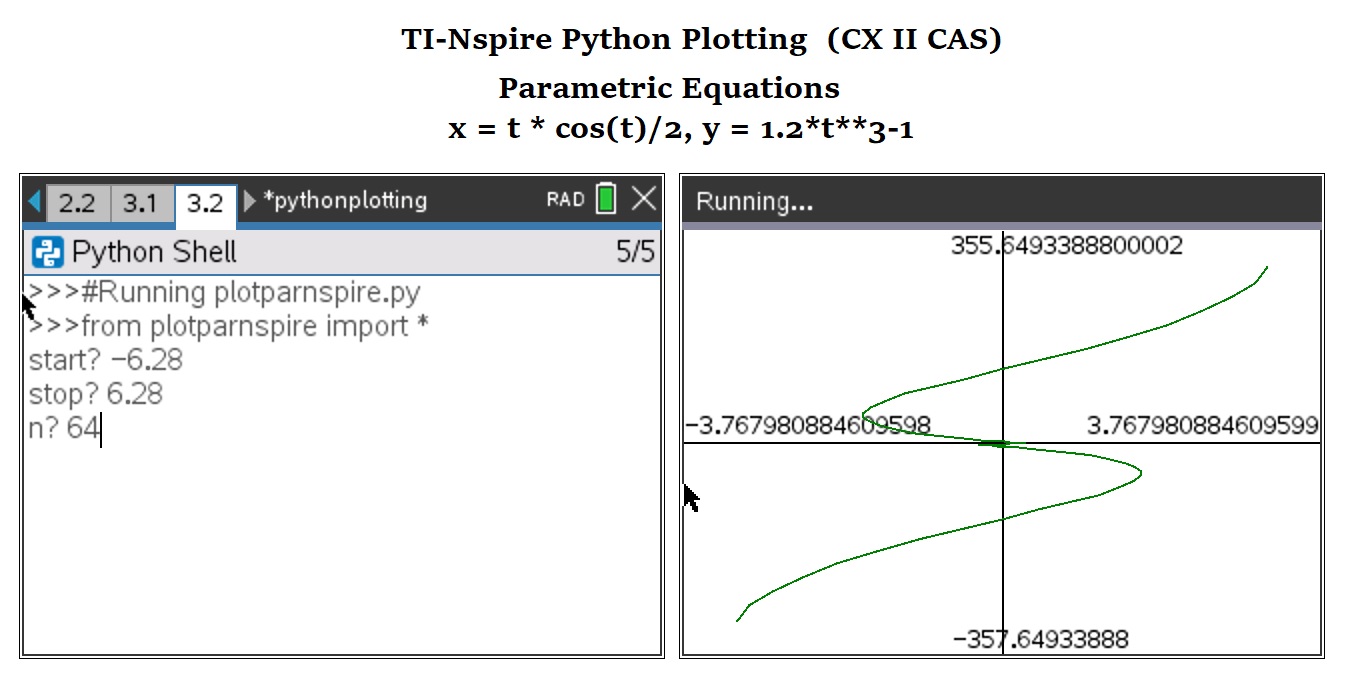
Plotting Parametric Equations -   TI-Nspire CX II (CAS) Script:  plotparnspire.py


from math import *

import ti_plotlib as plt


# EWS 2020-12-28


# define parametric here

def x(t):

  x=t*cos(t)/2

  return x

def y(t):

  y=1.2*t**3-1

  return y


# main routine

ta=float(input('start? '))

tb=float(input('stop? '))

n=float(input('n? '))

tc=(tb-ta)/n


# build

tp=ta

xp=x(tp)

yp=y(tp)

xlist=[xp]

ylist=[yp]


while tp<tb:

  tp=tp+tc

  xp=x(tp)

  yp=y(tp)

  xlist.append(xp)

  ylist.append(yp)


# plot routine

# clear the screen

plt.cls()

# automatically fits the screen to fit the data

plt.auto_window(xlist,ylist)

# display the axes

# "on" plots axes and endpoints

# "axes" just plots the axes

plt.axes("on")


# select color - use RGB style

# mid green

plt.color(0,128,0)


# plot the graph

plt.plot(xlist,ylist,".")

plt.show_plot()


Plotting a Recurrence Relation-   TI-Nspire CX II (CAS) Script:  plotseqnspire.py


Use u for u_n-1.  You should also be able to include n without problems.  


from math import *

import ti_plotlib as plt


# EWS 2020-12-28


# define sequence here, u for u(n-1)

def w(u):

  w=cos(u)+1

  return w


# main routine

ui=float(input('initial? '))

n=float(input('n? '))


# build

xlist=[0]

ylist=[ui]

k=0


while k<n:

  k=k+1

  f=w(k)

  xp=k

  yp=f

  xlist.append(xp)

  ylist.append(yp)


# plot routine

# clear the screen

plt.cls()

# automatically fits the screen to fit the data

plt.auto_window(xlist,ylist)

# display the axes

# "on" plots axes and endpoints

# "axes" just plots the axes

plt.axes("on")


# select color - use RGB style

# orange

plt.color(255,127,39)


# plot the graph

plt.plot(xlist,ylist,".")

plt.show_plot()


Eddie


All original content copyright, © 2011-2021.  Edward Shore.   Unauthorized use and/or unauthorized distribution for commercial purposes without express and written permission from the author is strictly prohibited.  This blog entry may be distributed for noncommercial purposes, provided that full credit is given to the author. 


Saturday, January 16, 2021

Numworks: Templates to Plot Functions, Parametric Equations, and Sequences

 Numworks:  Templates to Plot Functions, Parametric Equations, and Sequences


Introduction


The following are sample templates to plot functions in the form of y=f(x), parametric equations (x(t), y(t)), and one-level deep recurrence relations.


I used a while loop instead of a for loop because I tend to always use for loops, and working with integer objects can be quite difficult for non-Python experts like me.  


The equations will be defined inside the script instead of having the user enter the script.  If anyone knows how to use input to enter functions, please let me know.   I am using Numworks software version 14.4.  


As far as entering numbers at the input prompt, I have to enter approximations for π (which is approximately 3.1415926535).  The plot screen is made to fit the y-minimum and y-maximum values within the window.


The list.append(value) or list.append(list) adds the elements to the end of the list and the list is automatically saved.  


The named colors, which is required in matplolib.pyplot, available are:  'black', 'blue', 'brown', 'green', 'grey', 'orange', 'pink', 'purple', 'red', 'white', and 'yellow'.


Plotting Functions -   Numworks Script:  plotfunction.py


from math import *

from matplotlib.pyplot import *

# EWS 2020-12-26


# define function here

def f(x):

  y=1/(x**2+1)

  return y


# main routine

xa=float(input('start? '))

xb=float(input('stop? '))

n=float(input('n? '))

xc=(xb-xa)/n


# build

xp=xa

yp=f(xp)

xlist=[xp]

ylist=[yp]


while xp<xb:

  xp=xp+xc

  yp=f(xp)

  xlist.append(xp)

  ylist.append(yp)


# plot routine


# set axes

ya=min(ylist)

yb=max(ylist)

axis((xa,xb,ya,yb))

axis(True)

grid(True)


# select color, type color

ch="blue"


# plot points

plot(xlist,ylist,color=ch)

show()


Plotting Parametric Equations -   Numworks Script:  plotparametric.py


from math import *

from matplotlib.pyplot import *

# EWS 2020-12-26


# define parametric here

def x(t):

  x=t**2-3*t+1

  return x

def y(t):

  y=abs(2*sin(t))

  return y


# main routine

ta=float(input('start? '))

tb=float(input('stop? '))

n=float(input('n? '))

tc=(tb-ta)/n


# build

tp=ta

xp=x(tp)

yp=y(tp)

xlist=[xp]

ylist=[yp]


while tp<tb:

  tp=tp+tc

  xp=x(tp)

  yp=y(tp)

  xlist.append(xp)

  ylist.append(yp)


# plot routine


# set axes

xa=min(xlist)

xb=max(xlist)

ya=min(ylist)

yb=max(ylist)

axis((xa,xb,ya,yb))

axis(True)


# select color, type color

ch="red"


# plot points

plot(xlist,ylist,color=ch)

show()


Plotting a Recurrence Relation-   Numworks Script:  plotsequence.py


Use u for u_n-1.  You should also be able to include n without problems.  


from math import *

from matplotlib.pyplot import *

# EWS 2020-12-26


# define parametric here

# u: u(n-1)

def w(u):

  f=sqrt(3*u+1)

  return f


# main routine

ui=float(input('initial? '))

n=float(input('n? '))


# build

xlist=[0]

ylist=[ui]

k=0


while k<n:

  k=k+1

  f=w(k)

  xp=k

  yp=f

  xlist.append(xp)

  ylist.append(yp)


# plot routine


# set axes

ya=min(ylist)

yb=max(ylist)

axis((0,n,ya,yb))

axis(True)


# select color, type color

ch="green"


# plot points

plot(xlist,ylist,color=ch)

show()


On tomorrow's blog, January 17, 2021, I am going to present these scripts for the TI-Nspire CX II.   I used the CX CAS software, but this should work on the CX (non-CAS) calculator and software as well.  

Eddie


All original content copyright, © 2011-2021.  Edward Shore.   Unauthorized use and/or unauthorized distribution for commercial purposes without express and written permission from the author is strictly prohibited.  This blog entry may be distributed for noncommercial purposes, provided that full credit is given to the author. 


Sunday, January 10, 2021

Casio fx-9750GIII: Trigonometric Integral Graphs, including The Euler Spiral

 Casio fx-9750GIII:  Trigonometric Integral Graphs, including The Euler Spiral


Introduction


The program ESGRAPH plots the parametric equations containing integrals:


x(t) = ∫(cos f(x) dx, x = 0 to t)

y(t) = ∫(sin f(x) dx, x = 0 to t)


The program uses f(x) = a*x^p


When p = 2, the curve is a Euler Spiral (see source).


Casio fx-9750GIII Program: ESGRAPH


' 2020-12-22 EWS

Rad

' L1, X L2, Y

"F = A×X^P"

"FACTOR"?→A

"P=2, EULER SPIRAL"

"POWER"?→P

∫(A×cos(X^P),0,-2π)→X

∫(A×sin(X^P),0,-2π)→Y

{X}→List 1

{Y}→List 2

Menu "π÷R?","8",A,"16",B,"32",C

Lbl A: 8 → R: Goto 0

Lbl B: 16 → R: Goto 0

Lbl C: 32 → R : Goto 0

Lbl 0

For -2π+π÷R→T To 2π Step π÷R

∫(A×cos(X^P),0,-2π)→X

∫(A×sin(X^P),0,-2π)→Y

Augment(List 1, {X})→List 1

Augment(List 2, {Y})→List 2

(T+2π)÷(4π)×100→G

RndFix(G,0)→G

Locate 1,7,"PROGRESS:    %"

Locate 11,7,G

Next

S-Gph1 DrawOn, xyLine, List 1, List 2, 1, Dot

DrawStat


Notes:


*  There are four spaces between PROGRESS: and %.  This progress meter is to inform the user of the program's completion. 


*  The characters % and ', percent sign and apostrophe respectively, are found on the program editing default menu (TOP, BTM, SRC, MENU, A ←→a, CHAR), by pressing [F6] (CHAR), [F2] (SYBL)


*  Everything that follows an apostrophe is a comment and can be left out.


*  The range of -2π to 2π is used. 


*  The lower the precision, the faster the graph is made but accuracy of the graph is sacrificed.  In a lot of cases, patience is required. 


*  P is a positive integer.  


Examples


Example 1:  Euler Spiral:  A = 1/2, P = 2, precision 32


Example 2:  A = 1, P  = 3, precision 32


Example 3:  A = 2, P = 1, precision 16


Source:


Havil, Julian.  Curves for the Mathematical Curious: An Anthology of the Unpredictable, Historical, Beautiful, and Romantic  Princeton Universal Press. Princeton and Oxford. Princeton, NJ 2019 ISBN 978-0-691-18005-2


Eddie


All original content copyright, © 2011-2021.  Edward Shore.   Unauthorized use and/or unauthorized distribution for commercial purposes without express and written permission from the author is strictly prohibited.  This blog entry may be distributed for noncommercial purposes, provided that full credit is given to the author. 

Saturday, January 9, 2021

TI 84 Plus: Plotting Circular Arcs with Just Two Points

 TI 84 Plus: Plotting Circular Arcs with Just Two Points


Introduction


Knowing two points (x0, y0) and (x1, y1), we can draw a circular arc between two points.  We are going to assume that the points form the diameter of the circle.  Therefore, either point forms the radius along with the line's midpoint.   The midpoint between the points, labeled (A,B) is:


A = (x0 + x1) / 2, B = (y0 + y1) / 2


With the radius:


R = √((A - x0)^2 + (B - y0)^2) = √((x1 - A)^2 + (y1 - B)^2)


Set the parametric equations as:


x = R * (cos(t) + A / R)

y = R * (sin(t) + B / R)


With t being the range of required angle measure (θ), we have to determine the start and end points for the range of values for t.  Since (A, B) may not be the origin, we must take it into account the midpoint in determining the angle points:


t0 = atan((B - y0) / (A - x0)) mod 2*π

t1 = atan((y1 - B) / (x1 - A)) mod 2*π


The program ARC2PTS for the TI-84 Plus makes use the complex number functions abs and angle to determine radius and the angles, respectively.


TI-84 Plus Program: ARC2PTS


"2020-12-20 EWS"

Radian

a+bi

Param

FnOff 

Input "X0? ",J

Input "Y0? ",K

Input "X1? ",L

Input "Y1? ",M

(J+L)/2→A

(K+M)/2→B

angle((A-J)+i(B-K))→C

If C<0:C+2π→C

angle((A-L)+i(B-M))→D

If D<0:D+2π→D

abs((A-J)+i(B-K))→R

"R(cos(T)+A/R)"→X₁T

"R(sin(T)+B/R)"→Y₁T

Menu("DIRECTION","TOP",1,"BOTTOM",2)

Lbl 1

min(C,D)→Tmin

max(C,D)→Tmax

Goto 3

Lbl 2

max(C,D)→Tmin

min(C,D)+2π→Tmax

Goto 3

Lbl 3

π/64→Tstep

ZoomFit

ZSquare


Examples


Example 1


Points:  (1,3) and (5,9), top part of the circle


Example 2


Points:  (-5, -8) and (-1, -7), bottom part of the circle


Eddie


All original content copyright, © 2011-2021.  Edward Shore.   Unauthorized use and/or unauthorized distribution for commercial purposes without express and written permission from the author is strictly prohibited.  This blog entry may be distributed for noncommercial purposes, provided that full credit is given to the author. 


Sunday, January 3, 2021

Swiss Micros DM42 and HP71B: Present Value of a Growing Annuity

Swiss Micros DM42 and HP71B: Present Value of a Growing Annuity


Introduction


Today we are going to calculate the present value of a growing annuity.  Unlike most annuities where the payment is constant, in a growing annuity, the payment increases each period.  For this particular blog, we are working with annuities that payments increase by a growth percent (g%) each period.  The annuity has an different interest rate (r%) in which payments are discounted.  


Since the payments are not constant, the time value of money (TVM) keys on a financial calculator are not going to be used.  If your calculator has the the net present value (NPV) function, this can assist you in these calculations.

I am going to use a different approach.


Derivation


Variables:


P = base payment (the first payment)

g = growth rate per period 

r = interest rate per period

n = number of periods 

PV = present value


Ordinary Growing Annuity


In an ordinary growing annuity, the first payment will be received after one period (typically a year or a month) has passed.  Discounting all the payments to calculate present value:


PV 

=  P/(1+r) + P * (1+g)/(1+r)^2 + P * (1+g)^2/(1+r)^3 + ... + P * (1+g)^(n-1)/(1+r)^n

=  P/(1+r) * [ 1 + (1+g)/(1+r) + (1+g)^2/(1+r)^2 + ... + (1+g)^(n-1)/(1+r)^(n-1)


Let w = (1+g)/(1+r), then:


PV

= P/(1+r) * [ 1 + w + w^2 + ... + w^(n-1) ]


The result is a geometric series.  In a general geometric series:


a + a*r + a*r^2 + ... + a*r^(n-1) = Σ(a*r^k, k=0 to n-1) = a * (1 - r^n)/(1 - r)


Then:


PV

= P/(1+r) * [ 1 + w + w^2 + ... + w^(n-1) ]

= P/(1+r) * Σ(w^k, k=0 to n-1) 

= P/(1+r) * (1 - w^n)/(1 - w)


Alternatively, change w back to (1+g)/(1+r):


PV

= P/(1+r) * (1 - (1+g)^n/(1+r)^n) / (1 - (1+g)/(1+r))

= [ P/(1+r) * (1 - (1+g)^n/(1+r)^n) ] / [ 1 - (1+g)/(1+r) ]

= [ P/(1+r) * P/(1+r) * (1+g)^n/(1+r)^n ] / [ 1 - (1+g)/(1+r) ]


The article from finaceformulas.net (see source) suggests multiplying by (1+r) / (1+r):


= [ P/(1+r) - P/(1+r) * (1+g)^n/(1+r)^n ] / [ 1 - (1+g)/(1+r) ] * (1 + r) / (1 + r)

= [ P - P * (1+g)^n/(1+r)^n ] / [ 1 + r - (1 + g) ]

= [ P - P * (1+g)^n/(1+r)^n ] / [ r - g ]

= P / (r - g) * (1 - (1+g)^n/(1+r)^n )


Growing Annuity Due


On an annuity due, the first payment takes place immediately.  The present value is calculated as:


PV 

=  P +  P * (1+ g)/(1+r) + P * (1+g)^2/(1+r)^2 + P * (1+g)^3/(1+r)^3 + ... + P * (1+g)^n/(1+r)^n

=  P * [ 1 + (1+ g)/(1+r) + (1+g)^2/(1+r)^2 + (1+g)^3/(1+r)^3 + ... + (1+g)^n/(1+r)^n ]


Let w = (1+g)/(1+r), then:


PV 

= P * [1 + w + w^2 + w^3 + ... + w^n ]


We have another geometric progression:


PV 

= P  * (1 - w^(n+1))/(1 - w)


Summary:


Present Value of a Growing Annuity - Ordinary


PV = P/(1+r) * (1 - w^n)/(1 - w)


Present Value of a Growing Annuity - Due


PV = P  * (1 - w^(n+1))/(1 - w)


HP 42S/DM42 Program:  PVGROW


Both PVGROW and PVGDUE use only one register, R01.


00  {79-Byte Prgm}

01  LBL "PVGROW"

02  "BASE PMT?"

03  PROMPT

04  "INTEREST?"

05  PROMPT

06  1

07  X<>Y

08  %

09  +

10  STO 01

11  ÷

12  1

13  "GROWTH?"

14  PROMPT

15  %

16  +

17  RCL÷ 01

18  STO 01

19  "N?"

20  PROMPT

21  Y↑X

22  1

23  X<>Y

24  -

25  1

26  RCL- 01

27  ÷

28  ×

29  "PV="

30  ARCL ST X

31  AVIEW

32  END


HP 42S/DM42 Program:  PVGDUE


00  {79-Byte Prgm}

01  LBL "PVGDUE"

02  "BASE PMT?"

03  PROMPT

04  "INTEREST?"

05  PROMPT

06  1

07  X<>Y

08  %

09  +

10  1

11  "GROWTH?"

12  PROMPT

13  %

14  +

15  ÷

16  1/X

17  STO 01

18  "N?"

19  PROMPT

20  1

21  +

22  Y↑X

23  1

24  X<>Y

25  -

26  1

27  RCL- 01

28  ÷

29  ×

30  "PV="

31  ARCL ST X

32  AVIEW

33  END


HP 71B Program: PVGROW


Note:  This is for both ordinary and growing annuities due.


100  DESTROY P,G,R,W,A,C

105  INPUT "PAYMENT? "; P

110  INPUT "INTEREST? "; R

115  R=.01*R

120  INPUT "GROWTH? "; G

125  G=.01*G

130  W=(1+G)/(1+R)

135  INPUT "N? "; N

140  INPUT "DUE?(Y=1,N=0) ";C

145  IF C=1 THEN 200

150  IF C=0 THEN 300 ELSE 140 


200  A=P*(1-W^(N+1))/(1-W) @ ! DUE

205  GOTO 400


300  A=P*(1-W^N)/((1+R)*(1-W)) @ ! ORD

305 GOTO 400


400 PRINT "PV ="; A


Examples:


Base Payment:  P = 20.00

Interest Rate:  r = 4%

Growth Rate:  g = 5%

n = 5


Ordinary Growing Annuity


Result:  PV = 98.02


Timeline of Payments:

Period 0:  0.00

Period 1:  20.00

Period 2:  21.00

Period 3:  22.05

Period 4:  23.15

Period 5:  24.31


Growing Annuity Due


Result:  PV = 122.92


Period 0:  20.00

Period 1:  21.00

Period 2:  22.05

Period 3:  23.15

Period 4:  24.31

Period 5:  25.53


Source:


"Present Value of a Growing Annuity" financeformulas.net  https://financeformulas.net/Present_Value_of_Growing_Annuity.html   Retrieved December 13, 2020.  


Eddie


All original content copyright, © 2011-2021.  Edward Shore.   Unauthorized use and/or unauthorized distribution for commercial purposes without express and written permission from the author is strictly prohibited.  This blog entry may be distributed for noncommercial purposes, provided that full credit is given to the author. 


Saturday, January 2, 2021

Retro Review: Radio Shack EC-4018

 Retro Review:   Radio Shack EC-4018


HAPPY NEW YEAR!


Quick Facts:


Company:  Radio Shack

Model:  EC-4018

Equivalent of:  Casio fx-470

Type:  Scientific 

Years:  Late 1980's

Display:  10 digits

Batteries:  Solar

Memory Registers: 1


Keyboard


The keyboard of the EC-4018 is a folding landscape.    The top half has the screen and 18 gray keys (scientific) to the right side, and two solar panel strips to the left.  The bottom half has 15 large black keys (arithmetic).  I really like the large keys on this calculator.  The keys are really easy to press and operated, and they also have a nice feel to them.  


Features


*  Trigonometric functions, logarithms, powers, rots

*  Convert to and from degrees-minutes-seconds

*  Four base conversions:  binary, decimal, octal, hexadecimal

*  Boolean Algebra: AND, OR, XOR, NEG

*  Fractions, combinations, permutations, reciprocal, factorials of integers


Physical Constants


INV 1:  Speed of Light in a Vacuum: c =  299792458 m/s

INV 2:  Planck's Constant:  h = 6.626176 * 10^-34 J s 

INV 3:  Universal Gravitational Constant:  G = 6.672 * 10^-11 N m^2/kg^2

INV 4:  Elementary Charge:  e = 1.6021892 * 10^-19 C

INV 5:  Electron Rest Mass:  me = 9.109534 * 10^-31 kg

INV 6:  Atomic Mass Unit:  u = 1.6605655 * 10^-27 kg

INV 7:  Avogadro's Constant:  Na = 6.022045 * 10^23/mol

INV 8:  Boltzmann Constant:  k = 1.308662 * 10^-23 J/K

INV 9:  Molar Volume of Ideal Gas:  Vm = 0.02241383 m^3/mol


According to the Casio fx-650 manual, these values are based on 1978 Japan Industrial Standards.  


The nice thing is that the units are stated next to the symbol.  


Verdict 


I am really like the keyboard and the contrast of the font colors.  The bright orange and gold really stand out against the black keyboard.   The screen's digits are really nice and big.  As I mentioned before, the keys have a nice feel.  


If you like a folding scientific calculator, you are going to have to search for a vintage calculator.  The good thing about Radio Shack is that their calculators tend to be less expensive than Casio.  


Sources:


"Electronic Calculators"  epocalc.net  Last Updated April 25, 2013.  http://www.epocalc.net/pages/mes_calcs_03.htm   Retrieved December 12, 2020.


Casio fx-650 Operation Manual


Eddie


All original content copyright, © 2011-2021.  Edward Shore.   Unauthorized use and/or unauthorized distribution for commercial purposes without express and written permission from the author is strictly prohibited.  This blog entry may be distributed for noncommercial purposes, provided that full credit is given to the author. 


Sunday, December 20, 2020

Review: Swiss Micros DM41X

 Review: Swiss Micros DM41X


General Information


Company:  SwissMicros, https://www.swissmicros.com

Type:  Programmable Scientific

Memory:  319 registers (at default) - calculator; 32 MB external flash

Battery:  CR 2032

Date:  September 2020 - current

Cost:  229 CHF, about $257.34 according to currency converter on December 12, 2020 (https://www.xe.com/currencyconverter/convert/?Amount=229&From=CHF&To=USD)

Current Software Version:  2.1 (November 13, 2020)

Case Included?  Yes


The DM41X is a long waited calculator, and joins the DM 41L and DM41 family.  The family runs HP-41CX firmware, including a clock, time, and date functions.    On February 23, 2018, I reviewed the DM 41L which you can see here:


http://edspi31415.blogspot.com/2018/02/review-swissmicros-dm41l.html


I am going to address the features that are specific to the DM41X, which is added to all the great features of the DM41 and DM41L.  


A Return to the Original Layout


The DM41X's keyboard is in a portrait design, like the original Hewlett Packard HP-41C family (HP-41C, HP-41CV, HP-41CX)


Instead of the row of ON, USER, PRGM, and ALPHA keys on the top row, the DM41X adds a column of keys to the right of the main keyboard:


ON/CLK:  ON/OFF button, the shifted CLK displays the current time


USR/SETUP:  The user keyboard.  SETUP shows the DM41X's system menu where stve states and RAW progams can be saved, USB communication can be activated, modules can be saved and loaded, system settings can be changed, and accessing the About screen.


Blue Key:  This is the ALPHA key


Backspace Key


Up Arrow: for program scrolling and debugging


Down Arrow: for program scrolling and debugging


PRG/SIZE:  The PRGM button.  The shifted function allows the user set the number of registers to be set for numerical constants.


R/S/VIEW:  Run/Stop Key, View prompts for a view of a register's value without affecting the stack.


The Big Screen


The DM41X has three screen settings that is set by the DSP key:


1.  All four stacks, T, Z, Y, and X are displayed.  This is my preferred display. 


2.  The X stack and the Alpha Register are displayed.  On the top of the screen:  alarms, the number of storage registers designated for numerical constants, free memory, the current program loaded and it's pointer location.  


3.  Two stacks, Y and X are displayed. On the top of the screen:  alarms, the number of storage registers designated for numerical constants, free memory, the current program loaded and it's pointer location.  


Connectivity


The DM41X's connectivity interface is in line with the DM42's connectivity interface.  Simply plug the DM41X with a USB-Micro B port, then on the calculator press [shift], [USR] (SETUP), 1 for File, 5 for Activate USB Disk.  The DM41X now acts as a USB storage device like a smart phone.  


You can take screenshots by pressing and holding [SHIFT] and [DSP].  Screen shots are saved as .bmp files under the disk's SCREEN folder.


Black and white images of 400 x 240 pixels, 1 bit depth, .bmp format, can be saved to the disk's OFFIMG folder.  Every picture in the folder will be shown on a rotated basis every time the calculator is turned off.  


Custom Menu


Pressing the CST key will give you access to a custom menu 16 available slots for commands and programs.  CST also gives access to Help, ROM Map, and USB Disk activation.  To learn about how to set up the custom menu, click here:  https://edspi31415.blogspot.com/2020/10/swiss-micros-dm41x-custom-menus.html.


Programming


The DM41X operates like the HP-41CX in its programming language except the DM41X has a lot more room for ROM modules.


Verdict


Like the DM41L, the DM41X is a winner.  The keys feel good, I love seeing all four stack levels on the screen, and I am fan of the custom menu built into the DM41X.  This is definitely worth a purchase.


If the price tag of DM41X is too high, consider the DM41 or DM41L.  They may not have a four line display or a custom menu, but the high-quality calculator software and firmware is still present.  Currently only the DM41L is in stock from Swiss Micros, at CHF 129.  


- - - - - -


Announcement


This is the last post for 2020.  I want to wish everyone Merry Christmas, Happy Holidays, and Happy New Year.  2020 has been a brutal year in every respect.  May 2021 be free from disease, war, economic, social, and spiritual struggle; and be full of joy, health, and happiness.  Thank you to my blog's followers and readers; I appreciate all of you!  Take care, and the next schedule blog will be on January 2, 2021.  


Eddie


All original content copyright, © 2011-2020.  Edward Shore.   Unauthorized use and/or unauthorized distribution for commercial purposes without express and written permission from the author is strictly prohibited.  This blog entry may be distributed for noncommercial purposes, provided that full credit is given to the author. 


Saturday, December 19, 2020

Sum of Increasing Series

 Sum of Increasing Series


The Sum From 1 to N - Increasing by 1


It is well known that sum from 1 to N, which each term increasing by 1 is:


1 + 2 + 3 + 4 + ... + N = ∑ x from x = 1 to N = (N + 1) * N / 2


The derivation is fairly easy.  Let S be the sum:


S = 1 + 2 + 3 + ... + N-1 + N


Add S to both sides:


2 * S = 1 + 2 + 3 + ... + N-1 + N + 1 + 2 + 3 ... + N-1 + N


Thanks to the commutative property of addition, we can arrange terms, and with a clever and creative way of arranging terms:


2 * S = ( 1 + N ) + ( 2 + N - 1 ) + ( 3 + N - 2 ) + ... + ( N - 1 + 2 ) + ( N + 1 )


Note that:


2 * S = 

1   +    2   +   3   + ... +  N-1  + N +

N  +  N-1 + N-2  + ..  +   2   +  1


Written this way, there are N "pairs".  Hence:


2 * S = ( 1 + N ) + ( N + 1 ) + ( N +1 ) + ... + ( N + 1 ) + ( N + 1 )


2 * S = ( N + 1 ) * N


Solving for S:


S =  ( N + 1 ) * N / 2


The Sum From 1 to N - Increasing by 2


Now lets consider the sum:


1 + 3 + 5 + 7 + ...


Fun fact: Adding odd numbers in this fashion will always total perfect squares.


1 + 3 = 4 = 2^2

1 + 3 + 5 = 9 = 3^2

1 + 3 + 5 + 7  = 16 = 4^2

1 + 3 + 5 + 7 + 9  = 25 = 5^2

... and so on


Let's define S as the sum:


S = 1 + 3 + 5 + ... + N-4 + N-2 + N


Note that

1 = 2 * 0 + 1

3 = 2 * 1 + 1

5 = 2 * 2 + 1

and so on...


For integer q,

N = 2 * q + 1


Then:


S = 1 + 3 + 5 + ... + ( 2*(q-2) + 1 ) + ( 2*(q-1) + 1) + ( 2*q + 1 )


Using the same strategy as last time:


2 * S = 1 + 3 + 5 + ... + ( 2*(q-2) + 1 ) + ( 2*(q-1) + 1) + ( 2*q + 1 ) 

           + 1 + 3 + 5 + ... + ( 2*(q-2) + 1 ) + ( 2*(q-1) + 1) + ( 2*q + 1 )


2 * S =

     1         +          3            +         5            + ... + (2*(q-2) + 1) + (2*(q-1) + 1) +   (2*q + 1) +

(2*q + 1) + (2*(q-1) + 1)  + (2*(q-2) + 1) +  ... +             5        +            3        +     1


Combine each pair as such:


2  * S = (2*q + 2) + (2*q + 2) + (2*q + 2) + ... + (2*q + 2) + (2*q + 2) + (2*q + 2)


Since q starts at q = 0, there are q+1 "pairs".  


2 * S = (q + 1) * (2*q + 2)


S = (q + 1) * (2*q + 2) / 2


To show that the sum is a perfect square:


S = (q + 1) * (2*q + 2) / 2


= (2*q^2 + 2*q  + 2*q + 2) / 2


= (2*q^2 + 4*q + 2) / 2


= (q^2 + 2*q + 1)


= (q + 1)^2


Example:


Calculate 7^2 (albeit the "longer" way):


7 = q+1;  q = 6:


S = (6 + 1) * (2*6 + 2) / 2 = 7 * 14 / 2 = 7 * 7 = 49


The Sum From 1 to N - Increasing by 3


Now add the series:


S = 1 + 4 + 7 + 10 + ... + N - 3 + N


where each term increases by 3.  Letting q be a positive integer and noting that


1 = 3*0 + 1

4 = 3*1 + 1

7 = 3*2 + 1

10 = 3*3 + 1

and so on...


Then:


S = (3*0 + 1) + (3*1 + 1) + (3*2 + 1) + .... + (3(q-1) + 1) + (3q + 1)


2* S 

= (3*0 + 1) + (3*1 + 1) + (3*2 + 1) + ... + (3(q-1) + 1) + (3q + 1) 

+ (3*0 + 1) + (3*1 + 1) + (3*2 + 1) + ... + (3(q-1) + 1) + (3q + 1)


2 * S 

= (3*0 + 1) + (3*1 + 1)     + (3*2 + 1)     + ... + (3(q-1) + 1) + (3q + 1) 

+ (3*q + 1) + (3(q-1) + 1) +(3(q-2) + 1) + ...  +  (3*1 + 1)    + (3*0 + 1)


There are q+1 pairs.


2 * S 

= (3*q + 2)  + (3*q + 2) + (3*q + 2) + ... + (3*q + 2) + (3*q + 2)


2 *S = (q + 1) * (3*q + 2)


S = (q + 1) * (3*q + 2) / 2


Example:


q = 5  (terms from 0 to 5)


S = (5 + 1) * (3*5 + 2) / 2 = 6 * 17 / 2 = 51


1 + 4 + 7 + 10 + 13 + 16 = 51 


The Sum From A for q terms, increasing by D


Let A ≥ 0, D > 0 and q be a positive integer, and A is a starting term, let the sum S be:


S = A + (A + D) + (A + 2*D) + (A + 3*D) + ... + (A + (q-2)*D) + (A + (q-1)*D) + (A + q*D)


Since we start at q = 0, there are q+1 terms.


2*S =

A + (A + D) + (A + 2*D) + (A + 3*D) + ... + (A + (q-2)*D) + (A + (q-1)*D) + (A + q*D) +

A + (A + D) + (A + 2*D) + (A + 3*D) + ... + (A + (q-2)*D) + (A + (q-1)*D) + (A + q*D)


2*S = 

A + (A + D) + (A + 2*D) + ... + (A + (q-2)*D) + (A + (q-1)*D) + (A + q*D) +

(A + q*D) + (A + (q-1)*D) + (A + (q-2)*D) + ... + (A + 2*D) + (A + D) + A


2*S = (2*A + q*D) + (2*A + q*D) + (2*A + q*D) + ... + (2*A + q*D) + (2*A + q*D) + (2*A + q*D) 


2*S = (q + 1) * (2*A + q*D)


S = (q + 1) * (2*A + q*D) / 2


Example:


A = 10, D = 7; q = 4  (5 terms, increase by 7, initial term is 10)


(4 + 1) * (2*10 + 4*7) / 2 = 5 * (20 + 28) / 2 = 120


Note:  10 + 17 + 24 + 31 + 38  = 120


Source:


Knott, Dr. Ron "Proving that 1+2+3+...+n is n(n+1)/2"  February 12, 2003.  Accessed December 6, 2020.  http://www.maths.surrey.ac.uk/hosted-sites/R.Knott/runsums/triNbProof.html


Eddie


All original content copyright, © 2011-2020.  Edward Shore.   Unauthorized use and/or unauthorized distribution for commercial purposes without express and written permission from the author is strictly prohibited.  This blog entry may be distributed for noncommercial purposes, provided that full credit is given to the author. 


Sunday, December 13, 2020

Numworks and DM42: Lucas-Lehmer Primality Test

 Numworks and DM42: Lucas-Lehmer Primality Test


Introduction


The Lucas-Lehmer Primality tests whether integers of the form 2^p - 1 are prime by repeating the loop p-2 times:


s_i+1 = s_i^2 - 2


with the initial value s_0 = 4.


At the end of the loop, if s = 0 mod (2^p - 1), then integer 2^p - 1 is a prime number.


Caution:  this test fails when p = 2.  The user will be asked to input an integer greater than 2.  


Numworks Python Script:  llt.py


from math import *

# Lucas-Lehmer Test

# 2020-12-06 EWS

p=float(input("p (>2)? "))

s=4

m=2**p-1

for i in range(p-2):

  # repeat p-2 times

  s=(s*s-2)%m

print("Mersenne Number:")

print(m)

if s==0:

  print("Prime")

else:

  print("Not Prime")


HP 42S/DM42 Program LLT


00 {66-Byte Prgm}

01 LBL "LLT"

02 "P (>2)?"

03  PROMPT

04  STO 01

05  ENTER

06  2

07  X<>Y

08  Y↑X

09  1

10  -

11 STO 04

12 R↓

13 2

14 -

15 STO 02

16 4

17 STO 03

18 LBL 00

19 RCL 03

20 X↑2

21 2

22 -

23 RCL 04

24 MOD

25 STO 03

26 DSE 02

27 GTO 00

28 RCL 04

29 "M= "

30 ARCL ST X

31 AVIEW

32 STOP

33 RCL 03

34 X=0?

35 "PRIME"

36 X=0?

37 AVIEW

38 END


Registers


R01: p

R02: p - 2

R03: s

R04:  m = 2^p - 1


Examples


p = 3

m = 7

Prime


p = 4 

m = 15

Not Prime


p = 5 

m = 31

Not Prime


p = 15

m = 32767

Not Prime


p = 20

m = 1048575

Not Prime


Source:


Cook, John D.  "Searching for Mersenne Primes" John D. Cook Consulting  November 28, 2018.  Retrieved December 5, 2020.  https://www.johndcook.com/blog/2018/11/28/searching-for-mersenne-primes/


"Lucas-Lehmer primality test"  Wikipedia.   Last edited June 29, 2020.  Retrieved December 5, 2020.

https://en.wikipedia.org/wiki/Lucas–Lehmer_primality_test


Eddie


Saturday, December 12, 2020

DM41 and DM42: Self Timing Programs

 DM41 and DM42: Self Timing Programs


Timing a Program's Performance


The Swiss Micros calculators DM41 (including the DM41L, DM41X, Hewlett Packard HP 41CX, HP41C with a Time Module installed) and DM42 have an internal clock which allows us to set the date and time on the calculator.  With the use of the TIME function we can determine the how long a program takes to execute.


One structure that can be used:


[ preliminary storage]

TIME

HR (DM 41), →HR (DM 42)

STO Rxx  (register xx)

[ loop/main program starts here ]

TIME

HR (DM 41), →HR (DM 42)

RCL Rxx

-

ABS 

3600

*


The routine TIME, HR, RCL xx, -, ABS, 3600, * determines the amount of time in term of seconds.  


DM42S:  Accessing the TIME function:  [SHIFT], [ + ] (CATALOG), [down arrow], ( TIME )  ("F1")


Let's demonstrate this technique on three examples.  The time record is the calculator ran on batteries.  


Example 1:  40th Fibonacci Numbers 


Registers:  

R01:  counter

R02:  sum

R03:  time

(counter of 39 is set because the first Fibonacci number is loaded at the beginning)


DM41 Program TFIB


01  LBL ^T TFIB

02  39

03  STO 01

04  0

05  STO 02

06  TIME

07  HR

08  STO 03

09  1

10  0

11  +

12  LBL 00

13  LASTX

14  X<>Y

15  +

16  DSE 01

17  GTO 00

18  TIME

19  HR

20  RCL 03

21  -

22  ABS

23  3600

24  *

25  STO 03

26  END


Y:  Results:  102334155.0

X: Seconds:  0.5100


DM42 Program TFIB


00  {45-Byte Prgm}

01  LBL "TFIB"

02  39

03  STO 01

04  0

05  STO 02

06  TIME

07  →HR

08  STO 03

09  1

10  0

11  +

12  LBL 00

13  LASTX

14  X<>Y

15  +

16  DSE 01

17  GTO 00

18  TIME

19  →HR

20  RCL 03

21  -

22  ABS

23  3600

24  ×

25  STO 03

26  END


Y:  Results:  102334155.0

X: Seconds:  0.0200


Example 2:  The Sum of Cubes Using a Loop from 1 to 250


Registers:  

R01:  counter

R02:  sum

R03:  time


DM41 Program TSUM


01  LBL ^T TSUM

02  250

03  STO 01

04  0

05  STO 02

06  TIME

07  HR

08  STO 03

09  LBL 00

10  RCL 01

11  3

12  Y↑X

13  ST+ 02

14  DSE 01

15  GTO 00

16  RCL 02

17  TIME

18  HR

19  RCL 03

20  -

21  ABS

22  3600

23  *

24  STO 03

25  END


Y:  Results:  984390625.0

X: Seconds:  12.07


DM42 Program TSUM


00  {45-Byte Prgm}

01  LBL "TSUM"

02  250

03  STO 01

04  0

05  STO 02

06  TIME

07  →HR

08  STO 03

09  LBL 00

10  RCL 01

11  3

12  Y↑X

13  STO+ 02

14  DSE 01

15  GTO 00

16  RCL 02

17  TIME

18  →HR

19  RCL 03

20  -

21  ABS

22  3600

23  ×

24  STO 03

25  END


Y:  Results:  984390625.0

X: Seconds:  0.24


Example 3:  Savage Test


Let A = 1, then for 2499 loops:

A = tan(atan(exp(ln(sqrt(A^2))))) + 1   (radians mode is used)


Registers:  

R01:  counter

R02:  sum

R03:  time


DM41 Program SVGE


01  LBL ^T SVGE

02  2499

03  STO 01

04  1

05  STO 02

06  TIME

07  HR

08  STO 03

09  LBL 00

10  RCL 02

11  X↑2

12  SQRT

13  LN

14  E↑X

15  ATAN

16  TAN

17  1

18  +

19  STO 02

20  DSE 01

21  GTO 00

22  RCL 02

23  TIME

24  HR

25  RCL 03

26  -

27  ABS

28  3600

29  *

30  STO 03

31  END


Y:  Results:  2499.970322

X: Seconds:  246.4500240  (about 4 minutes, 6.45 seconds)


DM42 Program SVGE


00  {51-Byte Prgm}

01  LBL "SVGE"

02  2499

03  STO 01

04  1

05  STO 02

06  TIME

07  →HR

08  STO 03

09  LBL 00

10  RCL 02

11  X↑2

12  SQRT

13  LN

14  E↑X

15  ATAN

16  TAN

17  1

18  +

19  STO 02

20  DSE 01

21  GTO 00

22  RCL 02

23  TIME

24  →HR

25  RCL 03

26  -

27  ABS

28  3600

29  ×

30  STO 03

31  END


Y:  Results:  2500  (just over 2500)

X: Seconds:  13.24


Source:


Burkett, John.  "The Savage Benchmark"  TI-89 / TI-92 Plus Tip List 10.0   July 20, 2002.  http://www.technicalc.org/tiplist/en/files/pdf/tips/tip6_50.pdf   Retrieved November 28, 2020 


Eddie 


Sunday, December 6, 2020

Calculus of the Sinc Function

Calculus of the Sinc Function


Introduction and Setup


The unnormalized Sinc function is defined as:


unsinc(x) = sin x / x


And the normalized Sinc function is defined as:


sinc(x) = sin( π x ) / ( π x )


Two things to assume about the sinc function:


1.  The function is not defined at x = 0, and


2.  The function uses radian angle measure.  


(x ≠ 0, and assume radians measure)


Let α be a real constant and define f(x) as:


f(x) = sin( α x ) / (α x)


When α = 1, f(x) becomes unsinc(x).  Likewise, when α = π, f(x) becomes sinc(x).  I am going to analyze this function f(x).


Limit


Limit of sin( α x ) / ( α x )


lim x → 0 ( sin( α x ) / ( α x ) ) → sin 0 / 0 → 0 / 0


This form of improper limit allows us to use L'Hôspital's Rule, which allows us to take the derivative of both the numerator function and denominator function:


lim x → 0 ( α * cos ( α x ) / α ) → lim x → 0 ( cos ( α x ) ) →  cos ( 0 ) → 1


Hence  lim x → 0 ( sin( α x ) / ( α x ) ) → 1


Derivative


Taking the derivative will call for use to use the quotient rule:


d/dx [n(x) / d(x)] = ( n '(x) * d(x) - n(x) * d '(x)) / (d^2(x))


Then:


d/dx [ sin( α x ) / ( α x ) ]:


n(x) = sin ( α x )

n'(x) = α * cos( α x )

d(x) = α * x 

d^2(x) = (α * x)^2

d'(x) = α


d/dx [ sin( α x ) / ( α x ) ]

= [ α * cos( α x ) * α * x - sin( α x ) * α ] / [ α^2 * x^2 ]

= [ α^2 * cos( α x ) * x - sin( α x ) * α ] / [ α^2 * x^2 ]

= [ α * cos( α x ) * x - sin( α x ) ] / [ α * x^2 ]

= cos( α x ) / x^2 - sin( α x ) / (α * x^2)


Integral


The integral of 


∫ sin( α x ) / ( α x ) dx


does not look like it can easily integrated.


Let's use the Taylor Series approach:


sin x = x - x^3 / 3! + x^5 / 5! - x^7 / 7! + x^9 / 9! + . . . 


sin( α x ) =  ( α x ) - ( α x )^3 / 3! + ( α x )^5 / 5! - ( α x )^7 / 7! + ( α x )^9 / 9! + ...


With x≠0


sin( α x ) / ( α x ) 

=  1 - ( α x )^2 / 3! + ( α x )^4 / 5! - ( α x )^6 / 7! + ( α x )^8 / 9! + ...

=  1 -  α^2 * x^2 / 3! + α^4 * x^4 / 5! - α^6 * x^6 / 7! + α^8 * x^8 / 9! + ...


Now integrate the series:


∫ sin( α x ) / ( α x ) dx

=  x - ( α^2 * x^3 ) / (3 * 3!) + ( α^4 * x^5 ) / (5 * 5!) - ( α^6 * x^7 ) / (7 * 7!) +  ( α^8 * x^9 ) / (9 * 9!) + ... + C

 =  x - ( α^2 * x^3 ) / 18 + ( α^4 * x^5 ) / 600 - ( α^6 * x^7 ) / 35280 +  ( α^8 * x^9 ) / 3265920 + ... + C


Eddie


All original content copyright, © 2011-2020.  Edward Shore.   Unauthorized use and/or unauthorized distribution for commercial purposes without express and written permission from the author is strictly prohibited.  This blog entry may be distributed for noncommercial purposes, provided that full credit is given to the author. 


Saturday, December 5, 2020

HP 71B: Sign "Graph" of Trig Functions

 HP 71B: Sign "Graph" of Trig Functions


Introduction


The program SGNTRIG builds a 22 character binary string that depends on the function:


g(x) = 

1  if  sgn(t(x/c)) > 1

0  if  sgn(t(x/c)) ≤ 0


where:


c is a scaling factor, 


sgn(x) is the sign function,  and


t(x) represents one of three trigonometric functions, sin(x), cos(x), or tan(x).   Angles are assumed to be radians.


If we set to scale to c = 1, then g(x) takes the integer values from 1 to 22.  


The HP 71B builds the result to the string S$.   This is an aid to visualize at least some of the graph.   When the bit is 1, the graph is above the x-axis, otherwise, the graph is either on or below the x-axis.  The program presented can be expanded or modified to explore other functions.


The resulting string is a "psuedo-graph".  


Below is a graphical representation of g(x) (an HP Prime is used to graph g(x)).


HP 71B Program SGNTRIG

Size:  270 bytes


100 DESTROY S,I,N,E,C

105 S$=""

110 RADIANS

115 INPUT 'SCALE? ';C

120 DISP "S:SIN C:COS T:TAN"

125 E$=KEY$

130 IF E$="S" OR E$="C" OR E$="T" THEN 200 ELSE 120


200 FOR I=1 TO 22

205 IF E$="S" THEN N=SGN(SIN(I/C))

210 IF E$="C" THEN N=SGN(COS(I/C))

215 IF E$="T" THEN N=SGN(TAN(I/C))

220 IF N=1 THEN N=1 ELSE N=0

225 S$=S$&STR$(N)

230 DISP S$ @ BEEP 589,0.1 @ WAIT 0.2

235 NEXT I

240 DISP S$ @ BEEP 661,2


Notes:


Line 105:  creates a blank string, which is allowed on the HP 71B


Line 125:  The KEY$ function calls for a key input. S for sine, C for cosine, and T for tangent.


Lines 205 to 215: determine which trigonometric function to use


Line 220:  Sets the character to 0 if the sign function returns 0 or -1


Line 225:  &, the ampersand symbol concatenates two strings


Lines 230 and 240, respectively:  589 Hz is middle D, 661 Hz is middle E


Example


Below are results for each of the trigonometric functions when scale is set to 1.  


YouTube video: https://www.youtube.com/watch?v=GL6urOGvRGY&feature=youtu.be

Eddie


All original content copyright, © 2011-2020.  Edward Shore.   Unauthorized use and/or unauthorized distribution for commercial purposes without express and written permission from the author is strictly prohibited.  This blog entry may be distributed for noncommercial purposes, provided that full credit is given to the author. 


HP 67 Collection: October 2026

HP 67 Collection: Oct ober 2026 All examples are done in FIX 4. (DSP 4) Earth's Gravity at a Specific Latitude The true ea...